Most AI coding workflows begin with a ticket.
Ours begins in the meeting where the work is actually discovered.
Here’s what end to end development looks like for me at HQ (@HQForWork):
1. Capture the real context
An HQ meeting bot joins my standups, planning calls, and discussions. It captures decisions, signals, action items, open questions, and the reasoning behind them not just a transcript.
2. Find what matters
After the meeting, I ask my HQ agent to pull everything relevant to me. It already understands the discussions, my work, and the wider company context.
3. Turn discussions into executable work
From the same conversation, I can:
→ /PRD to turn an idea into a properly scoped PRD
→ /investigate to diagnose a bug or issue
→ /brainstorm to explore open ideas and decisions
This matters because no manually written ticket can fully capture everything discussed across meetings, messages, decisions, and previous work. The HQ bot already has that context.
4. Run the project
I use /run-project on the PRD.
It runs a Ralph loop across every story: implement, test, check against the acceptance criteria, fix the gaps, and repeat until the story passes.
5. Cross-check the work
When needed, /review can also run a cross model review, so a different model can find the gaps.
6. Ship and close the loop
Finally, /ship handles the complete production loop:
Review → Land → Deploy → Smoke test → Monitor the real world impact → Heal
And the workflow doesn’t end once the code is deployed. The agent continues watching the outcome and can respond when something doesn’t behave as expected.
Everything happens inside HQ.
The context, planning, implementation, review, deployment, and monitoring all stay connected. HQ automatically syncs the workspace, so anyone on my team can see the latest state and pick up exactly where I left off.
No copying context between tools.
No handoff black holes.
No starting from scratch in every new chat.
I don’t have to leave the conversation to get the work shipped.
The breakthrough isn’t just an agent that can write code.
It’s a company brain that carries shared context all the way from a conversation to production.
Ok I've been on HQ for three days. Here are my honest thoughts:
- I won't bury the lead. Overall it's cracked. @jacob_posel tried to get me on it for a while but I was too busy. I thought I didn't need it because I was already using github/vercel/supabase and had a bunch of skills made plus obsidian wiki. I was wrong.
- They might not agree, but it clicked for me when I thought of it as hermes for claude code. It's a harness for claude/codex that makes it easier to work across teams, devices, and models
How? Here's a few features i've noticed and liked so far and some other thoughts:
- Files live locally; I work in a HQ folder now on each device that automatically pushes to cloud. It feels pretty realtime. This has helped work between devices and models easily.
I've been heavily using Codex this weekend since 5.6 came out but subbing some stuff out to Claude and it's helped me go between well. I've also been using remote mostly since I I've been on the run and it's been near seamless.
- The secrets management is worth the price of admission alone. I've wasted so much time in the pastsetting up API keys. It's a pain to do normally, and you don't want to do it incorrectly. Hq makes this essentially one click.
- I can't prove it but I have to imagine it saves tokens. The context layer feels really smart; so it finds things really quickly. Normally in a fresh claude session you can waste a lot of tokens getting it up to speed if you don't have a handover or are starting fresh. This feels quick. This is what I mean what I say it feels like Hermes; if you have used it or Openclaw you likely get it.
- I also have seen some self learning subagents be automatically called upon, which I love. Helps to make your work better without you having to always manually create new skills.
- I had previous /handover and /resume skills I used a lot, but HQ has /handoff skills which are similiar but functionally a bit different so I'm trying to figure out the place for each so I don't have to track both. Likely user error.
- I have had some new skills not auto sync to codex when creating in claude. Likely user error.
- I'm also a bit unclear on what needs to push to github when. I used to use it heavily for even non-code stuff just to push and pull between devices but hq can do a lot of that. Also unclear on how obsidian will fit into play here and if it's redundant but I'm going to keep going with it.
- Apparently there's a way to start new claude remote control sessions on local folders using it but I haven't tried yet. That's been my biggest frustration with claude remote control and one reason I've been using codes more. Hope this helps it.
- Jacob showed me that you can run other models from Claude desktop so I build a /bakeoff skill that subs the same task out to GPT 5.6 and Grok 4.5 and compares or lets me compare. I'll share this as a hq pack once I figure out how.
- It also auto-deployes to what looks like AWS hosting which is nice and saves time. Trying to get them to auto-create databases as well.
- Overall I really like it. Definitely a learning curve first few days, especially for non-technical users. And I've just been using it solo; so excited to start using it with others. I set up a few "companies" for some of my new projects and will use them to collaborate with others on.
Hope this helps! Not getting paid, just a nerd with this stuff and have a bunch of extra time on my hands now. (No job and at in laws for the weekend so have built in babysitters).
If you try it and hate it, it's @NotZainAgain 's fault.
Marketers if there is one thing to do right now, it is to set up your personal and/or team marketing brain.
I hate clickbait. This is actual value. You'll never go back to normal claude/chatgpt again.
Do it in HQ or Github.
Please welcome, Hassaan, one of the most brilliant, kind, and curious engineer and innovator i have ever had the pleasure to build with.
give him a follow->
@HassaanTechie
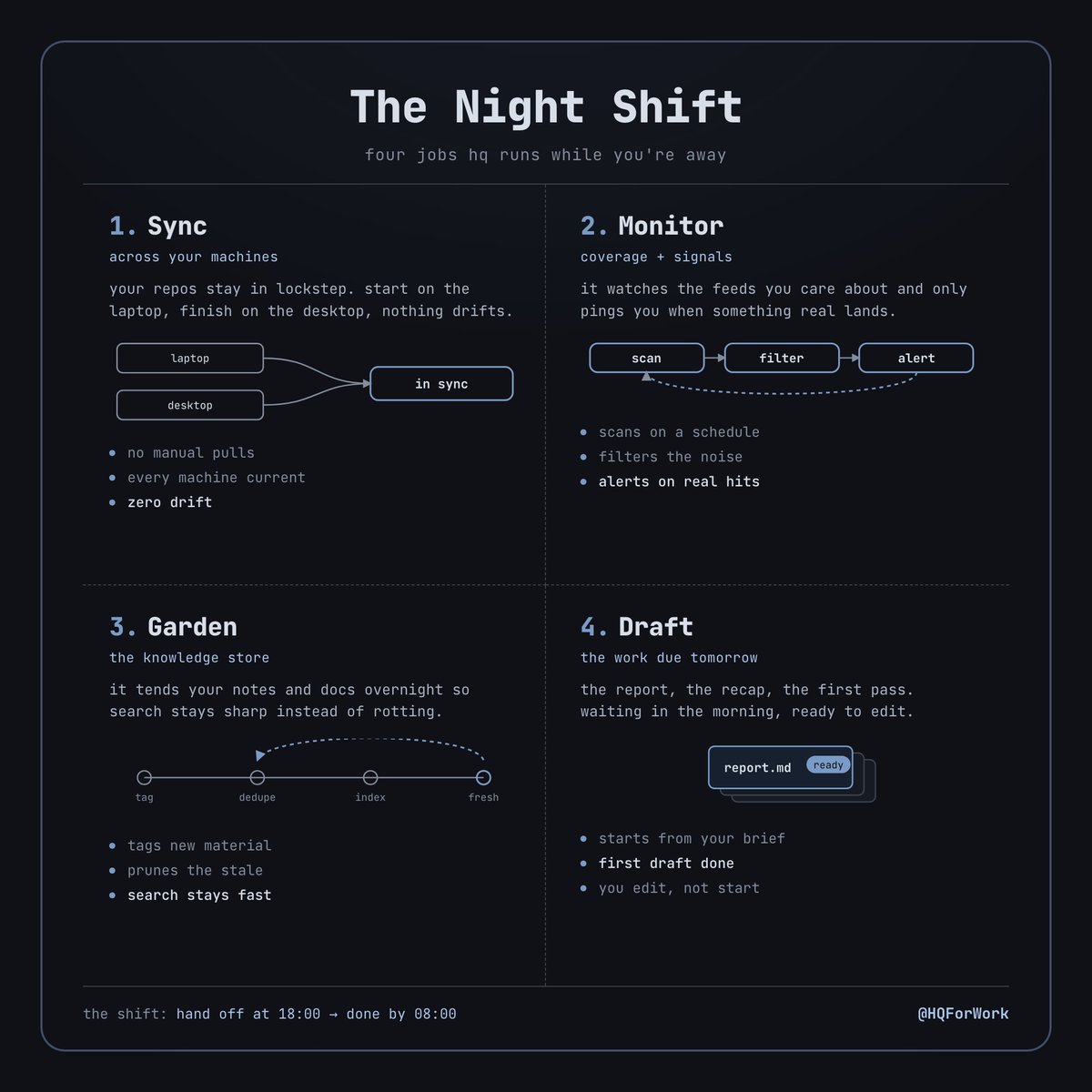
the whole point of handing work to an agent is that it doesn't need you in the room.
but most setups still wait for you to hit enter on every step. the agent answers, then stops, then waits for you to come back.
hq runs work in the background and on a schedule.
that's a second shift every night, on the hours you're not working:
> sync your repos across machines
> watch coverage and signals for anything new
> garden the knowledge store so search stays sharp
> draft the report that's due in the morning
you don't babysit it. you read the output.
you don't need every task the second you ask for it. the work that can wait, waits. it runs overnight while you're gone.
you wake up to finished work. that's what the background is for.