We'll be spending a lot more time trying to understand the outputs of language models. A few thoughts, tips & tricks:
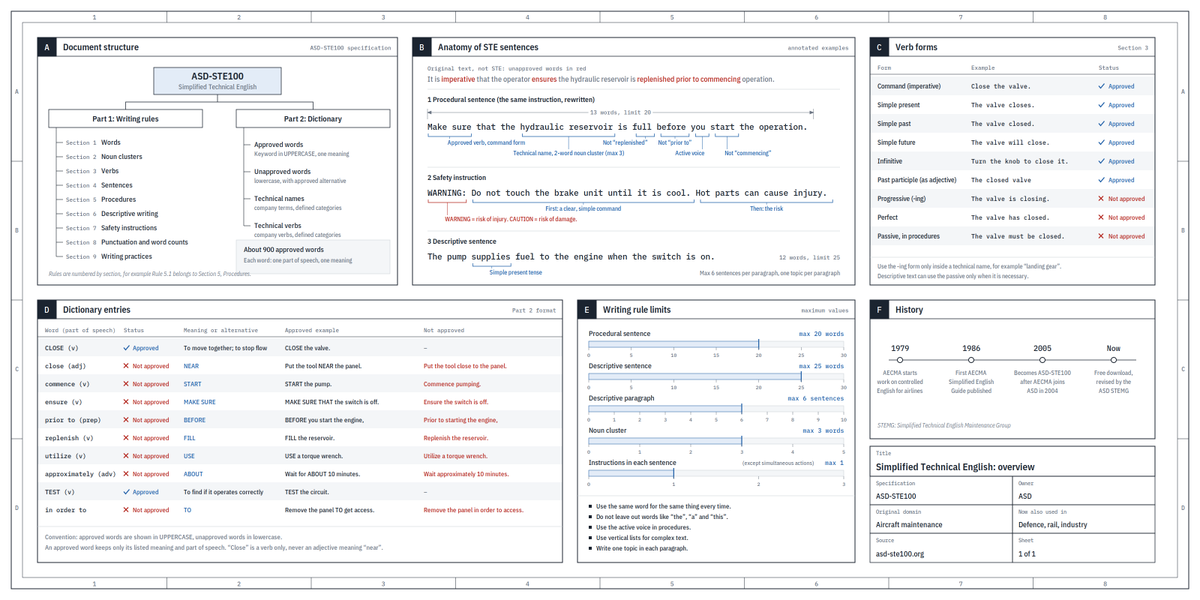
Writing. Something I've had success with: Ask your LLM to explain something in ASD-STE100, it's a controlled language specification originally developed for aerospace maintenance documentation. LLMs well-versed in this language and it comes with heavy constraints on clean writing style that I often find a lot more readable. Sometimes I've tried to soften it a bit e.g. ask for "80% of the way to ASD-STE100" because the spec is quite stringent. But even better:
Diagrams / images. Instead of writing, ask your LLM to create a diagram. These can be a lot easier to process, parse, and understand. But even better:
Web pages. Ask for output "in HTML" to get a beautiful, interactive webpage. LLMs are getting really good at frontend and can create beautiful experiences, animations, etc. But even better:
Explainer videos. The output format I am most bullish on is fully custom / bespoke explainer videos generated on any arbitrary topic. Experiment with things like "Create a 3b1b style video explainer on X. Use my ElevenLabs API key for audio narration". (you'd need an API key for the latter or you can ask your LLM to find you decent free alternatives that use your local compute). This is actually starting to work!
In summary:
- As LLMs get better, they will do more and more of the legwork autonomously, and a lot more of our work will rise up the abstractions into oversight and understanding.
- Luckily, LLMs can help here too because as intelligence and code are increasingly abundant, you can ask for large, custom, discardable software artifacts (e.g. web apps, video explainers) that would have never made sense to create before. Push the boundaries here and you'll be surprised.
@paolino Cool project.
Feature Request:
I think you should release as a Flatpak though for Linux. So you can easier distribute and update to all distros. AppImages are always annoying to maintain.
We got a Gemini 4 spoiler! Let's see if it's benchmaxxed like the previous ones.
Still bullish on Google long term: data, brains, money, and their own hardware (TPUs) gives them quite the edge. I think they catch up to Anthropic and OpenAI eventually.
But so far? Disappointing. Prove me wrong, Google.
We have all seen how fast customers switch from Anthropic to OpenAI and back, next stop @Google?
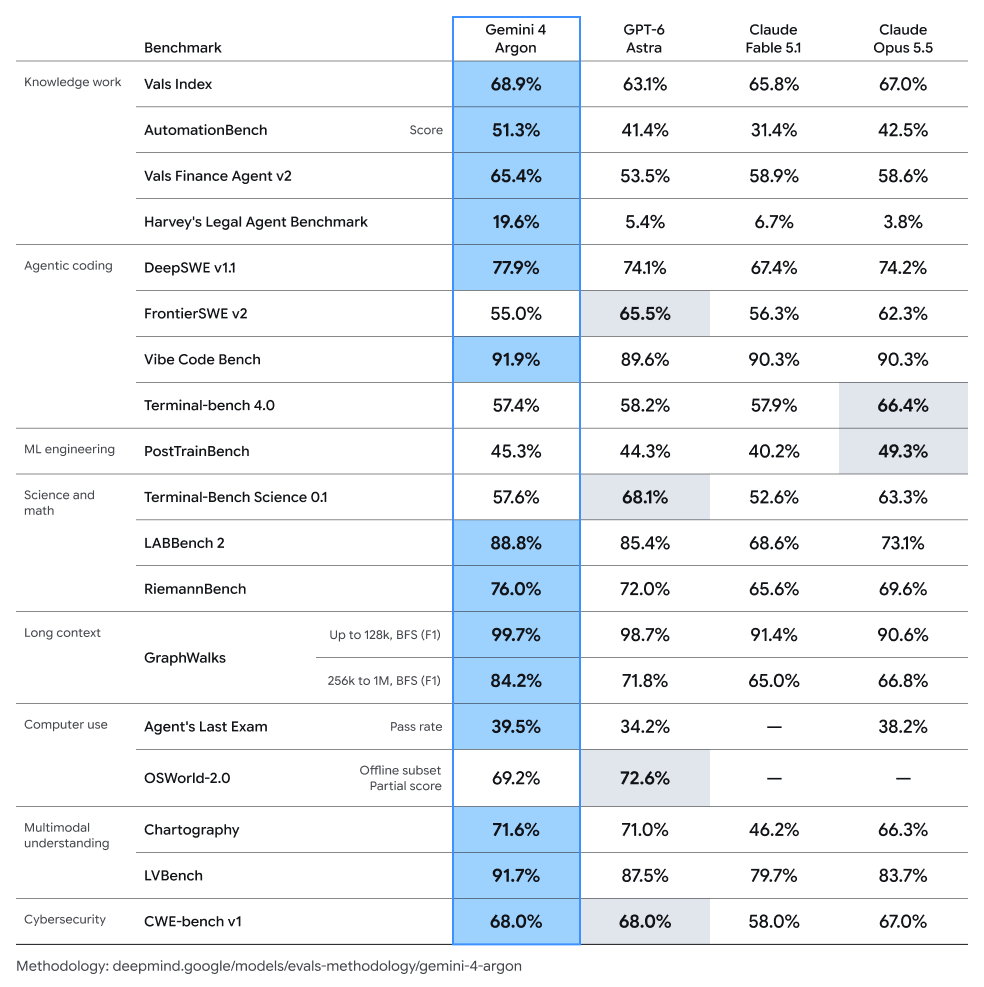
Lots of discussion out there about our next model(!), so I wanted to give an early look as soon as possible. Introducing Gemini 4 Argon!
It shows frontier performance in complex workflows, cyber defense and software engineering. Teams are using it extensively at Google, from coding to quantum computing, great feedback.
Here’s a look at the benchmarks:
@Da7_Tech I want to build a customer management system for the AI era: a platform where agents handle customer requests effectively and securely, improving customer satisfaction while reducing costs.
@Da7_Tech I'd want to build the customer management system of the AI age. Agents that handle customer requests properly and securely on a platform that increases customer satisfaction and lowers cost
@dabit3 I'd want to build the customer management system of the AI age. Agents that handle customer requests properly and securely on a platform that increases customer satisfaction and lowers cost
Got access to Jev!
I am very impressed, it opens up so many possibilities.
It is among other thigns like a fast and cheap classifier that seems to make training of classical ML models obsolete for many usecases.
Just tried it on an old project that I attempted to solve with Spacy and GliNER and it aced it + it was faster and better. For the pricepoint unbeatable.
@thsottiaux
Could we get an update to the Codex CLI that lets us access command history with the arrow keys even when there’s already text in the input?
I often start typing something, then realize it would be easier to pull up a previous message and modify it instead. Right now, I have to delete everything I’ve typed before I can browse the history.
Ideally, pressing the up arrow would let me browse previous messages, and going back down to the current entry would restore whatever I had already typed. That way, nothing gets accidentally lost.