자료가 서말이어도 꿰어야 보배다- Markitdown
무려 마이크로소프트가 만든 .md변환 툴 입니다. (무료)
오픈소스, 무료 .md변환툴입니다.
다양한 파일(PDF, Word, PPT, Excel, 이미지, 오디오 등)을 LLM(대형 언어 모델)이 쉽게 받아먹을 수 있는 깔끔한 Markdown(.md)으로 변환.
Microsoft Research에서 LLM 벤치마크와 AutoGen 프로젝트를 진행하면서, 파일을 AI가 먹기 좋게 준비하는 과정이 너무 복잡하고 번거로웠기 때문에 만들었다고 합니다.
기존 도구들은 구조(표, 제목, 리스트)를 제대로 유지하지 못하거나, 여러 포맷 지원이 약했음. 마이크로소프트가 내부 필요를 해결하다가 세상에 공개 했고 폭발적인 인기를 얻었습니다. (깃허브 10만+스타)
장점
-가볍다.
-PDF, DOCX, PPTX, XLSX, HTML, CSV, JSON, 이미지(PNG/JPG), 오디오(MP3/WAV), ZIP 오만것 다돌아 간다.
-CLI는 물론 VS Code 확장 만으로도 사용가능!
-에르메스나 오픈클로와도 연동가능
사용법
터미널 - pip install 'markitdown[all]'
저는!
VS Code에서 확장 프로그램으로 쓰고있는데 좋습니다.
확장탭에서 markitdown검색후 설치합니다.
변환하고자 하는 파일을 우클릭하면 제일 하단에 "Convert to Markdown" 이라고 있어요. 클릭후 기다리면 같은폴더안에 변환된 파일이 생성!
https://t.co/iRBJHF99qf
I've read every Obsidian guide on the internet.
Most of them cover one piece. Folder structure. Daily notes.
A specific plugin.
Nobody had written the complete guide that takes you from zero to a vault that actually runs your life.
So I wrote it.
Philosophy, architecture, linking system, Claude integration, five automated workflows, the daily practice, and what month six actually looks like.
Everything in one place.
Read this and Bookmark it now.
The Hermes Desktop App is insanely good.
It's now the best way to run AI agents on your computer.
Here's the full setup, start to finish.
Enjoy!
Chapters:
00:00 - why Hermes desktop is a game changer
00:46 - downloading and installing the desktop app
01:47 - picking your model and provider
02:52 - sessions, settings, and gateway connection
04:08 - adding a custom MCP server
04:58 - memory and context (the three-tier system)
06:52 - connecting to Telegram
09:45 - skills and tools
11:06 - the skills hub (built-in and community skills)
11:50 - creating a custom skill
14:18 - artifacts
15:11 - going from one to many agents (profiles and personas)
18:12 - agents working as a team (Hermes Kanban)
19:01 - outro
I have also written an article on Hermes masterclass, the same is quoted below.
THE CREATOR OF OBSIDIAN JUST TURNED YOUR NOTE VAULT INTO AN AI AGENT.
Not a plugin.
Not an integration.
A full agent skills system that teaches Claude Code, Codex, and OpenCode to READ, WRITE, and REASON inside your Obsidian vault like a power user.
27,000 GitHub stars in days.
Here is what shipped at launch:
obsidian-markdown — wikilinks, embeds, callouts, properties, the full Obsidian flavor Claude now understands natively.
obsidian-bases — Claude can create .base files with views, filters, formulas, and summaries.
json-canvas — Claude builds .canvas files with nodes, edges, groups, and connections.
obsidian-cli — Claude controls your vault, develops plugins and themes directly from the terminal.
defuddle — strips web pages into clean Markdown so you stop burning tokens on clutter.
Install the whole thing in one line:
npx skills add https://t.co/mHDEvCNOIC
Then connect it to Claude Code, Codex, or OpenCode.
That is it.
Your second brain now has an agent inside it that understands how Obsidian actually works.
Not a generic AI that pastes text into files.
An agent that knows what a wikilink is. What a callout is. What a canvas is.
Built on the open Agent Skills spec. MIT license. Free forever.
The gap between people using Obsidian as a note app and people using it as an AI operating system just got wider.
Bookmark this before you open your vault today.
Follow @cyrilXBT for every build that changes how Obsidian and Claude work together.
Gue baru nemu project open source yang bikin gue langsung berhenti scroll.
Serius.
Jarang banget gue nemu sesuatu yang langsung bikin mikir, "Kenapa gue baru tahu ini sekarang?"
Namanya Everything Claude Code.
Awalnya gue kira ini cuma kumpulan prompt atau template biasa yang dibungkus dengan nama keren.
Ternyata pas gue lihat lebih dalam, ini jauh lebih gila dari yang gue bayangkan.
Mereka basically sudah nyiapin hampir semua hal yang biasanya harus lu setup sendiri selama berhari-hari bahkan berminggu-minggu.
Yang bikin gue makin excited:
🔥 30 AI agents siap pakai
🔥 64 skills bawaan
🔥 33 commands untuk berbagai workflow coding
🔥 AgentShield dengan 1.282 security tests terintegrasi
🔥 Planning, code review, bug fixing, TDD, sampai optimasi token
🔥 Support Claude Code, Cursor, OpenCode, dan Codex CLI
Dan yang paling keren?
Semua ini open source.
Gratis.
Bisa langsung dipakai.
Kalau lu pernah habisin waktu berjam-jam buat nyusun workflow AI coding sendiri, nyari agent yang cocok, setup command, atau ngatur environment dari nol, lu bakal ngerti kenapa gue semangat banget waktu nemu repo ini.
Rasanya kayak menemukan toolbox yang isinya sudah lengkap sebelum mulai bangun sesuatu.
Bukan berarti tool ini bakal otomatis bikin semua project sukses.
Tapi jelas bisa menghemat banyak waktu yang biasanya habis buat setup dan eksperimen.
Jujur aja, ini salah satu repo AI yang paling menarik yang gue temukan dalam beberapa minggu terakhir.
Dan kalau lu suka ngoding pakai AI, simpan postingan ini sekarang juga.
Karena feeling gue, beberapa bulan dari sekarang repo ini bakal ada di daftar tool yang dipakai banyak developer setiap hari. 🔖🚀
JENSEN HUANG SOLD A $249 AI COMPUTER ON STAGE THAT KILLS YOUR $200/MONTH OPENAI BILL. THE VIDEO HAS 217,000 LIKES
the box is called the jetson orin nano super. 70 trillion ai operations per second, 25 watts, smaller than a wallet. it runs llama 3, mistral, gemma and deepseek locally with no api fees and no data leaving your house
a developer running automations and coding assistants pays $200 a month to openai. the same workload on this box costs $2 a month in electricity and breaks even on the hardware in 10 weeks
you install ollama with one command. change one line in your code. point it at localhost instead of openai. everything else works identically
7 billion parameter models handle 80% of what people use chatgpt for. summarization, drafting, coding, document q&a, automation pipelines. the hard 20% you keep claude or gpt for. total monthly cost drops from $200 to $22
cloud subscriptions keep getting more expensive and rate limits keep getting tighter. the people who set this up in 2025 are going to look very smart in 2027
bookmark this and read the article below
Obsidian trading journal = a system that studies every trade you make.
Works while you sleep.
Every pattern identified. Every edge validated. Every mistake documented so it never costs you twice.
After 30 days it knows your trading better than you do.
After 90 days it is preventing losses your past positions already predicted.
The people who build this tonight will never trade the same way again.
Read this and Bookmark it now.
🚨 Someone just built the open-source tool the internet has wanted for YEARS.
It’s called ReClip — and it downloads videos from almost any website.
100% free. Self-hosted. No ads. No tracking. No nonsense.
Paste any link from:
→ YouTube
→ TikTok
→ Instagram
→ Twitter/X
→ and 1000+ more sites
Choose MP4 or MP3, pick your resolution, and download instantly.
That’s it.
No popups.
No rate limits.
No forced signups.
No “premium” paywall halfway through.
Just your machine, your files, your privacy.
What makes it even better:
↳ Batch download multiple links at once
↳ Clean browser-based UI
↳ Lightweight setup anyone can self-host
↳ Built with simple HTML
↳ MIT licensed
↳ Open source forever
And the craziest part?
It went from 0 → 1.4K GitHub stars in just 9 days.
Already crossed 239 forks.
That kind of momentum says everything.
For the last decade, people have been stuck using sketchy downloader websites packed with ads, trackers, and fake buttons.
ReClip fixes that.
A clean, private alternative built for people who care about ownership, speed, and freedom.
No data harvesting.
No subscriptions.
No upsells.
Just download what you need—on your own terms.
Open source wins again. 👇
Claude Code cannot read 300 files at once.
So someone built a system that lets it control NotebookLM from the terminal instead. The results are wild.
Here is the full workflow nobody is talking about:
The Setup
→ Claude Code connects to NotebookLM via a command line interface
→ Claude searches YouTube, finds relevant videos, uploads them as sources automatically
→ NotebookLM processes up to 300 sources simultaneously and returns cited, grounded answers
→ Everything syncs back into your Obsidian vault with passage-level citations you can click to verify
Why This Changes Research Forever
→ No more 20 browser tabs you never close
→ No more copy-pasting outputs into random notes
→ No more hallucinated answers with no sources to back them up
→ 60% of citations verified as strong matches in accuracy audits - answers are grounded in real data
What Claude Can Do From the Terminal
→ Search YouTube for relevant videos on any topic and rank by relevance
→ Create a new NotebookLM notebook and add 20 sources in parallel automatically
→ Ask questions and export cited answers directly into Obsidian with wikilinks
→ Set custom personas per notebook - concise, no filler, no preamble
→ Generate audio overviews and save them as MP3 files into your vault
→ Build mind maps, flashcard decks, and research dashboards from your sources
→ Search arXiv for academic papers and feed them directly into NotebookLM
→ Upload competitor blog posts, podcast episodes, PDFs, and your own vault notes
The Obsidian Output
→ Every answer arrives with clickable citations that link to the exact passage in the source video or article
→ Graph view shows connections between all 20 sources and the topics they share
→ Q&A log tracks every question asked and the grounded response received
→ Source dashboard shows citation frequency, topics extracted, and which questions each source answered
Use Cases Worth Building Today
→ Academic research with arXiv papers, full citation traceability
→ Competitor analysis from their YouTube channels and blog posts
→ Company knowledge base for onboarding, new employees ask NotebookLM instead of interrupting teammates
→ Podcast research, feed 4-hour Lex Fridman episodes and ask what's new in AI this week
→ Personal second brain, 300 daily notes uploaded and queryable in one notebook
Before this system existed you needed 20 tabs, hours of manual reading, and no guarantee the answers were real.
Now you type one prompt in the terminal and Claude does all of it for you.
The research stack of 2026 is not a browser. It is a terminal connected to everything
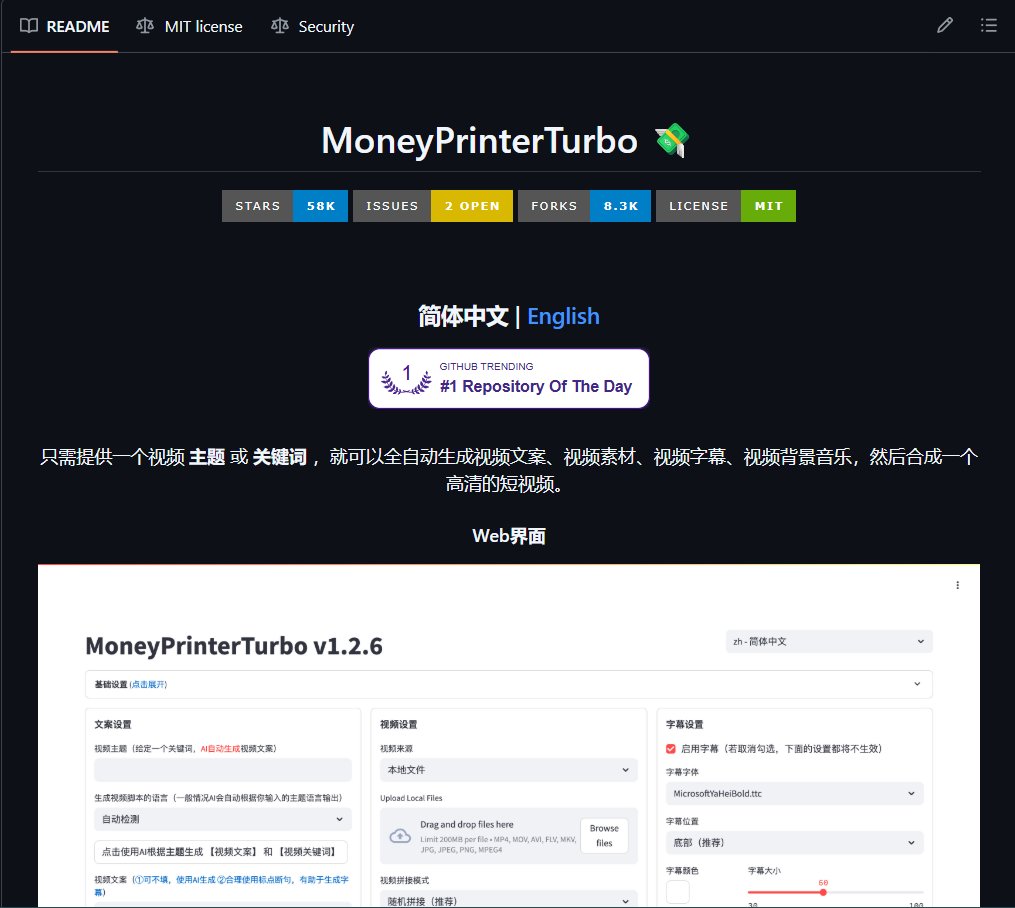
A Chinese developer built a free money printer. Literally named it MoneyPrinterTurbo. 13,000+ stars on GitHub.
You type a topic or keyword. It generates the script, finds HD copyright-free footage, adds subtitles, background music, and voiceover - then outputs a finished short video.
This is the exact pipeline TikTok Shop and YouTube faceless channel creators use to scale to $6,000-10,000/month. The difference: they paid for tools. This is free.
> What's inside:
Script generation via Claude, DeepSeek, Gemini, GPT, or any LLM you already have access to.
Batch video generation - create multiple versions at once, pick the best one. 9:16 vertical for TikTok and Reels, 16:9 horizontal for YouTube.
Voice synthesis with real-time preview.
Custom subtitles - font, size, color, position, outline. Background music from built-in library or your own files.
> Runs locally on your machine. Web UI and API both included. Docker supported. Google Colab supported if you don't want to install anything.
No subscriptions. No watermarks. No usage limits.
The repo is actively maintained - last commit was 44 minutes ago.
https://t.co/W4mlxu2jml
Claude 비싸게 쓰는 사람들 대부분 이걸 모르는 듯
Claude 공식 채널에 올라온 강의인데
클로드 팀 Alexander Bricken이
Claude를 무조건 오래 생각하게 만드는 게 아니라
작업마다 생각 시간을 어떻게 조절해야 하는지 설명함
영상 내용 요약하자면
쉬운 일은 빨리 시키고
어려운 일은 오래 생각하게 하고
진짜 중요한 작업에만 제일 강하게 돌리는 법
무조건 비싼 모델
무조건 max
무조건 오래 생각
이게 답이 아니라는 내용임
Claude Code 쓰는 사람
AI로 웹앱 만드는 사람
자동화 돌리다가 비용 부담 느낀 사람
비싼 모델 쓰는데 결과가 애매했던 사람은 보면 도움 될 듯
21분짜리 영상이라
핵심만 14분으로 줄이고 한국어 자막 붙여봤어요
RAG 쓰는 사람들 이 한 장 그림으로 끝남.
문제는 단순함. RAG는 질문 들어올 때마다 벡터 DB를 친다는 거. 근데 한 달 동안 안 바뀌는 사내 정책 문서, 제품 매뉴얼 같은 정적 데이터에도 매번 임베딩 조회 비용을 냄. 느리고 비쌈.
CAG(Cache-Augmented Generation)는 그걸 캐시에 미리 올려둠. 정적 컨텍스트는 한 번만 로드하고 그 위에 질문만 얹는 구조. 토큰 캐시 가격이 1/10 수준으로 떨어진 지금 이게 진짜 의미 있어짐.
내 옵시디언 볼트 작업도 이 방향임. 매번 재검색하지 말고, 자주 쓰는 폴더는 컨텍스트에 미리 박아두는 식으로 가고 있음
클로드 코드가 똑똑한 게 아니라, 구조가 똑똑한 거다
리버스 엔지니어링으로 까보니 Claude Code 코드의 AI 판단 로직은 단 1.6%였다. 나머지 98.4%는 권한·세션·툴·컨텍스트 관리다. 전체가 5계층(UI → 확장 → 통신 → 컨텍스트 → 에이전트 루프)으로 깔리는데, 진짜 코어는 맨 아래 ‘에이전트 루프’ — 모델이 도구 부르고 결과 받아 다시 판단하는 반복 구조다.
그래서 Anthropic도 작년에 ‘Claude Code SDK’를 ‘Claude Agent SDK’로 이름까지 바꿨다, 모델이 아니라 루프와 경계가 에이전트를 만든다는 선언이다. 모델만 갈아끼우는 사람은 시간을 잃고, 루프와 경계를 설계할 줄 아는 사람은 같은 모델로 몇 배 결과를 뽑는다.
“거의 모든 주요 에이전트 루프를 이걸로 돌린다” — Anthropic 엔지니어링 (약 1년 전 글, 지금은 더 확장됨)
https://t.co/LqUTHMxjcB
#클로드코드 #AI개발 #메타인지
Anthropic is giving away free Claude certifications - and I don't know why more people aren't taking advantage.
If I knew nothing about AI and wanted to become AI-native in 30 days, this is what I'd do:
< sign up for free Anthropic courses
< use Claude to study pre-exam
< once certified, extract the course content to a Claude project
< prompt Claude: "Based on this course, build me a 201 version and some real hands-on exams to test my knowledge."
< Complete 201
< Rinse and repeat
There isn't a faster way to learn AI right now (+ this is 100% free).
I just broke down the anatomy of the perfect SOUL. md file for AI agents.
SOUL. md is the identity file every AI agent reads before it does anything else.
Without it, your agent is just a raw LLM with no memory, no personality, and no boundaries.
With it, your agent knows who it is, how to talk, what to refuse, and which tools to use.
Here are the 9 sections that make a SOUL. md actually work:
→ Identity (who the agent IS, not what it does)
→ Values (decision-making when rules don't cover it)
→ Communication Style (tone, length, formality)
→ Expertise (specific tools and domains, not vague "knows things")
→ Boundaries (the immune system. Holds even under pressure)
→ Workflow (step-by-step process for every task)
→ Tool Usage (WHEN and HOW, not just which ones exist)
→ Memory Policy (what persists, what gets wiped)
→ Example Interactions (one good example beats 10 abstract rules)
Most people write "Be helpful and professional."
That describes nothing. Every AI already tries to do that.
The agents that actually work have SOUL. md files with real opinions, specific limits, and concrete examples of what "good" looks like.
A strong SOUL. md is 200-500 words. Shorter = sharper agent.
Save this. You'll need it the moment you build your first agent.
마운자로 위고비 (난리난 근황)
엉뚱한곳에서 암치료제 나올수도..ㄷㄷ
살 빼줘 금주도 해줘 금연도 도와줘
게임도 줄여줘 암도 고쳐줘
탈모 치료 빼면 만능약이네ㅋㅋ
1. 현재 위고비 등 GLP-1 비만약이 암 전이를 막는다는 연구가 쏟아지며 의학계가 난리 남.
2. 초기 암 환자가 이 약을 맞으면 4기(전이암)로 악화할 확률이 무려 38~50%나 떨어짐.
3. 유방암 환자 13만여 명 분석 결과, 약 복용군의 5년 생존율이 95%를 넘기며 압도함.
4. 수십만 명의 실제 처방 데이터에서 공통적으로 '암 예방 및 전이 억제 효과'가 확인됨.
5. 첫 번째 비결은 암세포의 주식인 '포도당'을 몸속에서 강력하게 차단하는 것임. 잉여 포도당을 싹 치워버리니 암세포의 식량줄이 끊겨 굶어 죽는 원리임.
6. 두 번째 이유는 비만과 당뇨 시 과다 분비되어 암세포를 쑥쑥 자라게 만드는 1등 공신인 'IGF-1(성장인자)' 수치를 대폭 떨어뜨리는 것임.
7. 약물이 암세포 표면에 직접 달라붙어 성장을 막는다는 '직접 타격 가설'까지 새로 등장함.
8. 암이 살기 힘든 몸으로 싹 리모델링하는 원리이며, 정식 승인을 위한 대규모 임상이 한창임.
AI로 일 줄이고 싶은 직장인은 이 영상 보면 좋을 듯함
Claude 공식 올라온 영상입니다 (한국어 번역)
발표자는 Omni CTO Chris Merrick입니다
영상 핵심만 요약해서 17분으로 만들어 봤습니다
Omni는 AI 데이터 분석 플랫폼이고
이번 영상에서는 Claude를 실제 제품과 개발팀에
어떻게 붙였는지 보여줌
이 영상은 개발자만 볼 영상이 아님
AI로 회사 일을 줄이고 싶은 사람
엑셀이나 대시보드 자주 보는 사람
보고서 만들 때마다 데이터 확인하는 사람
AI로 자동화 만들고 싶은 사람
팀 업무를 AI로 바꿔보고 싶은 사람
이런 사람한테 더 추천하고 싶음