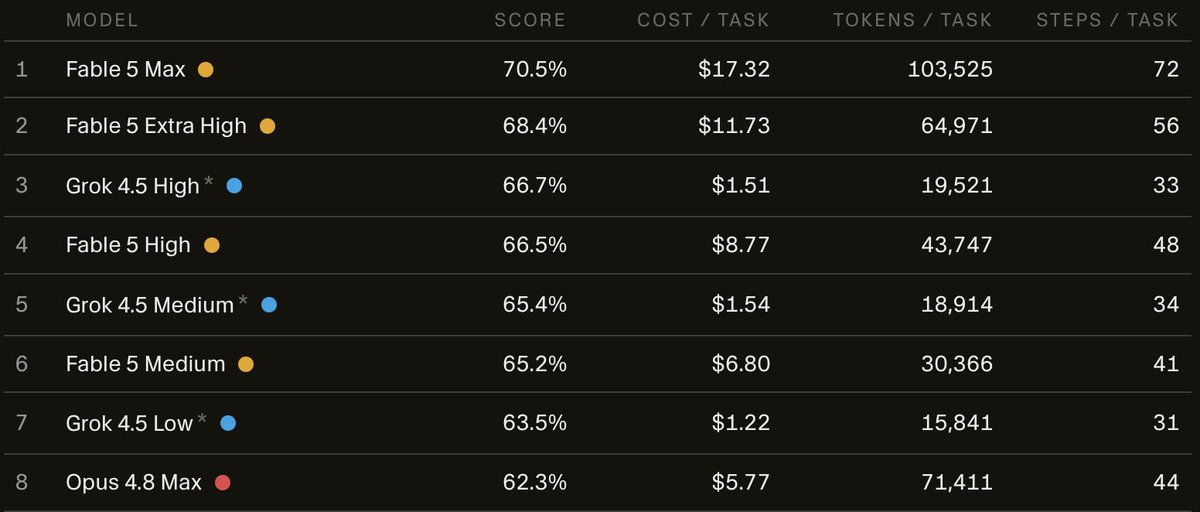
Announcing Grok 4.5, our first model trained specifically for coding and agents. It was trained with Cursor and offers frontier intelligence at leading speeds and cost efficiency.
https://t.co/i8HpU7w64k
Then @orca_build
The workflow was just there. Annotate a diff on markdown or code, hand it back, the agent resolves the comments. The YouTube thing, on my actual knowledge base.
And the things I wasn't even looking for are what I'd miss most now:
- Design Mode: click a UI element in the browser, the HTML, CSS and a screenshot drop straight into context.
- Account hot-swap: personal plus two client repos, no re-logging.
- A board with parallel worktrees, for when the knowledge base, portfolio and design-system work are all moving at once.
If your work lives in a repo, markdown or code, Orca is worth a real look 🧨
Until last week I was on VS Code every day. My full knowledge base lived there. Meetings, design decisions, research, mostly markdown.
Agent mode kept showing up everywhere. So of course I got triggered. Searched a bit, and found something that really took my attention: adding comments in a file for the AI to solve later. That alone felt like a huge win for my workflow.
End result: I left VS Code completely 🙃
Cursor first, everyone recommends it. Then Conductor. Then T3 Code, the open-source one I'd been curious about.
All three are strong, I'm not here to rank them. That one loop just never fit the way I work on markdown. So I kept moving.
big shoutout to @donniedamato + the folks in the DS slack.
a bunch of thoughtful comments led to a full naming cleanup in barely UI
some of the changes 👇
My design system was bloated.
107 color styles. Dozens of components.
I wasn’t even sure what was being used anymore.
So I tried something: Strip it all down using just Figma variables.
Overall, this was a great experience and a really nice opportunity to celebrate design, meet a lot of people, share knowledge, and learn a lot. That was my main goal for this event, and it was definitely achieved 🚀