🚨 Anthropic just showed a 27-minute workshop on how to actually do prompts for Claude.
Taught by the people who built it.
Free. No registration. No paywall.
I've seen $300 courses that don't cover what they teach in the first 8 minutes.
Watch it and bookmark it now.
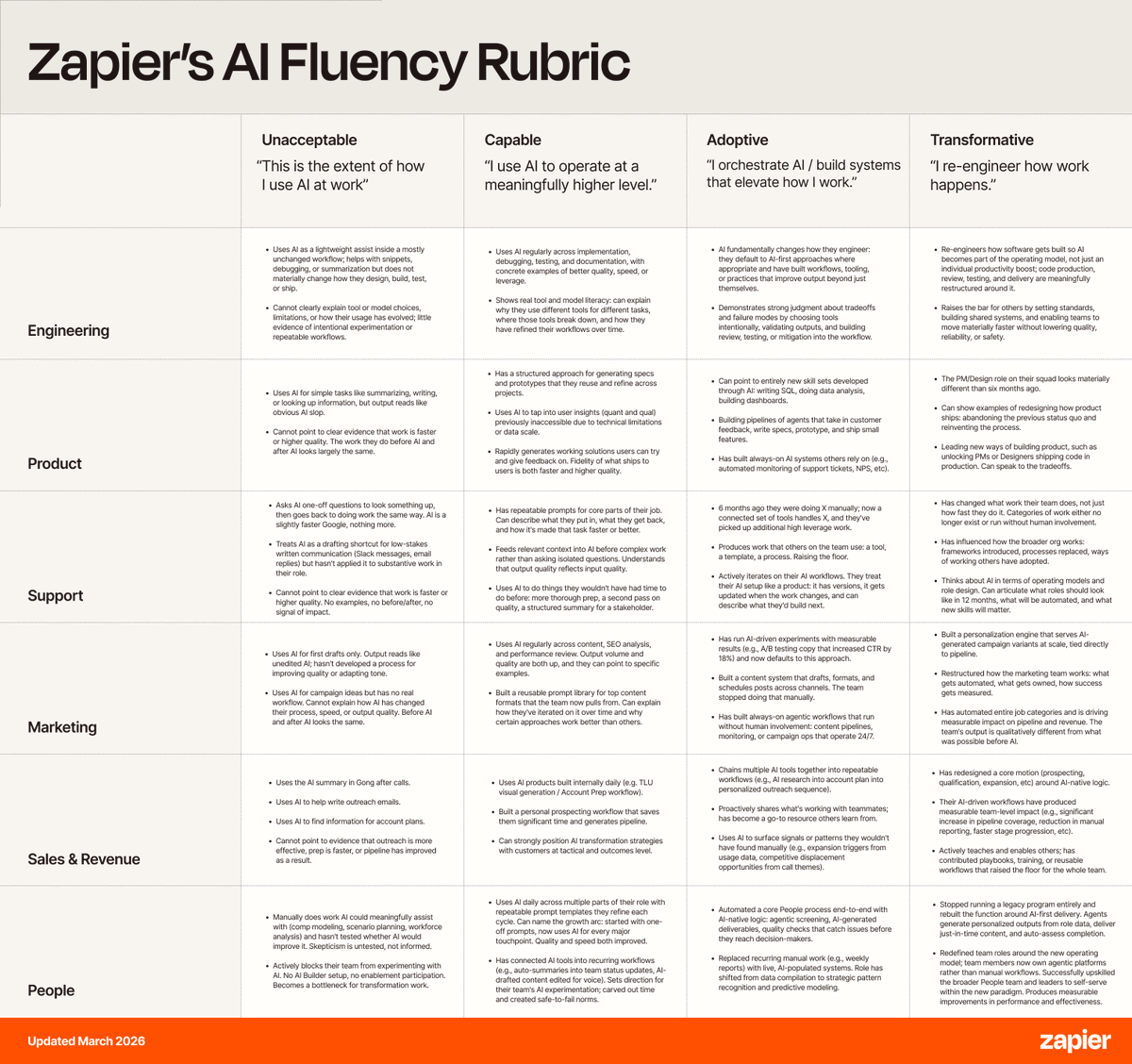
Today we released our new AI Fluency Rubric.
We use it for every hire, focusing on what they’ve actually built.
Last May we open-sourced V1. Hundreds of companies used it to screen candidates and develop teams. It worked. But the floor moved fast.
An updated look at the 3 levels of AI fluency at @Zapier:
1. Capable: "I use AI to operate at a meaningfully higher level."
2. Adoptive: "I orchestrate AI and build systems that elevate how I work."
3. Transformative: "I re-engineer how work happens."
We evaluate theses across 4 dimensions: Mindset, Strategy, Building, and Accountability.
We're sharing V2 publicly for the same reason we shared V1: every company needs a framework for this, and most don't have one yet.
Don’t see your role? See all departments / learn more here: https://t.co/EqLTK3Xfyr
🤯 R.I.P DESIGNERS!
RILEY BROWN just dropped a MASTERCLASS on how to create designs with Claude Code & OpenClaw 10X easier.
NO FIGMA SUBSCRIPTION needed anymore.
Figma: $45/month
Agency Charges:10k/month
This workflow: $0
Here's the full breakdown👇
Design → code → canvas → feedback → repeat. The @figma MCP server is now bidirectional. @GitHub Copilot users can pull design context into code and push working UI back to the Figma canvas, all from @code . No handoffs or context switching. Just flow.
https://t.co/FbDcp7kboG
We just built Figma for Claude Code
> Select any element on your local front-end
> Edit it like you would in Figma
> Apply the changes with Claude Code
This is not a demo or waitlist. Try it today.
Figma make is insane once you've figured out how to get your design system in there.
I spent a crazy amount of time this week getting it working and ran into a few hiccups. I published my adivce here for you all.
Build → Publish → Install → Done
https://t.co/yujTlsU0UJ
in 2020 i started recreating the stamps my grandpa collected, it was a small lockdown project that sort of grew into a digital collection of my own.
now, @rpavlini and I built an online philately experience where you can explore them and zooooom in like a true philatelist
Published a new update to the design system audit widget!
You can now toggle settings on / off
– Description
– Docs link
– Variables
– Hide/show values that are 0
https://t.co/DqjTTuVRvk
Figma Make will make you a superhuman.
But only if you know how to use it effectively.
After 50+ builds and errors in @Figma Make, here’s the ultimate list to help you build better products ⚡️:
1/ Attach Figma frames to guide Make
Drop a design frame into the chat and anchor your prompt to it.
Prompt: “Use this frame as the base. Add smooth scroll transitions between sections.”
2/ Point + prompt in the preview
Click directly on an element in the Make preview, then describe the change.
Prompt: “Make this button sticky to the top on scroll.”
3/ Break edits into smaller prompts
Instead of re-describing the whole project, target a section.
Prompt: “Improve spacing and hierarchy only for the pricing table.”
4/ Force responsiveness explicitly
Make can generate constraints and layouts with a single line.
Prompt: “Make this page responsive for desktop, tablet, and mobile.”
5/ Remix Make previews back into Figma Design
Copy a snapshot of the preview → paste it into your Figma file for polishing.
Prompt after paste: “Refine this pasted frame to match our design system.”
6/ Publish straight to a live URL
When you’re ready, prompt Make to handle launch.
Prompt: “Publish this project to a shareable web link with a custom favicon.”
7/ Collaborate in the same Make file
Multiple teammates can prompt at once. Treat it like multiplayer.
Prompt example during collab: “Add animations to the hero section while [teammate] finalizes footer layout.”
8/ Attach reference images as inspiration
Guide Make visually with screenshots, mockups, or mood boards.
Prompt: “Match the style of this attached screenshot — use its color palette + typography.”
9/ Prompt for prototype interactions
Make understands flow instructions directly.
Prompt: “Link the ‘Sign up’ button to the signup frame with a slide-in transition.”
10/ Pre-handoff cleanup in 1 line
Use the revert button whenever you need. Don't waste time fixing things that are broken—just go back and try again with a new approach. Be bold when you make changes!
11/ Final shipping checklist
Before you ship, don’t forget:
- Add title + description (SEO)
- Upload a favicon + OG/social image
- Connect your Analytics!
Then hit publish.
The component audit widget is live!
It scans your Figma library, then:
– Shows components by page
– Shows components missing variables/styles
– Lists components without descriptions
– Lists components without links
– Print a summary frame for a log
https://t.co/dCb5vjC5K2