Claude Cowork complete crash course from zero to expert in 12 minutes.
Installation, automations, connectors, plugins..all of it:
00:00 Intro
01:00 Installation & setup
02:08 Your first task
03:01 Global instructions (most skip this)
04:00 What Cowork can actually access
05:15 Skills feature
06:08 Connectors explained
07:04 Real workflow (Drive + Gmail)
07:46 Claude in Chrome
08:43 Scheduled tasks
09:52 Plugins (why $285B was wiped out)
11:41 Big picture
How to set up Claude Cowork so it actually works like an AI chief of staff (not just another chatbot):
1. Most people open Cowork, type a message, and get generic output. It's not a Claude problem. It's a setup problem. Cowork needs context before it can help you. Who you are. How you work. What you're building. Your team. Your priorities. Give it that, and every session feels like picking up a conversation with an executive assistant.
2. The setup has three layers:
a) Global instructions (who you are, how you work, what Claude should never do).
b) Connectors (Slack, Gmail, Google Calendar, Notion)
c) And a folder structure on your computer that acts as Claude's long-term memory. That combination is what takes it from generic to personalized.
3. Skills are the real leverage. A skill is a markdown file that tells Claude exactly how to do one thing well. Write my newsletter. Coach me on a decision. Review a case study. Each skill lives in its own folder with context, examples, and a definition of what success looks like.
4. We built a CEO coach skill in the video below. Gave it business context, leadership style, company goals. Then tested it with a real decision: should we increase our newsletter from once to twice a week? It came back with trade-offs, second-order consequences, and risk assessment.
5. Then we built a multi-agent advisory board. Five subagents, each with a defined persona:
a) the operator
b) the skeptic
c) the customer advocate
d) the finance partner
e) the legal/risk advisor.
You feed it a decision. Each agent evaluates independently. The main agent synthesizes the feedback. It's like having a board meeting on demand.
6. Third skill: a thought leadership content pipeline. Topic scoring, idea capture, distribution cadence, tone calibration. All built from your actual expertise and audience. Designed so an executive can go from idea to published post without starting from scratch every time.
7. The workspace map is what ties it all together. It's a top-level file that shows Claude how to navigate your entire setup. Which folders exist, what skills live where, how to invoke them. Without it, Claude has to search for everything. With it, Claude goes straight to what it needs.
8. Everything you build is portable. The folder structure works in Cowork, Claude Code, and Codex. Push it to a private GitHub repo and you can access it from your phone through Claude Code, or use Claude Dispatch.
9. The pattern is repeatable. Pick a task you do often. Create a folder. Build a skill. Add examples of what success looks like, and what a bad output looks like. Test it. Workshop it. Move on to the next one. Each skill is like onboarding a new employee who never forgets and never needs to be re-trained.
The people who invest in this setup now are the ones who will have a 10x advantage when these tools get even better. And they're getting better fast.
I sat down with @alexlieberman on Human In The Loop and we built all three of these live from scratch. Full breakdown in the video below..
I tried to explain this as clear as possible for my non-developer crowd.
Send it to someone who should be using Cowork but isn't yet. Or bookmark it to level up when you're ready.
Watch 👇🏼
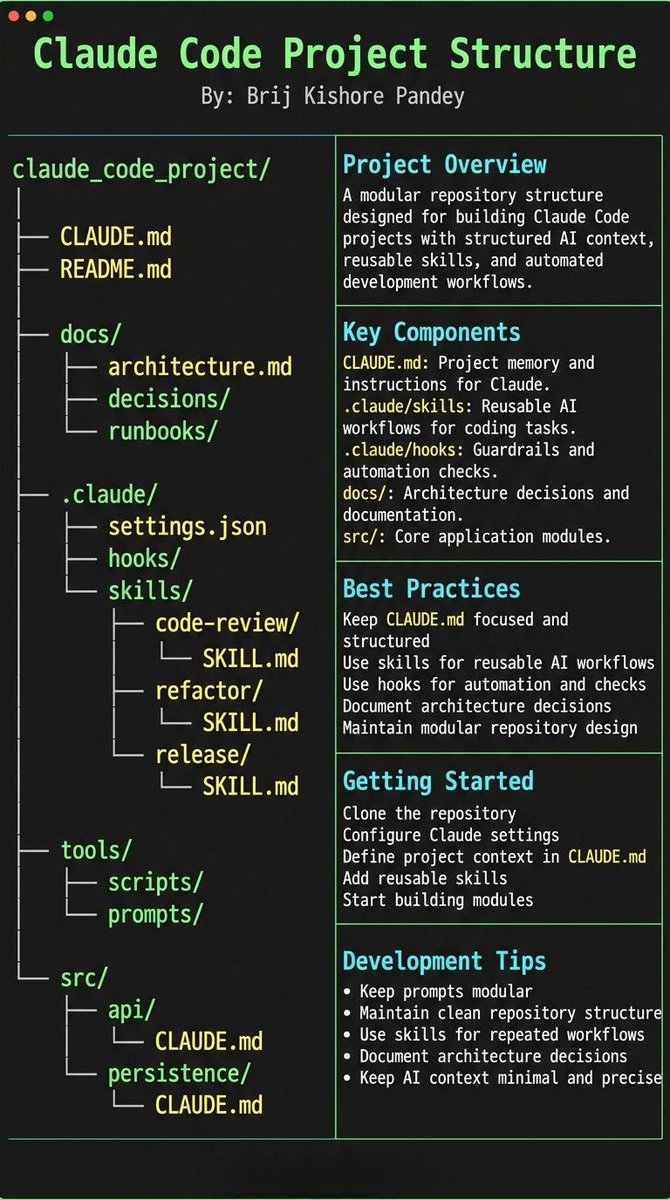
Most people treat CLAUDE.md like a prompt file.
That’s the mistake.
If you want Claude Code to feel like a senior engineer living inside your repo, your project needs structure.
Claude needs 4 things at all times:
• the why → what the system does
• the map → where things live
• the rules → what’s allowed / not allowed
• the workflows → how work gets done
I call this:
The Anatomy of a Claude Code Project 👇
━━━━━━━━━━━━━━━
1️⃣ CLAUDE.md = Repo Memory (keep it short)
This is the north star file.
Not a knowledge dump. Just:
• Purpose (WHY)
• Repo map (WHAT)
• Rules + commands (HOW)
If it gets too long, the model starts missing important context.
━━━━━━━━━━━━━━━
2️⃣ .claude/skills/ = Reusable Expert Modes
Stop rewriting instructions.
Turn common workflows into skills:
• code review checklist
• refactor playbook
• release procedure
• debugging flow
Result:
Consistency across sessions and teammates.
━━━━━━━━━━━━━━━
3️⃣ .claude/hooks/ = Guardrails
Models forget.
Hooks don’t.
Use them for things that must be deterministic:
• run formatter after edits
• run tests on core changes
• block unsafe directories (auth, billing, migrations)
━━━━━━━━━━━━━━━
4️⃣ docs/ = Progressive Context
Don’t bloat prompts.
Claude just needs to know where truth lives:
• architecture overview
• ADRs (engineering decisions)
• operational runbooks
━━━━━━━━━━━━━━━
5️⃣ Local CLAUDE.md for risky modules
Put small files near sharp edges:
src/auth/CLAUDE.md
src/persistence/CLAUDE.md
infra/CLAUDE.md
Now Claude sees the gotchas exactly when it works there.
━━━━━━━━━━━━━━━
Prompting is temporary.
Structure is permanent.
When your repo is organized this way, Claude stops behaving like a chatbot…
…and starts acting like a project-native engineer.
You're losing hours every week re-uploading files and re-explaining your brand to AI.
There's a fix and it takes 10 minutes to set up.
Here's how to set up a Claude Co-work Project step by step:
→ Download the Claude desktop app (Mac or Windows)
→ Open Co-work in the navigation panel
→ Click the "+" button and choose your setup method → Write instructions like you're onboarding a new assistant
→ Add your files, folders, or URLs as context → Enable scheduled tasks so Claude runs work for you automatically
From that point forward Claude knows your tone, your files, your rules.
No more starting from zero.
Save this video, you'll build your first autonomous AI workflow today.
Want the SOP? DM me.
300 powerful Claude prompts in a single article ready to copy and paste. Bookmark this and use it as you need.
You won't find a more useful post than this
https://t.co/v3Ck7MHCIl
BREAKING: Claude can now run your entire social media strategy like a $500/hour social media manager. For free.
Here are 7 prompts you should be using right now:
Save this before it goes viral.
BREAKING: Claude can turn any skill you already have into a $4K a month income stream.
Here are 8 prompts to go from zero to consistent cash working just 15 hours a week:
Save this before it goes viral.