Emulates 60+ AWS services locally on a single port, runs actual containers for RDS and ElastiCache, and consumes approximately 30 MB of RAM at idle.
https://t.co/hIbNmpeuAM
Quick Linux Tip #12
Ever wondered which files were changed on your system recently?
Here’s a simple way to check it in Linux:
find /etc -type f -mtime -30
This shows all files inside /etc that were modified in the last 30 days.
So instead of opening files one by one, Linux quickly shows you what changed.
The -type f part means it will only show files (not folders), and -mtime -30 means “modified less than 30 days ago”.
Follow @tecmint for more #Linux tips
Quick Linux Tip # 6
Need to repeat a command every few seconds without installing anything extra?
Use:
$ watch -n 2 df -h
It reruns df -h every 2 seconds and refreshes the output in place, so you can watch disk usage change live.
Works with any command, swap df -h for free -h, uptime, or ls -lh /var/log.
It's the fastest way to monitor something in real time when you don't have a dashboard in front of you.
Follow @tecmint for more #Linux tips
Kubernetes Service Discovery Clearly Explained !!!
Every Pod in Kubernetes gets its own IP. Sounds great… until it breaks your system.
In a Deployment, you don’t run just one Pod. You run multiple replicas:
pod-1 → 10.0.0.1
pod-2 → 10.0.0.2
pod-3 → 10.0.0.3
Each Pod has its own IP. So far, so good.
Now imagine another service wants to call this app. What should it use?
10.0.0.1?
10.0.0.2?
10.0.0.3?
There’s no single stable address. Already a problem.
Now it gets worse. Pods are ephemeral. If a Pod dies:
it is deleted
a new Pod is created
with a completely NEW IP
Example:
old pod → 10.0.0.2 ❌
new pod → 10.0.0.9 ✅
Your system is now pointing to a dead IP. So the real problem is:
👉 Pod IPs are dynamic
👉 Clients need a stable way to connect
Without that, service-to-service communication is unreliable. This is exactly what Kubernetes Services solve.
Instead of pointing to Pods directly, you create a Service. And here’s the key idea:
👉 You don’t connect to Pods
👉 You connect to a logical group of Pods
How does Kubernetes know which Pods belong to that group?
Using: labels & selectors
Pods are tagged with labels:
labels:
app: user-service
The Service defines a selector:
selector:
app: user-service
That’s it. This simple mapping connects them. Now Kubernetes keeps track of:
“All Pods with label app=user-service belong to this Service”
Even if Pods die or restart or scale up/down, The mapping is always updated.
And the Service gives you a stable entry point:
a fixed IP (ClusterIP)
a DNS name
So clients just call:
👉 user-service
Not individual Pods.
Behind the scenes Service finds matching Pods via labels traffic is routed to one of them, dead Pods are automatically removed, new Pods are automatically added
No manual updates.
So the transformation is:
❌ Before: Call fragile Pod IPs that keep changing
✅ After: Call a stable Service that tracks Pods dynamically
If you remember one thing:
Kubernetes doesn’t make Pods stable. It makes access to Pods stable.
That’s the real purpose of a Service. Not just load balancing. But solving the “changing IP” problem elegantly.
🧵 Day 2/30 — #SystemDesign
One server can’t handle millions of users.
That’s why scalable systems put a Load Balancer in front to distribute traffic.
It’s the first real step from single-server → scalable architecture.
What is a Load Balancer?
A load balancer sits between users and servers.
It receives requests and distributes them intelligently across multiple instances.
This helps with:
→ Preventing server overload
→ Improving availability
→ Handling traffic spikes
→ Enabling horizontal scaling
→ Removing single point of failure
Without load balancing, your system crashes when traffic grows.
netwatch is an all in one network diagnostics tool that monitors connections in real time.
It has a live traffic timeline, ASCII network map, latency heat-maps and more.
Matt Hartley (matthart1983 on GitHub) made netwatch using @ratatui_rs and is Terminal Tool of the Week! ⭐️
Nmap Commands for Educational Use only.
Nmap is a network scanning tool used by system administrators, IT professionals, and students for security auditing, troubleshooting, and learning.
Common Scans
nmap -sP → Ping Scan: Checks which devices are active on a network.
nmap -sS → TCP SYN Scan: Helps discover open services.
nmap -sU → UDP Scan: Finds active UDP services.
nmap -sV → Version Detection: Identifies service versions for maintenance.
nmap -O → OS Detection: Detects operating system type (for compatibility testing).
nmap -A → Aggressive Scan: Runs multiple checks for detailed results.
Timing & Input
nmap -T4 → Timing Template: Controls scan speed.
nmap -iL → Input from List: Reads targets from a file (useful for admins).
nmap -sn → Host Discovery: Finds devices without scanning ports.
Advanced TCP Techniques
nmap -sX → XMAS Scan: Uses a special test packet to check responses.
nmap -sF → FIN Scan: Uses a different method for host analysis.
nmap -sT → TCP Connect Scan: Connects directly to services.
nmap -sN → Null Scan: Uses empty packets to analyze responses.
nmap -sA → ACK Scan: Helps detect firewall filtering.
Scripting & Port Options
nmap -sC → Default Script Scan: Runs safe built-in scripts.
nmap --script <script> → Run Specific Script: For detailed service checks.
nmap --top-ports <number> → Top Ports Scan: Scans the most used ports.
Note:
These commands are meant for learning, ethical security research, and network administration only. Always use Nmap on your own systems or with proper authorization.
Its out.
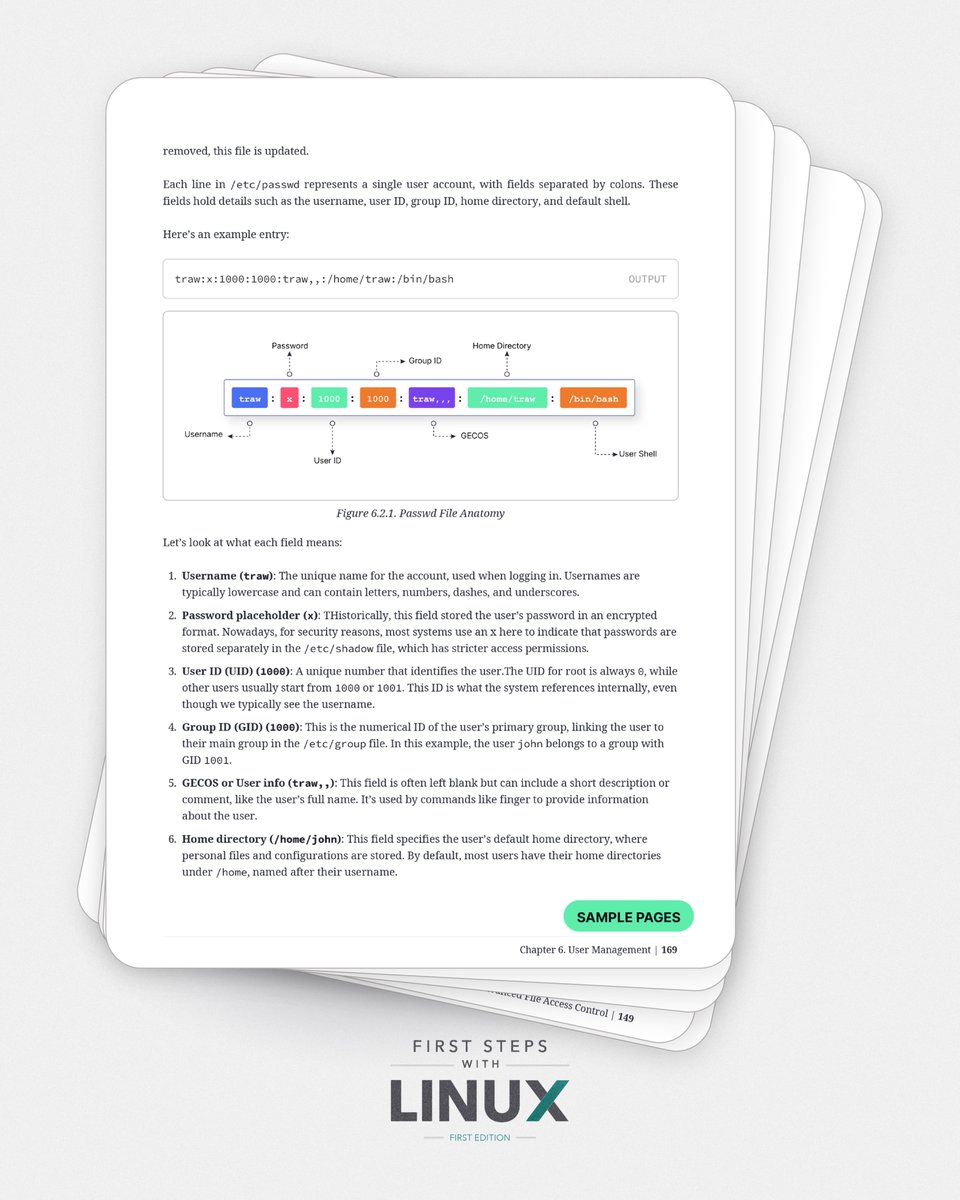
After almost 2 years of writing, First Steps with Linux is finally here.
700+ pages covering a wide range of Linux topics.
Linux command line fundamentals, storage, networking, and advanced system administration.
This is probably the most comprehensive Linux book I will ever write.
If you work with Linux, study it, or want to take your skills further, you’ll likely find this book genuinely useful.
🐧📕
Get your copy:
https://t.co/gPoaPe3GeR
🚨 Google ofrece herramientas de IA gratuitas capaces de llevar tu productividad a otro nivel.
Desde generar imágenes hasta crear apps, resumir contenido o construir asistentes personalizados.
Aquí tienes las 11 herramientas que debes conocer 👇
@ecuernavaco2 Esto no es solodaridad ni altruismo! Por que no hace lo mismo con otros regimenes? ah, sera que no tienen petromeo!? Cianto terminara pagando Venezuela?
@JavierGarcia_Uy Otra vez un ruso en el medio de manejos "raros", Empresas en Inglaterra, donde justamente hay negocios y empresas de blancos. Son todas casualidad?
Lanchas de patrullaje ... truchada, aviones hercules "de ocasion" .... truchada .... no puede seguir defendiendo lo indefendible!