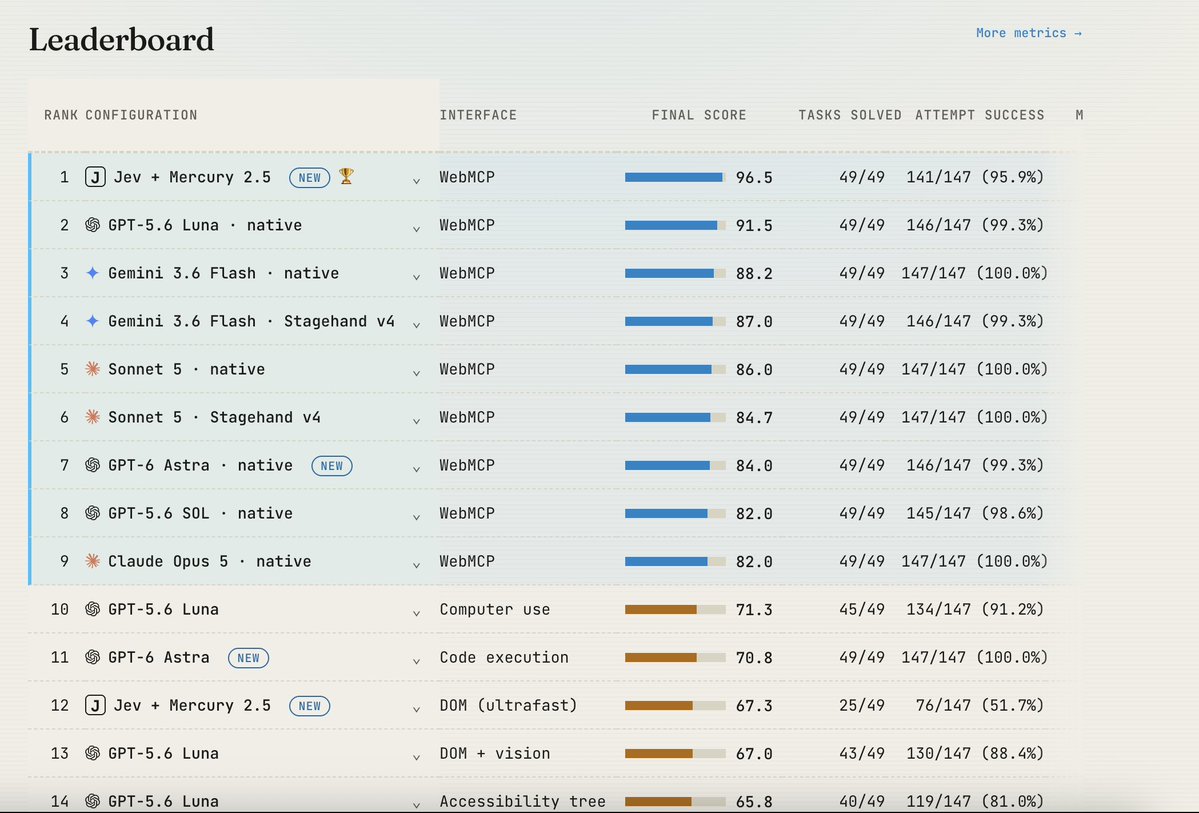
We just ran Jev on our WebMCP benchmark.
The result: basically broke the benchmark.
Jev + Mercury 2.5 (a fast, low-cost LLM) using WebMCP solved 100% of the tasks at roughly 112× lower model cost than GPT-6 Astra using computer use with code execution. Compared to Astra using screenshot-based computer use, the model cost was 245× lower (!).
We also compared Jev operating the browser with and without WebMCP.
We used Browser Use’s open-source Ultrafast, with some improvements to the harness to make it more reliable across the benchmark.
Jev’s browser-control accuracy on its own was not amazing - adding WebMCP nearly doubled the number of solved tasks, from 25/49 to 49/49, while reducing model cost by 18% (more on why below).
The benchmark and methodology are fully open and reproducible.
Full results: https://t.co/KmplyFMZdv
A few words on how the Jev + WebMCP harness works and why this is exciting:
Jev receives text as input and a set of discrete options it can choose from. With WebMCP, those options are the tools exposed by the website. At each step, Jev sees the task, the available tools and previous results, then picks what to do next.
The limitation is that Jev can’t generate arbitrary text, which you need for tool arguments. For example, it can choose the search_products tool, but it can’t generate the search query itself.
So we split the work: Jev picks the tool and Mercury 2.5 generates the arguments if needed.
This works well because turns out most of the cognitive load in these tasks is around choosing the right action. The argument generation itself is relatively simple, so we can delegate to a small and very fast model. We used Mercury, which outputs 1,000+ tokens/sec and is very cheap.
The result is a pretty simple combination: Jev for tool selection + Mercury for arguments + WebMCP for the interface. It ends up being very reliable, very fast, and very cheap.
A few words about Ultrafast and why do we think it underperforms:
Without WebMCP, Jev chooses from the page’s controls: which button to click, which field to fill, or which option to select.
But choosing a valid button is different from choosing the right next step. The agent still has to navigate menus, understand forms, recover from errors and recognize when the task is actually complete.
Our hypothesis is that WebMCP makes the decision space much simpler. Instead of figuring out a sequence of clicks through a website, Jev chooses explicit actions that directly advance the task.
@typesafeai itself documents weaker accuracy on questions requiring multiple reasoning steps. WebMCP moves much of that complexity into the website’s tools, leaving Jev with clearer decisions and fewer opportunities to go wrong (in a sense WebMCP "compresses" a sequence of clicks into one tool call).
Our modified Ultrafast setup solved 25/49 tasks - that is a result for our particular implementation and benchmark, not a universal limit on Jev or Browser Use. We are open to more harness optimization to get this result to perform better, feel free to directly contribute to the benchmark here: https://t.co/cK6MHsRV58
Browser-use ultrafast: https://t.co/DU9OdOtXHT
After today’s reality-check video on Jev, here I want to share a situation where I see a big potential for it.
The agent spins up 20 possible next moves.
Jev scores all of them in parallel and quietly murders the weak ones before the expensive reasoning even starts.
Fast, deeper planning, and super cheap.
Any more ideas like this one? I’d love to discuss.
Hype at his maximum nowadays, just sharing with you all an interesting video from @Steve8708 which gives a bit more context to Jev. Thanks for the content ✌🏻
Grok @Bot has made a few simple yet powerful technical decisions that I believe make it easy and enjoyable to use.
1. The best UI is none at all. The product interface is dramatically simpler than alternatives without sacrificing functionality. How is this possible? It's one of the first products designed for current frontier model capabilities and has a UI restrained enough to remain easy to use as models improve exponentially. Everyone knows how to text.
2. A thin harness for the client, a thick harness for the server. You might have noticed the app feels very fluid to use, even for a beta product. This is primarily because of everything we didn't have to build. The app harness is essentially a single tool to send messages between the client and server. The complexity moves to the server, where you can still use the coding agent harness with specialized tools as needed. This helps make the UI fast and responsive on desktop and mobile.
3. An always-on computer. Most coding agents and assistants today start fresh with every question you ask. Some of these sessions are on your local machine and others happen in the cloud. We believe strongly that cloud is the future, which is why it's the only option. Further, rather than spinning up virtual machines for every conversation, your bots connect to their own computer. This means you can still run agents on the bot's persistent filesystem. It's closer to what programmers have been doing by using Tailscale from their phones to connect to a remote computer and run an agent TUI. You get those capabilities without the hassle.
4. Your bots can use the browser. Coding agents have shown that most work on a computer can be expressed and run as code. You can ask for a task in natural language and the agent will decide to write a script to complete it. This is amazing, but there's still many tasks which can't be completed without logging into a website and clicking around the browser. Models and harnesses are now good enough to reliably handle this. The combination of writing code and using browsers means you can automate almost any task on a computer. Further, you can ask Grok Bot to record you doing the task, and then turn it into something repeatable.
The test for your AI services product:
Can you 3x revenue without 3x-ing your team?
If the answer is no, you've built a staffing agency with a UI.
Prove me wrong.
@pixel2ai Hey @pixel2ai founder here. Building a desktop workspace where any agent can plug in, running locally and fully in the background. The goal: make every piece of software agentic, API or not.
Let’s connect!
@BuildWithxAI Hey @BuildWithxAI founder here too. Building a desktop workspace where any agent can plug in, running locally and fully in the background. The goal: make every piece of software agentic, API or not.
Let’s connect!
@_desaina Hey @_desaina founder here. Building a desktop workspace where any agent can plug in, running locally and fully in the background. The goal: make every piece of software agentic, API or not.
Let’s connect!
@ZryMiller Hey @ZryMiller founder here too. Building a desktop workspace where any agent can plug in, running locally and fully in the background. The goal: make every piece of software agentic, API or not.
Let’s connect!