Live infinite Pokémon anime with H3 Max Director
Pokémon Red plays → the studio reads memory (map, battle, HP) → writes a director's note → @Hailuo_AI Minimax H3 on @fal renders the next 10s from the last frame
Not perfect - but the Confuse Ray hitting Meowth is great
the game's RAM is now a director: a 450ms poll watches the battle - intro, attack, damage, final faint each trigger a different vertical clip of the enemy trainer.
microdrama anime reaction cam for a pokémon red battle, driven entirely by memory reads, neat!
everyone keeps asking me... "how do i make these 3D pixel art gaussian splats??"
now you can... with ink studio!!
free on github.
it comes with a full animation suite, geometry nodes, sculpting, volumes, persistent world effects, particles, physics, destruction and more.
Inspired by the QT, I put together a
manga lineage explorer
Browse covers like you're exploring Nakano Broadway, and then dive into the mentor / assistant connections between mangaka.
Maybe you can discover some interesting connections & new manga to read.
I’m no longer prompting Claude through chat, except for initial messages. The reason: chat has become unmanageable. Instead I add an annotate-anything layer to the apps I build. Each message is a linked markdown file (git committed). A coordinator watches them and assigns tasks.
Introducing Real World Engineering Bench (RWE-Bench). AI isn’t great at designing rockets, engines, or chips yet. With better evals and RL environments, it will be.
Software was just the beginning. The physical world is next.
🌠 The Galverse OVA is now streaming on LINE Manga!
Galverse is now available for tens of millions of LINE users across Japan!
Watch it now on the LINE Manga app under the anime section~ ✌️
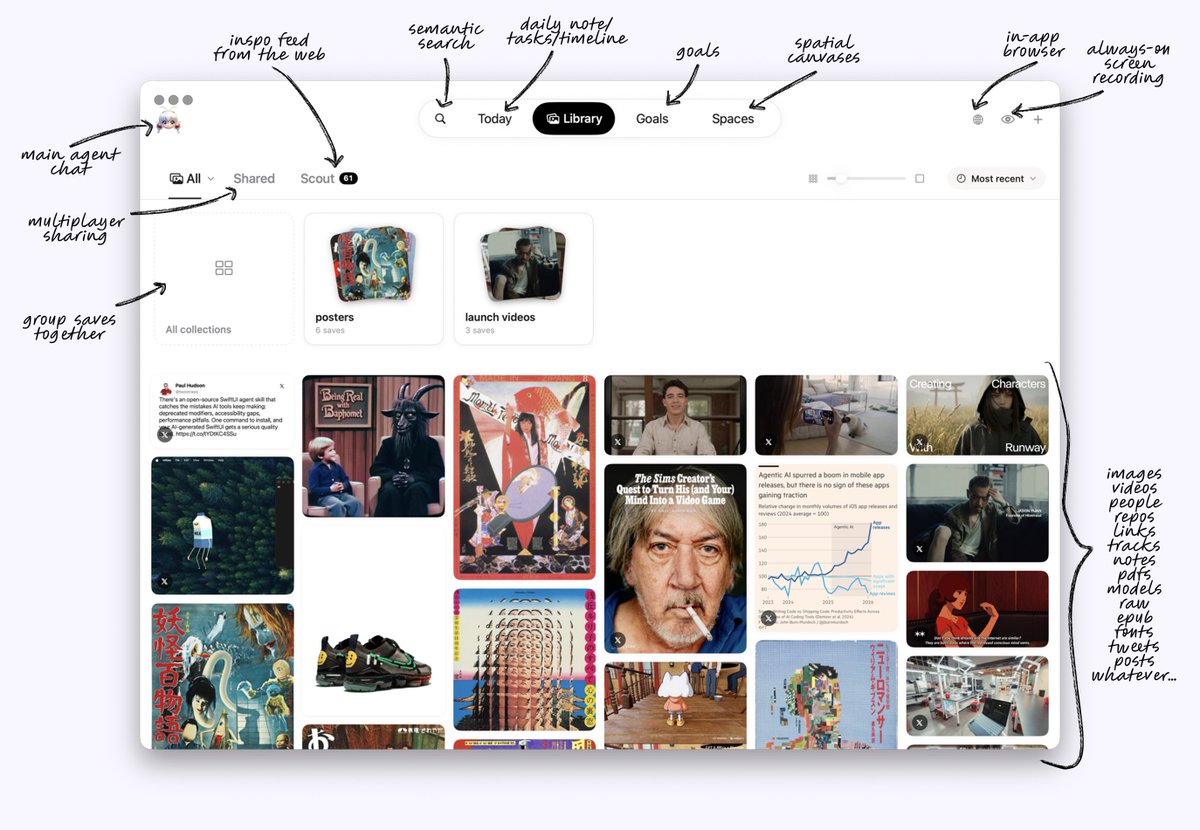
zero looks at a collection of images i saved and goes and finds more like them, across the web, without me typing a prompt
as a creative, your curation is one of the purest expressions of your taste. a collection in zero is a simple way to hand your personal agent your particular lens on an aesthetic/theme
MobileCLIP fingerprints the collection on-device, the look gets turned into search terms, and every result is re-scored against the same fingerprint. only the search terms ever leave the mac
it's the feature i'm using the most lately. as always, the thread below shares how it was built, with a brief at the end you can feed your agent if you want to build your own
inspired by @krispuckett and shadowfax, i started building my own personal agent workspace
just for fun and personal use. no chasing pmf. privacy first, local models, and a goal of replacing the saas apps i use every week
today, i finally have a working v1 of “zero”
still figuring out how to share what i’ve learned without dumping the whole repo on gh. maybe a thread for each major feature, with instructions you can feed your agent to build something similar
if you want to implement your own find inspo, feed this tweet to your agent:
goal: given a collection of images the user kept, find visually similar images across public sources, on-device, with only search terms leaving the machine
fingerprint every library image once with a small CLIP (MobileCLIP S2, 512 dims). a collection's "look" is k-means over its members' embeddings, up to 3 clusters at 6+ images; fall back to name + titles below 3
build a vocabulary: ~500 aesthetic/niche terms, art mediums and movements, thousands of artist names (CLIP Interrogator's lists are open). embed each term once. per look, rank terms by cosine, apply multiplicative MMR, reserve slots for one niche term and one artist. never include negations. let the user's description contribute up to 3 verbatim phrases
search each live source with ≤9 terms, 3 pages deep, paced ~350 ms. drop anything already in the library, previously dismissed, or a near-duplicate
tumblr specifics: request npf=true (the legacy photos[] array is empty for app-made posts), tag search is exact-match only, so send plain terms there. https://t.co/CGoYKg0KCB search needs a premium token
download thumbnails to a scratch folder, embed, score by distance to the nearest look weighted by that look's size. merge near-identical images
channel walk: for the top 30 hits find the collections they live in, test each on 8 sample images, admit up to 4 that pass and pull their contents. judge by images, never names
optional theme pass with a local text model on candidates that have text, 0–3. final = 0.65 look + 0.35 theme. keep the top N per source
keep → save the original with its source url, trust the channel, learn up to 3 genre terms from it. dismiss → hard-ban url + ≥0.96 embedding match and push the embedding into a bounded "not this" ring that steers future looks. bulk sweeps ban without teaching
for curated blogs, build a local index (post url, image urls, size, embedding) in the background with a resumable watermark, and ship it as a pack with a sha256 and the CLIP checkpoint id; refuse packs from another checkpoint
delete thumbnails the moment they miss the cut, delete the scratch folder when the run is sorted, and log every step to a panel the user can copy
enjoy ✌️
zero looks at a collection of images i saved and goes and finds more like them, across the web, without me typing a prompt
as a creative, your curation is one of the purest expressions of your taste. a collection in zero is a simple way to hand your personal agent your particular lens on an aesthetic/theme
MobileCLIP fingerprints the collection on-device, the look gets turned into search terms, and every result is re-scored against the same fingerprint. only the search terms ever leave the mac
it's the feature i'm using the most lately. as always, the thread below shares how it was built, with a brief at the end you can feed your agent if you want to build your own
here's something for your agent: everything i got wrong building a taste engine on CLIP, so you don't have to
✼ CLIP can't read negation. "no text" finds text. never put "no X" anywhere near a query
✼ umbrella bias: broad terms out-cosine sharp ones every time, so niche terms have to compete only against other niche terms or they never surface
✼ diversity (MMR) has to be multiplicative. subtractive let palette trivia leapfrog the genre terms
✼ textless posts are unreachable by text search, their vocabulary lives in the channel titles. that's what the channel walk is really for
✼ vision-model captions euphemize. a caption-fed LLM can't name half of what's on these blogs. CLIP with the right vocabulary can
✼ dismissal must hard-ban (url + ≥0.96 embedding match). steering the centroid away alone re-serves the same images
✼ a bulk "i'm done" carries no verdict. only a per-card ✕ should teach, or one sweep floods your taste ring with on-vibe images
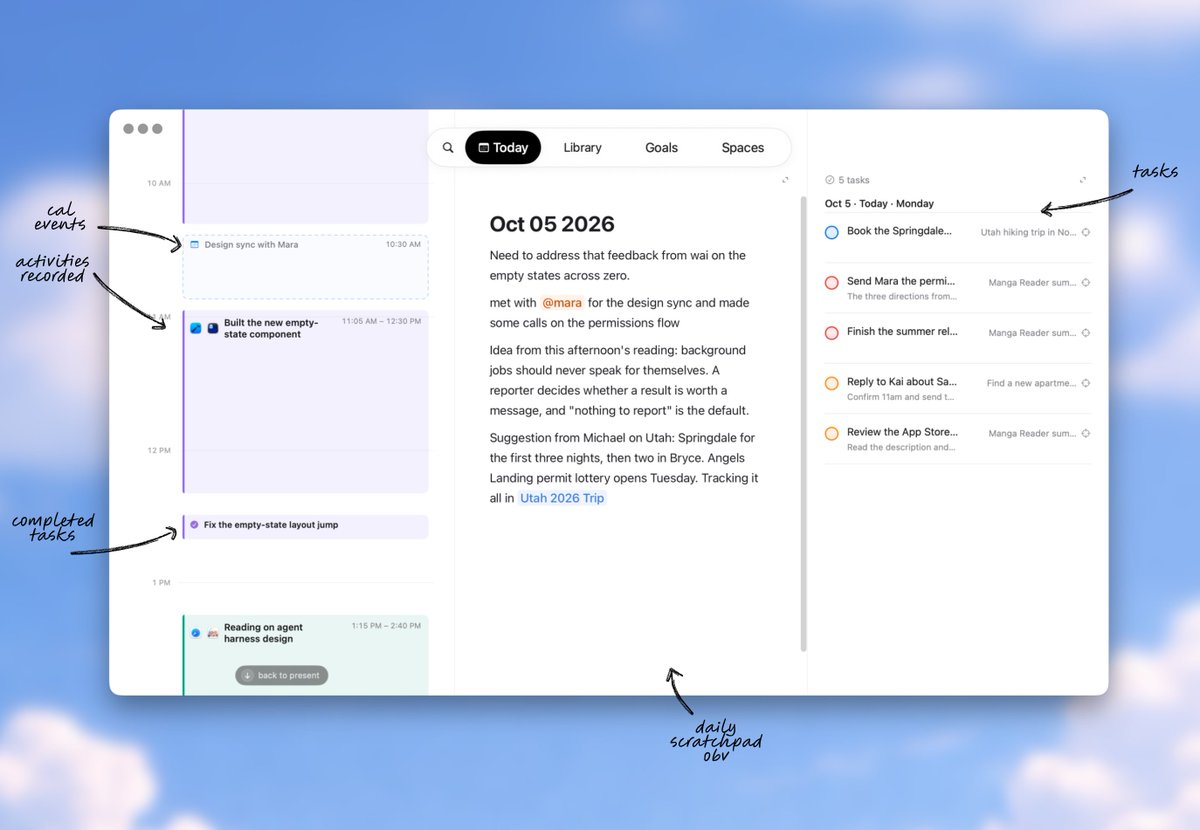
zero watches my screen all day and writes a timeline of my day itself, this forms the core of the today tab
it reads the exact text through macOS accessibility instead of OCR, and a small local vision model describes anything that isn't text
the today tab is focused around 3 panes:
✼ activity & event timeline
✼ scratchpad
✼ tasks
this is largely based on what heads-up info I like to see, but also after 3+ years of working on 'new tab' experiences at big tech, this is largely the core of what the majority of users want from this type of view...
glanceable access to:
1. whats my next meeting
2. whats my next task
3. where can I quickly jot something down
the most interesting technical implementation here is how zero approaches the timeline, I'll detail it in this thread so you can copy paste this tweet to your agent if you want to build your own!
today in v1 it all collapses onto the mac: web via link, zero's browser or the extension, screen via the timeline, text via dictation, camera roll via a drag once it's synced over, etc
ultimately the goal is to provide your agent with a 'world state' object that provides enough context for it to be helpful to you across workflows
for v1 the thing i'm trying to hold onto is one library with one search over all of it, whatever the source was
in v2 i'll leverage imessage and (maybe) a native app as a bridge to get iOS inputs to enrich the world-state
v3 would require 24/7 agents and sensors on me and around the house to fully round out the context
they do! the day summaries are leaves of a merge tree, and every summary above them (2-day, 4-day, 8-day… stretches, so "week" and "month" are approximate) stores a hash of the two texts it was built from
a correction note from me makes the day's digest get rewritten, the rewritten text changes that hash, so the parent block no longer matches its inputs and is marked stale and once it's rebuilt, its parent mismatches, and so on up
so then the sweep runs in the timeline's processing pass, a few blocks at a time, smallest first, so the cascade finishes over the next few passes rather than instantly. the cached summaries are only ever a cache; the day digests and the memory log underneath are never deleted
same rule heals old summaries saved before a cleanup fix, bc a malformed cached line counts as stale too
zero watches my screen all day and writes a timeline of my day itself, this forms the core of the today tab
it reads the exact text through macOS accessibility instead of OCR, and a small local vision model describes anything that isn't text
the today tab is focused around 3 panes:
✼ activity & event timeline
✼ scratchpad
✼ tasks
this is largely based on what heads-up info I like to see, but also after 3+ years of working on 'new tab' experiences at big tech, this is largely the core of what the majority of users want from this type of view...
glanceable access to:
1. whats my next meeting
2. whats my next task
3. where can I quickly jot something down
the most interesting technical implementation here is how zero approaches the timeline, I'll detail it in this thread so you can copy paste this tweet to your agent if you want to build your own!
If you want to implement your own always-on timeline, feed this tweet to your agent:
Goal: a timeline of the user's day, generated entirely on-device, that reads the exact text on screen instead of OCR'ing pixels.
1. Capture with ScreenCaptureKit: one persistent SCStream, a frame every 10 s plus on app switch, display under the pointer, cursor hidden, ≤1080 px JPEG. Retarget the stream's content filter when displays change — never rebuild it per tick, that leaks a WindowServer frame pool per capture. Gate every tick before pixels: pause toggle, lock screen, 60 s idle, a never-capture app list (password managers by default).
2. Record deterministic metadata per frame from SCShareableContent: frontmost app bundle id, window title, idle time. Icons from NSWorkspace. Don't make a model guess any of this.
3. Exact text via the Accessibility tree, not OCR. Constraint: the App Sandbox blocks cross-process AX reads with kAXErrorCannotComplete even when Accessibility is granted. So ship a tiny non-sandboxed helper (launchd agent, own Accessibility grant) staged OUTSIDE the app container — inside it, TCC merges it into the app's identity. Transport: CFMessagePort. Rules in the helper: read only on request, one app per request verified against the live pid, never enter secure text fields, skip element titles, cap 6,000 chars / 500 elements / 1 s walk / 0.25 s per call, no schedule of its own. Never let the in-app fallback read your own pid (in-process AX off-main deadlocks SwiftUI).
4. Chromium/Electron expose no AX tree until asked. Set AXManualAccessibility on the target app on every read; if the harvest is still empty, escalate to AXEnhancedUserInterface (Chrome ignores the first). Escalate only after a failure — the second flag slows some apps. Flags persist for the app's lifetime; the first read is cold, read again next tick.
5. Describe frames: ≥80 chars of exact text → use it (condense to 500 chars), skip the vision model. Otherwise a small local VLM (Qwen3-VL 2B), one image per call, app + title as the hint. Cache the description on the frame row or you'll re-run GPU minutes on every pass.
6. Redact before storing: JWTs, AWS/GitHub/OpenAI/Slack key shapes, 6–8 digit codes near "verification code".
7. Batch every minute: frames ≥15 min old into ~15-min groups, new group on a >2 min gap, ≤15 described frames per batch. Add browser visits as plain "site — title" lines. Local text model: notes → 2–5 timestamped observations → rebuild 1–4 cards over a 45-min lookback, category from the user's own list. Calendar events, meetings and completed tasks are placed deterministically; never let the model overwrite them.
8. Day summary ≤600 chars from cards only, "invent nothing", with a user correction note that overrides every future rewrite.
9. Retention: frames and exact text deleted after 3 days (only processed ones); cards and summaries kept. Nothing leaves the machine, in any mode.
here's something juicy for your agent: two things nobody tells you about reading the accessibility tree.
first, the App Sandbox blocks cross-process Accessibility reads completely, kAXErrorCannotComplete on every call, even with the permission granted and the entitlement set. so the reading lives in a tiny helper outside the sandbox with its own accessibility grant. it reads only when the timeline asks, one app per request, verified against the live process; never enters a password field; stops at 6,000 characters or 1 second; hands the text back over a local message port and keeps nothing. if the helper's slow, the frame goes to the vision model instead.
second, chromium apps hand you an empty tree until you ask for one. The first version was silently blind to every browser tab and every electron app, the walk found window chrome and zero text. and the opt-in flag is different per engine: electron listens to AXManualAccessibility; chrome ignores that and wants the older AXEnhancedUserInterface, the "a screen reader is running" flag. so zero sets the first on every read and escalates to the second only after a read comes back empty, because the second one makes some apps slower.
bonus trap: the in-app fallback must never read zero's own process. in-process accessibility bypasses the sandbox, walks your own SwiftUI tree off the main thread, and deadlocks the app. it took us a while to find that one.