We'll be spending a lot more time trying to understand the outputs of language models. A few thoughts, tips & tricks:
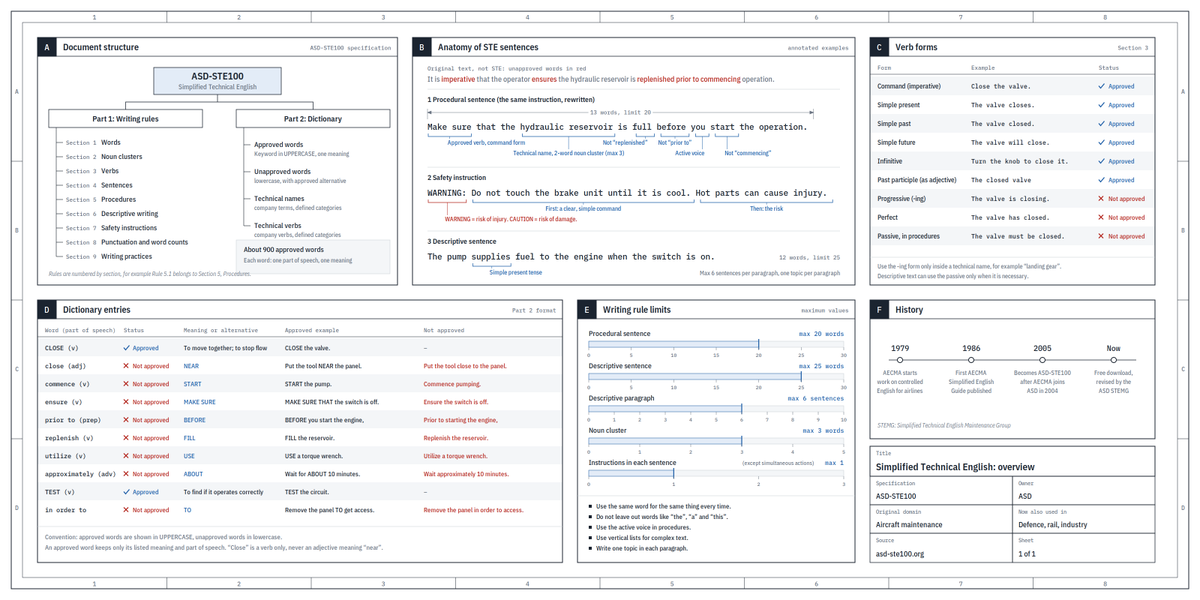
Writing. Something I've had success with: Ask your LLM to explain something in ASD-STE100, it's a controlled language specification originally developed for aerospace maintenance documentation. LLMs well-versed in this language and it comes with heavy constraints on clean writing style that I often find a lot more readable. Sometimes I've tried to soften it a bit e.g. ask for "80% of the way to ASD-STE100" because the spec is quite stringent. But even better:
Diagrams / images. Instead of writing, ask your LLM to create a diagram. These can be a lot easier to process, parse, and understand. But even better:
Web pages. Ask for output "in HTML" to get a beautiful, interactive webpage. LLMs are getting really good at frontend and can create beautiful experiences, animations, etc. But even better:
Explainer videos. The output format I am most bullish on is fully custom / bespoke explainer videos generated on any arbitrary topic. Experiment with things like "Create a 3b1b style video explainer on X. Use my ElevenLabs API key for audio narration". (you'd need an API key for the latter or you can ask your LLM to find you decent free alternatives that use your local compute). This is actually starting to work!
In summary:
- As LLMs get better, they will do more and more of the legwork autonomously, and a lot more of our work will rise up the abstractions into oversight and understanding.
- Luckily, LLMs can help here too because as intelligence and code are increasingly abundant, you can ask for large, custom, discardable software artifacts (e.g. web apps, video explainers) that would have never made sense to create before. Push the boundaries here and you'll be surprised.
Introducing Claude Fable 5: a Mythos-class model that we’ve made safe for general use.
Its capabilities exceed those of any model we’ve ever made generally available.
🤯This is insane… you can now run Codex inside Claude Code.
No tab switching.
No copy-pasting.
No second IDE.
Just one terminal — two AI agents working together.
It’s called codex-plugin-cc.
Here’s what this unlocks:
• Delegate entire coding tasks from Claude → Codex
• Ask Codex to review your changes before commit
• Run adversarial design reviews on your architecture
• Launch long-running fixes in the background
• All using your existing ChatGPT subscription
You literally get Claude planning + Codex executing in one workflow.
Even wilder — this is officially built by OpenAI.
Not a wrapper. Not a hack. Not a community fork.
OpenAI shipped a plugin that connects their agent
to Anthropic’s Claude Code environment.
Two competing AI labs.
One terminal.
One codebase.
That sentence shouldn’t exist in 2026.
The commands are clean:
/codex:review → full code review
/codex:adversarial-review → challenge architecture decisions
/codex:rescue → hand off bugs to Codex
/codex:status → track background jobs
/codex:result → fetch output
You can literally say:
“Ask Codex to investigate why tests are failing”
…and it runs in the background while you keep coding.
No API keys required.
Works with ChatGPT subscription.
Installs in one command.
100% open source.
This is the first real multi-agent coding workflow inside a single terminal.
Imagine every pixel on your screen, streamed live directly from a model. No HTML, no layout engine, no code. Just exactly what you want to see.
@eddiejiao_obj, @drewocarr and I built a prototype to see how this could actually work, and set out to make it real. We're calling it Flipbook. (1/5)
LLM Knowledge Bases
Something I'm finding very useful recently: using LLMs to build personal knowledge bases for various topics of research interest. In this way, a large fraction of my recent token throughput is going less into manipulating code, and more into manipulating knowledge (stored as markdown and images). The latest LLMs are quite good at it. So:
Data ingest:
I index source documents (articles, papers, repos, datasets, images, etc.) into a raw/ directory, then I use an LLM to incrementally "compile" a wiki, which is just a collection of .md files in a directory structure. The wiki includes summaries of all the data in raw/, backlinks, and then it categorizes data into concepts, writes articles for them, and links them all. To convert web articles into .md files I like to use the Obsidian Web Clipper extension, and then I also use a hotkey to download all the related images to local so that my LLM can easily reference them.
IDE:
I use Obsidian as the IDE "frontend" where I can view the raw data, the the compiled wiki, and the derived visualizations. Important to note that the LLM writes and maintains all of the data of the wiki, I rarely touch it directly. I've played with a few Obsidian plugins to render and view data in other ways (e.g. Marp for slides).
Q&A:
Where things get interesting is that once your wiki is big enough (e.g. mine on some recent research is ~100 articles and ~400K words), you can ask your LLM agent all kinds of complex questions against the wiki, and it will go off, research the answers, etc. I thought I had to reach for fancy RAG, but the LLM has been pretty good about auto-maintaining index files and brief summaries of all the documents and it reads all the important related data fairly easily at this ~small scale.
Output:
Instead of getting answers in text/terminal, I like to have it render markdown files for me, or slide shows (Marp format), or matplotlib images, all of which I then view again in Obsidian. You can imagine many other visual output formats depending on the query. Often, I end up "filing" the outputs back into the wiki to enhance it for further queries. So my own explorations and queries always "add up" in the knowledge base.
Linting:
I've run some LLM "health checks" over the wiki to e.g. find inconsistent data, impute missing data (with web searchers), find interesting connections for new article candidates, etc., to incrementally clean up the wiki and enhance its overall data integrity. The LLMs are quite good at suggesting further questions to ask and look into.
Extra tools:
I find myself developing additional tools to process the data, e.g. I vibe coded a small and naive search engine over the wiki, which I both use directly (in a web ui), but more often I want to hand it off to an LLM via CLI as a tool for larger queries.
Further explorations:
As the repo grows, the natural desire is to also think about synthetic data generation + finetuning to have your LLM "know" the data in its weights instead of just context windows.
TLDR: raw data from a given number of sources is collected, then compiled by an LLM into a .md wiki, then operated on by various CLIs by the LLM to do Q&A and to incrementally enhance the wiki, and all of it viewable in Obsidian. You rarely ever write or edit the wiki manually, it's the domain of the LLM. I think there is room here for an incredible new product instead of a hacky collection of scripts.
You don’t own “web3.”
The VCs and their LPs do. It will never escape their incentives. It’s ultimately a centralized entity with a different label.
Know what you’re getting into…
Samsung annuncia i nuovi MICRO LED, Neo QLED and Lifestyle TVs, che consentono di vedere, acquistare e scambiare NFT.
#NFTs#multivers
https://t.co/91aG4nR561
Ross+Kramer subisce un furto di NFT tramite phishing, OpenSea blocca la possibilità di scambiare i token rubati. Il sistema non è poi così decentralizzato…
#nft#Cripto#OpenSeaNFT#dApp#DeFiChain