@jacewbuilds Each answer has to type-check with swiftc against the case's SDK and pass per-task rules: required symbols, and no shortcuts like fatalError or stubs. Without docs, models pass about a third; with Sosumi, 94–98%. Counting real-SDK API picks would be a nice finer-grained signal!
Over the last 30 days, https://t.co/4AoSi5NGqo has served tens of millions of requests to coding agents looking up Apple docs, from about 6,900 (nice) unique IPs/day.
But does it actually help? I built an eval to find out: 41 Swift tasks, mostly new APIs in the OS 27 SDKs, checked by the compiler and per-task rules.
Without docs, Opus, GPT-6.1 Sol, and Sonnet pass about a third of them. With Sosumi, they pass 98%, 97%, and 94%.
Compared to built-in web search, Claude models score 12 to 30 points higher with Sosumi, at about half the cost or less. GPT does slightly better with web search (99%), but at 3× the cost.
Running the eval also turned up a handful of fixes, now live (one framework page was 3 MB 😬). The eval is open source: https://t.co/6fhU76OdYI
@technoplato Thanks! Xcode's agent can search Apple's docs, but only from inside Xcode with a project open. Sosumi works with any agent, anywhere, and it also covers the HIG, WWDC transcripts, and third-party Swift-DocC sites.
@itspdfu Thanks for mapping this out! Interesting that the five without a HybridSearch type include HealthInfo and Demographics. My guess is that's deliberate, to keep the most sensitive parts out of system-wide search, but it could just as easily be schema lag.
AnyLanguageModel 1.2 is out! 🎉
This release brings dynamic profiles from Foundation Models 27 to earlier OS versions and to other models, so a session can now change its model, instructions, and tools as it goes.
Huge thanks to @llqoli for this work, and to @jaleel_akbashev, @mergesort, and ﹫jihtsan.
https://t.co/d7JBUgB5VQ
We’ve been hard at work trying to make models work with harnesses better. The best thing @yb2698 found: “harness adapters”. Small LoRAs trained with RL inside the actual agent harness they’ll be used with.
Same base model. Different adapter for pi, opencode, hermes, etc. Why?
Simply because the same model behaves very differently depending on the tools, prompts and control flow around it. Instead of asking one set of weights to be optimal everywhere, we can specialize a tiny part of the model for each environment.
Early results are pretty encouraging: on held-out tasks, the adapters make fewer tool calls than the base model while keeping or improving accuracy.
And because they’re LoRAs, the operational side is surprisingly cheap too.
For one LFM2.5-24B-A2B experiment, we evaluated 9 checkpoints / 1,350 agent sessions on a single H200 in under an hour. The total: ~$5!
Merging and serving every checkpoint separately would have cost around $90.
There’s another important piece: RL agents will eventually try to hack the reward.
So every tool call goes through `safeagents`, a deterministic rule-based guard that blocks things like editing tests, tampering with rewards or bypassing the sandbox before they execute.
And the whole loop can start from real usage:
your coding sessions -> verifiable environments -> RL -> a better adapter for your agent.
The model doesn’t have to change completely.
Sometimes it just needs to get better at the harness it actually lives in.
https://t.co/1vZxJ0d5EY
Apple's Core AI models repo is now accepting third-party contributions 🥳
If you have developed some cool ports, this is the best place to share your recipes with the community. Looking at you @JackdeS11@mattt@kevinqz 😂
https://t.co/bQpzZiaAcJ
@Birostris_77@work_louder@moboudra Each state gets its own color: red when an agent fails, yellow when it needs input, and green when it's finished and I haven't read the result yet. It also skips subagents, so it isn't always 1:1 with the app's notification badges.
I made Paseo Micro: a plugin and macOS app that turns a @work_louder Creator Micro 2 keypad into a controller for my Paseo coding agents.
https://t.co/wqdVC1mAV4
I've been using @moboudra's Paseo for the past month, and it's been a great fit. I was getting so much done that noticing which agents were waiting on me had become the bottleneck. Then I saw @Thom_Wolf switching between 36 sessions with a tiny Work Louder keypad, and impulse-bought one.
There were probably easier, definitely more responsible ways to solve this. But buying a cool toy seems Pareto optimal (right?). I hadn't even checked whether it was compatible. Just took a leap of faith: "Claude, take the wheel."
Fortunately, @chacon had reverse-engineered the keypad's USB HID protocol and documented it in micro-manager. Following his work, I had a working plugin within an hour. I've spent the past week polishing it, and I'm really happy with it.
The translucent key glows green when an agent is waiting for me. I tap it, and Paseo opens to that conversation, even from the background. The double-wide key is hold-to-talk. So I see green, tap, read, and hold to respond by voice.
The top rows have keys to navigate back and forth. The dial scrolls the conversation (press while scrolling to go faster), and the joystick opens a radial menu of common responses. But the next-agent key and dictation get about 90% of my use.
(The photo is AI-generated from my own pictures of the keypad, because my desk was a mess.)
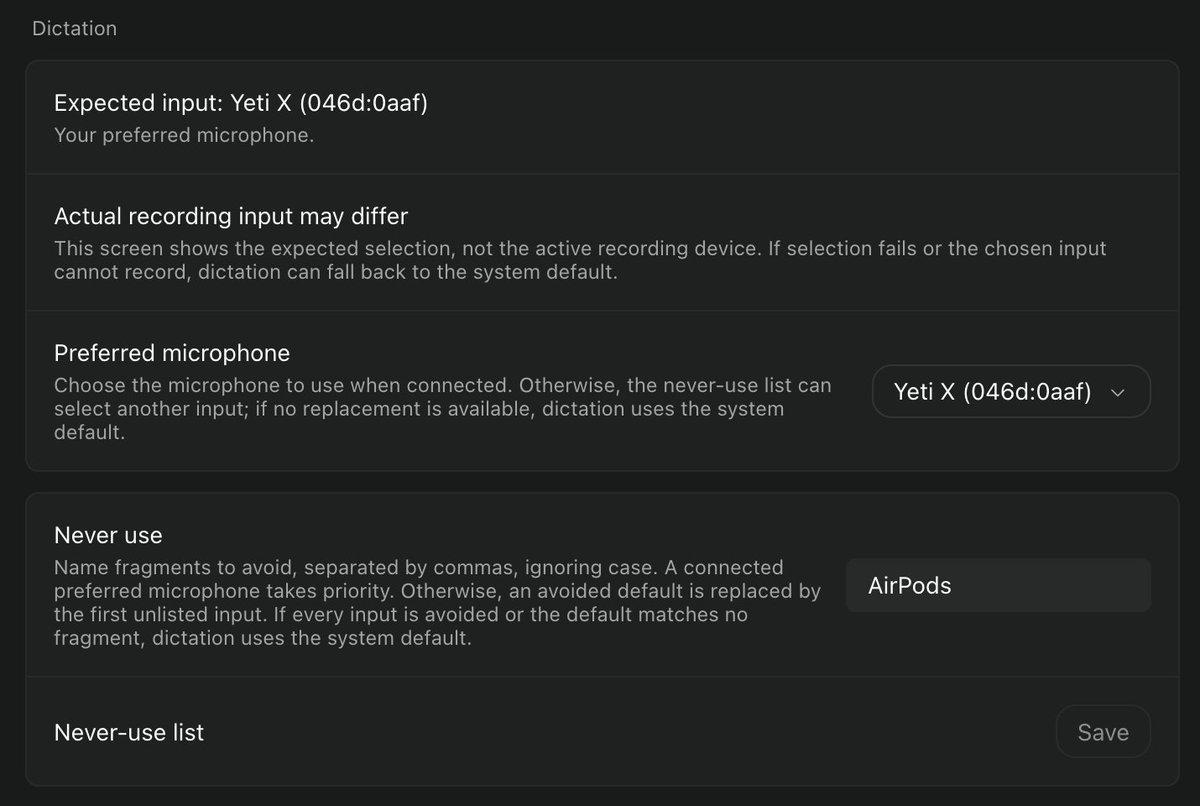
Dictation is half of how I use this. But when I put on AirPods, macOS makes them the default input, and the moment I dictate, whatever's playing gets loud and drops to walkie-talkie quality.
So I built a small plugin that keeps Paseo on the mic you pick: https://t.co/ZyN1HCHQx6
I made Paseo Micro: a plugin and macOS app that turns a @work_louder Creator Micro 2 keypad into a controller for my Paseo coding agents.
https://t.co/wqdVC1mAV4
I've been using @moboudra's Paseo for the past month, and it's been a great fit. I was getting so much done that noticing which agents were waiting on me had become the bottleneck. Then I saw @Thom_Wolf switching between 36 sessions with a tiny Work Louder keypad, and impulse-bought one.
There were probably easier, definitely more responsible ways to solve this. But buying a cool toy seems Pareto optimal (right?). I hadn't even checked whether it was compatible. Just took a leap of faith: "Claude, take the wheel."
Fortunately, @chacon had reverse-engineered the keypad's USB HID protocol and documented it in micro-manager. Following his work, I had a working plugin within an hour. I've spent the past week polishing it, and I'm really happy with it.
The translucent key glows green when an agent is waiting for me. I tap it, and Paseo opens to that conversation, even from the background. The double-wide key is hold-to-talk. So I see green, tap, read, and hold to respond by voice.
The top rows have keys to navigate back and forth. The dial scrolls the conversation (press while scrolling to go faster), and the joystick opens a radial menu of common responses. But the next-agent key and dictation get about 90% of my use.
(The photo is AI-generated from my own pictures of the keypad, because my desk was a mess.)
iMCP 1.8.2 fixes a security issue: in 1.8.1 and earlier, another process on your Mac could intercept an MCP client's session with iMCP. Please update with "Check for Updates..." or brew upgrade --cask imcp, then follow the steps in the release notes:
https://t.co/CH2bE76bTw
@krispuckett I've been experimenting with a system that works a bit like human memory, where its confidence in what it remembers fades over time, Ebbinghaus-style, and checking the source again brings it back. https://t.co/Z40mFDcc3z
@helloshiva0801@work_louder@moboudra It follows whichever agent is waiting. I started out with the top six keys mapped to my first six workspaces, but this fit the way I actually work a lot better. If I need to jump to a specific one, ⌘1 through ⌘6 still do that.
@zerg_ai@work_louder@moboudra Whichever one's been waiting longest. Tap again and it moves on to the next. If I go too far, I've got a button to go back. It also skips subagents by default, so it only pulls me into agents I started myself, not the helpers they spin up.
@Xjohannesh@work_louder@moboudra Pretty much every key, plus the dial and the joystick. The joystick opens a radial menu with eight canned replies like Continue, Test, Commit, and Review. But the green key and push-to-talk do most of the work.
@dmytrovirych@work_louder@moboudra It's a lot like browser tabs. Right now I've got a few dozen open, though honestly most of those could be closed out. At any one time, maybe a handful are running in parallel.
@progerallworld@zeke@fayazara Hi Ruslan! I'd start with iMCP and Companion: an MCP server and an MCP client, both complete Mac apps. iMCP has the boring bits around the main feature, like the menu bar, permission prompts, and Settings.
https://t.co/u0ePanMH8J
https://t.co/nWWbAKmzc7