Meet: The Email Markup Consortium (EMC) 🎉💌🤝 @EmailMarkup is a new community of industry professionals working to improve the accessibility, user experience, performance, consistency, and reliability of email markup.
My agency has written 10,000+ pieces of copy.
Our #1 Copywriting Rule:
Never write copy from scratch, always use a framework.
Here are 10 proven copywriting frameworks to write high-converting copy.
🧵 THREAD 🧵
We joined forces with @litmusapp & @reallygoodemail to unveil this year’s top email design trends! Catch the webinar recording to boost your email efforts for 2022 #EmailGeeks! 🎥
https://t.co/071K1SCX8V
Lingering misconceptions about email unsubscribes lead some brands to put the wrong tactics in place that actually end up increasing list churn or hurting their deliverability, or both. https://t.co/Ns7HpFmNJr #emailgeeks
You can improve your coding skills by building projects and taking courses.
But here's another idea – try studying an established open source project's code.
In this guide @initcommit shows how to solidify your skills by reading Git's code. Have fun!
https://t.co/O9HsiQwq3T
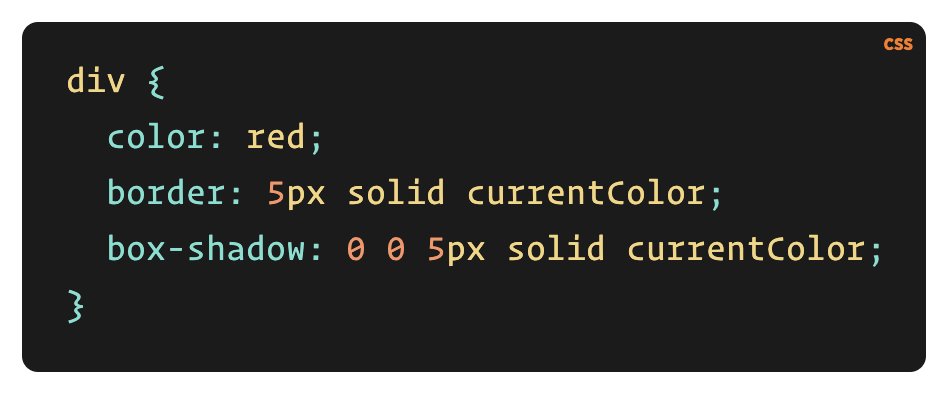
Today I learned about CSS' currentColor value.
It says "apply this element's color to this other attribute".
So in this example, the border will be red. 😎
Outlook has plagued email marketers for a long time.
💭 But does it have to? How can we work with it?
🗣️@carinslater shares email rendering and display issues in Outlook, how to fix them, and how she learned to love 💘 Outlook 👉 https://t.co/Jg2yEwPUdL
💬 Think BEYOND the subject line... 🚀
@jainamistry, Litmus’ own Senior Manager of Email Marketing, urges you to "think of your preview text as an extension to your subject line."
Discover more subject line tips to win opens 👉 https://t.co/S7PDkaKffE
“Colors are not possessions; they are the intimate revelations of an energy field… light waves with mathematically precise lengths… deep, resonant mysteries with boundless subjectivity.”
Remembering Ellen Meloy, who would have been 75 today https://t.co/SWLNmTsKzP
Tip:
Take full-size screenshots of websites.
1. Open Chrome Dev Tools
2. Open Command Menu (Command+Shift+P on a Mac or Control+Shift+P on Windows/Linux)
3. Type: "capture full size screenshot" and click it.
Done!
Example screenshot: