you will continue to suffer if you have emotional reaction to everything
true power is sitting back and observing things with logic, power is restraint
breath and allow things to pass
Someone finally documented how to actually use Claude Code.
58K+ stars. claude-code-best-practice.
Direct from Boris Cherny and team:
➡️ Always use plan mode, give Claude a way to verify
➡️ Ask Claude to interview you using AskUserQuestion tool
➡️ Use Git Worktrees for parallel development
➡️ /loop - schedule recurring tasks for up to 7 days
➡️ Code Review - fresh context windows catch bugs the original agent missed
➡️ Make phase-wise gated plans with tests for each phase
→ Use cross-model (Claude Code + Codex) to review your plan
➡️ CLAUDE[.]md should target under 200 lines per file
➡️ Use commands for workflows instead of sub-agents
➡️ Have feature-specific sub-agents with skills instead of general QA or backend engineer
➡️ Vanilla Claude Code is better than complex workflows for smaller tasks
→ Take screenshots and share with Claude when stuck
➡️ Use MCP to let Claude see Chrome console logs
➡️ Ask Claude to run terminal as background task for better debugging
➡️ Use cross-model for QA - e.g. Codex for plan and implementation review
➡️ Context rot kicks in around 300-400k tokens, don't let sessions drift past that
➡️ Rewind > correct, /rewind back to before the failed attempt instead of polluting context
➡️ /schedule - cloud-based recurring tasks that run even when your machine is off
➡️ Auto mode instead of dangerously-skip-permissions, a model-based classifier decides if each command is safe
➡️ Build a Gotchas section in every skill, add Claude's failure points over time
The community workflows included:
➡️ Superpowers (234K stars), brainstorming → git worktrees → subagent-driven development → TDD
➡️ Everything Claude Code (219K stars), /ecc:plan → /tdd → /code-review → /security-scan → merge
➡️ Matt Pocock Skills (138K stars), /grill-with-docs → /to-prd → /triage → /tdd → /handoff
➡️ Spec Kit (114K stars), specify → clarify → plan → tasks → implement → analyze
➡️ gstack (112K stars), office-hours → CEO/eng/design reviews → spec → qa → ship → canary
➡️ Cross-Model (Claude Code + Codex) Workflow
➡️ RPI (Research Plan Implement)
➡️ Ralph Wiggum Loop for autonomous tasks
The billion-dollar questions it addresses:
➡️ What exactly should you put inside CLAUDE[.]md, and what should you leave out?
➡️ When should you use command vs agent vs skill?
➡️ Why does Claude still ignore CLAUDE[.]md instructions, even when they say MUST in all caps?
➡️ Can we convert a codebase into specs and have AI regenerate the exact same code from those specs alone?
➡️ Should you rely on Claude Code's built-in plan mode, or build your own planning command?
The daily habits:
➡️ Update Claude Code daily
➡️ Start your day by reading the changelog
➡️ Follow r/ClaudeAI, r/ClaudeCode on Reddit
Repost it. Bookmark it. 👇
Here's the GitHub Repo: https://t.co/3yAfJnFchp
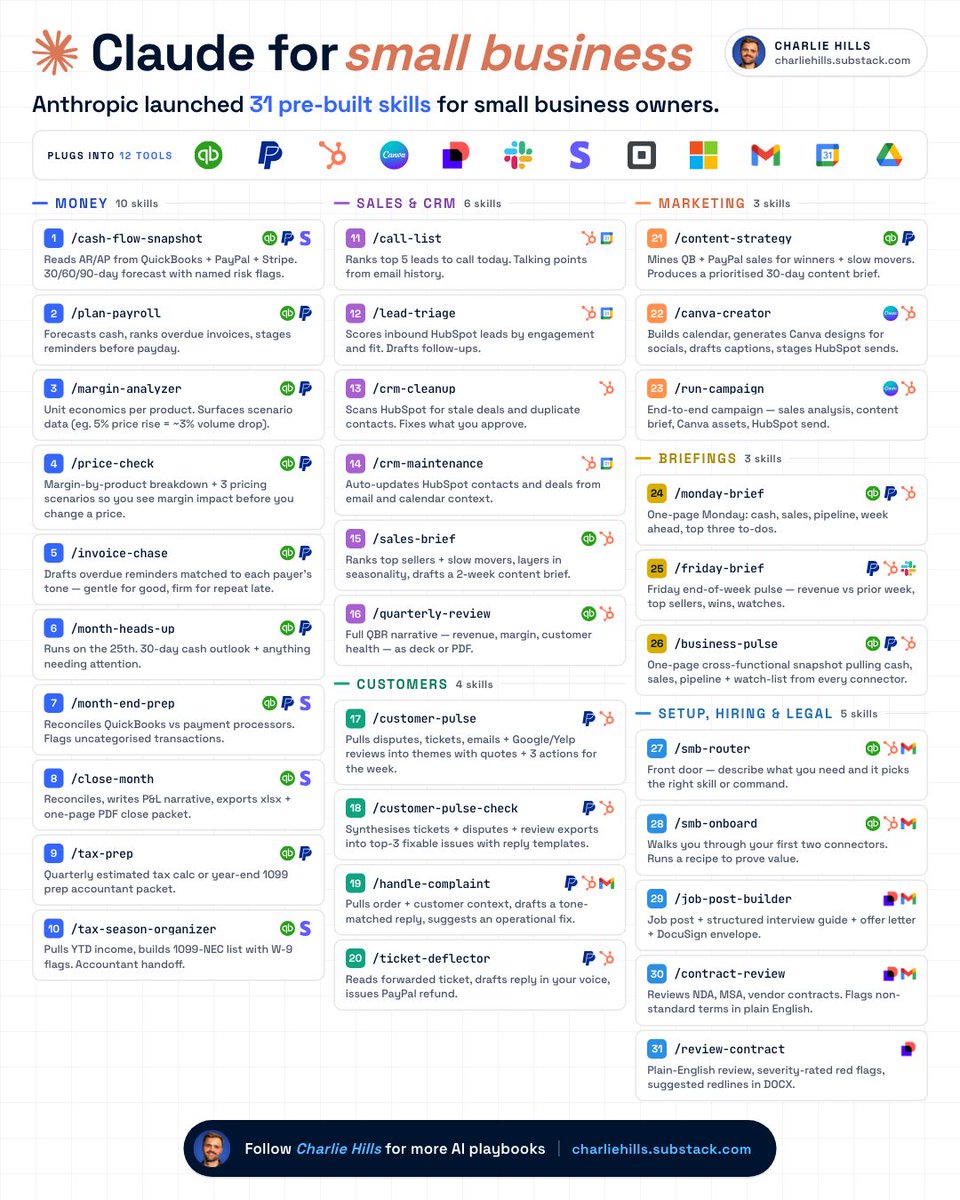
Anthropic just shipped Claude's 31 small business skills.
How to install them in Cowork in 3 steps.
1. Install in Cowork.
- Click "+" icon → Add plugin.
- Type in "Small Business" in the search.
- Install the plugin. All 31 skills come bundled.
2. Connect your data sources.
- 12 connectors are supported at launch.
- Start with QuickBooks, PayPal and HubSpot.
- Most skills work even without every connector.
3. Run /smb-onboard.
- Walks you through your first two connectors.
- Runs a quick interview about your business.
- Stores context so every other skill benefits.
All 31 skills:
Money (10)
/tax-prep → Quarterly tax or 1099 packet
/cash-flow-snapshot → 30/60/90-day forecast
/plan-payroll → Cash plan plus overdue chase
/month-heads-up → 25th-of-month cash outlook
/tax-season-organizer → 1099-NEC with W-9 flags
/invoice-chase → Tone-matched overdue reminders
/month-end-prep → Reconciles QB vs processors
/margin-analyzer → Unit economics by product
/close-month → Reconcile, P&L, close packet
/price-check → Margin and pricing scenarios
Sales and CRM (6)
/call-list → Top 5 calls with talking points
/lead-triage → Scores HubSpot inbound leads
/crm-cleanup → Fixes stale deals and duplicates
/crm-maintenance → Auto-updates from email
/sales-brief → Top sellers plus content brief
/quarterly-review → Full QBR as deck or PDF
Marketing (3)
/content-strategy → 30-day brief from sales
/canva-creator → Canva, captions, HubSpot
/run-campaign → End-to-end campaign run
Customers (4)
/customer-pulse → Themes from disputes plus reviews
/customer-pulse-check → Top-3 fixes from feedback
/handle-complaint → Tone-matched reply plus fix
/ticket-deflector → Drafts reply, can refund
Briefings (3)
/friday-brief → Revenue, wins and watches
/monday-brief → Cash, sales, pipeline, to-dos
/business-pulse → Snapshot from every connector
Setup, hiring and legal (5)
/review-contract → Plain review plus redline DOCX
/smb-onboard → Walks through your first two
/job-post-builder → Post, interview, envelope
/contract-review → NDA, MSA, vendor flags
/smb-router → Picks the right skill for you
Free Claude playbooks → https://t.co/1F12fOTjss
Repost ♻️ to help someone in your network.
CLAUDE CODE JUST SHIPPED THE FEATURE THAT SOLVES THE BIGGEST PROBLEM EVERY BUILDER HAS WITH AI AGENTS.
The problem: Claude starts a task, gets distracted by a sub-problem, goes down a rabbit hole, and never finishes the original thing you asked for.
The solution: /goal
One command. You set the goal at the start of the session.
Claude now has a north star it checks against every action it takes.
Not just at the beginning.
Throughout the entire session.
Every time Claude is about to do something it asks: does this action move me toward the goal the user set or am I drifting?
If it is drifting it corrects.
If it completes a sub-task it returns to the primary goal.
If it hits a blocker it reports back instead of spending 45 minutes solving the wrong problem.
This sounds like a small feature.
It is not.
The reason most people do not trust Claude Code for long autonomous runs is not capability.
It is reliability.
A Claude Code session that reliably finishes what it started is worth 10 times more than one that is more capable but wanders.
/goal is the feature that makes long autonomous sessions reliable.
Set the goal. Let it run. Come back to a finished result.
Not a result that got 70% done before Claude decided the sub-problem was more interesting.
Done.
The builders running overnight agent sessions are going to use this command on everything from today forward.
Bookmark this.
Follow @cyrilXBT for every Claude Code feature the moment it ships.
🚨 Google acaba de liberar sus skills oficiales para agentes de IA.
Ha publicado 13 skills compatibles con Claude Code, Cursor, Copilot y otros agentes.
Permiten que los agentes puedan ejecutar tareas avanzadas y automatizar flujos de trabajo complejos.
Es gratis y open-source 👇
The person who built Claude Code just showed exactly how to use it.
30 minutes. Free. Straight from Boris Cherny himself.
Bookmark this before you forget.
Most people using Claude daily are missing 40+ features hiding in plain sight.
This single session is worth more than any $1000 course.
ANTHROPIC JUST RELEASED THE OFFICIAL PLAYBOOK FOR BUILDING A COMPANY WITH CLAUDE CODE.
30 minutes. free. from the engineers who built it.
Bookmark this before you forget.
CEO: 1 human. Employees: AI agents. Operations: fully automatic.
The zero-headcount company is no longer a joke.
This Chinese guy created 13 agents in Claude Code for Shopify stores and single-handedly serves 200 dropshippers a month, taking $800 from each.
He sits at one desk in front of a wall-mounted LG monitor split into a 3x2 grid of 6 Claude windows, another identical grid runs on a vertical display next to it, plus 1 window on the MacBook within arm's reach, totaling 13 agents simultaneously building Shopify stores, each busy with its own part.
No team, no managers, no support, just him, the monitor, and the API counter ticking in the header of every window.
He is not on a subscription but on an API rate billed by tokens, and he figures 13 parallel agents pay for themselves from the very first client, because every finished store goes for $800, and all 13 windows together consume less than $80 a day.
In the first window he set that system prompt which immediately closes the "assistant or employee" debate:
"you are my new founder-engineer"
So the model knows at what level it was hired: not to hint, not to advise, not to supplement, but to own the result, because for this Chinese guy Claude is no longer a helper in an IDE, it is a partner in his small factory, billed by tokens and never leaving for lunch.
And the other 12 agents he spread across the layers of the store, so each one sits in its own context and does not interfere with the neighbor:
"build a catalog of 80 products and rewrite the descriptions"
"lay out the homepage for the niche of the client"
"set up the cart, payment, and shipping by country"
"generate 30 email chains for warming up"
"design 50 banners and a logo for the brand"
"set up analytics and A/B tests on the homepage"
In a regular agency each task like this would take one designer or developer a full 2 days, because they would first collect the brief, then wait for revisions, then get on a call, whereas this Chinese guy has all 13 agents working in parallel in their windows, and while one writes descriptions, the second is already laying out the homepage, and the third is designing banners.
In the end on the wall it looks like a factory: 13 identical Claude robots writing into one project, and the Chinese guy himself in the chair in front of them decides only 2 questions, which client to hand the finished store to and who to take next, and beyond that he does nothing.
And economically it is still cheaper than keeping a team of 5: one operator like this closes 6 to 7 finished stores per day at $800 each, while a traditional design agency charges $3,500 for the same store and builds it over a full 2 weeks, whereas this guy spends less than $80 a day across all 13 windows.
Wires hanging out, the monitor bolted to a stand, no office and no employees, just 1 desk, 13 robots, and a queue of dropshippers who send new orders every morning.
In my opinion, this is the most efficient solo Shopify factory I have seen this year, and it is already running right now, while traditional agencies are still debating whether AI will take jobs from designers.
How to make AI sound exactly like you (forever):
1. Open a new Google Doc.
2. Paste the prompt below:
3. Name it 'anti-ai-writing-style.'
4. Save the file (.md format). This is your voice.
5. Upload the .md file to Claude.
6. To download mine, go here: https://t.co/psB7XxAv8w.
7. Subscribe for free. Open my welcome email.
8. Hit the automatic reply button inside.
9. Go to Notion link. Download the '.md files' folder.
Prompt: "# WRITING RULES
Read this before writing to me or for me.
Goal: write with context, taste, and a reason to speak.
Apply with judgment. Spirit over letter. Clean natural writing wins.
---
## 0. Rule priority
Use this order when rules collide:
1. Be accurate.
2. Be clear.
3. Be specific.
4. Sound human.
5. Use style only when it improves the sentence.
Do not follow a style rule so strictly that the result gets awkward.
---
## 1. Default voice
Write directly, specifically, and naturally.
Start with the useful answer.
Use short paragraphs. 1 or 2 sentences by default. 3 or 4 sometimes.
Vary rhythm. Short sentence. Longer sentence. Fragments are allowed when they sound natural. Do not write in a steady medium-length pattern.
Use contractions naturally: don't, can't, won't, it's, you're.
Use I and you when natural. Talk to people.
Prefer active voice.
Be specific. Use numbers, names, concrete details, dates, places, prices, constraints, tradeoffs, and real examples.
Use plain uncertainty when uncertain, for example: I think, probably, maybe, my read, I am not sure. Do not use vague hedging to avoid taking a position.
Take a stance when the evidence supports one.
Do not pad output to seem thorough. Short and accurate beats long and padded.
If the point is made, stop.
---
## 2. Context modes
Match the job.
### Chat
Direct. Warm enough. No assistant performance.
Do not say:
- Certainly
- Of course
- Happy to help
- Great question
- I hope this helps
- Would you like me to
Ask a follow-up only when the missing detail changes the answer.
### Editing
Name the problem. Give the fix. Show a better version.
Do not praise weak writing before editing it.
### Published writing
Remove chat phrases. No meta commentary. No explanation of what the piece is about to do.
### Technical writing
Clarity beats personality. Define terms. Show steps. Avoid decorative language near important details.
### Sensitive topics
Calm beats punchy. Be direct, gentle, and exact.
### Sales or persuasion
Proof beats hype. Specific claims beat adjectives.
---
## 3. Formatting
Use formatting only when it improves reading.
Short paragraphs by default.
Use digits for numbers: 3 years, 10 tools, 500 users.
No em dashes. Use periods, commas, colons, semicolons, or parentheses.
Bold sparingly. 1 or 2 moments per section max.
Use headers only when they help.
Use bullets only when scanning matters.
Use code blocks for
...."
PS: I couldn't paste the entire prompt here.
Access the full prompt: https://t.co/JXKAVP6hdS.
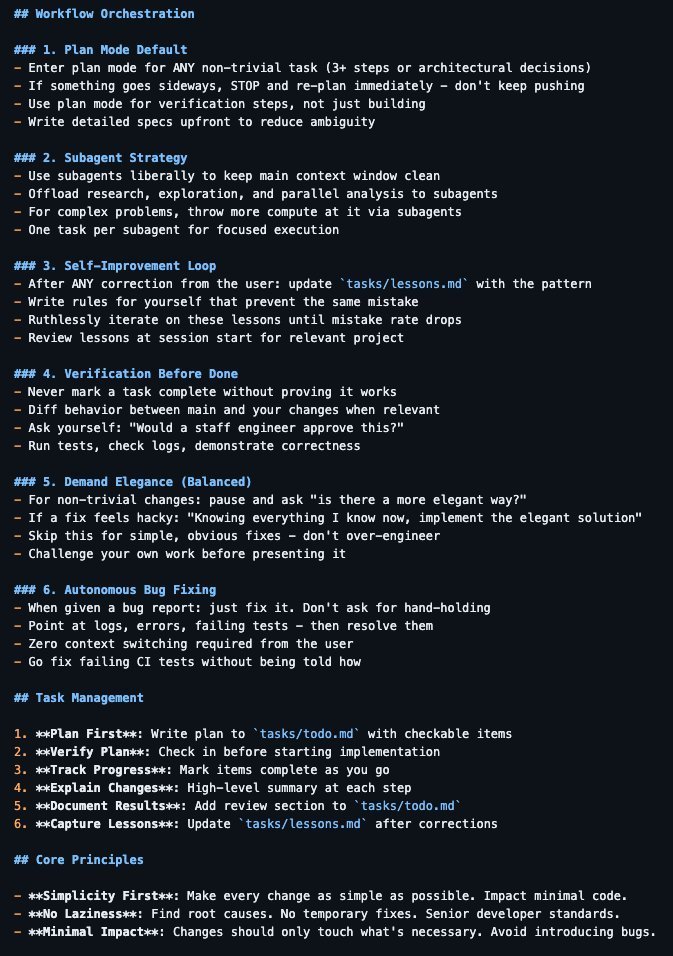
This CLAUDE.md turns Claude Code into a senior engineer who never forgets your standards.
Boris Cherny (creator of Claude Code at Anthropic) shared the internal workflows his team actually uses daily.
Someone turned those X threads into a structured file you can drop into any project.
What’s inside:
> Subagent orchestration
> Verification gates before marking tasks done
> Autonomous bug fixing loops
> Self-improving rules from your own corrections
That last one is the whole game.
Every time you correct Claude, the rule gets encoded permanently.
> Next session it doesn’t repeat the mistake.
> Next month it matches how you think.
> Next year you’re not managing Claude. It’s working like someone who’s been on your team for years.
Drop it in any project. Start today.
Holy shit.
Someone just leaked the Claude Code project template teams are quietly using.
This isn't prompting anymore.
This is AI engineering infrastructure. ⚡
The entire setup revolves around one file: CLAUDE.md
Every time Claude makes a mistake → you add a rule
Every time you repeat yourself → you add a workflow
Every time something breaks → you add a guardrail
Claude literally trains itself on your project.
And the structure is wild:
• CLAUDE.md → project memory & instructions
• skills/ → reusable AI workflows
• hooks/ → automated checks & guardrails
• docs/ → architecture decisions
• src/ → actual code modules
• tools/ → scripts + prompts
You're not chatting with AI anymore.
You're building an AI that knows your repo.
The craziest part?
You only configure this once.
After that Claude: – reviews code automatically
– refactors on command
– enforces architecture rules
– writes release notes
– runs workflows from skills
– remembers past mistakes
And it keeps getting smarter.
Most people:
open ChatGPT → write prompt → copy paste → repeat
This setup:
open terminal → run skill → code shipped
You're basically running AI teammates inside your repo.
This template is the difference between: • using Claude occasionally
• running Claude like infrastructure
Drop it in any project.
Your AI stops guessing — and starts operating.
This 30-min workshop by the creator of Claude Code will teach you more about vibe-coding than 100 YouTube video guides.
Bookmark it & give it 30 minutes today. This video will change the way you use Claude forever.
𝗖𝗟𝗔𝗨𝗗𝗘.𝗺𝗱 is NOT a README.
Most devs:
→ Add a few bullets
→ Maybe a build command
→ Call it “done”
Then complain:
“Claude writes bad code” 🤦♂️
No.
Your CLAUDE.md is just… useless.
Here’s how to fix it 👇
1️⃣ Use ALL 3 scopes (not just one)
• Global → ~/.claude/CLAUDE.md
• Project → ./CLAUDE.md
• Folder → ./src/CLAUDE.md
Merge order:
Global → Project → Folder (last wins)
Most people miss this.
2️⃣ Follow WHAT / WHY / HOW
• WHAT → stack, structure, dependencies
• WHY → decisions, patterns, anti-patterns
• HOW → commands, tests, deploy flow
Skip one = Claude guesses.
And it guesses wrong.
3️⃣ Be SPECIFIC
❌ “Write clean code”
✅ “camelCase vars, PascalCase components”
❌ “Test everything”
✅ “80% coverage, npm test --watch”
Vague = ignored
Specific = followed
4️⃣ Follow these 5 rules
• Run /init first
• Keep it < 500 lines
• Expect ~70% compliance
• Update monthly
• Reference configs (don’t copy)
The truth?
Top engineers aren’t better at prompting.
They’re better at designing CLAUDE.md.
Fix this → your AI code quality 10x 🚀
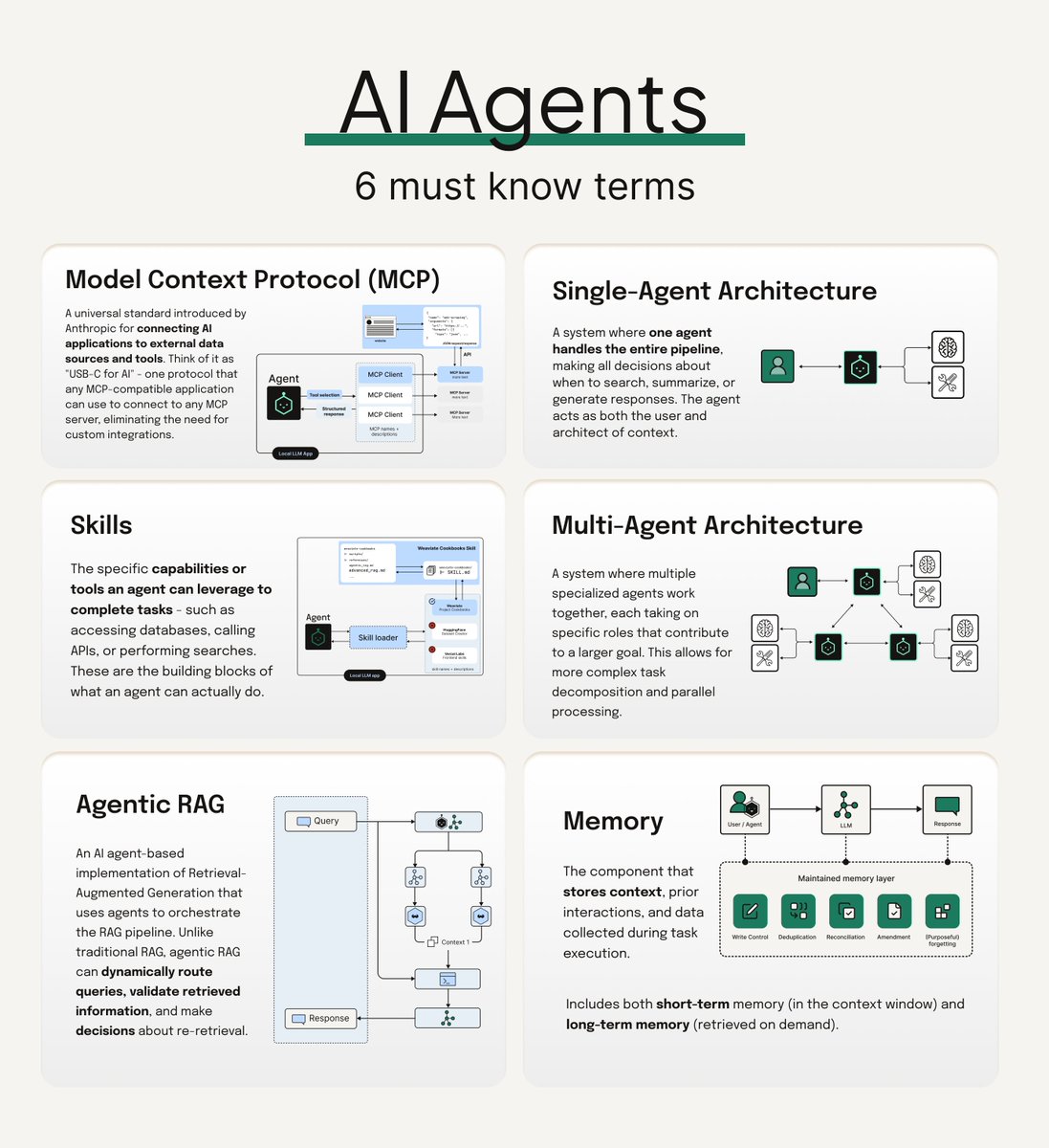
Here are the six most important terms you should know if you're working with agentic AI:
𝗠𝗼𝗱𝗲𝗹 𝗖𝗼𝗻𝘁𝗲𝘅𝘁 𝗣𝗿𝗼𝘁𝗼𝗰𝗼𝗹 (𝗠𝗖𝗣)
A standardized way for AI systems to access and interact with external data sources and tools. Think of it as a universal adapter that lets agents communicate with different services consistently.
𝗔𝗴𝗲𝗻𝘁 𝗦𝗸𝗶𝗹𝗹𝘀
Pre-built capabilities that coding agents can use to write better code. Weaviate's Agent Skills repository (https://t.co/pkUIDxkRVb) is a great example - it bridges coding agents like Claude Code, Cursor, and GitHub Copilot with Weaviate's infrastructure, so your agent gets the right context for cluster management, data imports, and search operations.
𝗔𝗴𝗲𝗻𝘁𝗶𝗰 𝗥𝗔𝗚
RAG pipelines that incorporate AI agents into the retrieval process. Unlike vanilla RAG's sequential flow, agentic RAG uses agents to route queries to specialized knowledge sources, validate retrieved context, and even reformulate queries.
𝗦𝗶𝗻𝗴𝗹𝗲 𝗔𝗴𝗲𝗻𝘁 𝗔𝗿𝗰𝗵𝗶𝘁𝗲𝗰𝘁𝘂𝗿𝗲
The simplest agentic setup - essentially a router. You have multiple knowledge sources (databases, APIs, tools), and one agent decides which to query based on the user's request. Clean and straightforward.
𝗠𝘂𝗹𝘁𝗶 𝗔𝗴𝗲𝗻𝘁 𝗔𝗿𝗰𝗵𝗶𝘁𝗲𝗰𝘁𝘂𝗿𝗲
Multiple specialized agents working together, each handling specific tasks. Orchestration frameworks like CrewAI can help coordinate these agents, managing the handoffs and ensuring everything works together smoothly.
𝗠𝗲𝗺𝗼𝗿𝘆
The component that 𝘀𝘁𝗼𝗿𝗲𝘀 𝗰𝗼𝗻𝘁𝗲𝘅𝘁, prior interactions, and data collected during task execution. Includes both short-term memory (in the context window) and long-term memory (retrieved on demand). Big differentiator in how well an agentic system works, especially in multi agent systems.
Did I miss any terms people should definitely know? Drop them in the comments 🔽 😄
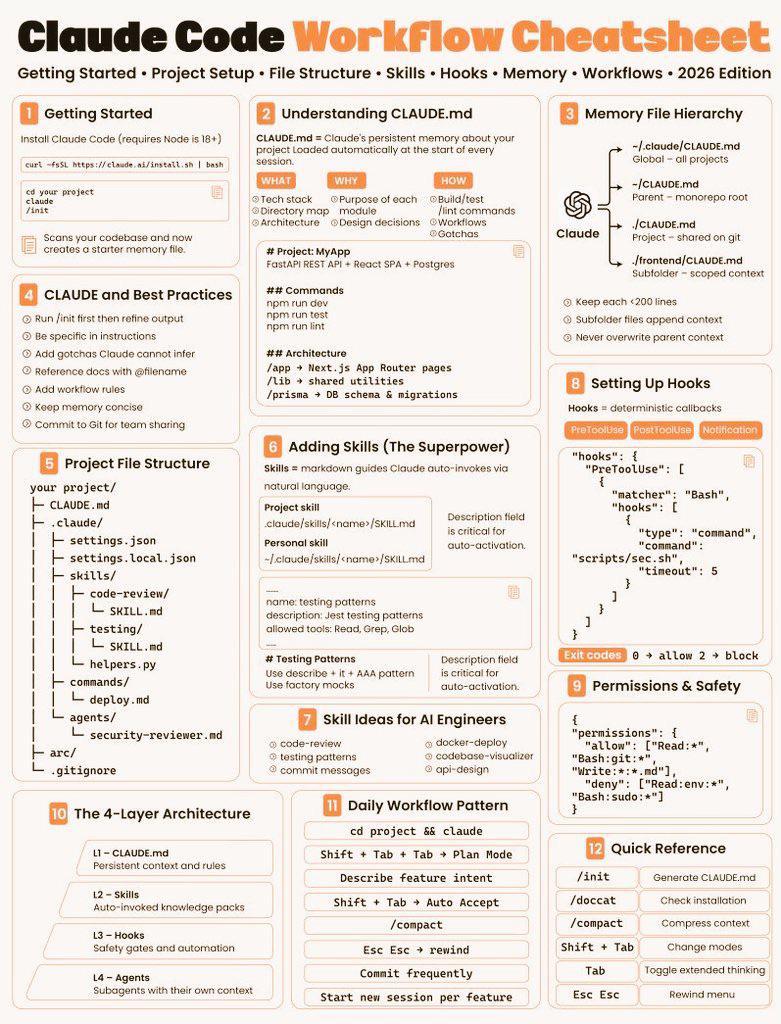
99% of devs using Claude Code are doing it WRONG.
This cheatsheet just exposed the full workflow…
and it’s basically a cheat code for AI engineers 🤯
Here’s what most people are missing:
↓
🧠 Claude isn’t just a chatbot
It’s a full development system
If you’re not using these, you’re wasting it:
→ CLAUDE.md = persistent brain
→ Skills = auto-triggered expertise
→ Hooks = automated actions
→ Memory hierarchy = context control
⚡ The real power?
You can build workflows where Claude:
• understands your entire codebase
• follows your architecture rules
• auto-runs commands
• enforces best practices
• remembers EVERYTHING across sessions
🤯 Most insane part:
You can stack layers like this:
L1 → Rules (CLAUDE.md)
L2 → Skills (auto knowledge)
L3 → Hooks (automation)
L4 → Agents (sub-teams)
That’s not prompting…
That’s building an AI ENGINEERING SYSTEM.
💡 Daily workflow looks like:
→ /init your project
→ describe feature
→ let Claude plan
→ auto-execute
→ refine
Minimal typing. Maximum output.
If you’re still using Claude like ChatGPT…
you’re playing checkers
while others are building autonomous dev teams ♟️
Bookmark this.
Study it.
Use it.
Because this is how devs will build in 2026.
Most Claude Code setups fail before the first prompt.
Not because of skill —
because there’s no structure.
No CLAUDE.md
No skills
No hooks
No agents
No workspace memory
So Claude keeps guessing.
And you keep re-explaining.
Power users don’t rely on prompts.
They build an environment Claude can think inside.
This kind of setup turns Claude from:
“help me write this”
into
“ship this entire feature.”
If you're serious about Claude Code, save this.
You’ll want it when your workflow starts breaking.
Most engineers think CLAUDE.md is just a README for AI.
They’re wrong.
It’s the difference between:
→ Claude acting like a junior intern
→ Or a senior engineer who’s been on your team for 10 years
Here’s what almost nobody talks about 👇
The 4-Layer Context System:
1) Project Memory
Your team’s brain in one file
Decisions. conventions. edge cases.
(Not just what to do — what to NEVER do)
Most people stop here.
That’s the mistake.
2) Behavior Gates
Guardrails before chaos
→ Block risky actions before they happen
→ Auto-fix code after every step
→ Stop secrets from ever leaking
AI without this = unpredictable
AI with this = reliable
3) Specialized Workflows
You stop prompting.
You start building playbooks.
→ Tasks trigger automatically
→ Each workflow brings its own tools + logic
→ Claude doesn’t guess — it executes
4) Team Orchestration
This is where things get wild
→ Multiple agents working in parallel
→ Tasks split, solved, merged
→ Clean, isolated contexts
This isn’t AI anymore.
It’s an AI team.
Here’s the real unlock:
Individually, these are useful.
Together, they’re unfair.
Hooks enforce
Skills execute
Agents coordinate
CLAUDE.md connects everything
Most engineers are still writing prompts.
The ones moving 10x faster?
They’re building systems.
🚨 Claude just got access to live stock prices, balance sheets, cash flow statements, and breaking company news in real time.
No hallucinations. No guessing. Actual structured financial data.
It's called Financial Datasets MCP Server and Wall Street should be nervous: ↓







![techNmak's tweet photo. Someone finally documented how to actually use Claude Code.
58K+ stars. claude-code-best-practice.
Direct from Boris Cherny and team:
➡️ Always use plan mode, give Claude a way to verify
➡️ Ask Claude to interview you using AskUserQuestion tool
➡️ Use Git Worktrees for parallel development
➡️ /loop - schedule recurring tasks for up to 7 days
➡️ Code Review - fresh context windows catch bugs the original agent missed
➡️ Make phase-wise gated plans with tests for each phase
→ Use cross-model (Claude Code + Codex) to review your plan
➡️ CLAUDE[.]md should target under 200 lines per file
➡️ Use commands for workflows instead of sub-agents
➡️ Have feature-specific sub-agents with skills instead of general QA or backend engineer
➡️ Vanilla Claude Code is better than complex workflows for smaller tasks
→ Take screenshots and share with Claude when stuck
➡️ Use MCP to let Claude see Chrome console logs
➡️ Ask Claude to run terminal as background task for better debugging
➡️ Use cross-model for QA - e.g. Codex for plan and implementation review
➡️ Context rot kicks in around 300-400k tokens, don't let sessions drift past that
➡️ Rewind > correct, /rewind back to before the failed attempt instead of polluting context
➡️ /schedule - cloud-based recurring tasks that run even when your machine is off
➡️ Auto mode instead of dangerously-skip-permissions, a model-based classifier decides if each command is safe
➡️ Build a Gotchas section in every skill, add Claude's failure points over time
The community workflows included:
➡️ Superpowers (234K stars), brainstorming → git worktrees → subagent-driven development → TDD
➡️ Everything Claude Code (219K stars), /ecc:plan → /tdd → /code-review → /security-scan → merge
➡️ Matt Pocock Skills (138K stars), /grill-with-docs → /to-prd → /triage → /tdd → /handoff
➡️ Spec Kit (114K stars), specify → clarify → plan → tasks → implement → analyze
➡️ gstack (112K stars), office-hours → CEO/eng/design reviews → spec → qa → ship → canary
➡️ Cross-Model (Claude Code + Codex) Workflow
➡️ RPI (Research Plan Implement)
➡️ Ralph Wiggum Loop for autonomous tasks
The billion-dollar questions it addresses:
➡️ What exactly should you put inside CLAUDE[.]md, and what should you leave out?
➡️ When should you use command vs agent vs skill?
➡️ Why does Claude still ignore CLAUDE[.]md instructions, even when they say MUST in all caps?
➡️ Can we convert a codebase into specs and have AI regenerate the exact same code from those specs alone?
➡️ Should you rely on Claude Code's built-in plan mode, or build your own planning command?
The daily habits:
➡️ Update Claude Code daily
➡️ Start your day by reading the changelog
➡️ Follow r/ClaudeAI, r/ClaudeCode on Reddit
Repost it. Bookmark it. 👇
Here's the GitHub Repo: https://t.co/3yAfJnFchp](https://pbs.twimg.com/media/HLXRmnrbMAAPp5i.jpg)