Most people will still be “learning AI” in 2026.
A small group will be shipping, automating, and replacing workflows with it.
These 9 skills decide which side you’re on 👇
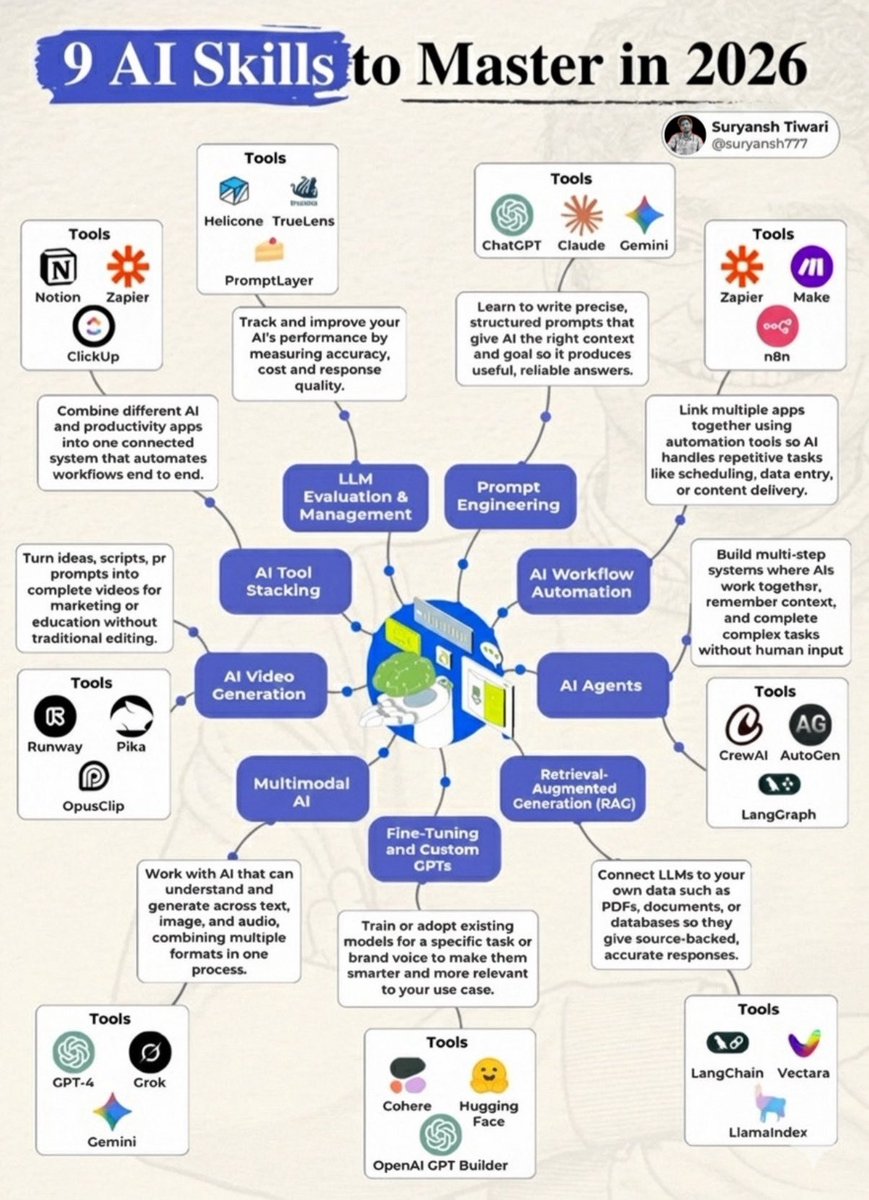
• Prompt Engineering
(ChatGPT, Claude, Gemini)
• AI Workflow Automation
(Zapier, Make, n8n)
• AI Agents
(CrewAI, AutoGen, LangGraph)
• RAG (Retrieval-Augmented Generation)
(LangChain, LlamaIndex, Vectara)
• Fine-tuning & Custom GPTs
(OpenAI GPT Builder, Hugging Face, Cohere)
• Multimodal AI
(GPT-4, Gemini, Grok)
• AI Video Generation
(Runway, Pika, OpusClip)
• AI Tool Stacking
(Notion, Zapier, ClickUp)
• LLM Evaluation & Management
(Helicone, TrueLens, PromptLayer)
Hot take:
If you’re only “using ChatGPT”, you’re already behind.
The real leverage is systems, not prompts.
Save this.
Revisit it in 6 months.
You’ll thank yourself.
♻️RT if you’re building, not just experimenting.
Follow @Suryanshti777 for real-world AI workflows.
🧠📸 How to Build Multimodal AI Agents from Scratch — No Prior Experience Needed.
𝗧𝗵𝗶𝘀 𝗶𝘀 𝗮 𝟵-𝗦𝘁𝗲𝗽 𝗚𝘂𝗶𝗱𝗲 𝗳𝗿𝗼𝗺 𝗦𝗰𝗿𝗲𝗲𝗻𝘀𝗵𝗼𝘁 𝘁𝗼 𝗥𝗲𝗮𝘀𝗼𝗻𝗶𝗻𝗴.
STEP 0: WHAT IS AN AI AGENT?
✹ A system that uses an LLM to reason, plan, act, and adapt
✹ Goes beyond prompts & RAG — can use tools + learn from memory
✹ Use when workflows are complex, multi-step, or need personalization
》Agents ≠ demos. They’re decision-makers.
STEP 1: DEFINE THE AGENT’S ROLE AND GOAL
✹ What will your agent do?
✹ Who is it helping?
✹ What kind of output will it generate?
》Example: An agent that answers questions and explains graphs from reports
STEP 2: PREPARE THE MULTIMODAL CORPUS
✹ Convert each page of your PDFs into screenshots
✹ Preserve text + image layout together
✹ Store image paths as metadata
》Why? So retrieval captures full document context
STEP 3: GENERATE UNIFIED EMBEDDINGS
✹ Use Vision-Language Models (VLMs)
✹ Avoid the “modality gap” of CLIP-style models
✹ One encoder for both text + visuals
》Tools: YJI-VLM, Gemini 2, Claude Opus
STEP 4: STORE IN VECTOR DATABASE
✹ Embed screenshots and attach metadata
✹ Store in a retrievable format
✹ Make retrieval page-level, not just paragraph-level
》Tools: MongoDB Atlas, Weaviate, ChromaDB
STEP 5: RETRIEVE CONTEXT VIA TOOL USE
✹ Agent uses vector DB to fetch relevant pages
✹ Returns image references, not raw text chunks
✹ Agent fetches actual images based on those references
》Think: tool = bridge to your multimodal memory
STEP 6: ADD MEMORY (SHORT-TERM)
✹ Use session IDs to track conversations
✹ Load past Q&A into LLM at each turn
✹ Let agent reason over previous steps
》Long-term memory optional — short-term is a must
STEP 7: PLUG IN A MULTIMODAL LLM
✹ Must support both images + text
✹ Inputs = query + memory + retrieved images
✹ Generates step-by-step plans or final answers
》Tools: Gemini 2.0, GPT-4o, Claude 3.5
STEP 8: DESIGN PLANNING AND FEEDBACK LOOPS
✹ Chain-of-Thought for stepwise reasoning
✹ ReAct for dynamic reasoning + tool calls
✹ Prompt the LLM to decide: act or answer?
》This is where real agentic behavior kicks in
STEP 9: WRAP IT IN AN APP OR API (OPTIONAL)
✹ Let users upload reports, images, or ask questions
✹ Build a UI or expose your agent via API
✹ This turns your agent into a product
》Tools: Gradio, Streamlit, FastAPI
https://t.co/zy8mvcqSrv
≣≣≣≣≣≣≣≣≣≣≣≣≣≣≣≣≣≣≣≣≣≣≣≣≣≣
⫸ꆛ Want to Build Real-World AI Agents?
Join My 𝗛𝗮𝗻𝗱𝘀-𝗼𝗻 𝗔𝗜 𝗔𝗴𝗲𝗻𝘁 𝟱-𝗶𝗻-𝟭 𝗧𝗿𝗮𝗶𝗻𝗶𝗻𝗴,
trusted by 1,500+ builders worldwide!
➠ Build Geo, Audio, Video & Vision Agents
➠ Master 5 Modules: 𝗠𝗖𝗣 · LangGraph · PydanticAI · CrewAI · OpenAI Swarm
➠ Deploy for Healthcare, Finance, Smart Cities & More
➠ 9 Real-World Projects with Full Code
Only basic Python required.
👉 𝗘𝗻𝗿𝗼𝗹𝗹 𝗡𝗢𝗪 (𝟱𝟲% 𝗢𝗙𝗙): https://t.co/5i2v1fIrhJ