1/3
Every new Elementor section starts from Elementor's default styles. Then you restyle the headings, links and buttons by hand, a little differently each time.
Elementor 4 can keep those styles site-wide. Most sites never set it up.
Do you want to migrate your WordPress site to a new host, or a new domain?
Two steps with Duplicator Pro: a backup on the old site, and an import on the new one.
https://t.co/DCYhNtlqVO
#WordPress#Duplicator
I’ve been a paying Drip (@getdrip) customer for years.
Today, I’m excited to share that we’ve acquired the company 😍
https://t.co/qGTrvA1IeI is the email and SMS marketing platform that has powered @WPBeginner and our other brands for a long time.
We also acquired Sleeknote (@Sleeknotecom), the onsite conversion tool behind Drip’s popups, slide-ins, and forms, which comes free with every Drip plan. Both are joining the @AwesomeMotive family of brands.
Why Drip?
I don’t have a sophisticated acquisition strategy. We generally buy businesses that we already use to make us money. I’ve pulled up Drip’s revenue dashboard more times than I’d like to admit, so I know exactly what a good email and SMS setup brings in.
Some numbers, because who doesn't like numbers: over 6,000+ brands run on Drip, and they’ve earned over $1.5 billion in revenue from Drip emails. Not impressions, not engagement ... Real Dollars.
But here’s the real reason.
Advertising costs keep going up. Social traffic keeps going down. And AI is changing how people find and discover businesses.
Your email list and your SMS list are the only assets that nobody can take away from you. They’re not rented, they’re YOURS. And in the AI era, that matters more than it ever has.
Business owners who own their customer relationships are going to come out ahead. The ones building on rented land are going to pay the ultimate cost.
My goal is simple: make Drip the best email & SMS marketing platform for the AI era, and make marketing automation both EASY and affordable for every small business owner.
All Drip users already have access to a free MCP connector, so you can point ChatGPT, Claude or any of your favorite AI tools at your customer data, and just ask it questions. That’s where this is headed.
Mogens Møller and his team built a great product, and he’s staying on to run Drip as an independent brand, like all of our companies. Nothing changes for existing customers, except the team behind you just got bigger.
If you’re an existing Drip customer, eCommerce store owner, and / or a small business owner that has a wishlist or feature idea that you'd love to see from an AI-first email & SMS marketing platform, let me know in the comments below because I’m excited to be working with the team.
Full story and links in the first comment 👇
عايز تنقل موقعك الـ WordPress لهوست جديد أو لدومين جديد؟
في خطوتين بس مع Duplicator Pro: باكب من الموقع القديم، وإمبورت على الجديد.
https://t.co/DCYhNtkT6g
#WordPress#Duplicator
Full WordPress backups copy your whole site every time.
Duplicator Pro incremental backups save only what changed: about 1 min per backup instead of 11 on a typical site, stored on Duplicator Cloud.
Setup in 3 steps 👇
https://t.co/x105CyYb1B
#WordPress#Duplicator
موقعك الـ WordPress وقع وحتى لوحة التحكم مش بتفتح؟
مثال حقيقي: موقعي رجع بلينك واحد بخاصية Disaster Recovery في Duplicator Pro، من غير ما أدخل WordPress.
https://t.co/36wwTSHjP3
#WordPress#Duplicator
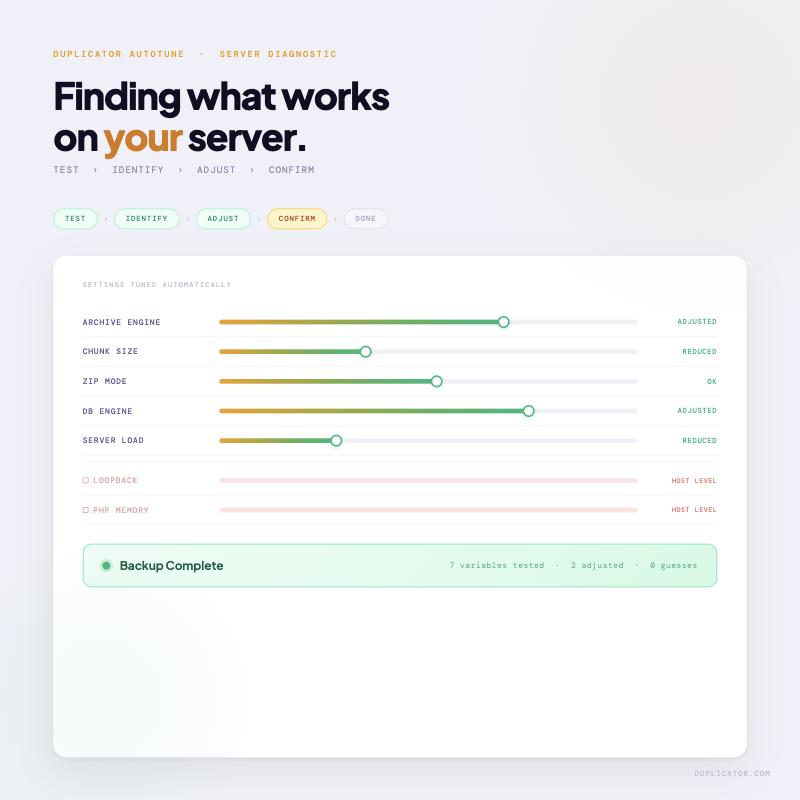
Most people run AutoTune, the backup works, they close the tab.
What happened: real test backups, one setting changed at a time until it completes. No presets. No guessing.
Most backup failures aren’t mysterious. Just misconfigured.
#WordPress#Duplicator#autotune
I built this hero section with one sentence.
Found a design I liked → pasted the link into Claude → WPVibe built it live on my WordPress site.
No code. No page builder.
Watch 👇
Looking for a remote job? We’re hiring at AM.
Several positions open: https://t.co/ezUJ6oMIxt
🌏 We're a global team with team members in 50+ countries!
🚀 Over 30 million websites using our software
👫 Imagine being part of a diverse and dynamic team of 320+ amazing individuals working together to create something extraordinary. 🌐
Come join us :)
...just crossed 20,000 active installs. Every one of them is a vote of confidence that WordPress and AI can work together safely, securely, and... dare I say "FUN". Onward to 30k 🚀 🫡
A real unscripted first look. He'd never used WPVibe before hitting record, and he caught two legit gaps: our docs search was too narrow, and we had no public changelog. Both fixed and live before the day ended. Best kind of review.
I've spent the past few weeks on calls with WordPress agencies using WPVibe to run client sites.
I expected them to tell me it 2-3x'd their output. That's not what they're saying. Teams that wire Claude or ChatGPT into WordPress properly are doing 10x+ the client work: content updates, landing pages, audits, cleanup jobs that used to eat a day.
If you run a WordPress agency and want to see how, DM me. I'm holding a handful of 15-minute call slots next week.
Day 37/100: Fixing Your Website. 🚀
Add a cool magnifying effect to your WordPress website for free and customize it to your liking!
Here's how to set it up using WPCode:
1. Install @wpcodelibrary: This free code snippet plugin is available in the WordPress repository. Find the link in the description and pinned comments.
2. Add a Snippet:
- Go to Code Snippets and click Add Snippet.
- Search for "magnify" to find the magnifying effect snippet.
3. Customize the Effect:
- Adjust the zoom level, glass size, and border size to fit your design.
- Edit these settings directly in the snippet to get the perfect effect.
4. Activate and View:
- Once satisfied, activate your snippet and clear your cache.
- Enjoy the eye-catching magnifier effect on your site!
Give your visitors an interactive experience with this simple tweak. Check out and enhance your website today.
Follow WPBeginner for more website customization tips!
Stop emailing clients for testimonials one by one.
Build this form once. Star rating, quote, photo, permission — every submission comes in ready to use.
Part 2 of our series 👇
A few months ago, one of our WPBeginner forms got hit by 18,000 spam requests in a single night.
If they had slipped through, they could have seriously damaged our sender reputation.
And we know we are not alone. Spam comments, fake leads, endless moderation, these problems pile up fast for every WordPress site owner.
So we sat down with a challenge to build a spam protection tool that actually understands modern spam, never punishes real visitors, and stays affordable for businesses of every size.
We are thrilled to announce @activelayerapi, an AI-powered spam protection that catches spam server-side in milliseconds.
Here is what makes ActiveLayer different:
⚡ Detects Spam in Milliseconds: Most spam tools take 2+ seconds to make a decision. ActiveLayer delivers a verdict faster than a typical database query, so your forms feel instant.
🚫 Zero CAPTCHAs, Zero Friction: Studies show CAPTCHAs cause up to 40% of users to abandon a form. ActiveLayer protects your forms in the background, with no puzzles, no tracking scripts, and no lost conversions.
🔌 Works With Every Form Plugin You Already Use: Native integration with @easywpforms, Gravity Forms, Contact Form 7, Elementor Forms, and WordPress comments. Install, add your API key, enable per form. Done.
📊 Full Transparency With Confidence Scores: Instead of a blind yes/no, ActiveLayer gives you a numerical confidence score behind every decision, plus easy feedback to improve future detections.
🌐 Unlimited Sites on Every Plan: Most tools charge per site. ActiveLayer keeps it simple - unlimited sites, full API access, even on the free plan.
💰 Starts at Just $4/month: The Pro plan offers 5,000 spam checks per month. That's less than $0.07/day for peace of mind. Free plan includes 1,000 spam checks, no credit card required.
🛠️ Built for Developers Too: A clean REST API drops into any backend - Node.js, Next.js, Python, PHP, Laravel, Rails, .NET, and more.
Every large company already has systems in place to protect their websites from spam. ActiveLayer levels the playing field for small businesses.
Ready to stop spam without sacrificing user experience, performance, or your wallet? Try @activelayerapi free today 👇
(Link is in the thread below)
I hate CAPTCHAs.
And so do your customers ... up to 40% of them abandon a form the moment they see one.
But the alternative used to be worse.
At one point, my @wpbeginner forms got 18,000 spam requests in a single night.
So I tried everything. Honeypots, rate limiting, etc -- they worked for a while until they didn't.
There are premium spam tools, but they're often slow & expensive. They flag real people without telling me why.
So I asked my team to build something better.
It's called ActiveLayer (@activelayerapi) - an AI-powered spam protection that blocks bots without ever asking your real customers to prove they're human.
No CAPTCHAs. No tracking scripts. No friction.
It runs server-side in milliseconds and returns a verdict with a confidence score, so you can actually see why something was flagged.
It works with every WordPress form plugin you already use including WPForms (@easywpforms), @gravityforms, Contact Form 7, Elementor (@elemntor), etc.
There's also a clean REST API for everything else, so you can use it on any application platform, not just WordPress.
Think of it as a smart security guard for your forms. It welcomes real people, blocks the bots, and never asks anyone to prove they are human.
Let's make the web a little less spammy together.
Try it free → https://t.co/6yC13fh9PM
StellarWP, the brand behind GiveWP, LearnDash, SolidWP, IconicWP, Restrict Content Pro, and more, is officially dissolved.
Their parent company Liquid Web (Nexcess) is consolidating everything down to just 4 core products under the Liquid Web Software: Kadence, LearnDash, The Events Calendar, and Give.
If you run a WordPress site that relies on any of these tools, you probably have questions.
So we put together a full guide on what's changing and what your options are.
Here is what you need to know:
📋 What's Actually Happening: SolidWP folds into Kadence Security. IconicWP becomes Kadence Shop Kit. Restrict Content Pro turns into Kadence Memberships. MemberDash gets absorbed into LearnDash. GiveWP rebrands as Give.
⚠️ The Critical Catch: Liquid Web confirmed legacy pricing stays the same as long as your subscription stays active. But if it lapses, your old plan is gone forever and you will be forced onto a new plan at current rates. Check your auto-renew settings TODAY.
🗓️ Security Patches Until April 2027: For the brands being absorbed, you have a clear timeline to plan a move if you decide to switch.
💡 Trusted Alternatives We Recommend (if you decide to switch):
✅ @WPCharitable (instead of GiveWP): Includes a one-click GiveWP importer to bring over donors, donations, and campaigns.
✅ @MemberPress (instead of LearnDash & MemberDash): A full LMS plus membership system in one integrated tool.
✅ @OptinMonster (instead of Kadence Conversions): The most widely used conversion optimization tool in the WordPress ecosystem.
✅ @DuplicatorWP (instead of SolidWP): Trusted backups, migrations, and disaster recovery with 1.5 million+ active installs.
✅ @SugarCalendar (instead of The Events Calendar): Lightweight, fast, and built specifically because Events Calendar got bloated.
✅ Merchant by @aThemesdotcom (instead of IconicWP): 40+ WooCommerce conversion modules in a single plugin.
The biggest lesson from watching acquisitions play out over the last decade?
The best long-term bet is to choose plugins built by small, focused teams who answer their own support emails and plan to still be doing this in 5-10 years.
Worried about your site or trying to figure out your next move? Read our full breakdown of everything that's changing 👇
(Link is in the thread below)
Stuck using the same boring stock photos as every other blog on the internet? 🎨
You spend hours searching, checking licenses, and still end up with images that thousands of other sites are already using. It eats into time you could be spending actually creating content.
AI image generators have changed the game. You can now describe exactly what you want and get a completely unique, royalty-free image in seconds, no design skills required.
We will show you 6 different ways to generate AI images for your WordPress site, from chatbots to fully integrated WordPress workflows.
Here is what you will learn:
🎨 Generate Images With ChatGPT: Write a detailed prompt, refine the result conversationally ("make the background darker"), download, and upload to WordPress.
🍌 Try Gemini's Nano Banana (Free): Google's powerful new image model with interactive prompt suggestions to help you explore different creative directions.
✨ Generate Images Inside WordPress With https://t.co/JlP9JJheng: Skip the back-and-forth between tabs. Generate, configure dimensions and styles, and edit images directly inside the WordPress editor.
🤖 Automate It With Uncanny Automator: Build a workflow that auto-generates a featured image every time a new post is created through a form. Hands-free content creation.
🎯 Use https://t.co/gLheOSWCpK's AI Assistant: If you build pages or themes with SeedProd, generate custom hero images and graphics right inside the drag-and-drop builder.
🔌 Try AI Engine (Free Plugin): Connect your own API key from OpenAI or Google for a flexible, free way to generate images from your WordPress dashboard.
💡 Master Your Prompts: Be specific, define the style ("watercolor," "photorealistic"), set the mood and lighting, and describe the composition for stunning results.
Ready to stop settling for generic stock photos and start creating visuals that make your blog stand out? Read the full step-by-step guide 👇
(Link is in the comments below)