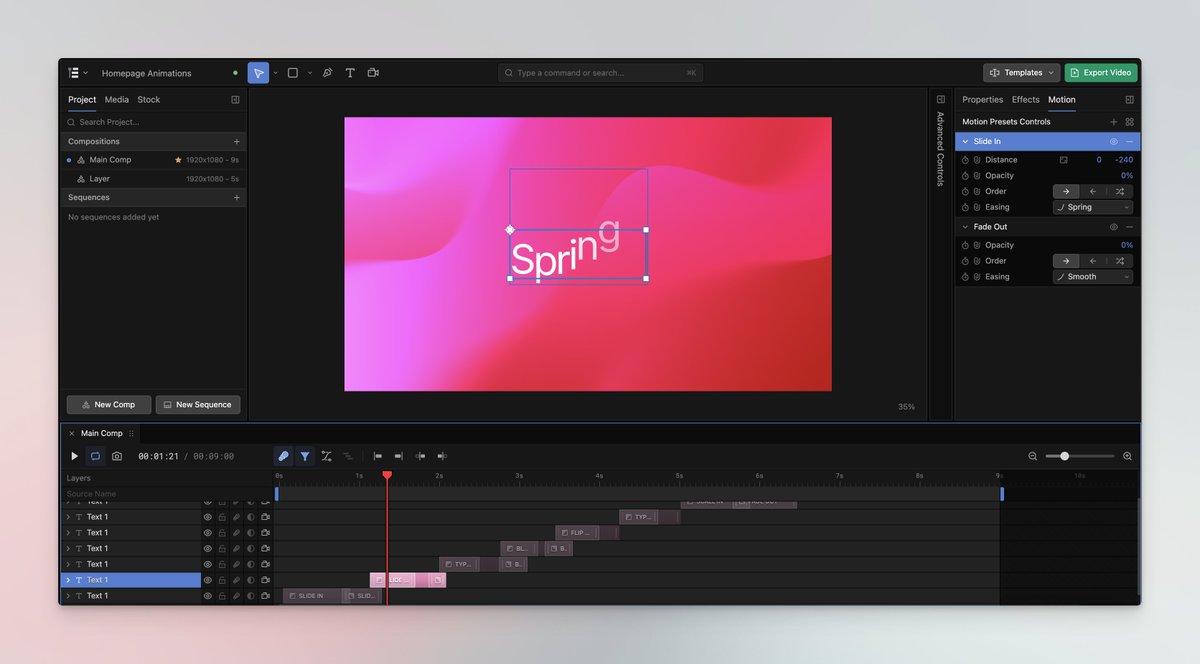
It's very easy to create a UI that 'looks' like a professional video editor. Oneshot. It's quite something else to make it behave like one. Each and every feature needs to be tweaked out. And that still takes a lot of time even with AI help.
I just tried the photoshop clone, and it's completely unusable.
The thing people don't understand about software development is the bottle neck wasn't ever the implementation, but rather the care and consideration behind every choice.
@notrab Imagine this but with a full editing experience to tweak your design and animations 👀 Rolling out MCP support soon would love to get your thoughts on it dude!
These Opus 5.5 motion graphic demos are impressive. If only you could adjust everything in an editor...
Introducing https://t.co/Oc7FOEtz1N
A GPU-powered, web-based editor. Years in the making, and we're just getting started.
Rolling out MCP to early adopters now.
Any compositor who looks at this and says I won't use a tool like this because it's AI is just stupid and self-sabatoging. There is nothing precious about green screen removal. There is nothing artistic about rotoscoping. It's painful, costly, time consuming grunt work that almost nobody enjoys. And if you happen to be someone that does, do it in your own free time. No employer wants to pay for your me roto time.
Speaking as someone who has done literally hundreds of hours of roto, its about freaken time. https://t.co/fC3AZtcAB4
Create your own animations with our web-based motion graphics editor (no sign-up required): https://t.co/fiXzavsKhX
Or find out more: https://t.co/Oc7FOEu6Rl
Text animations are notoriously hard, we made them easy. Get creative with fully customisable properties and target by letter, word or line.
Mix and match to create all sorts of unique looks. Start from scratch or choose a preset from our library.
@mikeysee Looks great! Would love to give it a spin.
Interested to see what those tabs at the top show. What things are you enjoying the most vs professional NLES like Premiere or Resolve?
@0xDesigner 100% agree.
Over the last few years we've been building a motion graphics editor and hooked Opus 5.5 up to it via our MCP. The idea being to use prompting as a starting point and then refining in an actual editor. https://t.co/KXMVkUJohU
These Opus 5.5 motion graphic demos are impressive. If only you could adjust everything in an editor...
Introducing https://t.co/Oc7FOEtz1N
A GPU-powered, web-based editor. Years in the making, and we're just getting started.
Rolling out MCP to early adopters now.
@jakeinmotion Oh really? I meant not to advocate it, more to educate how these videos are being generated and what the limitations are. Dissecting the hype, similar to your Higgs field video.
Anyways, really enjoying your recent videos. Keep up the great work!
@elie2222 👋 We've built a fully featured motion graphics editor. Our MCP is rolling out soon so users will be able to prompt & have a full editing experience to manually refine their projects. https://t.co/Oc7FOEu6Rl
Can someone show me the editing experience for these Opus 5.5 motion graphics videos?
All I've seen are one-shot examples. They have some impressive parts, but are far from deliverable and in desperate need of refinement.
Interested to see someone use it on a real project.
@marcelpociot Working on it 🫡 LLM API pricing will likely be too expensive, but we’re focusing on accelerating workflows within our editor https://t.co/Oc7FOEtz1N
One shot. Opus 5.5 max.
"make a dynamic 15-second motion graphics video that shows what an incredible motion designer you are, like it's your showreel for a résumé. go all out."
Try our editor for free whilst you wait for MCP access: https://t.co/fiXzavsKhX
These Opus 5.5 motion graphic demos are impressive. If only you could adjust everything in an editor...
Introducing https://t.co/Oc7FOEtz1N
A GPU-powered, web-based editor. Years in the making, and we're just getting started.
Rolling out MCP to early adopters now.