On November 18 Cloudflare experienced a service outage, triggered by an issue with a Bot Management feature, impacting multiple Cloudflare services. Here's a detailed breakdown of what happened. https://t.co/7WArlr5ghI
On Thursday February 6th, Cloudflare experienced an outage with our object storage service (R2) and products that rely on it. Here's what happened and what we're doing to fix this going forward. https://t.co/pV6oT63u9C
How to build your own Redis.
Redis is an open-source, in-memory data store that powers some of the world’s fastest and most scalable applications.
But have you ever wondered how Redis works under the hood?
Great engineers know the importance of knowing internals of top technologies.
And nothing beats practical building when it comes to learning SWE and cracking interviews.
Take on the Redis challenge by CodeCrafters here: https://t.co/PeBjibq7kf
It can be implemented in all popular programming languages, such as C#, Python, TypeScript, Rust, and more.
How challenging is it? You can actually choose the difficulty level, and there are plenty of challenges available (Redis, Kafka, Git, Docker, and more).
They allow you to tailor your experience by choosing your familiarity with a specific language. Want to directly learn a new language by building a project instead of following another YouTube tutorial? Just set it to "beginner mode" to learn the details of the language.
The best part? We genuinely rate the CodeCrafters platform and have partnered with them to bring you a rare 40% lifetime discount. And for the next month the Redis challenge is free.
Pro tip: Many engineers expense this through their team’s learning budget—why not do the same?
Let’s walk through how to build a simple Redis clone:
1) Implement Basic Commands
Start by creating responses for simple commands like PING and ECHO.
2) Enable Client Concurrency
Use threads or an event loop to handle multiple client requests at the same time.
3) Add Key-Value Storage
Implement SET and GET commands to store and retrieve key-value pairs in memory.
4) Implement Persistence
Add the ability to save and load data using RDB (Redis Database) files, so data persists across restarts.
5) Add Replication
Configure leader-follower replication to synchronize data from a primary server to replicas.
6) Implement Stream Commands
Add support for streams, allowing the server to handle time-ordered entries for real-time applications.
7) Implement Transactions
Enable multiple commands to be grouped and executed atomically in a single transaction.
8) Add Error Handling in Transactions
Handle errors in transactions, ensuring that commands execute correctly or fail gracefully.
9) Support Multiple Transactions
Extend the server to handle multiple simultaneous transactions, managing separate command queues for each client.
This build focuses on Redis's core functionality and gives you the foundation to understand how it operates behind the scenes. While advanced features like clustering and sharding aren’t included, this build implements core functionality and provides practical insight into Redis’s speed and scalability.
Why is Kafka fast?
There are many design decisions that contributed to Kafka’s performance. In this post, we’ll focus on two. We think these two carried the most weight.
1️. The first one is Kafka’s reliance on Sequential I/O.
2️. The second design choice that gives Kafka its performance advantage is its focus on efficiency: zero copy principle.
The diagram below illustrates how the data is transmitted between producer and consumer, and what zero-copy means.
🔹Step 1.1 - 1.3: Producer writes data to the disk
🔹Step 2: Consumer reads data without zero-copy
2.1: The data is loaded from disk to OS cache
2.2 The data is copied from OS cache to Kafka application
2.3 Kafka application copies the data into the socket buffer
2.4 The data is copied from socket buffer to network card
2.5 The network card sends data out to the consumer
🔹Step 3: Consumer reads data with zero-copy
3.1: The data is loaded from disk to OS cache
3.2 OS cache directly copies the data to the network card via sendfile() command
3.3 The network card sends data out to the consumer
Zero copy is a shortcut to save multiple data copies between the application context and kernel context.
--
Subscribe to our weekly newsletter to get a Free System Design PDF (158 pages): https://t.co/FIzCeaWsZV
nobody will remember:
- your salary
- how “busy you were”
- how many hours you worked
people will remember:
- the time you pushed the .env file to git/github
- the time your force push broke the prod.
🔥 🏖️ August is upon us! Here are all the Pokémon GO events taking place during the month of August! For more details check out our written event schedule 👉 https://t.co/Yc2TvgbPWZ
Discover how the 'Konfety' ad fraud operation exploits Google Play Store apps, using a novel 'decoy/evil twin' mechanism to commit large-scale ad fraud
Read it here: https://t.co/sFv7s9wTW6
#cybersecurity#infosec#Android
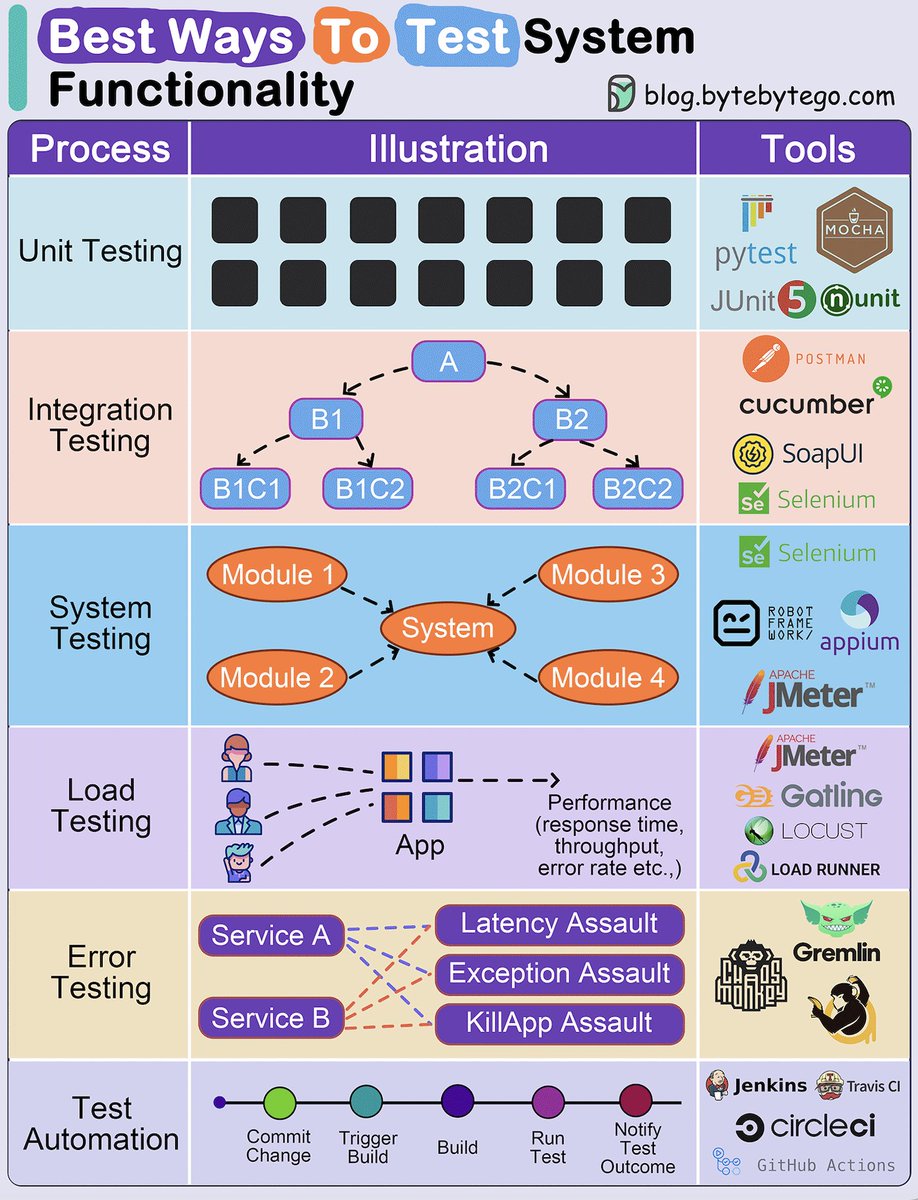
Best ways to test system functionality.
Testing system functionality is a crucial step in software development and engineering processes.
It ensures that a system or software application performs as expected, meets user requirements, and operates reliably.
Here we delve into the best ways:
1. Unit Testing: Ensures individual code components work correctly in isolation.
2. Integration Testing: Verifies that different system parts function seamlessly together.
3. System Testing: Assesses the entire system's compliance with user requirements and performance.
4. Load Testing: Tests a system's ability to handle high workloads and identifies performance issues.
5. Error Testing: Evaluates how the software handles invalid inputs and error conditions.
6. Test Automation: Automates test case execution for efficiency, repeatability, and error reduction.
Over to you: How do you approach testing system functionality in your software development or engineering projects?
Over to you: what's your company's release process look like?
–
Subscribe to our weekly newsletter to get a Free System Design PDF (158 pages): https://t.co/uc5M7CdXXC
UPDATE >>
#Cloudflare warns website owners to remove polyfill[.]io due to potential malicious JavaScript injections.
Namecheap takes down polyfill[.]io, which has now moved to polyfill[.]com.
Read: https://t.co/JaZU8vUtiQ
Android 15 Beta 2 is HERE! Beta 2 brings loads of new changes and features. Here’s a summary:
- Private space is here! This feature, as I previously reported, lets users make a separate space where they can keep sensitive apps away from prying eyes. It makes a separate user profile that’s paused when the device is locked. Private space apps show up in a dedicated container in the launcher and are hidden from recents, notifications, settings, etc. when the profile is locked.
- App pairs are here! As I previously reported, Android 15 now lets you save a pair of apps to launch in split-screen mode.
- Predictive back is enabled by default! You no longer need to enable a developer option to see the system animations for back-to-home, cross-task, and cross-activity in apps that have properly migrated.
- Apps can now highlight only the most recently selected photos and videos when partial access to media permissions is granted.
- Apps targeting Android 15 can provide Remote Views to the Widget Picker so they can update the preview to be more personal/relevant.
- Health Connect adds 2 new data types: skin temperature and training plans.
- If your system language is set to French, you can now change how the OS addresses you (grammatical gender) by going to language settings.
- Android 15 Beta 2 lets apps set rich vibrations for incoming notifications by channel. This lets users distinguish between notifications by haptics.
- The animation for entering PiP mode in Android 15 is now smoother. This will benefit apps having UI elements overlaid on top of their main UI that enters PiP. Apps can now receive a callback when the PiP enter animation starts so they can quickly toggle irrelevant UI elements.
- Android 15 blocks apps that don’t match the top UID on the stack from launching activities. This is to prevent malicious apps within the same task from launching another app’s activity then overlaying themselves on top.
- New APIs to perform permission checks on content URIs.
- Android 15 will block users from installing apps with a target SDK version ≤ 23. Previously, Android 14 blocked apps with target SDK version ≤ 22.
- As I previously reported, Android 15 is adding support for 16 KB page sizes. Google says devices with larger page sizes can see improved performance in memory-intensive workloads. Apps with NDK libraries will likely need to be rebuilt to work on these devices.
- Android 15 includes ANGLE as an optional layer for running OpenGL ES on top of Vulkan. The move to ANGLE will standardize the Android OpenGL implementation. Going forward, ANGLE will be shipped as the default GL system driver on more new devices with the goal for GL/ES to be only available through ANGLE.
- On devices that don’t have a HW AV1 decoder, VideoLAN’s SW AV1 decoder (dav1d) can be utilized. As I previously reported, dav1d is a highly efficient and performant AV1 decoder. It’s included by default in Android 15 but is available on Android 11+ devices through a Play System Update. However, apps have to opt in by invoking dav1d by name for now.
- Improvements to the security of intents. Intents that target specific components must match the target’s intent-filter specifications. Intents without an action will no longer match any intent-filters.
- Foreground services that rely on the SYSTEM_ALERT_WINDOW permission exemption for background starts are now required to have a visible overlay when targeting Android 15.
- The dataSync and mediaProcessing foreground service types now have a ~6 hour timeout after which the service is no longer considered a foreground service. If the service doesn’t stop itself, it’ll get stopped with a failure.
- Lastly, some text changes. Beta 2 includes API-related updates from ICU 74. The font file for Chinese, Japanese, and Korean is now a variable font. There’s now a font file for the Japanese Hentaigana font. TextView now allocates additional width for cursive fonts or language characters with complex shaping that may otherwise get clipped.