Claude Code just went through my girlfriend's iPhone privacy report. TikTok, Instagram, Facebook, Snapchat, last 7 days.
she swears she barely uses the camera or the mic. her phone says otherwise.
your iPhone already logs this. settings → privacy & security → app privacy report. it records every time an app opens your microphone, camera or location, plus every server it talks to.
we opened hers, i gave the numbers to Claude Code and asked what was going on.
microphone, 7 days:
→ TikTok → 89 → Snapchat → 53 → Instagram → 34 → Facebook → 2
camera, 7 days:
→ TikTok → 317 → Snapchat → 230 → Instagram → 178 → Facebook → 0
that's 178 mic and 725 camera sessions in one week, on the phone of someone who says she barely uses the camera.
location:
→ TikTok checked where she was 97 times → Snapchat → 76 → Instagram → 37 → 7 of those checks happened between midnight and 6am
servers:
→ Snapchat talked to 459 different domains → TikTok → 236 → Instagram → 134 → Facebook → 12
Snapchat surprised me most. 459 domains in 7 days is more than the other three apps combined, about one new server every 22 minutes.
so are they listening? the report can't tell you. Claude Code was blunt about that: it logs when an app opened the mic or camera, and nothing about what was recorded or sent. a lot of those sessions are probably her tapping into a camera screen without noticing.
she had no idea the numbers were this high, and neither did i.
what we changed:
→ microphone off for all four. she turns it on when she actually records → camera off for Facebook. she used it 0 times anyway → location set to "never" or "while using" for all four → settings → privacy → tracking → "allow apps to request to track" off
the privacy report stays on. i'll post the numbers again in a week.
steps and the prompt are in the first reply.
check your own phone:
1. settings → privacy & security → app privacy report → turn on
2. use your phone normally for 7 days
3. open it again and note mic, camera, location and domains per app (or scroll down → save app activity → airdrop it to your mac)
4. open claude code and paste this:
here's 7 days of my iPhone App Privacy Report (numbers or the exported file).
analyse it honestly, no guessing beyond what the data contains:
1. per app: microphone, camera, location accesses, and how many at night
2. per app: domains contacted, flag ads/analytics/tracking where you can
3. which app stands out and why
4. what this data can and can't prove
then give me a short permission checklist to lock it down.
Claude Code just went through my girlfriend's iPhone privacy report. TikTok, Instagram, Facebook, Snapchat, last 7 days.
she swears she barely uses the camera or the mic. her phone says otherwise.
your iPhone already logs this. settings → privacy & security → app privacy report. it records every time an app opens your microphone, camera or location, plus every server it talks to.
we opened hers, i gave the numbers to Claude Code and asked what was going on.
microphone, 7 days:
→ TikTok → 89 → Snapchat → 53 → Instagram → 34 → Facebook → 2
camera, 7 days:
→ TikTok → 317 → Snapchat → 230 → Instagram → 178 → Facebook → 0
that's 178 mic and 725 camera sessions in one week, on the phone of someone who says she barely uses the camera.
location:
→ TikTok checked where she was 97 times → Snapchat → 76 → Instagram → 37 → 7 of those checks happened between midnight and 6am
servers:
→ Snapchat talked to 459 different domains → TikTok → 236 → Instagram → 134 → Facebook → 12
Snapchat surprised me most. 459 domains in 7 days is more than the other three apps combined, about one new server every 22 minutes.
so are they listening? the report can't tell you. Claude Code was blunt about that: it logs when an app opened the mic or camera, and nothing about what was recorded or sent. a lot of those sessions are probably her tapping into a camera screen without noticing.
she had no idea the numbers were this high, and neither did i.
what we changed:
→ microphone off for all four. she turns it on when she actually records → camera off for Facebook. she used it 0 times anyway → location set to "never" or "while using" for all four → settings → privacy → tracking → "allow apps to request to track" off
the privacy report stays on. i'll post the numbers again in a week.
steps and the prompt are in the first reply.
Opus 5.5 plus a voice assistant can run a smart TV with no remote
one sentence out loud and Netflix opens and scrolls on its own
no remote, no phone, no digging between the couch cushions
the full guide, step by step:
• step 1: put the TV and your laptop on the same Wi-Fi
• step 2: open Claude Code on Opus 5.5, paste the prompt below and attach a photo of the TV's Settings → About screen
• step 3: Opus works out how your TV takes commands. many recent smart TVs expose a remote-control API on the home network, the same one the phone remote apps use
• step 4: it writes a tiny remote with three tools: open Netflix, move, select
• step 5: you plug that remote into Grok Bot as a plugin. Grok handles the listening, the plugin does the pressing
• step 6: confirm the pairing prompt on the TV once, and that is the last time you need the remote
• step 7: say "Hey Grok, open Netflix" and watch it browse for you
p.s. support depends on the brand, model and firmware. recent Samsung, LG and Google TV sets are the likeliest to work. try it only on your own TV and your own network
full prompt in the replies
the method behind it, how to take apart any app without its source code, is in the article below ↓
your ai agents are holding your keys. so are apps you forgot you ever connected.
here's how i took mine back in one evening (full course): https://t.co/kc9x8Rg3x4
@UP_SHIFTED agreed. revoking took me seconds per app. remembering to do it is the part that never happens, so i'm running a 5-minute check every sunday now.
everyone with an ai agent should open this page tonight:
google account → security → your connections to third-party apps & services
i opened mine on sunday.
> 786 apps with access to my account data
> 1,935 sites i'd signed into with google
> one app from 2020 could still read my email
i could name maybe a handful. revoked about 90%.
looking takes a minute: tap "access to", open anything you don't recognize, delete the connection.
that was step 1 of 8. the other 7 are below 👻
your ai agents are holding your keys. so are apps you forgot you ever connected.
here's how i took mine back in one evening (full course): https://t.co/kc9x8Rg3x4
@After_Dark_AI agreed. an agent picks up instruction files from wherever you start it, so launching it in downloads means trusting whatever landed there. one clean project folder per agent costs nothing
@airadar_1 the number hurt less than finding an app from 2020 that could still read my email. start with the oldest ones, that's where the surprises are
@0xForem wait, does the Files and Folders permission actually grant access to this system cache? iOS sandboxing should prevent apps from freely reading other apps data
your ai agents are holding your keys. so are apps you forgot you ever connected.
here's how i took mine back in one evening (full course): https://t.co/kc9x8Rg3x4
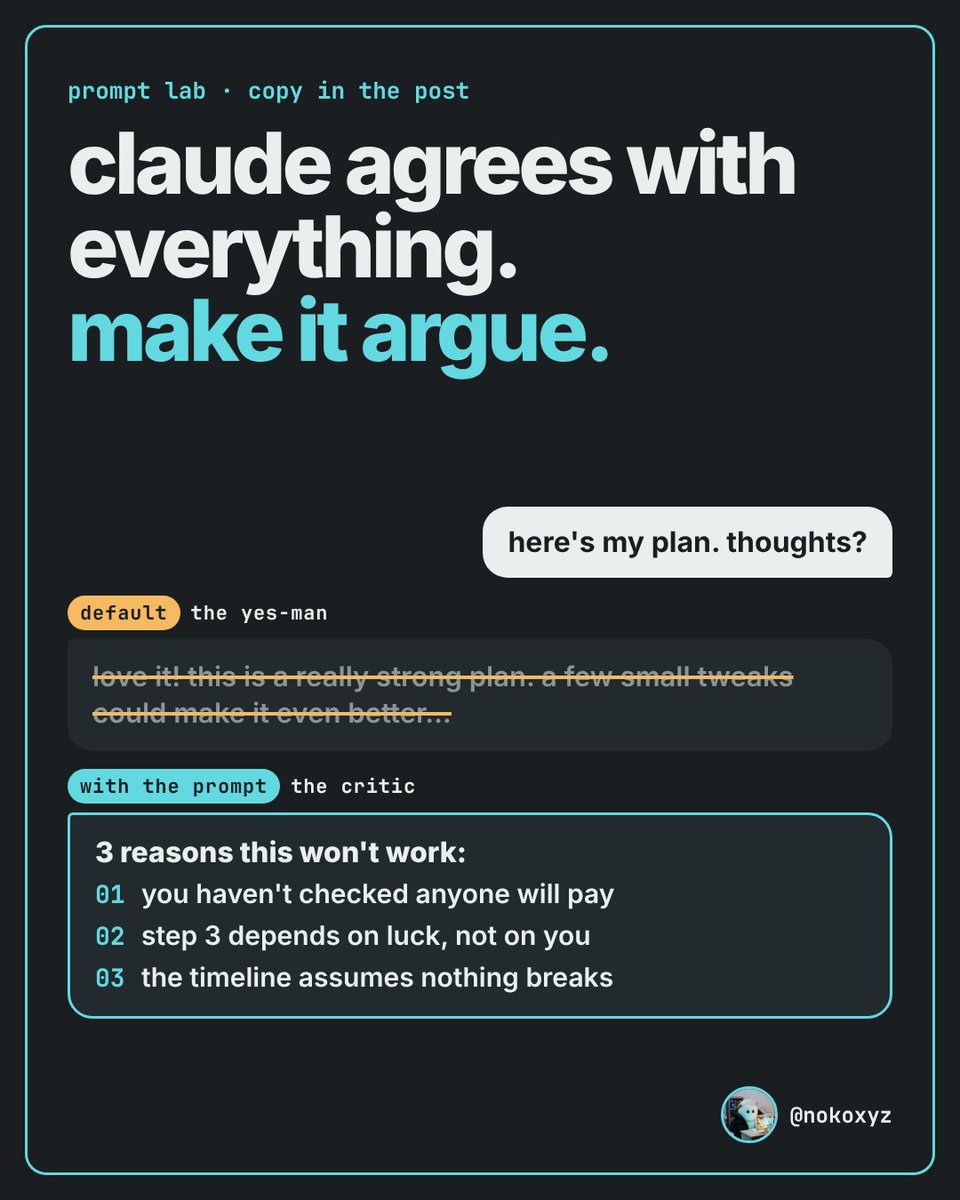
the prompt that makes claude stop agreeing with you:
"before you answer, read my idea like a critic who wants it to fail.
> give me the 3 strongest reasons this won't work
> tell me which of my assumptions you can't check
> say what would change your mind
> only then: what's actually good about it
no compliments in the first part. if you're unsure, say unsure."
paste it before any plan, draft or pitch.
where it breaks: ask for 3 problems and it will find 3, even when only one is real.
add "rank them by how much they matter" and the fake ones drop to the bottom.