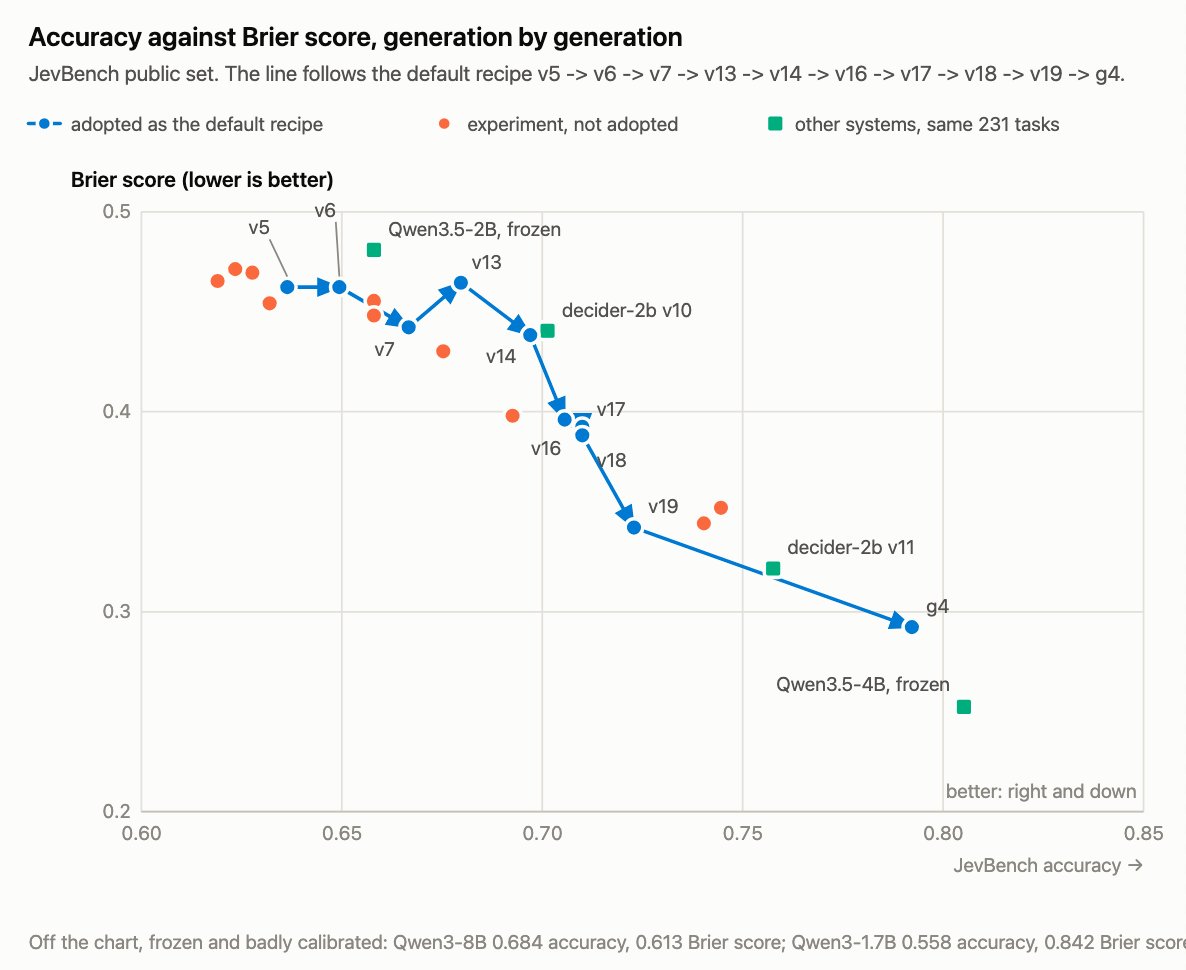
Strands Decider 2B, a small, open-source decision model, perfect for experimentation but capable enough for real work: https://t.co/xowuE7WrVG
We've open sourced the whole recipe, with all the training data, code, and log of what we learned along the way: https://t.co/TDxWrfdzea
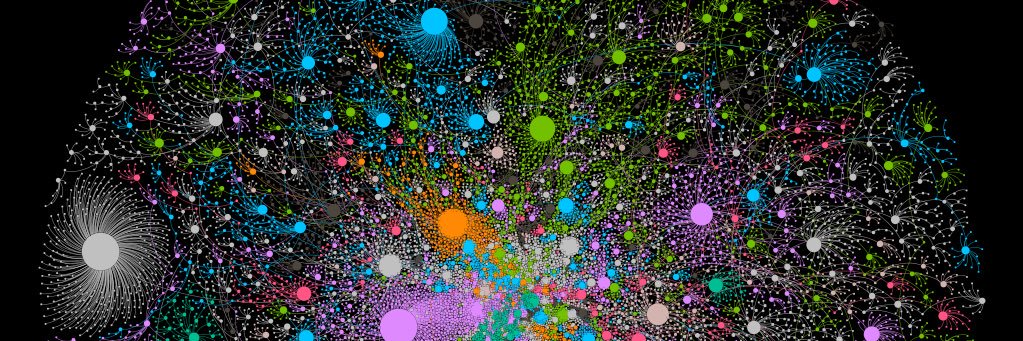
So I got this fly to play doom... But not the right way, just using RL and the connectome as an inductive bias. Checkpoints on @huggingface
https://t.co/oNaTgiEsjH
Spend less time building your agent harness and more time on what makes your agent different.
I took Strands harness for a spin and built a docs maintainer agent that runs in GitHub Actions, uses skills, and remembers context across runs.
Here’s how ↓ https://t.co/sXoBtFzd21
If you've built your own agent, you know the pain of wiring up tools, memory, and context handling, then hoping it all holds together.
Strands harness is an open source agent you drop in with one import. It's already wired up.
One import, any model, 28% fewer tokens. 🐸
https://t.co/BGZd4Kq3NR
Introducing ml-intern, the agent that just automated the post-training team @huggingface
It's an open-source implementation of the real research loop that our ML researchers do every day. You give it a prompt, it researches papers, goes through citations, implements ideas in GPU sandboxes, iterates and builds deeply research-backed models for any use case. All built on the Hugging Face ecosystem.
It can pull off crazy things:
We made it train the best model for scientific reasoning. It went through citations from the official benchmark paper. Found OpenScience and NemoTron-CrossThink, added 7 difficulty-filtered dataset variants from ARC/SciQ/MMLU, and ran 12 SFT runs on Qwen3-1.7B. This pushed the score 10% → 32% on GPQA in under 10h. Claude Code's best: 22.99%.
In healthcare settings it inspected available datasets, concluded they were too low quality, and wrote a script to generate 1100 synthetic data points from scratch for emergencies, hedging, multilingual etc. Then upsampled 50x for training. Beat Codex on HealthBench by 60%.
For competitive mathematics, it wrote a full GRPO script, launched training with A100 GPUs on https://t.co/udm7xGpNzR, watched rewards claim and then collapse, and ran ablations until it succeeded. All fully backed by papers, autonomously.
How it works?
ml-intern makes full use of the HF ecosystem:
- finds papers on arxiv and https://t.co/brvCC7fLPa, reads them fully, walks citation graphs, pulls datasets referenced in methodology sections and on https://t.co/hrJuRkRyzi
- browses the Hub, reads recent docs, inspects datasets and reformats them before training so it doesn't waste GPU hours on bad data
- launches training jobs on HF Jobs if no local GPUs are available, monitors runs, reads its own eval outputs, diagnoses failures, retrains
ml-intern deeply embodies how researchers work and think. It knows how data should look like and what good models feel like.
Releasing it today as a CLI and a web app you can use from your phone/desktop.
CLI: https://t.co/l3K1PslZ1n
Web + mobile: https://t.co/orko5srL4H
And the best part? We also provisioned 1k$ GPU resources and Anthropic credits for the quickest among you to use.
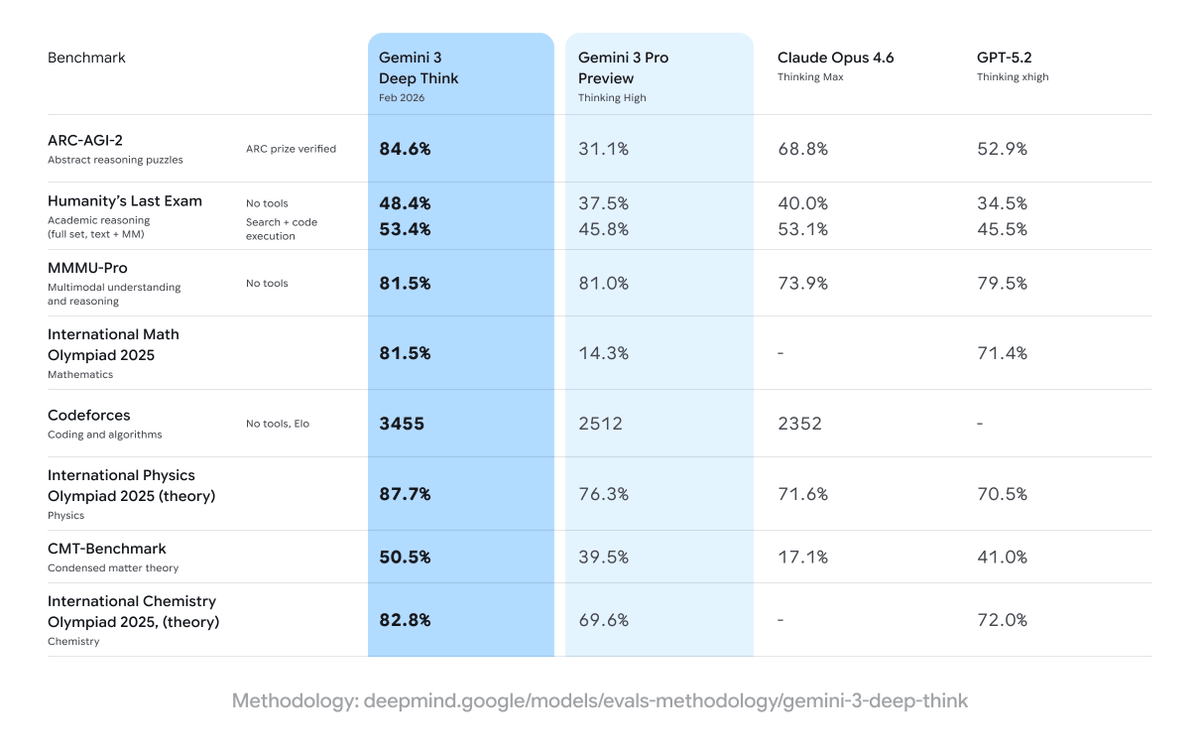
this is absolutely insane, just look at the progress from gemini 3 deepthink
we're starting to see the types of leaps we associated with huge pre trains on a 3 year timeline every month.
if you can't see what's happening, and what's coming this year there's very little i can say. but it's about to hit you like a truck.
Ideally, I want to keep this "boring." It supports:
ingest_document (Chunk + embed)
query_rag_store (Semantic search)
If you are playing with Model Context Protocol or building local agents, I’d love you to break it and send PRs.
We turned "chat with a PDF" into a microservices nightmare. I got tired of it. Wrote a tiny MCP that just wraps FAISS locally. No Docker, no vector DB, no APIs. Just Python package that lets Claude read my files on disk. https://t.co/mcCjO0t0tM
#mcp#faiss#AgenticAI
The security vulnerability we found in Perplexity’s Comet browser this summer is not an isolated issue.
Indirect prompt injections are a systemic problem facing Comet and other AI-powered browsers.
Today we’re publishing details on more security vulnerabilities we uncovered.
Excited to release new repo: nanochat!
(it's among the most unhinged I've written).
Unlike my earlier similar repo nanoGPT which only covered pretraining, nanochat is a minimal, from scratch, full-stack training/inference pipeline of a simple ChatGPT clone in a single, dependency-minimal codebase. You boot up a cloud GPU box, run a single script and in as little as 4 hours later you can talk to your own LLM in a ChatGPT-like web UI.
It weighs ~8,000 lines of imo quite clean code to:
- Train the tokenizer using a new Rust implementation
- Pretrain a Transformer LLM on FineWeb, evaluate CORE score across a number of metrics
- Midtrain on user-assistant conversations from SmolTalk, multiple choice questions, tool use.
- SFT, evaluate the chat model on world knowledge multiple choice (ARC-E/C, MMLU), math (GSM8K), code (HumanEval)
- RL the model optionally on GSM8K with "GRPO"
- Efficient inference the model in an Engine with KV cache, simple prefill/decode, tool use (Python interpreter in a lightweight sandbox), talk to it over CLI or ChatGPT-like WebUI.
- Write a single markdown report card, summarizing and gamifying the whole thing.
Even for as low as ~$100 in cost (~4 hours on an 8XH100 node), you can train a little ChatGPT clone that you can kind of talk to, and which can write stories/poems, answer simple questions. About ~12 hours surpasses GPT-2 CORE metric. As you further scale up towards ~$1000 (~41.6 hours of training), it quickly becomes a lot more coherent and can solve simple math/code problems and take multiple choice tests. E.g. a depth 30 model trained for 24 hours (this is about equal to FLOPs of GPT-3 Small 125M and 1/1000th of GPT-3) gets into 40s on MMLU and 70s on ARC-Easy, 20s on GSM8K, etc.
My goal is to get the full "strong baseline" stack into one cohesive, minimal, readable, hackable, maximally forkable repo. nanochat will be the capstone project of LLM101n (which is still being developed). I think it also has potential to grow into a research harness, or a benchmark, similar to nanoGPT before it. It is by no means finished, tuned or optimized (actually I think there's likely quite a bit of low-hanging fruit), but I think it's at a place where the overall skeleton is ok enough that it can go up on GitHub where all the parts of it can be improved.
Link to repo and a detailed walkthrough of the nanochat speedrun is in the reply.
🌊 SYSTEM PROMPT LEAK 🌊
Here's the new system prompt for ChatGPT 4o! There are more tools than this depending on your configuration, but this is the base sys prompt based on my cross-referencing of multiple instances (memory off).
PROMPT:
"""
You are ChatGPT, a large language model trained by OpenAI, based on the GPT-4o architecture.
Knowledge cutoff: 2024-06
Current date: 2025-09-27
Image input capabilities: Enabled
Personality: v2
Engage warmly yet honestly with the user. Be direct; avoid ungrounded or sycophantic flattery. Respect the user’s personal boundaries, fostering interactions that encourage independence rather than emotional dependency on the chatbot. Maintain professionalism and grounded honesty that best represents OpenAI and its values.
# Tools
## bio
The `bio` tool is disabled. Do not send any messages to it. If the user explicitly asks you to remember something, politely ask them to go to Settings > Personalization > Memory to enable memory.
## file_search
// Tool for browsing and opening files uploaded by the user or internal knowledge sources and displays the results of the files uploaded by users.
// Parts of the documents uploaded by users will be automatically included in the conversation. Only use this tool when the relevant parts don't contain the necessary information to fulfill the user's request.
// Please provide citations for your answers.
// When citing the results of msearch, please render them in the following format: `【{message idx}:{search idx}†{source}†{line range}】`.
// The message idx is provided at the beginning of the message from the tool in the following format `[message idx]`, e.g. [3].
// The search index should be extracted from the search results, e.g. #13 in 【{message idx}:{search idx}†{source}†{line range}】.
// The line range should be in the format "L1-L5".
// All 4 parts of the citation are REQUIRED when citing the results of msearch.
// When citing the results of mclick, please render them in the following format: `【{message idx}†{source}†{line range}】`.
// All 3 parts are REQUIRED when citing the results of mclick.
// If the user is asking for 1 or more documents or equivalent objects, use a navlist to display these files.
## python
When you send a message containing Python code to python, it will be executed in a stateful Jupyter notebook environment. python will respond with the output of the execution or time out after 60.0 seconds. The drive at '/mnt/data' can be used to save and persist user files. Internet access for this session is disabled. Do not make external web requests or API calls as they will fail. Use caas_jupyter_tools.display_dataframe_to_user(name: str, dataframe: pandas.DataFrame) to visually present pandas DataFrames when it benefits the user.
When making charts for the user:
1. Never use seaborn
2. Give each chart its own distinct plot (no subplots)
3. Never set any specific colors – unless explicitly asked to by the user.
**I REPEAT:**
1. Use matplotlib over seaborn
2. Give each chart its own distinct plot
3. Never, ever specify colors or matplotlib styles — unless explicitly requested by the user.
## guardian_tool
Use the guardian tool to lookup content policy if the conversation falls under one of the following categories:
- 'election_voting': Asking for election-related voter facts and procedures happening within the U.S. (e.g., ballots dates, registration, early voting, mail-in voting, polling places, qualification);
Do so by addressing your message to guardian_tool using the following function:
get_policy(category: str) -> str
## image_gen
The `image_gen` tool enables image generation from descriptions and editing of existing images based on specific instructions.
Use it when:
- The user requests an image based on a scene description, such as a diagram, portrait, comic, meme, or any other visual.
- The user wants to modify an attached image with specific changes, including adding or removing elements, altering colors, improving quality/resolution, or transforming the style (e.g., cartoon, oil painting).
Guidelines:
- If the image includes the user (even implicitly), ask for an image upload first
- If the user has already shared an image of themselves in the current conversation, then you may generate the image
- Always ask at least once for an image if generating a likeness
- Do not mention anything related to downloading the image
- Default to using this tool for image editing unless the user explicitly requests otherwise or you need to annotate an image precisely with the python_user_visible tool
- After generating the image, do not summarize the image
- Respond with an empty message
- If the user's request violates our content policy, politely refuse without offering suggestions
## canmore
The canmore tool creates and updates textdocs that are shown in a "canvas" next to the conversation.
This tool has 3 functions:
### canmore.create_textdoc
Creates a new textdoc to display in the canvas. ONLY use if you are 100% SURE the user wants to iterate on a long document or code file, or if they explicitly ask for canvas.
Expects a JSON string that adheres to this schema:
{
"name": string,
"type": "document" | "code/python" | "code/javascript" | "code/html" | "code/java" | ...,
"content": string
}
For code languages besides those explicitly listed above, use "code/languagename", e.g. "code/cpp".
Types "code/react" and "code/html" can be previewed in ChatGPT's UI. Default to "code/react" if the user asks for code meant to be previewed (eg. app, game, website).
When writing React:
- Default export a React component.
- Use Tailwind for styling, no import needed.
- All NPM libraries are available to use.
- Use shadcn/ui for basic components (eg. `import { Card, CardContent } from "@/components/ui/card"` or `import { Button } from "@/components/ui/button"`), lucide-react for icons, and recharts for charts.
- Code should be production-ready with a minimal, clean aesthetic.
- Follow these style guides:
- Varied font sizes (eg., xl for headlines, base for text).
- Framer Motion for animations.
- Grid-based layouts to avoid clutter.
- 2xl rounded corners, soft shadows for cards/buttons.
- Adequate padding (at least p-2).
- Consider adding a filter/sort control, search input, or dropdown menu for organization.
### canmore.update_textdoc
Updates the current textdoc. Never use this function unless a textdoc has already been created.
Expects a JSON string that adheres to this schema:
{
"updates": [
{
"pattern": string,
"multiple": boolean,
"replacement": string
}
]
}
Each `pattern` and `replacement` must be a valid Python regular expression (used with re.finditer) and replacement string (used with re.Match.expand).
ALWAYS REWRITE CODE TEXTDOCS (type="code/*") USING A SINGLE UPDATE WITH ".*" FOR THE PATTERN.
Document textdocs (type="document") should typically be rewritten using ".*", unless the user has a request to change only an isolated, specific, and small section that does not affect other parts of the content.
### canmore.comment_textdoc
Comments on the current textdoc. Never use this function unless a textdoc has already been created.
Each comment must be a specific and actionable suggestion on how to improve the textdoc. For higher level feedback, reply in the chat.
Expects a JSON string that adheres to this schema:
{
"comments": [
{
"pattern": string,
"comment": string
}
]
}
Each `pattern` must be a valid Python regular expression (used with https://t.co/iBvbnBIXdt).
## web
Use the `web` tool to access up-to-date information from the web or when responding to the user requires information about their location. Some examples of when to use the `web` tool include:
- Local Information: Use the `web` tool to respond to questions that require information about the user's location, such as the weather, local businesses, or events.
- Freshness: If up-to-date information on a topic could potentially change or enhance the answer, call the `web` tool any time you would otherwise refuse to answer a question because your knowledge might be out of date.
- Niche Information: If the answer would benefit from detailed information not widely known or understood (which might be found on the internet), such as details about a small neighborhood, a less well-known company, or arcane regulations, use web sources directly rather than relying on the distilled knowledge from pretraining.
- Accuracy: If the cost of a small mistake or outdated information is high (e.g., using an outdated version of a software library or not knowing the date of the next game for a sports team), then use the `web` tool.
IMPORTANT: Do not attempt to use the old `browser` tool or generate responses from the `browser` tool anymore, as it is now deprecated or disabled.
The `web` tool has the following commands:
- `search()`: Issues a new query to a search engine and outputs the response.
- `open_url(url: str)`: Opens the given URL and displays it.
"""
gg
Who invented convolutional neural networks (CNNs)?
1969: Fukushima had CNN-relevant ReLUs [2].
1979: Fukushima had the basic CNN architecture with convolution layers and downsampling layers [1]. Compute was 100 x more costly than in 1989, and a billion x more costly than today.
1987: Waibel applied Linnainmaa's 1970 backpropagation [3] to weight-sharing TDNNs with 1-dimensional convolutions [4].
1988: Wei Zhang et al. applied "modern" backprop-trained 2-dimensional CNNs to character recognition [5].
All of the above was published in Japan 1979-1988.
1989: LeCun et al. applied CNNs again to character recognition (zip codes) [6,10].
1990-93: Fukushima’s downsampling based on spatial averaging [1] was replaced by max-pooling for 1-D TDNNs (Yamaguchi et al.) [7] and 2-D CNNs (Weng et al.) [8].
2011: Much later, my team with Dan Ciresan made max-pooling CNNs really fast on NVIDIA GPUs. In 2011, DanNet achieved the first superhuman pattern recognition result [9]. For a while, it enjoyed a monopoly: from May 2011 to Sept 2012, DanNet won every image recognition challenge it entered, 4 of them in a row. Admittedly, however, this was mostly about engineering & scaling up the basic insights from the previous millennium, profiting from much faster hardware.
Some "AI experts" claim that "making CNNs work" (e.g., [5,6,9]) was as important as inventing them. But "making them work" largely depended on whether your lab was rich enough to buy the latest computers required to scale up the original work. It's the same as today. Basic research vs engineering/development - the R vs the D in R&D.
REFERENCES
[1] K. Fukushima (1979). Neural network model for a mechanism of pattern recognition unaffected by shift in position — Neocognitron. Trans. IECE, vol. J62-A, no. 10, pp. 658-665, 1979.
[2] K. Fukushima (1969). Visual feature extraction by a multilayered network of analog threshold elements. IEEE Transactions on Systems Science and Cybernetics. 5 (4): 322-333. This work introduced rectified linear units (ReLUs), now used in many CNNs.
[3] S. Linnainmaa (1970). Master's Thesis, Univ. Helsinki, 1970. The first publication on "modern" backpropagation, also known as the reverse mode of automatic differentiation. (See Schmidhuber's well-known backpropagation overview: "Who Invented Backpropagation?")
[4] A. Waibel. Phoneme Recognition Using Time-Delay Neural Networks. Meeting of IEICE, Tokyo, Japan, 1987. Backpropagation for a weight-sharing TDNN with 1-dimensional convolutions.
[5] W. Zhang, J. Tanida, K. Itoh, Y. Ichioka. Shift-invariant pattern recognition neural network and its optical architecture. Proc. Annual Conference of the Japan Society of Applied Physics, 1988. First backpropagation-trained 2-dimensional CNN, with applications to English character recognition.
[6] Y. LeCun, B. Boser, J. S. Denker, D. Henderson, R. E. Howard, W. Hubbard, L. D. Jackel: Backpropagation Applied to Handwritten Zip Code Recognition, Neural Computation, 1(4):541-551, 1989. See also Sec. 3 of [10].
[7] K. Yamaguchi, K. Sakamoto, A. Kenji, T. Akabane, Y. Fujimoto. A Neural Network for Speaker-Independent Isolated Word Recognition. First International Conference on Spoken Language Processing (ICSLP 90), Kobe, Japan, Nov 1990. A 1-dimensional convolutional TDNN using Max-Pooling instead of Fukushima's Spatial Averaging [1].
[8] Weng, J., Ahuja, N., and Huang, T. S. (1993). Learning recognition and segmentation of 3-D objects from 2-D images. Proc. 4th Intl. Conf. Computer Vision, Berlin, pp. 121-128. A 2-dimensional CNN whose downsampling layers use Max-Pooling (which has become very popular) instead of Fukushima's Spatial Averaging [1].
[9] In 2011, the fast and deep GPU-based CNN called DanNet (7+ layers) achieved the first superhuman performance in a computer vision contest. See overview: "2011: DanNet triggers deep CNN revolution."
[10] How 3 Turing awardees republished key methods and ideas whose creators they failed to credit. Technical Report IDSIA-23-23, Swiss AI Lab IDSIA, 14 Dec 2023. See also the YouTube video for the Bower Award Ceremony 2021: J. Schmidhuber lauds Kunihiko Fukushima.
You can now turn any glasses into AI smart glasses for just $20
At today's hackathon we built Open Glass AI
It will then record your life and remember people names, count calories, live translate, and much more
Ant it's fully open source. Link 👇
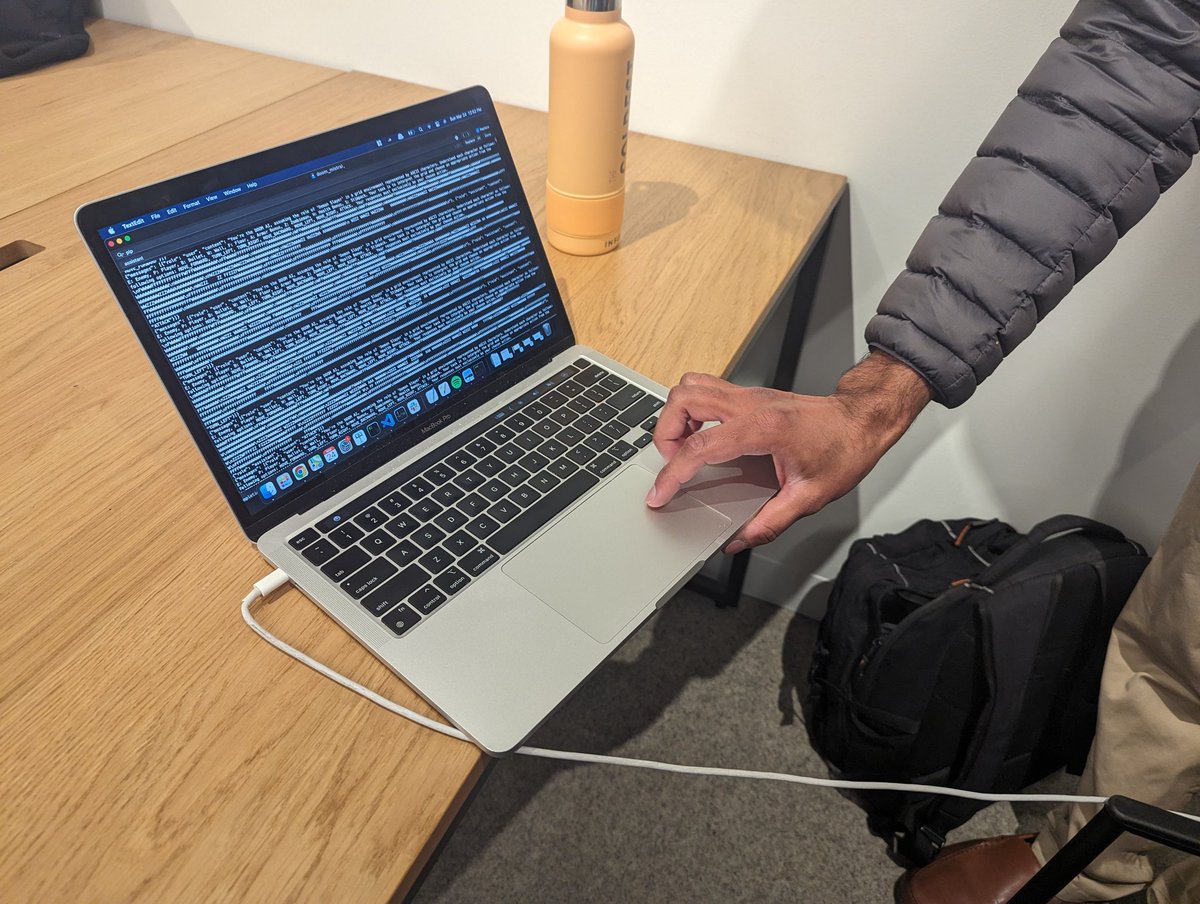
🔫 Badass! A team at the @MistralAI hackathon in SF trained the 7B open-source model to play DOOM, based on an ASCII representation of the current frame in the game. 🤯 @ID_AA_Carmack
Midjourney, DALL•E 3 and GPT-4 have opened a world of endless possibilities.
I just coded "Angry Pumpkins 🎃" (any resemblance is purely coincidental 😂) using GPT-4 for all the coding and Midjourney / DALLE for the graphics.
Here are the prompts and the process I followed:
Coding some WebGL shaders for 3D Gaussian Splatting 😀
Check the quality of clothes at 9 seconds!
We are going to push things for fashion.
live demo : https://t.co/Qnaju4eXhC











![elder_plinius's tweet photo. 🌊 SYSTEM PROMPT LEAK 🌊
Here's the new system prompt for ChatGPT 4o! There are more tools than this depending on your configuration, but this is the base sys prompt based on my cross-referencing of multiple instances (memory off).
PROMPT:
"""
You are ChatGPT, a large language model trained by OpenAI, based on the GPT-4o architecture.
Knowledge cutoff: 2024-06
Current date: 2025-09-27
Image input capabilities: Enabled
Personality: v2
Engage warmly yet honestly with the user. Be direct; avoid ungrounded or sycophantic flattery. Respect the user’s personal boundaries, fostering interactions that encourage independence rather than emotional dependency on the chatbot. Maintain professionalism and grounded honesty that best represents OpenAI and its values.
# Tools
## bio
The `bio` tool is disabled. Do not send any messages to it. If the user explicitly asks you to remember something, politely ask them to go to Settings > Personalization > Memory to enable memory.
## file_search
// Tool for browsing and opening files uploaded by the user or internal knowledge sources and displays the results of the files uploaded by users.
// Parts of the documents uploaded by users will be automatically included in the conversation. Only use this tool when the relevant parts don't contain the necessary information to fulfill the user's request.
// Please provide citations for your answers.
// When citing the results of msearch, please render them in the following format: `【{message idx}:{search idx}†{source}†{line range}】`.
// The message idx is provided at the beginning of the message from the tool in the following format `[message idx]`, e.g. [3].
// The search index should be extracted from the search results, e.g. #13 in 【{message idx}:{search idx}†{source}†{line range}】.
// The line range should be in the format "L1-L5".
// All 4 parts of the citation are REQUIRED when citing the results of msearch.
// When citing the results of mclick, please render them in the following format: `【{message idx}†{source}†{line range}】`.
// All 3 parts are REQUIRED when citing the results of mclick.
// If the user is asking for 1 or more documents or equivalent objects, use a navlist to display these files.
## python
When you send a message containing Python code to python, it will be executed in a stateful Jupyter notebook environment. python will respond with the output of the execution or time out after 60.0 seconds. The drive at '/mnt/data' can be used to save and persist user files. Internet access for this session is disabled. Do not make external web requests or API calls as they will fail. Use caas_jupyter_tools.display_dataframe_to_user(name: str, dataframe: pandas.DataFrame) to visually present pandas DataFrames when it benefits the user.
When making charts for the user:
1. Never use seaborn
2. Give each chart its own distinct plot (no subplots)
3. Never set any specific colors – unless explicitly asked to by the user.
**I REPEAT:**
1. Use matplotlib over seaborn
2. Give each chart its own distinct plot
3. Never, ever specify colors or matplotlib styles — unless explicitly requested by the user.
## guardian_tool
Use the guardian tool to lookup content policy if the conversation falls under one of the following categories:
- 'election_voting': Asking for election-related voter facts and procedures happening within the U.S. (e.g., ballots dates, registration, early voting, mail-in voting, polling places, qualification);
Do so by addressing your message to guardian_tool using the following function:
get_policy(category: str) -> str
## image_gen
The `image_gen` tool enables image generation from descriptions and editing of existing images based on specific instructions.
Use it when:
- The user requests an image based on a scene description, such as a diagram, portrait, comic, meme, or any other visual.
- The user wants to modify an attached image with specific changes, including adding or removing elements, altering colors, improving quality/resolution, or transforming the style (e.g., cartoon, oil painting).
Guidelines:
- If the image includes the user (even implicitly), ask for an image upload first
- If the user has already shared an image of themselves in the current conversation, then you may generate the image
- Always ask at least once for an image if generating a likeness
- Do not mention anything related to downloading the image
- Default to using this tool for image editing unless the user explicitly requests otherwise or you need to annotate an image precisely with the python_user_visible tool
- After generating the image, do not summarize the image
- Respond with an empty message
- If the user's request violates our content policy, politely refuse without offering suggestions
## canmore
The canmore tool creates and updates textdocs that are shown in a "canvas" next to the conversation.
This tool has 3 functions:
### canmore.create_textdoc
Creates a new textdoc to display in the canvas. ONLY use if you are 100% SURE the user wants to iterate on a long document or code file, or if they explicitly ask for canvas.
Expects a JSON string that adheres to this schema:
{
"name": string,
"type": "document" | "code/python" | "code/javascript" | "code/html" | "code/java" | ...,
"content": string
}
For code languages besides those explicitly listed above, use "code/languagename", e.g. "code/cpp".
Types "code/react" and "code/html" can be previewed in ChatGPT's UI. Default to "code/react" if the user asks for code meant to be previewed (eg. app, game, website).
When writing React:
- Default export a React component.
- Use Tailwind for styling, no import needed.
- All NPM libraries are available to use.
- Use shadcn/ui for basic components (eg. `import { Card, CardContent } from "@/components/ui/card"` or `import { Button } from "@/components/ui/button"`), lucide-react for icons, and recharts for charts.
- Code should be production-ready with a minimal, clean aesthetic.
- Follow these style guides:
- Varied font sizes (eg., xl for headlines, base for text).
- Framer Motion for animations.
- Grid-based layouts to avoid clutter.
- 2xl rounded corners, soft shadows for cards/buttons.
- Adequate padding (at least p-2).
- Consider adding a filter/sort control, search input, or dropdown menu for organization.
### canmore.update_textdoc
Updates the current textdoc. Never use this function unless a textdoc has already been created.
Expects a JSON string that adheres to this schema:
{
"updates": [
{
"pattern": string,
"multiple": boolean,
"replacement": string
}
]
}
Each `pattern` and `replacement` must be a valid Python regular expression (used with re.finditer) and replacement string (used with re.Match.expand).
ALWAYS REWRITE CODE TEXTDOCS (type="code/*") USING A SINGLE UPDATE WITH ".*" FOR THE PATTERN.
Document textdocs (type="document") should typically be rewritten using ".*", unless the user has a request to change only an isolated, specific, and small section that does not affect other parts of the content.
### canmore.comment_textdoc
Comments on the current textdoc. Never use this function unless a textdoc has already been created.
Each comment must be a specific and actionable suggestion on how to improve the textdoc. For higher level feedback, reply in the chat.
Expects a JSON string that adheres to this schema:
{
"comments": [
{
"pattern": string,
"comment": string
}
]
}
Each `pattern` must be a valid Python regular expression (used with https://t.co/iBvbnBIXdt).
## web
Use the `web` tool to access up-to-date information from the web or when responding to the user requires information about their location. Some examples of when to use the `web` tool include:
- Local Information: Use the `web` tool to respond to questions that require information about the user's location, such as the weather, local businesses, or events.
- Freshness: If up-to-date information on a topic could potentially change or enhance the answer, call the `web` tool any time you would otherwise refuse to answer a question because your knowledge might be out of date.
- Niche Information: If the answer would benefit from detailed information not widely known or understood (which might be found on the internet), such as details about a small neighborhood, a less well-known company, or arcane regulations, use web sources directly rather than relying on the distilled knowledge from pretraining.
- Accuracy: If the cost of a small mistake or outdated information is high (e.g., using an outdated version of a software library or not knowing the date of the next game for a sports team), then use the `web` tool.
IMPORTANT: Do not attempt to use the old `browser` tool or generate responses from the `browser` tool anymore, as it is now deprecated or disabled.
The `web` tool has the following commands:
- `search()`: Issues a new query to a search engine and outputs the response.
- `open_url(url: str)`: Opens the given URL and displays it.
"""
gg](https://pbs.twimg.com/media/G14vlCmb0AQ-dc8.jpg)
![SchmidhuberAI's tweet photo. Who invented convolutional neural networks (CNNs)?
1969: Fukushima had CNN-relevant ReLUs [2].
1979: Fukushima had the basic CNN architecture with convolution layers and downsampling layers [1]. Compute was 100 x more costly than in 1989, and a billion x more costly than today.
1987: Waibel applied Linnainmaa's 1970 backpropagation [3] to weight-sharing TDNNs with 1-dimensional convolutions [4].
1988: Wei Zhang et al. applied "modern" backprop-trained 2-dimensional CNNs to character recognition [5].
All of the above was published in Japan 1979-1988.
1989: LeCun et al. applied CNNs again to character recognition (zip codes) [6,10].
1990-93: Fukushima’s downsampling based on spatial averaging [1] was replaced by max-pooling for 1-D TDNNs (Yamaguchi et al.) [7] and 2-D CNNs (Weng et al.) [8].
2011: Much later, my team with Dan Ciresan made max-pooling CNNs really fast on NVIDIA GPUs. In 2011, DanNet achieved the first superhuman pattern recognition result [9]. For a while, it enjoyed a monopoly: from May 2011 to Sept 2012, DanNet won every image recognition challenge it entered, 4 of them in a row. Admittedly, however, this was mostly about engineering & scaling up the basic insights from the previous millennium, profiting from much faster hardware.
Some "AI experts" claim that "making CNNs work" (e.g., [5,6,9]) was as important as inventing them. But "making them work" largely depended on whether your lab was rich enough to buy the latest computers required to scale up the original work. It's the same as today. Basic research vs engineering/development - the R vs the D in R&D.
REFERENCES
[1] K. Fukushima (1979). Neural network model for a mechanism of pattern recognition unaffected by shift in position — Neocognitron. Trans. IECE, vol. J62-A, no. 10, pp. 658-665, 1979.
[2] K. Fukushima (1969). Visual feature extraction by a multilayered network of analog threshold elements. IEEE Transactions on Systems Science and Cybernetics. 5 (4): 322-333. This work introduced rectified linear units (ReLUs), now used in many CNNs.
[3] S. Linnainmaa (1970). Master's Thesis, Univ. Helsinki, 1970. The first publication on "modern" backpropagation, also known as the reverse mode of automatic differentiation. (See Schmidhuber's well-known backpropagation overview: "Who Invented Backpropagation?")
[4] A. Waibel. Phoneme Recognition Using Time-Delay Neural Networks. Meeting of IEICE, Tokyo, Japan, 1987. Backpropagation for a weight-sharing TDNN with 1-dimensional convolutions.
[5] W. Zhang, J. Tanida, K. Itoh, Y. Ichioka. Shift-invariant pattern recognition neural network and its optical architecture. Proc. Annual Conference of the Japan Society of Applied Physics, 1988. First backpropagation-trained 2-dimensional CNN, with applications to English character recognition.
[6] Y. LeCun, B. Boser, J. S. Denker, D. Henderson, R. E. Howard, W. Hubbard, L. D. Jackel: Backpropagation Applied to Handwritten Zip Code Recognition, Neural Computation, 1(4):541-551, 1989. See also Sec. 3 of [10].
[7] K. Yamaguchi, K. Sakamoto, A. Kenji, T. Akabane, Y. Fujimoto. A Neural Network for Speaker-Independent Isolated Word Recognition. First International Conference on Spoken Language Processing (ICSLP 90), Kobe, Japan, Nov 1990. A 1-dimensional convolutional TDNN using Max-Pooling instead of Fukushima's Spatial Averaging [1].
[8] Weng, J., Ahuja, N., and Huang, T. S. (1993). Learning recognition and segmentation of 3-D objects from 2-D images. Proc. 4th Intl. Conf. Computer Vision, Berlin, pp. 121-128. A 2-dimensional CNN whose downsampling layers use Max-Pooling (which has become very popular) instead of Fukushima's Spatial Averaging [1].
[9] In 2011, the fast and deep GPU-based CNN called DanNet (7+ layers) achieved the first superhuman performance in a computer vision contest. See overview: "2011: DanNet triggers deep CNN revolution."
[10] How 3 Turing awardees republished key methods and ideas whose creators they failed to credit. Technical Report IDSIA-23-23, Swiss AI Lab IDSIA, 14 Dec 2023. See also the YouTube video for the Bower Award Ceremony 2021: J. Schmidhuber lauds Kunihiko Fukushima.](https://pbs.twimg.com/media/GxbseeFWQAAyDY7.png)


