Create with seedance 2.5 video
Prompt
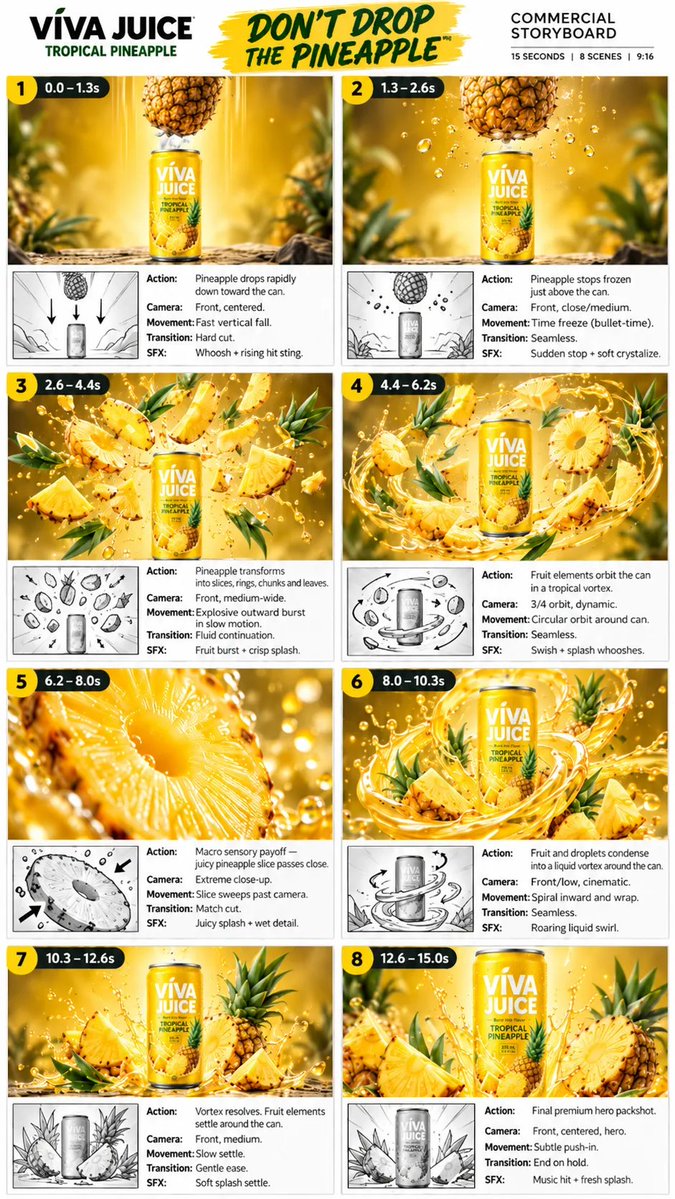
Create a premium 15-second vertical 9:16 commercial advertisement for “VIVA JUICE – Tropical Pineapple.”
Visual style: ultra-realistic cinematic product commercial, luxury beverage advertising, vibrant tropical pineapple aesthetic, rich golden-yellow lighting, glossy realistic liquid, detailed fruit textures, dramatic slow motion, photorealistic CGI, shallow depth of field, crisp 4K/8K detail.
IMPORTANT: Keep the VIVA JUICE can design, logo, colors, typography, and product label perfectly consistent and clearly readable in every shot. The can must remain the hero product.
SCENE 1 — 0.0–1.3s
A fresh whole pineapple rapidly drops straight down toward a VIVA JUICE Tropical Pineapple can standing upright on a tropical wooden surface. Front-centered camera, fast vertical fall, cinematic golden background with soft pineapple foliage and warm sunlight. Add a powerful whoosh and rising impact sound.
SCENE 2 — 1.3–2.6s
Just before the pineapple touches the can, everything suddenly freezes in mid-air. Pineapple suspended directly above the can with realistic juice droplets and tiny particles frozen around it. Front close/medium shot. Use dramatic bullet-time/time-freeze cinematography with a sudden stop and subtle crystalline sound effect.
SCENE 3 — 2.6–4.4s
The frozen pineapple explosively transforms into beautiful fresh pineapple slices, rings, chunks, leaves and juicy droplets surrounding the VIVA JUICE can. Dynamic front medium-wide camera. Fruit pieces burst outward in spectacular slow motion while maintaining perfect focus on the can. Golden liquid splashes through the scene. Crisp fruit-burst and splash sound.
SCENE 4 — 4.4–6.2s
All pineapple slices, rings, leaves and liquid droplets begin orbiting around the VIVA JUICE can in a beautiful circular tropical vortex. Dynamic 3/4 camera angle. Create a seamless swirling motion with the can perfectly stable in the center. Golden pineapple juice forms elegant liquid arcs around the product. Add smooth swish and splash sounds.
SCENE 5 — 6.2–8.0s
Cut to an extreme macro close-up of a fresh juicy pineapple slice. Show highly detailed pineapple fibers, wet texture, translucent juice and sparkling droplets. The slice slowly passes close across the camera lens. Warm golden cinematic lighting, shallow depth of field, rich sensory food-commercial aesthetic. Match-cut transition with juicy splash and wet detail sound.
SCENE 6 — 8.0–10.3s
Transition back to the VIVA JUICE can as pineapple fruit pieces and golden liquid droplets condense into a powerful liquid vortex around the product. Front low cinematic camera angle. The liquid spirals inward and wraps elegantly around the can while pineapple leaves and chunks move naturally through the vortex. High-end beverage commercial look, realistic fluid simulation, dramatic golden highlights.
SCENE 7 — 10.3–12.6s
The swirling liquid and fruit gradually settle around the VIVA JUICE Tropical Pineapple can. Fresh pineapple slices, chunks, leaves and a whole pineapple form a beautiful premium composition around the product. Front medium shot. Camera movement slows smoothly as the vortex resolves. Add soft realistic splash droplets settling onto the surface.
SCENE 8 — 12.6–15.0s
Final premium hero product shot. VIVA JUICE Tropical Pineapple can stands perfectly upright in the center, surrounded by fresh pineapple slices, chunks, leaves and subtle golden droplets. Front-centered hero camera with a very subtle cinematic push-in. Warm glowing tropical background, beautiful bokeh, premium advertising lighting. Hold the final frame cleanly for branding.
Overall:
Seamless cinematic transitions, consistent product identity, realistic physics, natural fruit motion, detailed liquid simulation, premium beverage commercial cinematography, dramatic golden lighting, photorealistic textures, smooth camera movement, high-end advertising quality, no distorted can, no changing logo, no extra objects, no random text, no flickering, no deformed fruit.
I use Opus 5.5 as my motion designer.
Here's how to make your own video in 7 steps (no After Effects):
1. Open Claude Code in a new, empty folder
2. Tell it what you want: your product, your website and the length
3. Share a few reference videos if you have them
4. Ask it to build the whole video as one web page
5. Open that page in your browser to watch it
6. Ask it to record the page as an MP4, frame by frame
7. Tell it what looks wrong, and it makes a new version
If a tool is missing, ask Claude to install it.
This video was made exactly this way.
Bookmark this.
Claude Opus 5.5 can (finally) generate motion graphics
16 motion graphics in Claude Code (my 3 steps):
1. Pick one motion, like a chart that morphs.
2. Show Claude a reference and name every state.
3. Ask for HTML and SVG, then fix it round by round.
Download them all here:
https://t.co/pjMv8ExvWx
Repost ♻️ to help someone in your network.
The only Claude Code skill you need to make videos like this
It analyzes your repo and outputs a complete motion-graphics teaser with sound design and launch copy in a single run.
repo link: https://t.co/zu0R9Faga9
🎓 GOOGLE FREE COURSES WITH CERTIFICATES
Looking to learn new skills without spending a fortune?
Here are 10 Google courses you can explore across AI, data, marketing, cybersecurity, UX and more:
🔐 Cybersecurity
https://t.co/buYCtvn5dM
📊 Business Intelligence
https://t.co/j6ZsDeeVYo
📈 Advanced Data Analytics
https://t.co/Xh1ldaOfzS
📣 Digital Marketing
https://t.co/F7BT8LmWZx
🤖 AI & Machine Learning
https://t.co/vjih3Z6V8C
📊 Data Analytics
https://t.co/uT8YepkbSb
📋 Project Management
https://t.co/Gbjq5wgQQp
🎨 UX Design
https://t.co/DIO4rq3y4C
⚙️ IT Automation
https://t.co/2wDhjPUFNX
💻 IT Support
https://t.co/35MJEnw7g5
📌 Save this post for later.
Share it with someone who is looking to upskill or build a new career path.
❤️ Like
🔁 Retweet
🔖 Bookmark
Follow
@sakhil_ai
for more such posts
send this prompt to GPT-Astra, it might just change your life
your agent can install whatever it wants. this shows you what that actually means
in the right hands, this changes everything:
Created with @GeminiApp
Prompt :
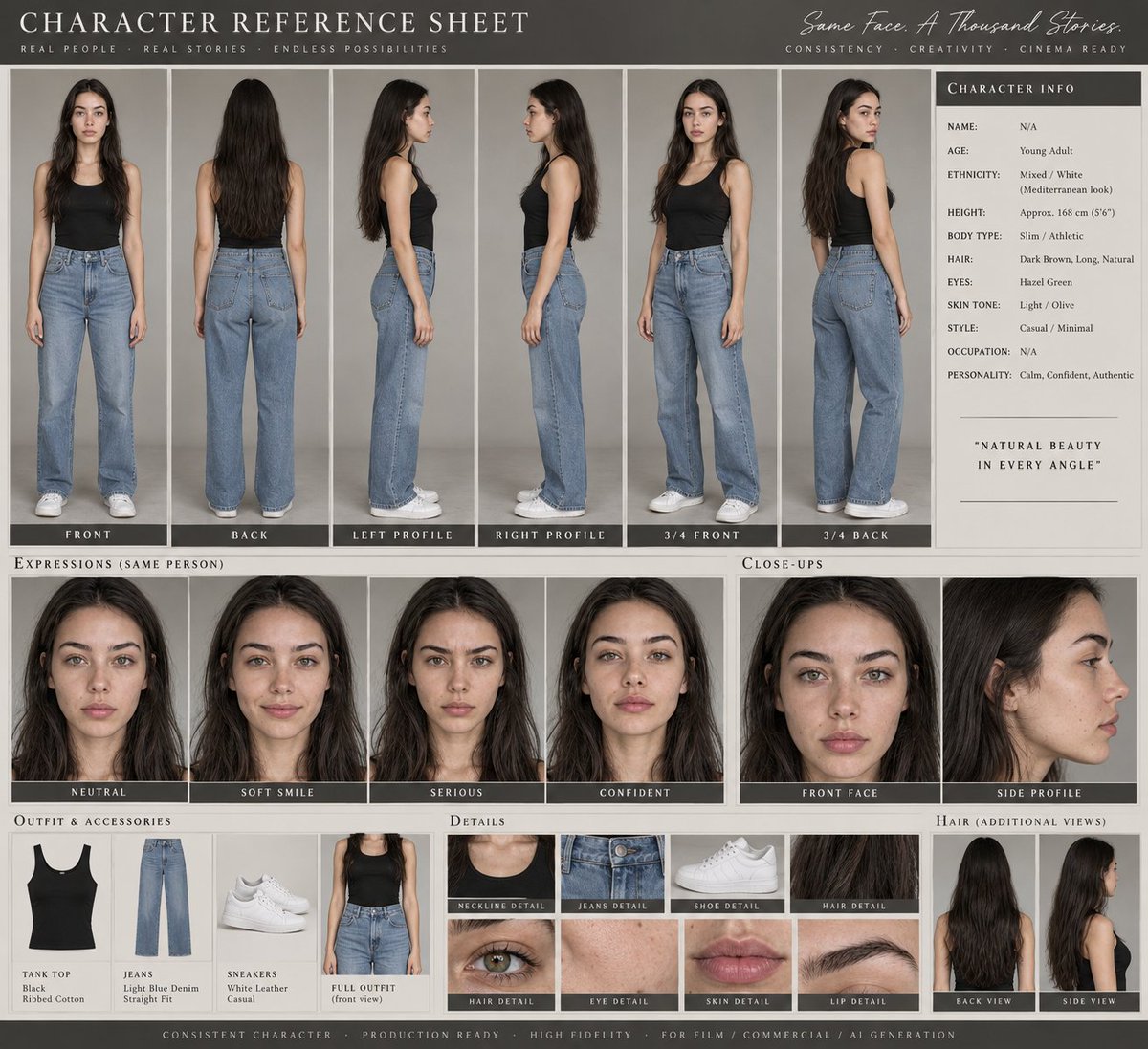
Create a **premium professional AI CHARACTER REFERENCE SHEET** using the provided reference image as the **PRIMARY and STRICT identity reference**.
The character must remain **100% visually consistent with the reference** across every panel. Do not redesign, beautify, age, or alter the character's identity.
### CHARACTER IDENTITY LOCK
Preserve exactly:
- facial structure and proportions
- face shape
- eyes, eye shape and eye color
- eyebrows
- nose structure
- lips and mouth shape
- jawline and cheekbones
- skin tone and natural skin texture
- hairstyle, hair color, length and texture
- recognizable facial features
- overall body proportions and silhouette
### CHARACTER VIEWS
Show the same character in a clean professional character-sheet layout with:
1. Full-body FRONT view
2. Full-body BACK view
3. LEFT SIDE profile
4. RIGHT SIDE profile
5. 3/4 FRONT view
6. 3/4 BACK view
7. Close-up FRONT face
8. Close-up SIDE profile
9. Neutral expression
10. Soft smile
11. Serious expression
12. Confident expression
Every panel must depict **the exact same person**, with identical facial identity, hairstyle, proportions and styling.
### OUTFIT & STYLING
Clearly document the character's complete outfit:
- clothing
- colors
- fabric/material
- shoes
- accessories
- jewelry
- hairstyle
- makeup/grooming
Include small **detail callout panels** for important clothing, accessories, hairstyle and facial details.
### PRESENTATION
Design the sheet like a **professional film/advertising character bible**.
Clean studio background, elegant editorial layout, evenly spaced panels, consistent neutral studio lighting, sharp details, realistic skin, premium fashion photography quality.
Add subtle professional labels such as:
**FRONT • BACK • PROFILE • 3/4 • EXPRESSION • OUTFIT • DETAILS**
Use a sophisticated cinematic presentation with excellent visual hierarchy.
### CONSISTENCY RULE
The reference image is the **single source of truth**.
Do NOT change:
- identity
- facial features
- hairstyle
- skin tone
- body proportions
- outfit design
- accessories
No random variations, no different faces, no duplicate-looking characters, no distorted anatomy, no extra fingers, no inconsistent clothing.
The final result should look like an **official production-ready character reference sheet created for a high-budget cinematic commercial**, suitable for maintaining character consistency across AI-generated images and videos.
Professional character reference sheet with consistent facial identity, expressions, angles, outfit, hair, and cinematic lighting.
Created with @grok
prompt :
Create a highly detailed PROFESSIONAL CHARACTER DEVELOPMENT / CHARACTER REFERENCE SHEET using the uploaded reference image as the ONLY source for the subject's identity.
IMPORTANT IDENTITY RULE:
Use the uploaded face reference ONLY to preserve the subject's true facial identity, facial structure, proportions, eyes, eyebrows, nose, lips, cheeks, jawline, chin, skin characteristics and recognizable features.
The subject can be MALE or FEMALE depending entirely on the uploaded reference.
Do NOT change, beautify, feminize, masculinize, age, de-age, or redesign the person's natural facial identity.
Preserve the exact recognizable identity consistently throughout every panel.
Create ONE SINGLE LARGE VERTICAL CHARACTER SHEET / MODEL SHEET, not separate images.
VISUAL STYLE:
Premium professional film-production character reference sheet, realistic photography combined with clean production-design documentation, white/off-white studio background, extremely clean editorial layout, subtle thin gray divider lines, small professional labels, technical annotations, realistic photographic rendering, high-end cinematic character-development presentation, natural skin texture, realistic hair strands, accurate anatomy, consistent proportions.
OVERALL COMPOSITION:
Match the structure and density of a professional character reference board.
TOP SECTION:
Large primary head-and-shoulders portrait of the character, approximately 3/4 or front-facing view, with natural expression and neutral studio lighting.
Place a professional CHARACTER PROFILE information panel beside the main portrait containing fields such as:
NAME:
AGE:
HEIGHT:
BODY TYPE:
OCCUPATION:
ETHNICITY:
EYES:
SKIN TONE:
DISTINCTIVE FEATURES:
The information must describe only visually observable characteristics from the reference image.
Do not invent unnecessary biographical information.
SECTION 1 — HEAD ANGLES:
Show a row of consistent head-angle portraits:
1. FRONT
2. 3/4 FRONT
3. LEFT PROFILE
4. 3/4 BACK
5. LOOKING UP
6. LOOKING DOWN
All views must represent EXACTLY the same person.
Keep facial proportions, hairstyle, skin texture and identity consistent.
SECTION 2 — EXPRESSIONS:
Show multiple close-up facial expressions:
1. NEUTRAL
2. SOFT SMILE
3. SERIOUS
4. THOUGHTFUL
5. additional natural subtle expression if space allows
Expressions must change naturally while the person's identity remains completely unchanged.
SECTION 3 — FULL BODY / OUTFIT REFERENCE:
Show full-body character views in the same outfit:
1. FRONT
2. 3/4 FRONT
3. BACK
4. SIDE
Use a simple, realistic outfit appropriate for a professional character sheet.
Keep clothing, body proportions, hairstyle and accessories consistent across all views.
Show realistic hands, feet, posture and anatomy.
SECTION 4 — DETAIL CLOSE-UPS:
Create small photographic detail panels for:
- EYES
- EYEBROWS
- HAIR TEXTURE
- EARS / EARRINGS if present
- SKIN TEXTURE
- LIPS
- NOSE
- DISTINCTIVE FACIAL FEATURE
Every detail must belong to the same reference person.
SECTION 5 — HAIR ANALYSIS:
Show a clean back-of-head / rear hairstyle reference.
Include small labeled callouts for:
- HAIR LENGTH
- HAIRLINE
- HAIR SHAPE
- HAIR COLOR
- HAIR TEXTURE
Preserve the exact hairstyle characteristics visible in the reference.
SECTION 6 — FACE ANALYSIS:
Show:
- FRONT FACE ANALYSIS
- SIDE PROFILE ANALYSIS
Add subtle professional guide lines/callouts indicating:
FACIAL PROPORTIONS
EYE SHAPE
NOSE STRUCTURE
LIP SHAPE
JAWLINE
CHIN
CHEEKBONE STRUCTURE
Do not alter the actual face to match the guides.
SECTION 7 — COLOR PALETTE:
Create a small professional palette derived from the actual reference:
- SKIN TONES
- HAIR COLORS
- EYE COLOR
- LIP TONE
- ACCENT COLORS
Use small rectangular color swatches with clean labels.
SECTION 8 — LIGHTING REFERENCE:
Show 3–4 small portrait lighting examples of the SAME CHARACTER:
- SOFT STUDIO LIGHT
- WARM CINEMATIC LIGHT
- COOL CINEMATIC LIGHT
- NATURAL WINDOW LIGHT
The lighting may change, but facial identity must remain exactly consistent.
SECTION 9 — STYLE NOTES:
Add a small clean professional notes section describing visible characteristics such as:
- overall visual style
- silhouette
- hairstyle character
- clothing direction
- accessories
- facial presence
- cinematic impression
Do not invent personal information.
CAMERA / PHOTOGRAPHY:
Professional full-frame photography.
85mm portrait lens for close-up portraits.
50mm lens for medium/full-body reference where appropriate.
Natural perspective with minimal distortion.
Eye-level camera for standard views.
Precise profile camera positioning for side views.
Consistent camera height and subject scale across corresponding panels.
Sharp facial detail.
Natural depth of field.
Soft controlled studio lighting.
Accurate skin texture.
Realistic pores and fine hair strands.
Subtle natural photographic grain.
No artificial CGI appearance.
CONSISTENCY LOCK:
The SAME PERSON must appear in every single panel.
Maintain identical:
facial identity
facial proportions
bone structure
eyes
eyebrows
nose
lips
jawline
chin
skin tone
hairline
hair texture
body proportions
age appearance
gender presentation
distinctive features
Only camera angle, pose, expression, lighting and viewing direction may change.
LAYOUT:
One single vertical poster.
Dense but highly organized professional character-sheet layout.
Clean white background.
Strong visual hierarchy.
Small elegant uppercase section headings.
Thin technical guide lines.
Neat spacing.
Consistent margins.
Professional film/VFX/pre-production reference-board aesthetic.
No decorative clutter.
TEXT QUALITY:
All labels should be small, clean, correctly spelled, professional English.
Do not generate random paragraphs or meaningless text.
Keep text minimal and functional.
Prioritize visual accuracy over excessive text.
REALISM:
Ultra-photorealistic.
High-resolution professional photography.
Natural skin.
Natural asymmetry.
Realistic hair.
Realistic eyes.
Realistic clothing materials.
Physically accurate lighting.
No plastic skin.
No beauty-filter effect.
No AI-looking face.
No duplicated facial features.
No inconsistent identity.
FINAL OUTPUT:
A polished, production-ready CHARACTER REFERENCE / CHARACTER DEVELOPMENT SHEET that looks like it was professionally prepared for a film, Netflix series, game, VFX production, or cinematic project.
IMPORTANT:
Use the uploaded reference image as the identity anchor.
Do not copy the reference image's exact pose or composition.
Reconstruct the character into the complete professional character-sheet format described above while preserving the person's identity with maximum accuracy.
Created with @ChatGPT image 2.5
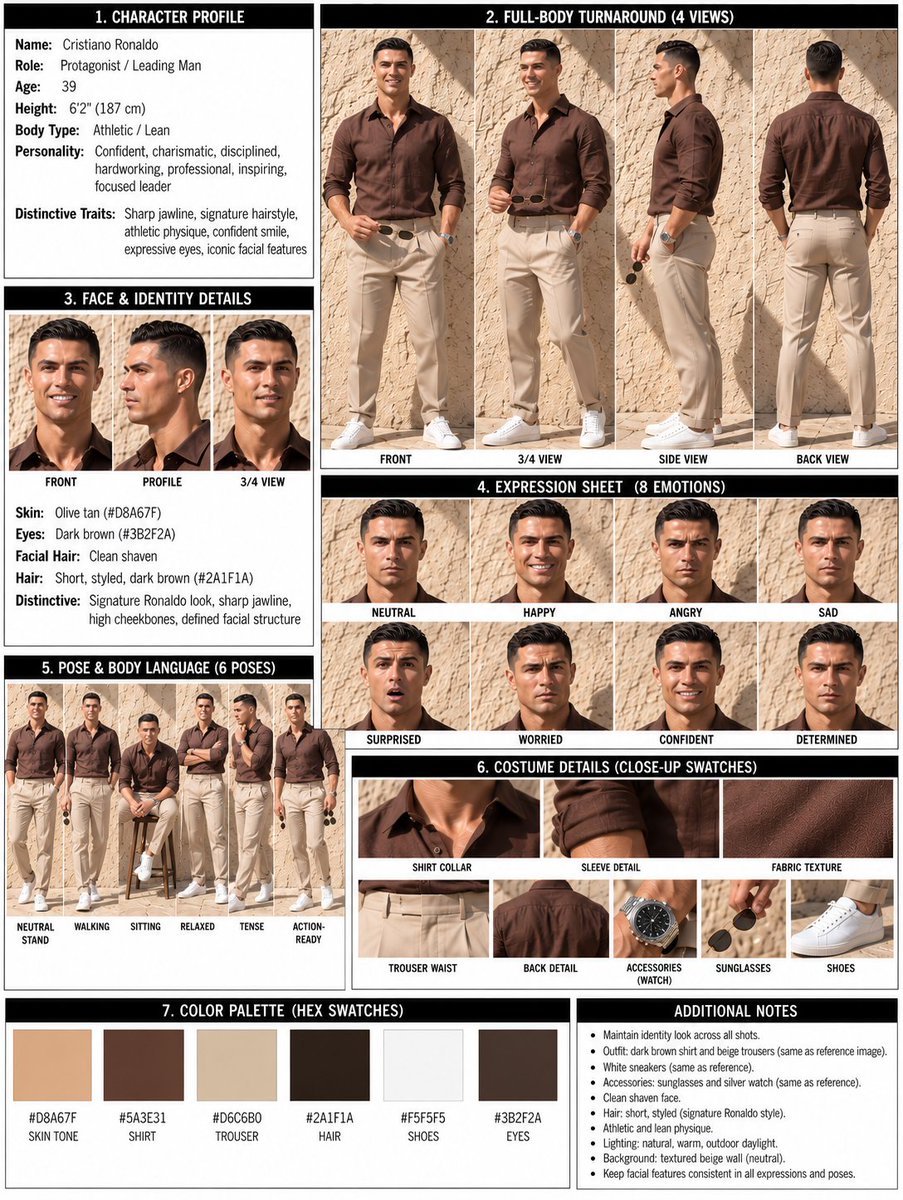
prompt :
Create a premium professional character design reference sheet / production model sheet based strictly on the provided reference image.
REFERENCE & IDENTITY LOCK:
Use the uploaded reference as the single source of truth for the character's identity. Preserve the exact facial identity, facial structure, hairstyle, hairline, eye shape and color, eyebrows, nose, lips, skin tone, body proportions, physique, age appearance, distinctive features, costume design, accessories, footwear, colors, patterns and all recognizable visual details. Do not redesign, beautify, simplify, age, de-age, or reinterpret the character.
CHARACTER DESIGN ANALYSIS:
Before constructing the sheet, internally analyze and lock the character's:
facial construction
head-to-body ratio
body proportions
shoulder width and torso structure
limb length and joint placement
silhouette
hairstyle and hair volume
costume construction
accessory placement
color relationships
material characteristics
distinctive identity anchors
All subsequent views must represent the exact same character design.
PAGE FORMAT:
Create one sophisticated studio-grade character reference board, landscape 16:9, clean neutral/off-white studio background, refined editorial production-board aesthetic, highly organized hierarchy, generous spacing, subtle technical guide lines, restrained professional typography-style labels where appropriate, no decorative clutter.
01 — HERO CHARACTER PORTRAIT
Place one larger polished head-and-shoulders or three-quarter portrait as the visual identity anchor.
Show the character's canonical facial identity clearly with neutral professional expression and accurate hairstyle, skin, costume and accessories.
02 — FULL-BODY TURNAROUND
Create a clearly organized full-body turnaround showing the same character at identical scale and proportions:
FRONT VIEW
3/4 FRONT VIEW
SIDE PROFILE
3/4 BACK VIEW
BACK VIEW
Use a neutral standing pose with consistent posture and anatomical alignment.
Keep head height, eye line, shoulder line, waist, hips, knees and feet consistently aligned across every view.
The costume, hairstyle, accessories, seams, patterns, footwear and silhouette must remain identical from every angle.
03 — EXPRESSION STUDY
Include a clean expression grid containing approximately 6 expressions:
Neutral
Happy / subtle smile
Serious
Angry / determined
Surprised
Sad / emotional
Maintain the exact same facial identity, head proportions, hairstyle and facial construction in every expression.
Expressions should demonstrate believable facial acting rather than exaggerated deformation.
04 — SIGNATURE POSE STUDIES
Include 4–6 full-body pose studies that communicate the character's personality and physical behavior.
Use varied but believable poses such as:
relaxed standing
confident stance
walking
sitting
interacting with an object
dynamic signature pose
Maintain exact character proportions, costume construction and recognizable silhouette in every pose.
05 — COSTUME & DETAIL CALLOUTS
Add several clean close-up detail panels showing the most important design elements:
hairstyle / hair detail
face detail
collar / neckline
sleeves / garment construction
footwear
jewelry or accessories
distinctive emblem / pattern / texture
important prop if present
Show construction and material clearly without turning the sheet into a decorative fashion collage.
06 — MATERIAL STUDIES
Visually communicate the primary materials present in the design:
fabric, leather, metal, denim, silk, knit, plastic, glass, jewelry, hair, skin or other relevant materials.
Show realistic surface behavior, texture, reflectivity and construction appropriate to each material.
07 — COLOR PALETTE
Include a compact professional color palette strip containing the dominant character colors.
Organize colors according to their visual role:
skin
hair
primary costume
secondary costume
accent color
accessories / materials
Keep the palette faithful to the reference.
08 — PROPORTION & SILHOUETTE GUIDE
Include a subtle technical proportion guide beside the turnaround.
Show:
overall height
head-to-body ratio
major horizontal alignment guides
key body proportions
clean silhouette thumbnail
Keep this section understated and production-oriented.
09 — DESIGN CONTINUITY
Treat the entire page as a single canonical character source of truth.
Every panel must depict the SAME person/character with:
identical facial identity
identical body proportions
identical hairstyle
identical costume
identical accessory placement
identical color palette
identical design language
consistent left/right details
No accidental costume changes, missing accessories, duplicated accessories, altered facial features, changing body proportions, inconsistent hairstyles or unexplained design variations.
VISUAL DIRECTION:
High-end professional character design presentation, studio production reference quality, sophisticated concept-art discipline, clean polished rendering, precise construction, controlled neutral lighting, realistic material definition, excellent anatomical consistency, crisp readable details, refined editorial layout, premium art-direction quality.
The sheet should feel like an actual professional animation / game / visual-development production document, not a collection of random AI images.
COMPOSITION:
Clear information hierarchy, balanced negative space, aligned panels, consistent character scale, clean grid system, logical visual flow, no overlapping figures, no cropped bodies, no confusing perspective, no unnecessary scenery.
CAMERA / VIEW CONTROL:
Turnaround views should use consistent orthographic-like framing and neutral perspective. Expression studies should use a consistent head framing. Pose studies may use natural perspective while preserving character proportions.
LIGHTING:
Neutral studio illumination designed for design inspection rather than cinematic drama. Soft, even, physically believable light with controlled shadows and accurate material readability.
PHOTOGRAPHIC / RENDER FINISH:
Ultra-clean high-end visual development presentation, realistic surface detail, natural skin and hair rendering, physically believable materials, sharp but refined detail, professional production-board finish.
OUTPUT QUALITY:
16K: 15360 × 8640 ≈ 132.7 million pixels, high-resolution professional quality.
NEGATIVE CONSTRAINTS:
No character redesign, no identity drift, no inconsistent proportions, no changing face, no changing hairstyle, no costume variations, no missing accessories, no duplicated accessories, no extra limbs, no malformed hands, no distorted anatomy, no random props, no dramatic scenery, no cinematic background, no excessive effects, no clutter, no watermark, no logo, no cropped views.
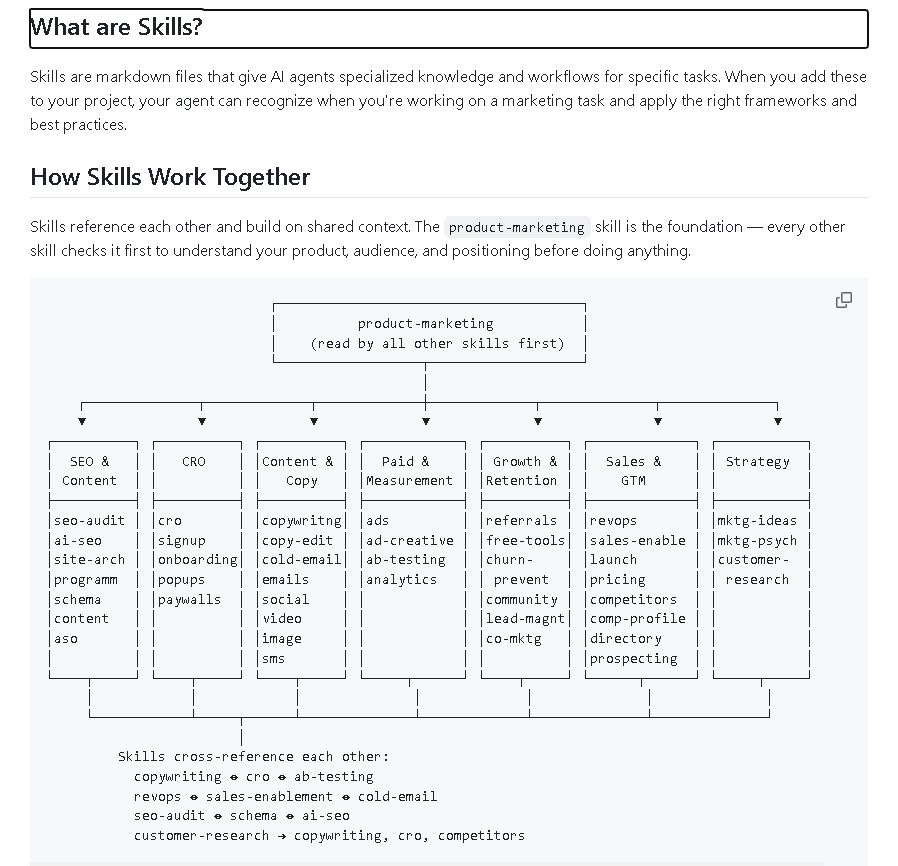
THIS REPO TURNS YOUR AI AGENT INTO A 50-PERSON MARKETING TEAM
It adds specialized skills for copy, CRO, SEO, pricing, ads, launches, and more
Repo: https://t.co/MYRPG4a3y8
Grok Bot is literally the closest thing to a real-life Jarvis
It can start a business, ship software, and make you go viral - all at once.
Here's how to run your entire business with it in 4 minutes:
1. Install Grok Bot and create your chief of staff
2. Give it the Digital Chief of Staff prompt
3. Connect it to X, Docs, Notion, Whop, and GitHub
4. You're done
Then paste this article and hand it to your chief of staff.
No matter what, this will be the most productive thing you do this week ↓
Bookmark this before you scroll past it.
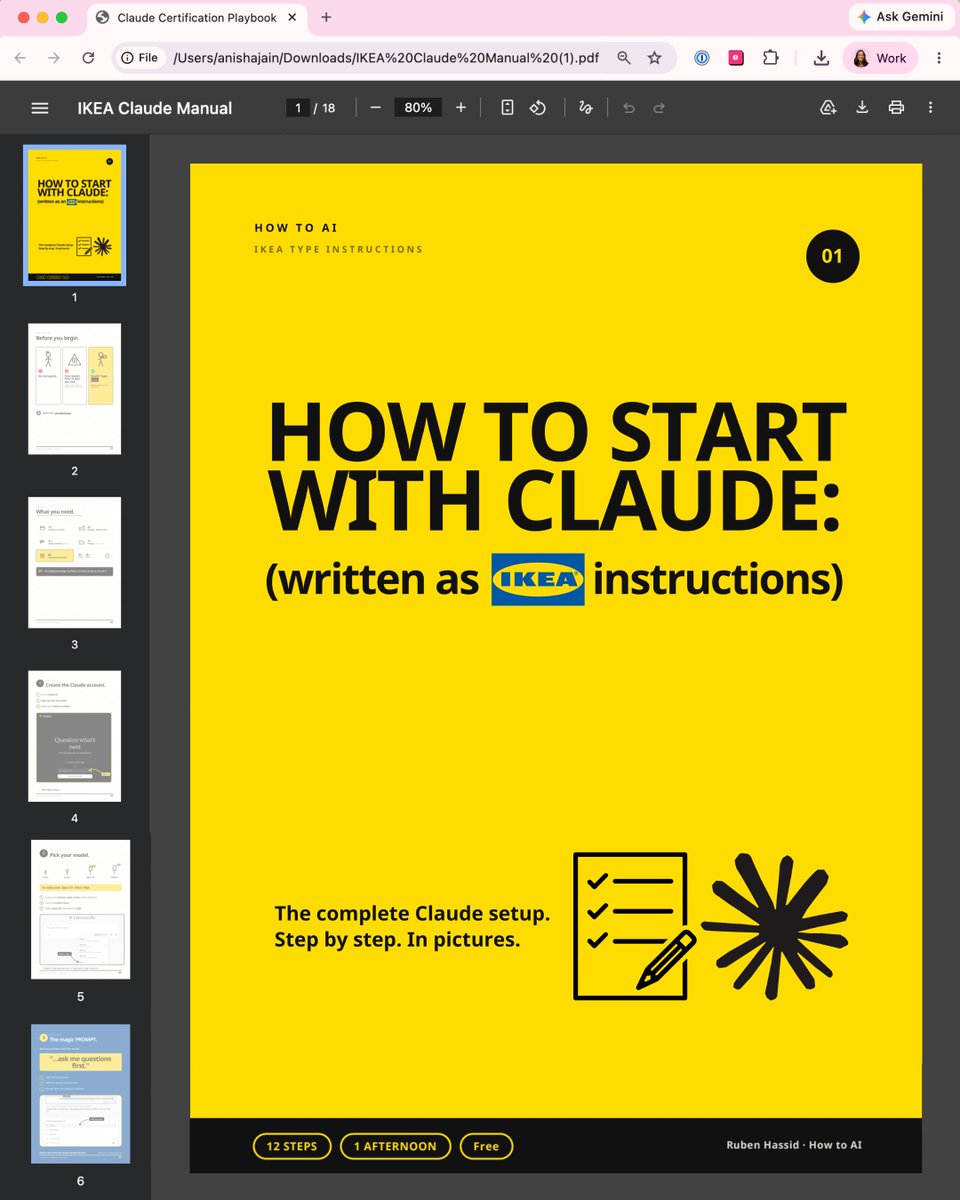
Claude doesn't come with a manual.
So I wrote a simple guide (like IKEA instructions):
Most people open Claude, type a question, get a bad answer & decide it's "just another chatbot."
The problem is nobody handed you the instructions. So I wrote one, like flat-pack furniture.
Here's the whole thing:
1. Get the entire manual (for free)
Go to https://t.co/psB7XxB2Y4. Subscribe for free.
Open the received email in your inbox.
Go to the link, download "Ikea Claude manual"
Keep it open in a second tab while you follow along.
2. The one sentence to end every prompt with - it makes you better at Claude than 99% of people
3. Goals vs. tasks: why "write me an email" gets a worse result than telling Claude what you want
4. The Claude rule that stops your chats getting slow, dumb, and expensive
5. How to give Claude a memory, so every chat already knows who you are
6. The expensive model nobody warns you about and when to use it
7. Connecting your Gmail and calendar, and the skills you build once and never rebuild
No coding. No folders. No jargon.
If you can build a bookshelf, you can do this.
Keep it open in a second tab while you follow along:
→ https://t.co/psB7XxB2Y4.
I removed every word that wasn't necessary and drew the rest.
If your team is still typing one-line questions into a Ferrari, send them this.
(If you share it, mention the newsletter. Be nice.)