@jeremybernier It makes zero sense that you as an American have to navigate Chinese culture within an American company Lol, not worth wasting your career doing that TBH @jeremybernier
@antigravity can we support explicit renaming sessions in the Agent Manager? it's annoying that AI kept changing session name and I'll have to craw through the history just to understand what it is working on
I've never felt this much behind as a programmer. The profession is being dramatically refactored as the bits contributed by the programmer are increasingly sparse and between. I have a sense that I could be 10X more powerful if I just properly string together what has become available over the last ~year and a failure to claim the boost feels decidedly like skill issue. There's a new programmable layer of abstraction to master (in addition to the usual layers below) involving agents, subagents, their prompts, contexts, memory, modes, permissions, tools, plugins, skills, hooks, MCP, LSP, slash commands, workflows, IDE integrations, and a need to build an all-encompassing mental model for strengths and pitfalls of fundamentally stochastic, fallible, unintelligible and changing entities suddenly intermingled with what used to be good old fashioned engineering. Clearly some powerful alien tool was handed around except it comes with no manual and everyone has to figure out how to hold it and operate it, while the resulting magnitude 9 earthquake is rocking the profession. Roll up your sleeves to not fall behind.
Continuing the journey of optimal LLM-assisted coding experience. In particular, I find that instead of narrowing in on a perfect one thing my usage is increasingly diversifying across a few workflows that I "stitch up" the pros/cons of:
Personally the bread & butter (~75%?) of my LLM assistance continues to be just (Cursor) tab complete. This is because I find that writing concrete chunks of code/comments myself and in the right part of the code is a high bandwidth way of communicating "task specification" to the LLM, i.e. it's primarily about task specification bits - it takes too many bits and too much latency to communicate what I want in text, and it's faster to just demonstrate it in the code and in the right place. Sometimes the tab complete model is annoying so I toggle it on/off a lot.
Next layer up is highlighting a concrete chunk of code and asking for some kind of a modification.
Next layer up is Claude Code / Codex / etc, running on the side of Cursor, which I go to for larger chunks of functionality that are also fairly easy to specify in a prompt. These are super helpful, but still mixed overall and slightly frustrating at times. I don't run in YOLO mode because they can go off-track and do dumb things you didn't want/need and I ESC fairly often. I also haven't learned to be productive using more than one instance in parallel - one already feels hard enough. I haven't figured out a good way to keep CLAUDE[.]md good or up to date. I often have to do a pass of "cleanups" for coding style, or matters of code taste. E.g. they are too defensive and often over-use try/catch statements, they often over-complicate abstractions, they overbloat code (e.g. a nested if-the-else constructs when a list comprehension or a one-liner if-then-else would work), or they duplicate code chunks instead of creating a nice helper function, things like that... they basically don't have a sense of taste. They are indispensable in cases where I inch into a more vibe-coding territory where I'm less familiar (e.g. writing some rust recently, or sql commands, or anything else I've done less of before). I also tried CC to teach me things alongside the code it was writing but that didn't work at all - it really wants to just write code a lot more than it wants to explain anything along the way. I tried to get CC to do hyperparameter tuning, which was highly amusing. They are also super helpful in all kinds of lower-stakes one-off custom visualization or utilities or debugging code that I would never write otherwise because it would have taken way too long. E.g. CC can hammer out 1,000 lines of one-off extensive visualization/code just to identify a specific bug, which gets all deleted right after we find it. It's the code post-scarcity era - you can just create and then delete thousands of lines of super custom, super ephemeral code now, it's ok, it's not this precious costly thing anymore.
Final layer of defense is GPT5 Pro, which I go to for the hardest things. E.g. it has happened to me a few times now that I / Cursor / CC are all stuck on a bug for 10 minutes, but when I copy paste the whole thing to 5 Pro, it goes off for 10 minutes but then actually finds a really subtle bug. It is very strong. It can dig up all kinds of esoteric docs and papers and such. I've also used it for other meatier tasks, e.g. suggestions on how to clean up abstractions (mixed results, sometimes good ideas but not all), or an entire literature review around how people do this or that and it comes back with good relevant resources / pointers.
Anyway, coding feels completely blown open with possibility across a number of "kinds" of coding and then a number of tools with their pros/cons. It's hard to avoid the feeling of anxiety around not being at the frontier of what is collectively possible, hence random sunday shower of thoughts and a good amount of curiosity about what others are finding.
#2 — 1,600,000 views 👀
@chamath opens up about parenting and 3 rules he has for his kids.
TikTok wasn't ready for this one! 😆
And now, the most viewed clip in 2024 goes to... 🥁
It was a huge week of AI and robotics news.
So I summarized everything announced by OpenAI, Apple, Google DeepMind, Adobe, The White House, Mistral, Tencent, Runway, and more.
Here's everything you need to know and how to make sense out of it:
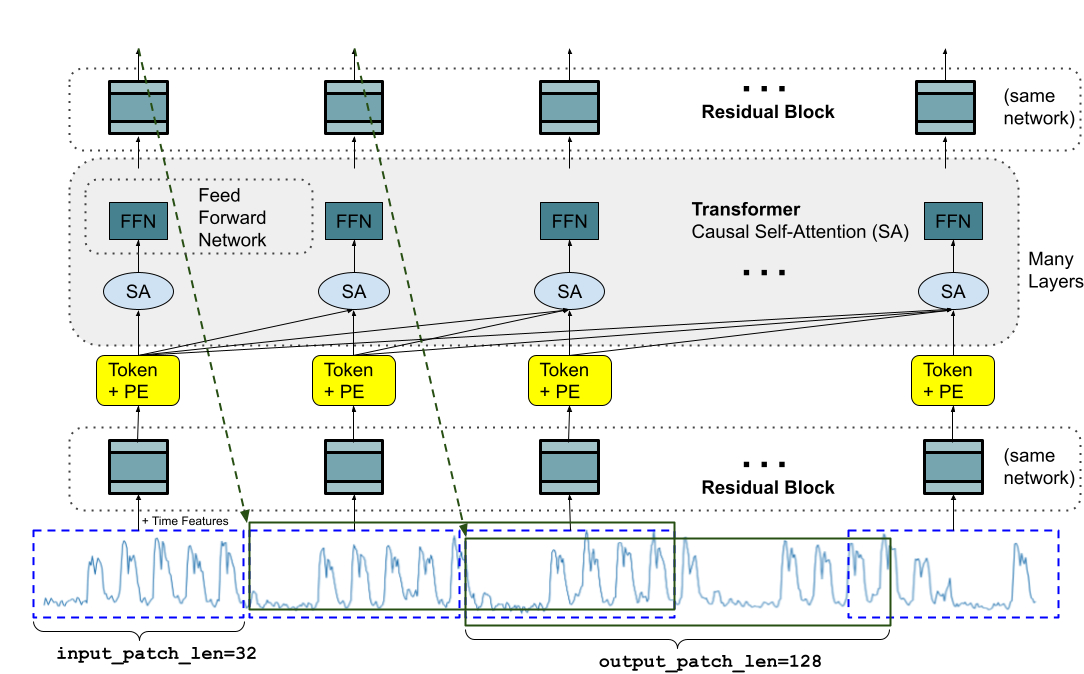
TimesFM is a forecasting model, pre-trained on a large time-series corpus of 100 billion real world time-points, that displays impressive zero-shot performance on a variety of public benchmarks from different domains and granularities. Learn more → https://t.co/U1OctNPZET
Planning is a key agentic AI design pattern in which we use a large language model (LLM) to autonomously decide on what sequence of steps to execute to accomplish a larger task. For example, if we ask an agent to do online research on a given topic, we might use an LLM to break down the objective into smaller subtasks, such as researching specific subtopics, synthesizing findings, and compiling a report.
Many people had a “ChatGPT moment” shortly after ChatGPT was released, when they played with it and were surprised that it significantly exceeded their expectation of what AI can do. If you have not yet had a similar “AI Agentic moment,” I hope you will soon. I had one several months ago, when I presented a live demo of a research agent I had implemented that had access to various online search tools.
I had tested this agent multiple times privately, during which it consistently used a web search tool to gather information and wrote up a summary. During the live demo, though, the web search API unexpectedly returned with a rate limiting error. I thought my demo was about to fail publicly, and I dreaded what was to come next. To my surprise, the agent pivoted deftly to a Wikipedia search tool — which I had forgotten I’d given it — and completed the task using Wikipedia instead of web search.
This was an AI Agentic moment of surprise for me. I think many people who haven’t experienced such a moment yet will do so in the coming months. It’s a beautiful thing when you see an agent autonomously decide to do things in ways that you had not anticipated, and succeed as a result!
Many tasks can’t be done in a single step or with a single tool invocation, but an agent can decide what steps to take. For example, to simplify an example from the HuggingGPT paper (cited below), if you want an agent to consider a picture of a boy and draw a picture of a girl in the same pose, the task might be decomposed into two distinct steps: (i) detect the pose in the picture of the boy and (ii) render a picture of a girl in the detected pose. An LLM might be fine-tuned or prompted (with few-shot prompting) to specify a plan by outputting a string like "{tool: pose-detection, input: image.jpg, output: temp1 } {tool: pose-to-image, input: temp1, output: final.jpg}".
This structured output, which specifies two steps to take, then triggers software to invoke a pose detection tool followed by a pose-to-image tool to complete the task. (This example is for illustrative purposes only; HuggingGPT uses a different format.)
Admittedly, many agentic workflows do not need planning. For example, you might have an agent reflect on, and improve, its output a fixed number of times. In this case, the sequence of steps the agent takes is fixed and deterministic. But for complex tasks in which you aren’t able to specify a decomposition of the task into a set of steps ahead of time, Planning allows the agent to decide dynamically what steps to take.
On one hand, Planning is a very powerful capability; on the other, it leads to less predictable results. In my experience, while I can get the agentic design patterns of Reflection and Tool use to work reliably and improve my applications’ performance, Planning is a less mature technology, and I find it hard to predict in advance what it will do. But the field continues to evolve rapidly, and I'm confident that Planning abilities will improve quickly.
If you’re interested in learning more about Planning with LLMs, I recommend:
- Chain-of-Thought Prompting Elicits Reasoning in Large Language Models, Wei et al. (2022)
- HuggingGPT: Solving AI Tasks with ChatGPT and its Friends in Hugging Face, Shen et al. (2023)
- Understanding the planning of LLM agents: A survey, by Huang et al. (2024)
[Original text: https://t.co/pWmIR9wEki ]
During a solar eclipse, the gaps between leaves on trees act as multiple pinhole cameras,
and each gap projects its own crescent-shaped image of the eclipsed sun onto the ground.
📹gottigreen
Whether some surface is drivable or not is all contextual. We typically don’t want the car to drive on dirt, but since the paved road is closed, the car needs to drive on dirt. The same logic also applies to, for example, mounting small curbs to avoid a larger obstacle. So “collision avoidance” cannot be an absolute objective, but a relative one. The actual objective is minimizing risk of injury / property damage while still getting to the destination. It requires a lot of intelligence to assess this risk accurately. This comes naturally to humans and is now also obvious to the car’s AI.