🖥️ Best Local LLMs for Consumer GPUs — llama.cpp Guide (June 2026)
What I actually run on consumer hardware right now. Every model below runs via llama.cpp with a simple one-liner — no Docker, no Python env, no cloud.
━━━ 8-16GB VRAM ━━━
🔹 Gemma 4-12B (Google)
• Smartest model in this size class — competes with stuff 2× bigger
• Unsloth's MTP GGUFs: 162 tok/s vs 52 tok/s normal (3× speedup)
• Minimum 8GB VRAM recommended for Q4_K_M quant
• GGUF → https://t.co/VWp818MB3D
🔹 LFM2.5-8B-A1B (LiquidAI)
• Hybrid MoE, only 1B active params — absurdly fast for its size
• Perfect for 8-12GB cards, MacBooks, or anyone on a tight budget
• GGUF → https://t.co/ZbOs4mXJDq
━━━ 16-32GB VRAM ━━━
🔹 Qwen3.6-27B (Qwen)
• Scored 1.00 on tool-efficiency benchmarks — best local agent available
• 40 deterministic tasks, 32k/128k context needle tests — all passed
• GGUF → https://t.co/n7K3sPvliE
• MTP version (faster) → https://t.co/gwdfnJTzcy
🔹 Qwopus3.6-27B-v2 (Jackrong)
• Best quantization of Qwen3.6-27B — topped 5 agent & coding benchmarks (1200 samples)
• If you're running Q4, this is the one to grab
• GGUF → https://t.co/tV1DFqXnOD
• MTP version → https://t.co/PMqz7V5ewv
🔹 Gemma 4-31B QAT (Google/Unsloth)
• QAT variant with MTP draft head: 76-125 tok/s (1.67× speedup)
• Excellent for multi-agent / subagent workflows
• GGUF → https://t.co/FgVsUX0YOB
🔹 Nex-N2-Mini (Nex AGI)
• Post-train of Qwen3.5-35B-A3B — MoE with only 3B active params
• Fits on 16GB+ VRAM, overflow loads from system RAM
• Adaptive thinking saves ~20% tokens with no quality loss
• For deep multi-step reasoning, nothing in this size comes close
• GGUF → https://t.co/oyC522a8Eh
━━━ Quick Picks ━━━
• 16GB all-rounder → Gemma 4-12B with MTP GGUFs
• 32GB all-rounder → Qwen3.6-27B / Qwopus-v2
• Agents & tool use → Qwen3.6-27B or Qwopus Q4
• Deep reasoning → Nex-N2-Mini (MoE, fits 16GB+)
• Tight budget → LFM2.5-8B-A1B
• Cheapest full build: 1× used RTX 3090 (24GB) + rest of PC ≈ $1000-1500
━━━ Setup on Windows ━━━
1. Download llama.cpp → https://t.co/et0J7Swua7 (latest .zip)
2. Extract to any folder (e.g. C:\llama.cpp)
3. Download a .gguf from the links above (Q4_K_M or Q5_K_M for best quality/speed balance)
4. Run one of the commands below depending on your hardware
━━━ Launch Commands ━━━
SINGLE GPU — Standard model (no MTP):
llama-server.exe ^
-m C:\models\Qwen3.6-27B-Q5_K_M.gguf ^
--ctx-size 180000 ^
--flash-attn on ^
--cache-type-k q4_0 ^
--cache-type-v q4_0 ^
--batch-size 1024 --ubatch-size 512 ^
-ngl 100 ^
-np 1 ^
--port 8080 ^
--jinja
SINGLE GPU — MTP model (faster inference):
llama-server.exe ^
-m C:\models\Qwen3.6-27B-MTP-Q5_K_M.gguf ^
--ctx-size 180000 ^
--flash-attn on ^
--cache-type-k q4_0 ^
--cache-type-v q4_0 ^
--batch-size 1024 --ubatch-size 512 ^
--spec-type draft-mtp ^
--spec-draft-n-max 3 ^
-ngl 100 ^
-np 1 ^
--port 8080 ^
--jinja
DUAL GPU — Split across two cards:
llama-server.exe ^
-m C:\models\Qwen3.6-27B-Q5_K_M.gguf ^
--ctx-size 180000 ^
--flash-attn on ^
--cache-type-k q4_0 ^
--cache-type-v q4_0 ^
--batch-size 1024 --ubatch-size 512 ^
-ngl 100 ^
--tensor-split 0.55,0.45 ^
--main-gpu 0 ^
-np 1 ^
--port 8080 ^
--jinja
DUAL GPU + MTP + Vision (multimodal):
llama-server.exe ^
-m C:\models\Qwen3.6-27B-MTP-Q5_K_M.gguf ^
--ctx-size 180000 ^
--flash-attn on ^
--cache-type-k q4_0 ^
--cache-type-v q4_0 ^
--batch-size 1024 --ubatch-size 512 ^
--spec-type draft-mtp ^
--spec-draft-n-max 3 ^
-ngl 100 ^
--tensor-split 0.60,0.40 ^
--main-gpu 0 ^
-np 1 ^
--port 8080 ^
--jinja ^
--mmproj C:\models\mmproj-F16.gguf
━━━ Parameter Breakdown ━━━
-m <path>
Path to your .gguf model file. Change this to wherever you downloaded it.
--ctx-size 180000
Context window in tokens. 180k = huge context for long conversations or big codebases.
Reduce to 32768 or 65536 if you don't need long context — uses less VRAM.
--flash-attn on
Flash Attention — dramatically speeds up inference and reduces VRAM usage.
Works on RTX 30xx/40xx/50xx. Always enable this.
--cache-type-k q4_0 / --cache-type-v q4_0
Quantizes the KV cache (key/value attention cache) to 4-bit.
This is what makes 180k context fit in VRAM. Without it, huge contexts eat all your memory.
Quality impact is minimal — this is a free performance win.
--batch-size 1024 / --ubatch-size 512
batch-size = how many tokens are processed in one forward pass (throughput).
ubatch-size = micro-batch actually sent to the GPU per step.
Higher = faster prompt processing but needs more VRAM.
If you run out of VRAM, lower these (e.g. 512/256).
-ngl 100
Number of layers to offload to GPU. 100 = all layers on GPU (full offload).
This is what you want if the model fits in your VRAM.
If it doesn't fit, reduce this (e.g. -ngl 40) — remaining layers run on CPU/RAM.
--tensor-split 0.55,0.45
How to split model layers across multiple GPUs. Values are ratios.
0.55,0.45 = GPU 0 gets 55% of layers, GPU 1 gets 45%.
Adjust based on your VRAM — give more to the card with more memory.
Example: 0.70,0.30 for a 24GB + 12GB setup.
Not needed for single GPU setups.
--main-gpu 0
Which GPU handles the batch computation (the "orchestrator").
Set to 0 (your primary GPU). The other GPU(s) handle their assigned layers.
Minor performance impact — usually just leave it at 0.
-np 1
Number of parallel slots (concurrent requests). 1 = one user at a time.
Increase to 2-4 if you want multiple clients connected simultaneously.
Each extra slot uses additional VRAM for its own KV cache.
--port 8080
Which port the server listens on. Change if port 8080 is busy.
--jinja
Enables Jinja2 template processing — required for proper chat formatting.
Most modern models expect this. Always include it.
--spec-type draft-mtp
Enables Multi-Token Prediction (MTP) speculative decoding.
Only works with MTP GGUF models (downloaded separately).
The model predicts multiple tokens at once and verifies them — big speed boost.
--spec-draft-n-max 3
How many tokens the MTP draft head proposes per step.
3 is a good default. Higher = potentially faster but more VRAM and may reduce quality.
--mmproj <path>
Path to the multimodal projector file (for vision models).
Enables image understanding — paste screenshots into the web chat.
Only needed if you want vision capabilities. Omit for text-only use.
━━━ Your Hardware → Your Command ━━━
Single GPU (8-24GB VRAM):
Use the "Single GPU" command. Change -m to your model path.
8GB card → Gemma 4-12B Q4 or LFM2.5-8B
12GB card → Gemma 4-12B Q5/Q6
16GB card → Gemma 4-31B QAT Q4 or Nex-N2-Mini
24GB card → Qwen3.6-27B Q4/Q5, Qwopus-v2, Gemma 4-31B QAT Q5/Q6
Dual GPU:
Use the "Dual GPU" command. Adjust --tensor-split based on your VRAM ratio.
24GB + 24GB → --tensor-split 0.50,0.50
24GB + 12GB → --tensor-split 0.70,0.30
24GB + 8GB → --tensor-split 0.75,0.25
Want speed? Use MTP versions of models with the "MTP" commands.
Want vision? Add --mmproj with the projector file from the model's HuggingFace repo.
5. Once running, you get:
• Web chat UI → http://localhost:8080
• OpenAI-compatible API → http://localhost:8080/v1
• Playground → http://localhost:8080/playground
━━━ Why /v1 API Is the Killer Feature ━━━
One local endpoint replaces your entire cloud API bill. The /v1 endpoint is drop-in OpenAI-spec compatible — every tool that speaks OpenAI just works. No custom code, no glue layer.
Works out of the box with:
• IDEs: Cursor, Continue, Windsurf, Cline, Roo Code
• CLI tools: aider, Open Interpreter, OpenCode
• Frameworks: LangChain, LlamaIndex, LiteLLM
• Any OpenAI SDK (Python, Node, Go, Rust)
Why this beats cloud APIs:
• 100% private — code never leaves your machine
• $0 per token — no rate limits, no quotas, no surprise bills
• Works fully offline
• Zero telemetry, no training on your data
• Swap models by dropping in a different .gguf — no app changes needed
• Run 32k–128k context windows without burning money
Good combos:
• Cursor + Qwopus-v2 → near-frontier quality, zero API cost
• Continue + Qwen3.6-27B → best local coding agent
�� aider + Gemma 4-12B MTP → 162 tok/s, feels instant
• OpenCode + Nex-N2-Mini → deep reasoning on 16GB
Set any OpenAI-compatible client to your local endpoint:
set OPENAI_API_KEY=sk-dummy (any non-empty string works)
set OPENAI_BASE_URL=http://localhost:8080/v1
# every OpenAI-compatible tool now hits your local GPU
Shoutouts: @0xSero @rS_alonewolf @witcheer @UnslothAI @LottoLabs
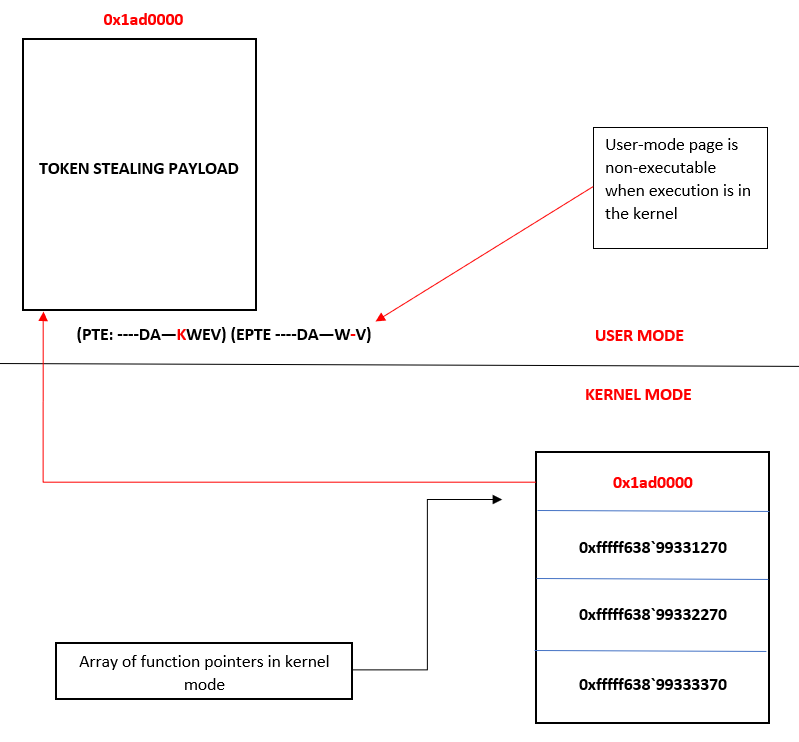
One of the best FREE Windows exploit development and security research blogs out there. Kernel pool exploitation. PTE overwrites. HVCI and kernel CFG bypass. XFG internals. Browser type confusion. Kernel shadow stacks. Secure kernel internals. ARM64 Pointer Authentication bypass. ETW and PPL research.
Covers everything from ROP fundamentals all the way to cutting edge ARM64 and VBS security research. Still actively publishing in 2026.
https://t.co/tyfevXiWOp
Author: @33y0re
#ExploitDevelopment #WindowsInternals #ReverseEngineering
When measuring effectiveness versus cost, the frontier presents as a tradeoff rather than a single winner.
Read our methodology and explore the results below:
https://t.co/InjYdQeD1B
RSA private keys biased toward 0 bits can be factored by swapping a hard math problem for an easy one: integer factorization becomes polynomial factorization.
We found hundreds of real-world keys vulnerable to this. Many traced to a type mismatch in CompleteFTP (now patched): each 32-bit limb got only 8 bits of randomness. We recovered 603 RSA and 74 DSA private keys. https://t.co/C2jcxVW9WG