🇨🇦 Canada’s FMCSP opens a fresh intake on August 26 with up to 2,970 study permit applications, offering eligible French-speaking students a dedicated pathway to permanent residence after completing studies.
🇨🇦 Check out full details here 👇
https://t.co/MbsQx41G5G
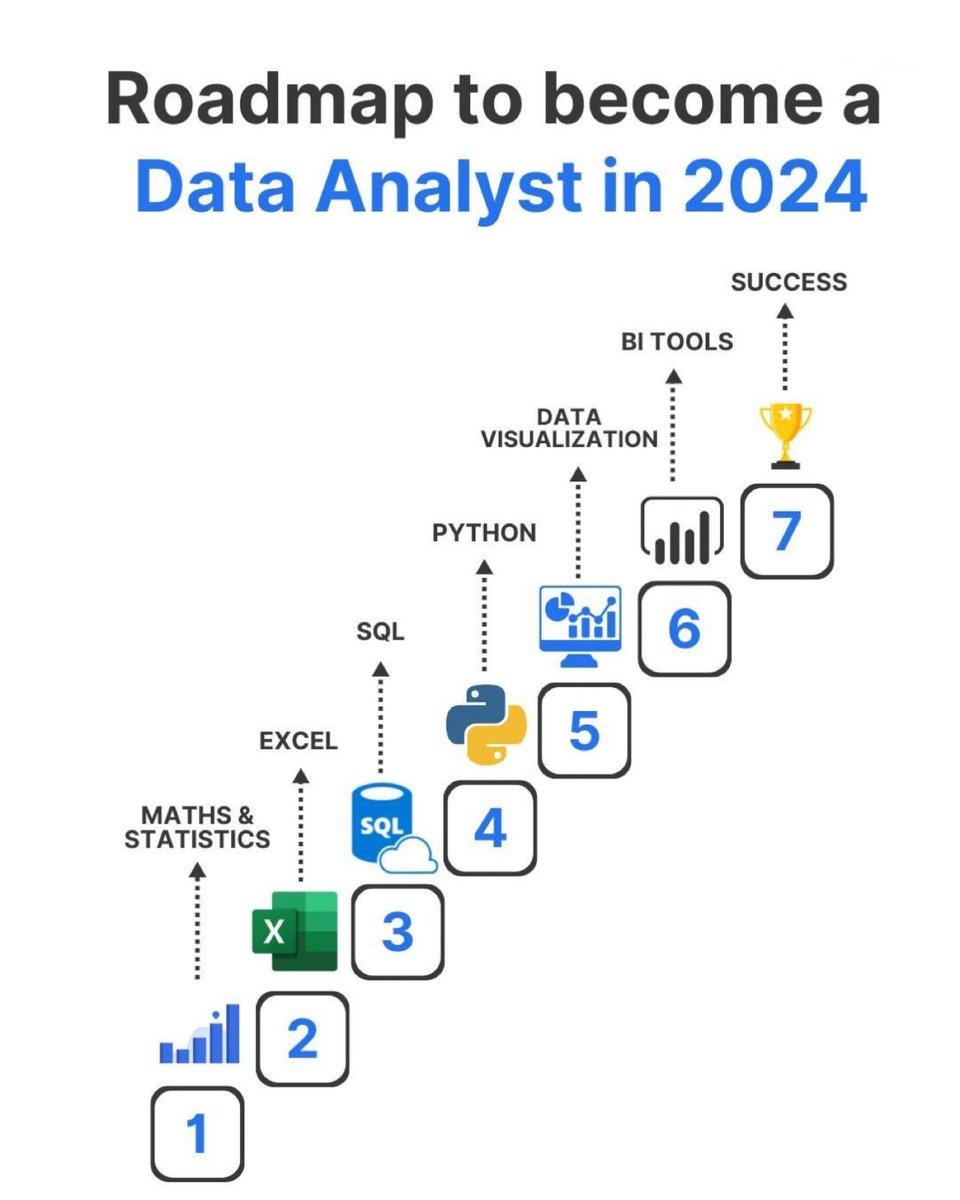
Free Certification Courses to Learn Data Analytics in 2024:
1. Python
🔗 https://t.co/gTbLYAFn8B
2. SQL
🔗 https://t.co/SzslJwZ1iB
3. Statistics and R
🔗 https://t.co/XV3xAFhYlc
4. Data Science: R Basics
🔗https://t.co/yxTYxuzgPl
5. Excel and PowerBI
🔗 https://t.co/iyV7Y6Fb5s
6. Data Science: Visualization
🔗https://t.co/jd6FoFY3EK
7. Data Science: Machine Learning
🔗https://t.co/N2BRbNW2FV
8. R
🔗https://t.co/evPpMnd5F1
9. Tableau
🔗https://t.co/VJVrM9VHyX
10. PowerBI
🔗 https://t.co/OzBt3UXocx
11. Data Science: Productivity Tools
🔗 https://t.co/DqBWoG4QOO
12. Data Science: Probability
🔗https://t.co/vrO9BL1091
13. Mathematics
🔗https://t.co/TKLSpOTG2I
14. Statistics
🔗 https://t.co/wx610e5vYX
15. Data Visualization
🔗https://t.co/ewaLFSBd26
16. Machine Learning
🔗 https://t.co/k6YTXO1voe
17. Deep Learning
🔗 https://t.co/aurTSW5AbZ
18. Data Science: Linear Regression
🔗https://t.co/645OsptrFX
19. Data Science: Wrangling
🔗https://t.co/7rQcGUkNlk
20. Linear Algebra
🔗 https://t.co/MzvYzT5504
21. Probability
🔗 https://t.co/dlMoVjI2iW
22. Introduction to Linear Models and Matrix Algebra
🔗https://t.co/cFlZ7cJkDv
23. Data Science: Capstone
🔗 https://t.co/0TbD8v3oup
24. Data Analysis
🔗 https://t.co/CBFaIe3geH
25. IBM Data Science Professional Certificate
https://t.co/vX16mR6Yab
26. Neural Networks and Deep Learning
https://t.co/oZCiqT7pJZ
27. Supervised Machine Learning: Regression and Classification
https://t.co/JFxb8hd5h4
Happy Learning!🌟
Follow @manishkumar_dev for more such content.
We've all dealt with activation functions while working with neural nets.
- Sigmoid
- Tanh
- ReLu & Leaky ReLu
- Gelu
Ever wondered why they are so important❓🤔
Let me explain it to... 👇
My recommended materials for cracking your next technical interview
Coding
- Leetcode
- Cracking the coding interview book
- Neetcode
System Design Interview
- System Design Interview Book 1, 2 by Alex Xu, Sahn Lam
- Grokking the system design by Design Guru
- Design Data-intensive Application book
Behavioral interview
- Tech Interview Handbook (Github repo)
- A Life Engineered (YT)
- STAR method (general method)
OOD Interview
- Interviewready
- OOD by educative
- Head First Design Patterns Book
Mock interviews
- Interviewingio
- Pramp
- Meetapro
Apply for Jobs
- Linkedin
- Monster
- Indeed
Over to you: What is your favorite interview prep material?
--
Subscribe to our weekly newsletter to get a Free System Design PDF (158 pages): https://t.co/uc5M7CdXXC
Today we’re launching Google Threat Intelligence from @googlecloud to help cybersecurity professionals get better visibility of global threats. It uses Gemini’s advanced AI capabilities, plus expertise and insights from @Mandiant + @virustotal. https://t.co/YeeKzGWzM4
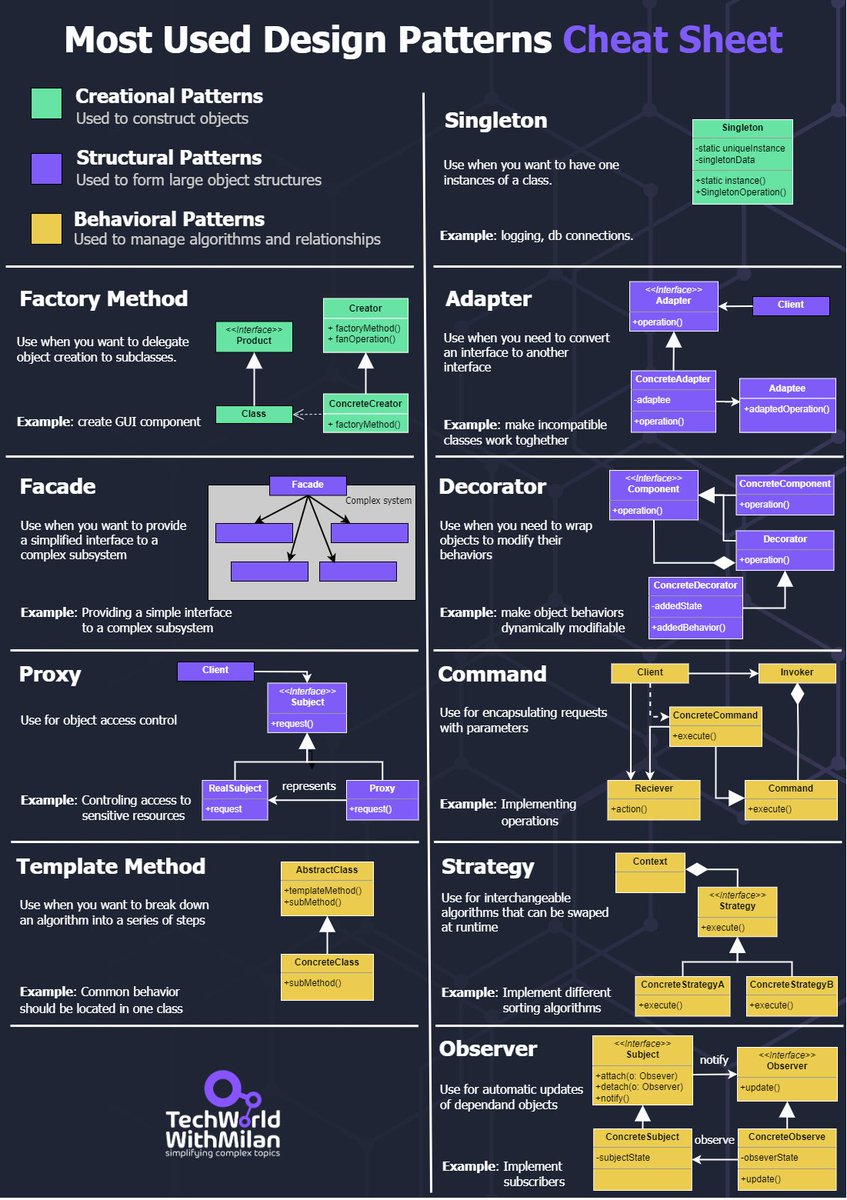
𝗗𝗼 𝗬𝗼𝘂 𝗡𝗲𝗲𝗱 𝗧𝗼 𝗞𝗻𝗼𝘄 𝗔𝗹𝗹 𝗗𝗲𝘀𝗶𝗴𝗻 𝗣𝗮𝘁𝘁𝗲𝗿𝗻𝘀?
The answer is no. Even though we have 23 design patterns, around 10 are mostly used in everyday development. Knowing which patterns exist overall is good, but you need to know these very well.
Design patterns can be divided into three main types:
𝟭. 𝗖𝗿𝗲𝗮𝘁𝗶𝗼𝗻𝗮𝗹 𝗣𝗮𝘁𝘁𝗲𝗿𝗻𝘀
These design patterns deal with object creation mechanisms, trying to create objects in a manner suitable to the situation.
Important patterns in this group are:
🔹𝗙𝗮𝗰𝘁𝗼𝗿𝘆: This pattern allows delegating the instantiation logic to factory classes. The Factory Method creates objects without exposing the instantiation logic to the client.
🔹𝗦𝗶𝗻𝗴𝗹𝗲𝘁𝗼𝗻: The Singleton pattern ensures that a class has only one instance and provides a global point of access to it. It's useful when exactly one object is needed to coordinate actions across the system.
𝟮. 𝗦𝘁𝗿𝘂𝗰𝘁𝘂𝗿𝗮𝗹 𝗣𝗮𝘁𝘁𝗲𝗿𝗻𝘀
These patterns deal with the composition of classes and objects that form larger structures.
Important patterns in this group are:
🔹𝗔𝗱𝗮𝗽𝘁𝗲𝗿: This pattern works as a bridge between two incompatible interfaces. It wraps an existing class with a new interface to become compatible with the client's interface.
🔹𝗙𝗮𝗰𝗮𝗱𝗲: The Façade pattern provides a unified interface to a set of interfaces in a subsystem. Façade defines a higher-level interface that makes the subsystem easier to use.
🔹𝗗𝗲𝗰𝗼𝗿𝗮𝘁𝗼𝗿: This pattern dynamically adds/overrides behavior in an existing method of an object. This pattern provides a flexible alternative to subclassing for extending functionality.
🔹𝗣𝗿𝗼𝘅𝘆: The Proxy pattern provides a surrogate or placeholder for another object to control access to it. In its most general form, a proxy is a class functioning as an interface to something else.
𝟯. 𝗕𝗲𝗵𝗮𝘃𝗶𝗼𝗿𝗮𝗹 𝗣𝗮𝘁𝘁𝗲𝗿𝗻𝘀
These patterns are specifically concerned with communication between objects and how they interact and distribute work.
Important patterns in this group are:
🔹𝗖𝗼𝗺𝗺𝗮𝗻𝗱: The Command pattern encapsulates a request as an object, thus allowing users to parameterize clients with queues, requests, and operations.
🔹𝗧𝗲𝗺𝗽𝗹𝗮𝘁𝗲 𝗠𝗲𝘁𝗵𝗼𝗱: This pattern defines the program skeleton of an algorithm in a method called template method, which defers some steps to subclasses.
🔹𝗦𝘁𝗿𝗮𝘁𝗲𝗴𝘆: The Strategy pattern defines a family of algorithms, encapsulates each one, and makes them interchangeable. Strategy lets the algorithm vary independently from clients that use it.
🔹𝗢𝗯𝘀𝗲𝗿𝘃𝗲𝗿: This pattern defines a one-to-many dependency between objects so that all its dependents are notified and updated automatically when one object changes state.
#technology #softwareengineering #programming #techworldwithmilan #developers
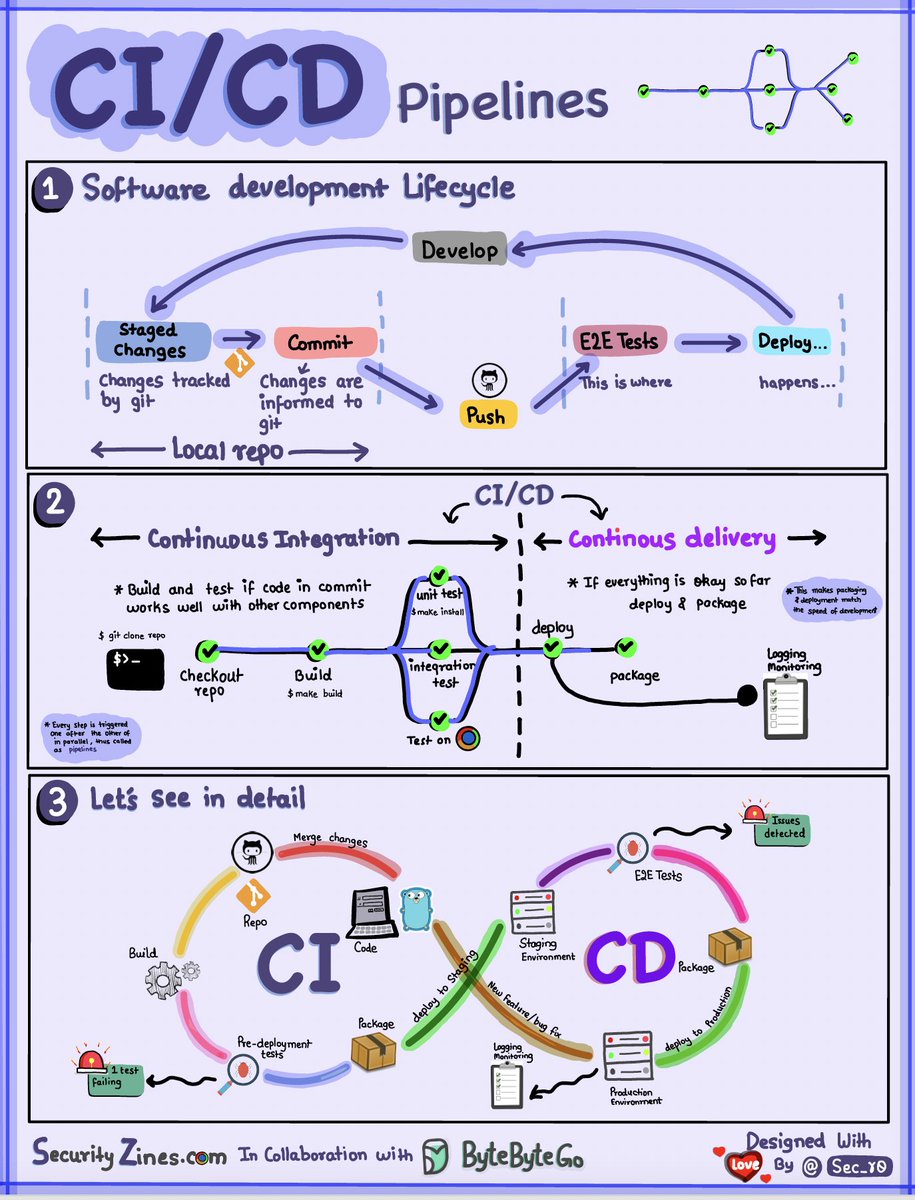
CI/CD Pipeline Explained to Kids
Section 1 - SDLC with CI/CD
The software development life cycle (SDLC) consists of several key stages: development, testing, deployment, and maintenance. CI/CD automates and integrates these stages to enable faster, more reliable releases.
When code is pushed to a git repository, it triggers an automated build and test process. End-to-end (e2e) test cases are run to validate the code. If tests pass, the code can be automatically deployed to staging/production. If issues are found, the code is sent back to development for bug fixing. This automation provides fast feedback to developers and reduces risk of bugs in production.
Section 2 - Difference between CI and CD
Continuous Integration (CI) automates the build, test, and merge process. It runs tests whenever code is committed to detect integration issues early. This encourages frequent code commits and rapid feedback.
Continuous Delivery (CD) automates release processes like infrastructure changes and deployment. It ensures software can be released reliably at any time through automated workflows. CD may also automate the manual testing and approval steps required before production deployment.
Section 3 - CI/CD Pipeline
A typical CI/CD pipeline has several connected stages:
- Developer commits code changes to source control
- CI server detects changes and triggers build
- Code is compiled, tested (unit, integration tests)
- Test results reported to developer
- On success, artifacts are deployed to staging environments
- Further testing may be done on staging before release
- CD system deploys approved changes to production
–
Subscribe to our weekly newsletter to get a Free System Design PDF (158 pages): https://t.co/FIzCeaWsZV
How do companies ship code to production? The method to download the high-resolution PDF is available at the end.
The diagram below illustrates the typical workflow.
Step 1: The process starts with a product owner creating user stories based on requirements.
Step 2: The dev team picks up the user stories from the backlog and puts them into a sprint for a two-week dev cycle.
Step 3: The developers commit source code into the code repository Git.
Step 4: A build is triggered in Jenkins. The source code must pass unit tests, code coverage threshold, and gates in SonarQube.
Step 5: Once the build is successful, the build is stored in artifactory. Then the build is deployed into the dev environment.
Step 6: There might be multiple dev teams working on different features. The features need to be tested independently, so they are deployed to QA1 and QA2.
Step 7: The QA team picks up the new QA environments and performs QA testing, regression testing, and performance testing.
Steps 8: Once the QA builds pass the QA team’s verification, they are deployed to the UAT environment, where the QA team, dev team, and even the product owner perform UAT testing.
Step 9: If the UAT testing is successful, the builds become release candidates and will be deployed to the production environment on schedule. Here we might not want to deploy to all the users in one go to mitigate the change risks, so some techniques like feature toggle, canary deployment can be used.
Step 10: SRE (Site Reliability Engineering) team is responsible for prod monitoring. They leverage a bunch of log-analyzing tools and process-tracing tools like ELK stack, Prometheus, and Skywalking. They report production issues to QA and dev teams, and teams need to fix them based on defined priority.
–
Subscribe to our newsletter to download the 𝐡𝐢𝐠𝐡-𝐫𝐞𝐬𝐨𝐥𝐮𝐭𝐢𝐨𝐧 𝐏𝐃𝐅. After signing up, find the download link on the success page: https://t.co/0v29X0VLNt
How does HTTPS work?
Hypertext Transfer Protocol Secure (HTTPS) is an extension of the Hypertext Transfer Protocol (HTTP.) HTTPS transmits encrypted data using Transport Layer Security (TLS.) If the data is hijacked online, all the hijacker gets is binary code.
How is the data encrypted and decrypted?
Step 1 - The client (browser) and the server establish a TCP connection.
Step 2 - The client sends a “client hello” to the server. The message contains a set of necessary encryption algorithms (cipher suites) and the latest TLS version it can support. The server responds with a “server hello” so the browser knows whether it can support the algorithms and TLS version.
The server then sends the SSL certificate to the client. The certificate contains the public key, host name, expiry dates, etc. The client validates the certificate.
Step 3 - After validating the SSL certificate, the client generates a session key and encrypts it using the public key. The server receives the encrypted session key and decrypts it with the private key.
Step 4 - Now that both the client and the server hold the same session key (symmetric encryption), the encrypted data is transmitted in a secure bi-directional channel.
Why does HTTPS switch to symmetric encryption during data transmission? There are two main reasons:
1. Security: The asymmetric encryption goes only one way. This means that if the server tries to send the encrypted data back to the client, anyone can decrypt the data using the public key.
2. Server resources: The asymmetric encryption adds quite a lot of mathematical overhead. It is not suitable for data transmissions in long sessions.
Over to you: how much performance overhead does HTTPS add, compared to HTTP?
–
Subscribe to our weekly newsletter to get a Free System Design PDF (158 pages): https://t.co/FIzCeaWsZV
The Google security team published an amazing Rust course.
I did the course few months back with almost not knowledge of C++ and 0 knowledge of Rust and loved it!
Go check it out: https://t.co/sAmLVGq58L
Types of Software Engineers and Their Typically Required Skills
In this overview, we'll explore three key types of Software engineers:
1. Front-End Engineer:
Specializes in creating user interfaces using HTML, CSS, and JavaScript. They focus on ensuring that apps are visually appealing and user-friendly.
2. Back-End Engineer:
Works on the server-side of web applications, managing data, business logic, and server infrastructure to ensure functionality, performance, and security.
3. Full-Stack Engineer:
A versatile expert who combines the roles of Front-End and Back-End engineers, handling UI design, server-side tasks, databases, APIs, and ensuring seamless application integration. They cover the entire development spectrum from start to finish.
Over to you: Which type of software engineer resonates most with your interests and career aspirations?
–
Subscribe to our weekly newsletter to get a Free System Design PDF (158 pages): https://t.co/uc5M7CdXXC
New article: "Freezes & ANRs? Check memory leaks!"
https://t.co/Z9eNgUMeea
Most Android engs I talk to think memory leaks lead to OutOfMemoryError crashes. I used to think that as well!
Turns out, they lead to freezes, ANRs, and users killing the app.
#Android#AndroidDev
Happy to share that over the weekend I released Chucker v4.0.0 - A new major releaser for the on-device HTTP Inspector for Android
https://t.co/eVNxqDLvfQ
👉👉 No more duplicated configurations for Android feature modules. Configuration can be simplified/shared/unified using Gradle local plugins. See this in action in my android-showcase project:
https://t.co/uM3s3J36OL
#AndroidDev#Kotlin#Gradle
NEW POST: My colleague Matthew Foster describes how Team Topologies and Domain-Driven Design helped an organization scale a technical architecture and team structure that significantly improved development speed.
https://t.co/Hf2tMqDcQW
Important Things About HTTP Headers You May Not Know!
HTTP requests are like asking for something from a server, and HTTP responses are the server's replies. It's like sending a message and receiving a reply.
An HTTP request header is an extra piece of information you include when making a request, such as what kind of data you are sending or who you are. In response headers, the server provides information about the response it is sending you, such as what type of data you're receiving or if you have special instructions.
A header serves a vital role in enabling client-server communication when building RESTful applications. In order to send the right information with their requests and interpret the server's responses correctly, you need to understand these headers.
Over to you: the header “referer” is a typo. Do you know what the correct name is?
--
👉 Subscribe to our weekly newsletter to get a Free System Design PDF (158 pages): https://t.co/4QcX8btXGL