Andrew Ng just dropped a 3-hour course on how to become an AI Engineer in 2026:
• 00:00 - How to build agentic AI systems
• 04:25 - Future of AI engineering
• 23:38 - AI Prompting full course
• 2:52:17 - Creating an app with AI in 30 minutes
This 3-hour watch could replace 10 AI engineering courses on the internet.
Watch it today, then read how to run a self-improving system in the article below.
Junior SWE: “Let’s just build one backend and one DB for everything”
Mid-level SWE: “We should move this into microservices with separate databases”
Senior SWE: “We need sharding, Kafka, CQRS, Redis, S3, and a global cache”
Principal SWE: “Can this just be a single service with a read replica”
What is the difference?
-> Junior chooses a simple setup because:
They just want it to work. One codebase, one DB, one deploy.
-> Mid-level pushes microservices because:
They just learned about scalability, patterns, queues, and want to use everything.
-> Senior pushes complex infra because:
They are anticipating scale, failures, and traffic patterns that may or may not come.
-> Principal comes back to simple because:
They have seen how much complexity costs in on-call pain, bugs, incidents, and slow teams.
The evolution in your system design thinking is not about tools.
It is about your sense of constraints.
If you are still learning system design, here is the direction I would give:
Note: This is not from an interview point of view, but general learning.
1. Start with the simplest thing that can actually work
– Single service, single database, clear API boundaries.
– Make sure you can monitor it, debug it, and deploy it safely.
2. Learn how systems fail before you learn how they scale
– Read postmortems.
– Study outages of big companies.
– Ask seniors why incidents happened and what they would do differently.
– You will understand why people are scared of unnecessary complexity.
3. Stop collecting tools, start collecting tradeoffs
– Do not just "learn Kafka".
– Learn when Kafka is useful and when it is overkill.
– Same for Redis, queues, microservices, event sourcing.
4. Always design with 3 time horizons in mind
– Today: Can we ship something reliable quickly
– 1 year: Can we change this system without rewriting everything
– 3 years: If this becomes 10x bigger, can we evolve it instead of replacing it
Your goal is not to design the fanciest system. Your goal is to design the smallest system that solves a problem and can grow when it actually needs to.
----------------
Check out my Java+Springboot+Microservices+Design Patterns+System design ebook curated for interviews from here https://t.co/iH4Ung369Y
Thank you all for helping me choose the cover for the Go Concurrency book. I didn't expect so much participation, and I really appreciate it!
Here's the final version, along with the table of contents.
How AWS Handles Auto Scaling
→ AWS Auto Scaling ensures that applications always have the right amount of compute capacity.
→ It automatically adds or removes resources based on real-time demand, health checks, and scaling policies.
→ This improves performance, reduces cost, and maintains high availability.
Auto Scaling Groups (ASGs)
→ An Auto Scaling Group is a collection of EC2 instances managed together.
→ You define the minimum, maximum, and desired number of instances.
→ AWS automatically launches or terminates instances to maintain the desired capacity.
→ ASGs distribute instances across multiple Availability Zones for resilience.
Scaling Policies
→ AWS provides multiple ways to decide when to scale:
→ Target Tracking → maintains a metric (like CPU at 60%).
→ Step Scaling → scales gradually based on thresholds.
→ Simple Scaling → triggers scaling based on CloudWatch alarms.
→ Scheduled Scaling → adjusts capacity at specific times (e.g., business hours).
→ AWS continuously monitors metrics and enforces these policies automatically.
Dynamic Scaling
→ Dynamic scaling responds to real-time traffic changes.
→ AWS uses CloudWatch metrics to detect increases or decreases in workload.
→ Autoscaling ensures new instances are launched when needed and removed when demand falls.
→ Helps maintain consistent performance during unpredictable traffic spikes.
Predictive Scaling
→ Predictive scaling uses machine learning to anticipate upcoming traffic.
→ AWS analyzes historical patterns to scale resources before load increases.
→ Ideal for apps with daily or weekly demand cycles.
→ Reduces latency and avoids cold starts of new instances.
Health Checks & Replacement
→ AWS performs both EC2-level and ELB-level health checks.
→ If an instance becomes unhealthy, AWS automatically replaces it.
→ Ensures continuous availability without manual intervention.
Integration With Load Balancing
→ Auto Scaling works directly with Elastic Load Balancers.
→ When new instances launch, AWS registers them automatically with the load balancer.
→ When instances terminate, they are deregistered gracefully.
→ This maintains smooth traffic distribution at all times.
Auto Scaling for More Services
→ AWS Auto Scaling is not limited to EC2.
→ It supports multiple AWS services:
→ ECS tasks
→ DynamoDB throughput
→ Aurora replicas
→ Lambda concurrency limits
→ This provides full-stack elasticity across compute, databases, and containers.
Cost Efficiency
→ Auto Scaling helps reduce cost by removing unnecessary instances during low demand.
→ You only pay for what you need at any moment.
→ Prevents over-provisioning by keeping resources tightly aligned with workload.
Monitoring & Logging
→ AWS integrates Auto Scaling with CloudWatch, CloudTrail, and SNS.
→ Receive alerts when scaling occurs.
→ Track scaling history and troubleshoot issues easily.
Tip
→ AWS Auto Scaling ensures applications remain responsive, reliable, and cost-efficient.
→ With automated scaling, health monitoring, and predictive logic, AWS maintains optimal performance with minimal manual effort.
Grab the Ebook for deeper AWS mastery
https://t.co/cZQIvhf99z
How the most popular deployment strategies work
(explained in 2 mins or less):
Each stands out for specific strengths.
• Blue/Green for safety and zero downtime.
• Canary for controlled, low-risk rollouts.
• Rolling for maintaining continuous operations.
• Feature Toggles for flexible feature management.
• A/B Testing for data-driven user insights.
𝗕𝗹𝘂𝗲/𝗚𝗿𝗲𝗲𝗻 𝗗𝗲𝗽𝗹𝗼𝘆𝗺𝗲𝗻𝘁
↳ Renowned for zero downtime, this method uses two environments, Blue and Green. One hosts the live version while the other tests the new version.
↳ After comprehensive testing without affecting live traffic, users are transitioned to the updated environment.
↳ If an issue is discovered after switching environments, it is relatively easy to switch back.
↳ The main challenge is the cost and complexity of managing two environments.
𝗖𝗮𝗻𝗮𝗿𝘆 𝗗𝗲𝗽𝗹𝗼𝘆𝗺𝗲𝗻𝘁
↳ Named after canary birds in mines, it starts by rolling out changes to a small subset of users.
↳ This allows for monitoring performance and gathering feedback.
↳ If successful, you gradually extend the update to more users.
↳ Excels in minimizing user impact during updates due to isolation of a small set of users.
𝗥𝗼𝗹𝗹𝗶𝗻𝗴 𝗗𝗲𝗽𝗹𝗼𝘆𝗺𝗲𝗻𝘁
↳ Updates software in phases, rather than all at once.
↳ Incrementally upgrades different segments of the system, ensuring most of it remains operational during the deployment.
↳ Can be ideal for critical systems that require continuous operation.
↳ However, it extends the total update time and might introduce temporary inconsistencies.
𝗙𝗲𝗮𝘁𝘂𝗿𝗲 𝗧𝗼𝗴𝗴𝗹𝗲𝘀
↳ Think of feature toggles as on-off switches for new features.
↳ They allow teams to deploy features quietly, turning them on for specific users when it makes sense.
↳ Feature toggles support strategies like canary releases and A/B testing.
↳ The challenge lies in managing numerous toggles, which can become complex and risk feature conflicts.
𝗔/𝗕 𝗧𝗲𝘀𝘁𝗶𝗻𝗴
↳ Comparable to a scientific experiment, A/B testing offers two variations of a feature to different user groups to gauge which performs better.
↳ It's a go-to for validating user preference and effectiveness of new features, based on concrete data like user engagement or ease of use.
Remember, the right deployment strategy varies depending on your project's needs and objectives.
--
Thanks to Kilo Code who keeps our content free to the community.
Built by GitLab founder, open-source, 500k+ downloads, enterprise-ready, and it has 5 agent modes (architect, code, debug, ask, orchestrate).
Try out the VS Code extension: https://t.co/gdwc8Gbw33
--
💾 Save for later.
♻️ Repost to help engineers learn system design.
🙋🏻♀️ Follow Nikki Siapno + turn on notifications 🔔
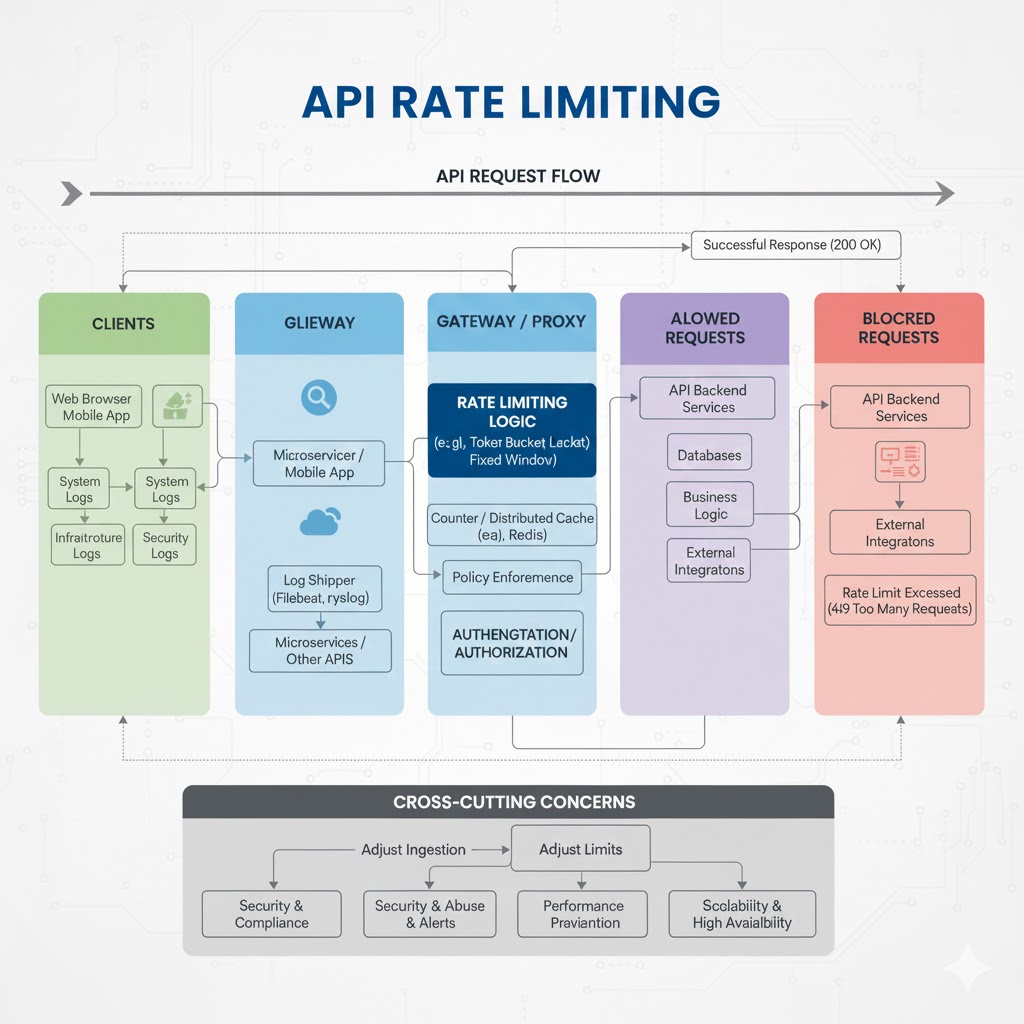
API Rate Limiting
API rate limiting is the practice of controlling how many requests a client can make within a specific time window. It protects your backend from abuse, ensures fair usage among clients, and maintains reliable performance even under heavy load.
Why API Rate Limiting Matters
→ Prevents server overload
→ Stops malicious bots or brute-force attempts
→ Ensures fair resource distribution
→ Improves API reliability and uptime
→ Helps manage API costs and infrastructure usage
Key Rate Limiting Techniques
1. Fixed Window Rate Limiting
→ Requests are counted within a fixed time window (e.g., 100 requests per minute)
→ Simple to implement
→ Can cause request spikes at window boundaries
2. Sliding Window Log
→ Tracks each request timestamp in a log
→ More accurate smoothing of traffic
→ Higher memory usage
3. Sliding Window Counter
→ Combines fixed window and log techniques
→ Provides smoothed limits without heavy storage
→ Reduces “burst” issues
4. Token Bucket Algorithm
→ Clients collect “tokens” at a fixed rate
→ Each request uses a token
→ Allows controlled bursts while enforcing limits
5. Leaky Bucket Algorithm
→ Processes requests at a constant, fixed rate
→ Queue holds overflow requests
→ Helps smooth fluctuations in traffic
Where Rate Limiting is Applied
→ API Gateways (Kong, NGINX, AWS API Gateway)
→ Reverse proxies
→ Backend application layer
→ CDN edges (Cloudflare, Akamai)
→ Microservices communication layer
Common HTTP Responses for Rate Limiting
→ 429 Too Many Requests — client exceeded limit
→ Retry-After header — tells client how long to wait
Best Practices
→ Set limits based on user roles (free vs. premium)
→ Provide clear error messages with retry instructions
→ Use caching systems like Redis for counters
→ Log all rate limit violations for analysis
→ Avoid extremely strict limits that hinder usability
→ Use adaptive limits for different workloads
Real-World Example
Rate Limit: 100 requests per 1 minute Exceeded: Server returns → 429 Retry-After: 60 seconds
Add-On: Rate Limiting in Modern API Ecosystems
→ Essential for securing public and partner APIs
→ Enforced in every scalable API architecture
→ Helps maintain predictable performance during traffic spikes
API Mastery Ebook (Add-On)
Get the full deep-dive into API design, security, scalability, and best practices:
API Mastery Ebook: https://t.co/142pBABAhq
🚦 Traefik power moves you're probably not using:
1. Redis-backed distributed rate limiting - sync rate limits across multiple Traefik instances instead of per-proxy limits.
Just add `redis` config to your rateLimit middleware and boom, cluster-wide protection.
2. TCP/UDP routing with Docker labels - yeah, Traefik handles more than HTTP.
Use `traefik.tcp.routers` and `traefik.udp.routers` labels to proxy databases, game servers, VPNs.
Just remember: declaring TCP/UDP prevents auto HTTP router creation, so define both explicitly.
3. IPv6 subnet grouping - set `ipv6Subnet` in rate limiters to prevent users from bypassing limits by grabbing new IPv6 addresses.
Groups entire subnets into one bucket.
4. Middleware chains with `period` tweaks - most folks miss that you can set rate limits below 1 req/s by defining `period` > 1s.
For example, `average=10, period=1m` = one request every 6 seconds, perfect for webhooks.
5. `sourceCriterion.requestHeaderName` - rate limit by header (like user ID or API key) instead of just IPs.
Way more flexible for authenticated APIs behind proxies.
And use @traefik v3's native HTTP/3 support and Wasm plugins for custom logic without rebuilding
#traefik #http3 #observability #k8s #docker #cloud #devops #sre #kubernetes
The new chapter of my Go Concurrency book covers the scheduler and its implementation details.
It's not meant to be a deep dive. But it's short, easy to understand, and will teach you more about goroutine scheduling than many other developers know.
https://t.co/iPmrnl1zej
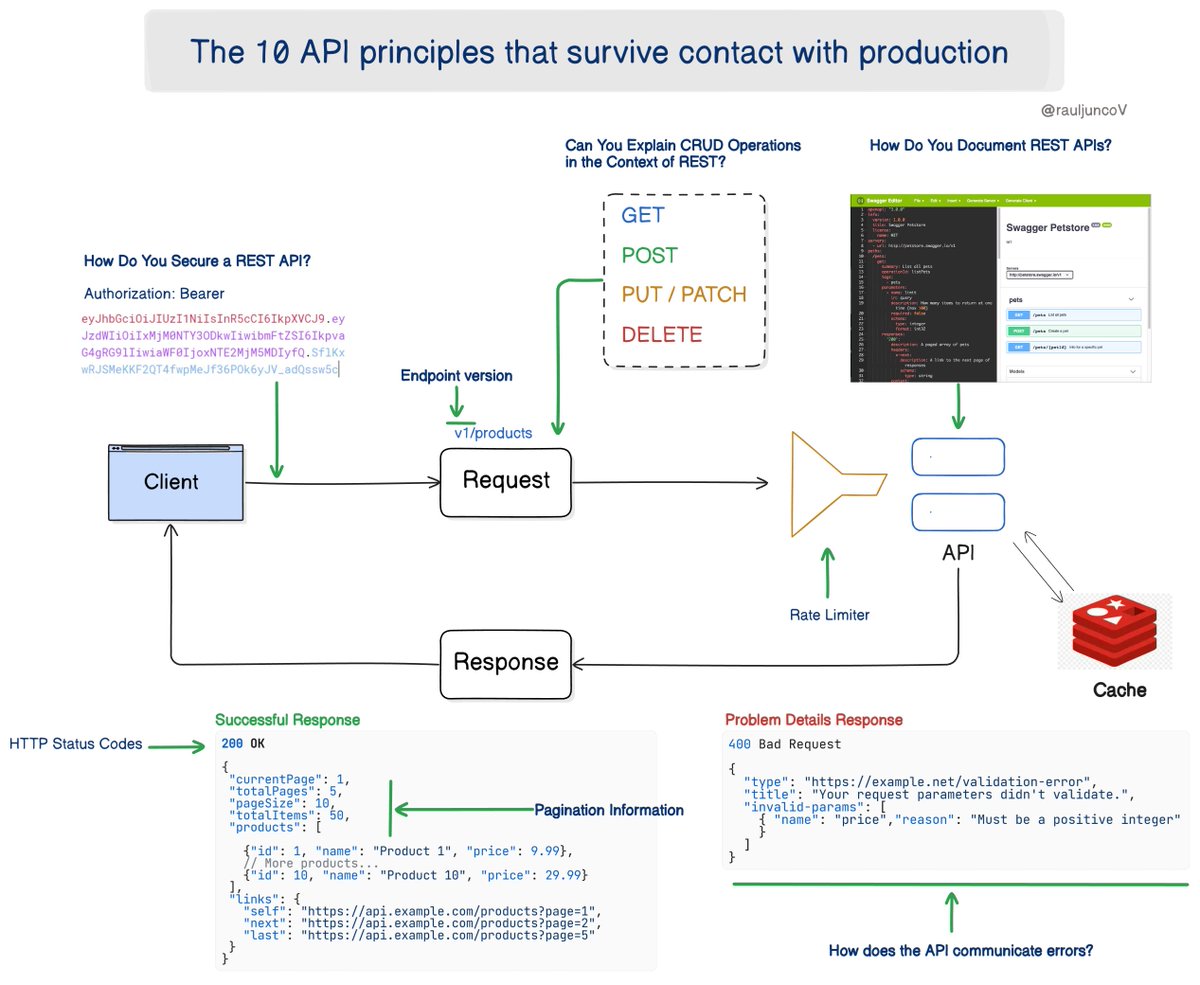
My first API caused outages. My tenth didn’t.
The 10 API principles that survive contact with production:
1. Ship business truth, not database columns
Design your contracts around real domain actions and entities. Internal schemas evolve. Your API is the promise you can’t break.
2. Consistency beats cleverness
Pick one naming style, one error format, one approach to pagination, one authentication strategy.
Your consumers shouldn’t need a decoder ring.
3. Don’t expose implementation details
Hide the storage model, hide job orchestration, hide temporary hacks.
Clients should never notice your system changes.
4. Errors must teach, not confuse
Include a clear message, machine-readable code, and actionable guidance.
A great error cuts support tickets in half.
5. Version on breaking change only
Expect change. Plan for it. V1, V2, sunset plans, and adapters.
Consumers should upgrade because they want improvements, not because you broke them.
6. Rate limits are product decisions
Define limits based on behavior you want. Reward good usage patterns.
Protect yourself from abuse. Make thresholds visible and predictable.
7. Idempotency everywhere
Clients retry. Networks glitch. Duplicate requests happen.
Use idempotency keys on write operations so your business rules stay correct.
8. Validate at the edges
Everything that crosses the boundary gets validated: shape, type, length, enums, security.
Trust nothing at runtime except what you check.
9. Performance is part of the contract
Fast responses turn your API into a dependency people love. Measure latency.
Optimize the hot paths.
10. Observability isn’t optional
Trace every call. Log context. Surface meaningful metrics.
When something fails, you must see the “why” within minutes.
Key takeaways
• Treat APIs as long-term promises
• Make behavior obvious, errors useful, and change safe
• Control misuse with clear rules, not hidden traps
• Build the level of visibility you’ll want at 3am when things break
What did I miss?
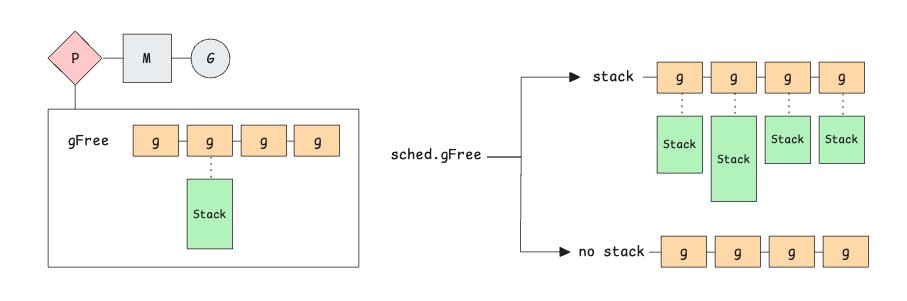
Many articles make you think that go func() {} always gives you a goroutine with a 2 KiB stack. That's sometimes true, but not always.
Go keeps a per-processor pool and a global pool of reusable goroutines, some with stacks already attached and some without. (diagram below)
The runtime maintains a dynamic 'starting stack size' that is recomputed on each garbage collection cycle from the average stack usage of all scanned goroutines.
When you run go f(), the runtime may use a goroutine and stack from the pools, so many goroutines actually start with something larger than the fixed 2 KiB minimum, such as 4 KiB, 8 KiB, 16 KiB, etc
If a reusable goroutine's stack size differs from the current 'starting stack size', its old stack is deallocated and a new stack of exactly the starting stack size is allocated and attached to it.
---
If no reusable goroutine is available, the runtime allocates a fresh one with the fixed 2 KiB initial stack on most 64-bit Unix-like platforms
"Our database won't scale".
Database:
- 40GB total data
- 12 queries per second
- 0 indexes on query columns
- N+1 queries everywhere
- 200ms average query time
Solution:
- Shard across 12 databases
- Add read replicas
- Implement caching layer
- Switch to "web scale" NoSQL
Actual solution:
- Add 3 indexes
- Fix the N+1 queries
- 5ms query time
- $40/month Postgres
You don't have a scaling problem.
You have a competence problem.
I'm getting a lot of DMs asking for a roadmap or where to start learning Golang.
Here's what I would do If I was starting to learn golang as a beginner:
Some important topics are Interfaces, arrays, slices, maps, variadic functions, strings and runes,
Mutex, defer, recover etc.
(Spend 60% of your time on these topics below)
master concurrency, goroutines, channels and then jump to concurrency patterns.
Check out Concurrency in Go book. It's a good Book.
Go to https://t.co/6K0Ws6tdql it's good for beginners and then see Golang's official Documentation.
After that try to do some coding problems using go. Try to do string/data manipulation problems & try to think "how would I solve this problem in Go? What functions should I use? This will help you get comfortable & boost your confidence while learning Go. Make a habit of solving 3-4 problems daily. Write code daily even if you're following some tutorial, don't just copy paste the example, try to write by yourself. Do this for 1-2 months or take more time if you feel you're not comfortable.
Then move on to build mini projects using the cobra cli library, APIs and utilise goroutines and channels.
Explore frameworks gin, go-chi, echo etc. try to write API using each framework and use popular features of framework. analyze these frameworks, do the comparison side by side and decide which one would be best for your project.
Implement authentication mechanism, circuit breakers, rate limiter etc.
For example, you can create an API to fetch client's data from DB and write to a PDF file. Use pdfcpu library (you can find this on GitHub).
If client's data is coming from different tables (3 or more), then use goroutines to write that data to pdf concurrently.
This example taught me a lot of things.
After you're done with this then learn about grpc.
Tip:- don't learn everything in one go. Learn one thing then implement it and then move to another topic and in that 2nd topic try to use the 1st topic. Do this for all topics.
You can look at my old tweets I've shared some good concepts
All the best👍
𝗜𝗻𝘁𝗲𝗿𝘃𝗶𝗲𝘄 𝗤𝘂𝗲𝘀𝘁𝗶𝗼𝗻 𝘁𝗵𝗮𝘁 𝗲𝘃𝗲𝗻 𝘀𝗲𝗻𝗶𝗼𝗿 𝗱𝗲𝘃𝘀 𝗼𝗳𝘁𝗲𝗻 𝗳𝗮𝗶𝗹
“What are the most important Design Patterns?”
Most developers learn design patterns in random order.
But not all patterns are equally valuable at every stage of your career.
Here's how to approach them the smart way 👇
Start learning patterns with these (𝗖𝗼𝗿𝗲 𝗣𝗮𝘁𝘁𝗲𝗿𝗻𝘀)
These are your foundation. You'll use them in almost every codebase.
1️⃣ Builder
2️⃣ Factory Method
3️⃣ Abstract Factory
4️⃣ Strategy
5️⃣ Adapter
6️⃣ Decorator
7️⃣ Facade
➡️ They help you create and organize objects and keep your architecture modular and clean.
If you're a junior developer, mastering these will instantly improve your design thinking.
Get to these next (Intermediate Patterns)
Once your projects grow, you'll face more complex workflows and coordination challenges.
1️⃣ Chain of Responsibility
2️⃣ State
3️⃣ Proxy
4️⃣ Template Method
5️⃣ Bridge
6️⃣ Command
➡️ These patterns teach you how to control behavior flow, abstract variation, and manage responsibilities.
Perfect for mid-level developers building scalable and extensible systems.
Use these when architecture gets complex (𝗔𝗱𝘃𝗮𝗻𝗰𝗲𝗱 𝗣𝗮𝘁𝘁𝗲𝗿𝗻𝘀)
You'll encounter them in large systems, frameworks, or domain-heavy architectures.
1️⃣ Singleton
2️⃣ Mediator
3️⃣ Flyweight
4️⃣ Interpreter
5️⃣ Composite
6️⃣ Visitor
7️⃣ Prototype
➡️ They help you optimize performance, coordinate subsystems, and manage object hierarchies.
For senior developers, these patterns refine your ability to reason about large-scale designs.
📌 Remember:
Don't chase patterns blindly.
Use them when they simplify your design, not when they add layers of unnecessary abstraction.
Do you agree with my priority list? Leave a comment down below 👇
——
♻️ Repost to help others learn Design Patterns in a better order
➕ Follow me ( @AntonMartyniuk ) to improve your .NET and Architecture Skills
📌 Save this post for future reference!
Your Golang knowledge, explaining:
Goroutines
Channels
Context cancellation
WaitGroups
Mutex vs RWMutex
Buffered vs unbuffered channels
Worker pools
Select statements
Interfaces
Error wrapping
Generics
net/http internals
gRPC in Go
sync.Pool
io.Reader / io.Writer
Goroutine leaks
Escape analysis
Zero-allocation patterns
Race detector
Memory profiling with pprof
Interview decision:
Sorry, we need someone who actually knows when to use a goroutine.
Knowing Go features ≠ knowing Go engineering.
I’ve seen engineers spin up 100 goroutines for a task that should’ve been a simple for-loop.
They knew what a goroutine is.
They didn’t know why to spawn one.
Understanding fundamentals in Go means asking better questions:
---
1. Do you really need concurrency here?
Just because Go makes concurrency easy doesn't mean everything should be parallelized.
If your job is CPU-bound
— concurrency won’t give you a speedup.
If your job is I/O-light
— concurrency might hurt performance.
Many Go beginners accidentally create spinning goroutine storms for trivial tasks.
---
2. Should this be a goroutine or a worker pool?
Goroutines are cheap — not free.
Thousands? Fine.
Millions? You’ll crash your service.
Worker pools add backpressure, limit concurrency, and prevent cascading failures.
Correct concurrency is about control, not enthusiasm.
---
3. Is a channel even the right abstraction?
Channels are not the default.
Sometimes:
a simple slice is faster
a mutex is simpler
a pipeline is unnecessary
atomic values give lower overhead
Channels introduce synchronization.
Synchronization introduces latency.
Engineers who love channels often write code that’s “clever” instead of correct.
---
4. How will this context propagate?
Most Go outages happen because developers:
forget to cancel contexts
pass background context everywhere
leak goroutines waiting on dead channels
ignore deadlines
If your system doesn’t handle cancellation properly, you don’t have a Go service — you have a time bomb tbh.
---
5. Have you run the race detector, profiler, and escape analyzer?
If you write Go without:
go test -race
go tool pprof
go build -gcflags="-m"
…then you're guessing, not engineering.
Being able to explain:
why a value escapes to the heap
why CPU usage spiked
why memory is ballooning
why goroutines aren’t releasing
is what separates a “Go tutorial graduate” from a real Go engineer.
---
6. Does this service need Go?
Go shines in:
high-throughput APIs
distributed systems
infrastructure tools
networking services
event processing
real-time pipelines
Sometimes Python is better.
Sometimes Rust is better.
Sometimes PostgreSQL stored procedures outperform your Go service entirely.
Knowing Go means knowing when not to use Go.
---
The best Go engineers aren’t the ones who know every feature.
They're the ones who can explain:
why this should NOT be concurrent
why this needs a mutex, not a channel
why this code must avoid allocations
why this API should return errors, not panics
why a simple goroutine is not a “system design pattern”
Anyone can memorize go routines + channels = concurrency.
Not everyone can architect a system that runs clean for months without leaking memory, burning CPU, or failing under load.
That’s the difference between Go as a language and Go as an engineering discipline.
"Microservices with Go" by Alexander shuiskov is an excellent resource for Beginners who are new to Golang.
Highly recommended for both beginners & senior devs
Some of the key topics are:
> Services scaffolding & discovery
> Testing strategies (unit & integration)
> Synchronous/async communication
> Observability & monitoring
> System reliability at scale
> Kubernetes deployment
Written by an uber staff engineer with 18+ years building distributed systems.