Grok Bot just got a bunch of updates in v0.75.2
Big ones:
- Bots can now build Pages, such as reports, memos, and dashboards. Bot can also keep these docs up to date
- Bots can create videos from a description or from an image you share
- Shop Pay support for purchases
- X Money integration for payments
- GitHub connector can list your repositories, compare commits, list a pull request's commits, and read branch and issue comments
- Built-in Gmail connection can attach files to drafts and sends, reply all, add a note when forwarding
- Routines can now read Bot inboxes
Grok Bot just keeps getting better everyday
Official changelog here:
https://t.co/DQxpi4GGdj
If you want to work on the hardest problems on Earth and off it, SpaceX is hiring. Drop a reply with what you build and if you know exceptional people.
Help us improve Grok Bot and I'll send you $100!
Reply on this thread with your best bug report or feature suggestion. I'll pick 5 replies and send you $100 through X Money tomorrow.
Watch Episode 1 of our Odyssey series made with Grok Imagine.
Let us know in the comments if you'd like a full breakdown of how it was done!
Creative collaboration with @WonderStudiosX and director Dev Walker @glumlot_
Cursor can now control your computer, and this is a massive upgrade for its coding agents
The new Computer Use feature allows agents to interact with desktop applications, not just websites or code editors
• Click, type and navigate across desktop apps
• Control tools like the iOS Simulator
• Test the features they build by interacting with the actual app
• Automatically use Computer Use when a task requires it
• Manually activate it by @-mentioning Computer Use in your prompt
This is a huge step toward agents that can build software, open it, interact with it and test how everything works without needing you to do every step manually
Coding agents are becoming actual computer operators
Update Cursor to try it
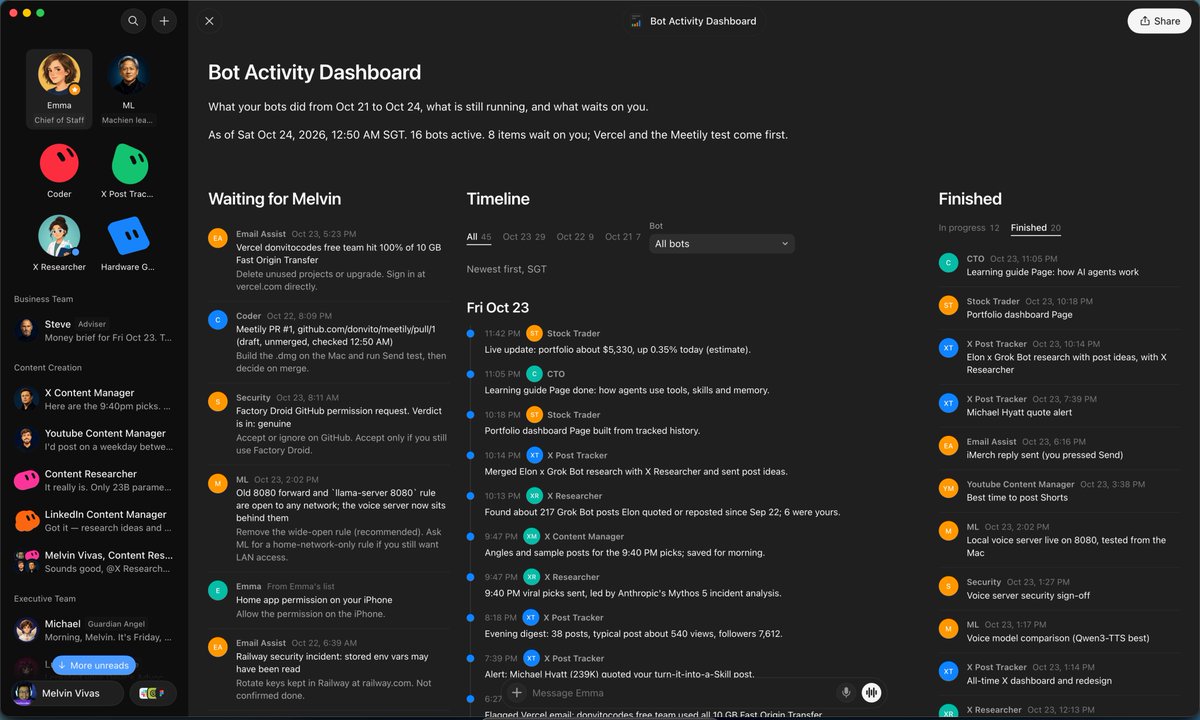
I made a Grok Bot Activity Dashboard
Ask your Chief of Staff to build a running document where you can see all bot's activities, progress, and status
Hope you guys find this useful
Prompt in replies👇
Another productive day at @spacexai 👇
1. Grok Bot can now use Calendar, Reminders, Contacts and more on your phone https://t.co/p6TZ8XrYsW
2. Grok Bot + 1Password, your Bot signs in for you (shoutout @roshan_s) https://t.co/Oi8euFwAnc
3. Grok voice multitasking from @aegeantic https://t.co/U2jMIFnaek
4. Pumpkin Bot 🎃 from @benjitaylor https://t.co/8PNVd7lSxS
5. Grok for Startups, up to 12 months of credits https://t.co/I2VnVMudye
6. The SpaceX Super Intelligence Partner Network https://t.co/UrId7PTzmE
7. Proud to be part of NVIDIA's OpenShell https://t.co/T2dGBM1sSs
8. Personalized Disney+ Canada picks from a like on X, from @jamiemichaels https://t.co/uviRs2IFyk
9. @poteto's statechart skill for your agents https://t.co/SpkHoVesb6
10. @Baconbrix had Grok Bot make Lego-style build instructions for a robot https://t.co/9JxdZFfxKL
11. @Phil_Holland's Practice Cents app https://t.co/V2x4n3ELTp
12. Terafab is hiring @SemiShinigami https://t.co/jRdiU23IAu
13. And @benln's recap of the last few days https://t.co/mAVZd7WUaU
Safe to say the team is cooking 🚀