@bcherny@_catwu So one thing with coding from the phone, I believe you need a repo to work from, but how about projects that need one conversation where we work across multiple repos?
@trq212 It’s generally good. I do notice some freezes / weird things. Like the thinking timer and various things like that will freeze. Won’t start updating until i resize the window
Sub-agents in (latent) space!
We’ve been working on a side project.
As far as I know, this is the first massively multiplayer, completely LLM-driven game. Come play Gradient Bang with us. See if you can catch me on the leaderboard.
This whole thing started because I wanted to explore a bunch of things I’m currently obsessed with, in an application of non-trivial size, that felt both new and old at the same time.
So … a retro-style space trading game built entirely around interacting with and managing multiple LLMs. Factorio, but instead of clicking, you cajole your ship AI into tasking other AIs to do things for you.
Some of the things we’ve been thinking about as we hack on Gradient Bang:
- Sub-agent orchestration
- Partial context sharing between multiple LLM inference loops
- Managing very long contexts, and episodic memory across user sessions
- World events and large volumes of structured data input as part of human/agent conversations
- Dynamic user interfaces, driven/created on the fly by LLMs
- And, of course, voice as primary input
If you’ve been building coding harnesses, or writing Open Claw agents, or doing pretty much anything that pushes the boundaries of AI-native development these days, you’re probably thinking about these things too!
This is all built with @pipecat_ai, the back end is @supabase, the React front end is deployed to @vercel, and all the code is open source.
Now people on the support team just need one mcp server to support customers and it will handle everything from call quality debugging, support ticket research, remember important things about customers, triage our different support channels, and know what others are doing.
I’ve been working on a really cool little project in my spare time. An MCP Gateway.
The issue I’m trying to solve is, how do you get Claude Cowork setup for your team? You might have 10s of MCP servers, lots of skills. How do you make sure it’s set up correctly for everyone?
It’s a gateway for 18 different MCP servers, plus handles storing critical things to remember (memory) as structured data in a database, and storing memory in a vector database.
All skills have unit tests.
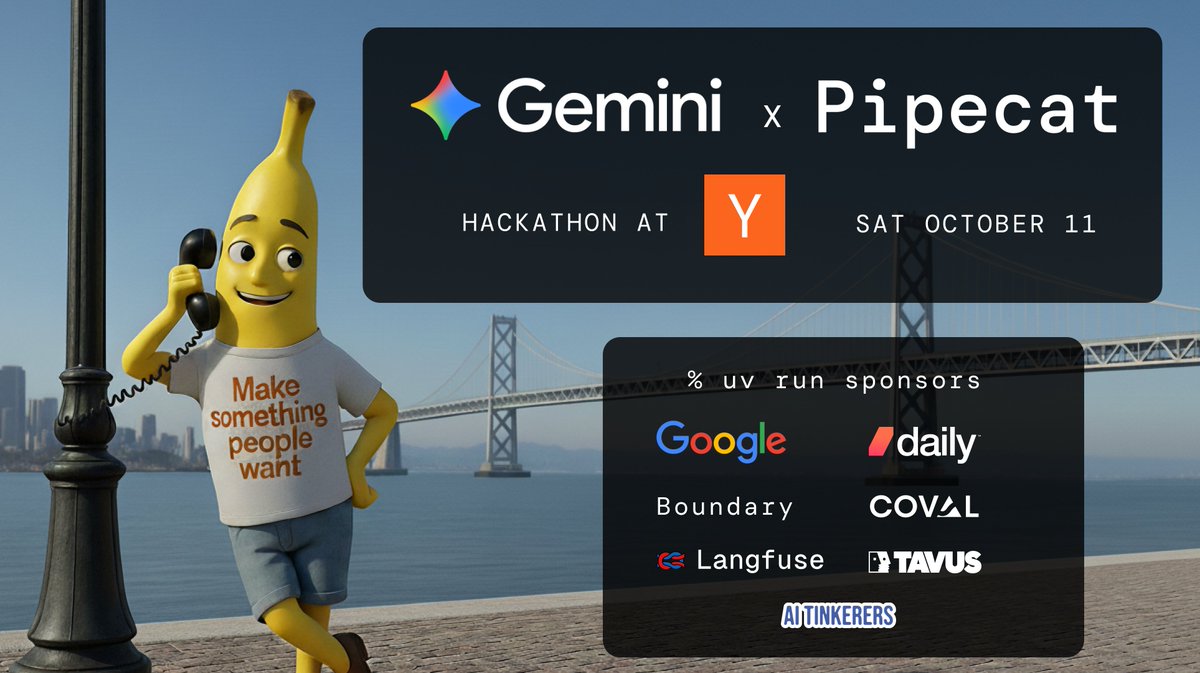
Join us for a hackathon at @ycombinator on October 11th.
Gemini x Pipecat realtime AI fun and games!
Build an application using Gemini and Pipecat. See some new APIs. Show off interesting things you're doing in your startup or side project. Hang out with engineers from Google DeepMind and Google Cloud, the AI Tinkerers community, and YC companies Daily, Boundary, Coval, Langfuse, and Tavus. Eat Outta Sight pizza.
Limited space ... apply below.
Quick PSA. Settings for minimizing GPT-5 latency (time to first token).
"service_tier": "priority", "reasoning_effort": "minimal", "verbosity": "low".
P50 TTFT with these settings is ~750ms. With the defaults, it's >3s.
The default settings are the right starting point for most use cases. It's *good* that this model can think proactively. As @swyx says, "It's a good model, ser."
For use cases where you care a lot about TTFT, use the above settings.
Posting this here because I've answered this question a bunch of times today in various DMs and channels.
Vibe coding multimodal voice user interfaces today with Claude Code, OpenAI Codex, and Google Jules.
Jules understood the assignment and went all-in on the story line. Sound on.
A voice agent powered by gpt-oss. Running locally on my macBook. Demo recorded in a Waymo with WiFi turned off.
I'm still on my space game voice AI kick, obviously. Code link below.
For conversational voice AI, you want to set the gpt-oss reasoning behavior to "low". (The default is "medium".) Notes on how to do that and a jinja template you can use are in the repo.
The LLM in the demo video is the big, 120B version of gpt-oss. You can use the smaller, 20B model for this, of course. But OpenAI really did a cool thing here designing the 120B model to run in "just" 80GB of VRAM. And the llama.cpp mlx inference is fast: ~250ms TTFT.
Running a big model on-device feels like a time warp into the future of AI.
GPT-5 is out in the world!
Here's a single-file voice agent powered by GPT-5. All you need is an OpenAI API key and Python.
```
export OPENAI_API_KEY=sk_proj-...
uv run gpt-5-voice-agent .py
```
The first time you run this, it will take about 30 seconds to install all the dependencies, accept connections, and begin processing audio and video.
For voice AI use cases, you probably want these parameter settings for GPT-5.
service_tier: priority
reasoning_effort: minimal
verbosity: low
Note that using the "priority" service tier doubles the cost per token. Having this option is great for latency sensitive, conversational voice applications.