Last night, Anthropic announced that Claude artifacts can now be installed as desktop apps. Judging by the comments I've seen on X and LinkedIn, I think people are seriously underrating how big this is for the SaaS industry.
My three key takeaways:
1) AI platforms clearly recognize the importance of UI. They keep adding new layers to the ecosystem: first MCP apps, then artifacts and sites, and now full packaging as apps for people to use.
2) SaaS companies like ours can no longer treat Claude artifacts as a nice-to-have. It reminds me of the early days of the iOS and Android SDKs, and we should treat artifacts the same way, as first-class citizens: consistent, on-brand UI, a real SDLC and tests, plus coverage in documentation and enablement.
3) Anthropic is betting bigger than OpenAI: apps built from artifacts land in your Dock, not just in a sidebar like ChatGPT's MCP app extensions.
If you're not using artifacts in Claude yet, here's a guide in our community:
https://t.co/KRFqVCWLqR
To my peers at other SaaS companies: are you treating artifacts as first-class citizens yet, or still as demos?
Most documents our users send through AI agents never get opened in our editor.
For a SaaS company, that should be scary. I think it's the best news we've had in years.
I strongly believe agents aren't killing UI - they're making it fit the user:
1) Plain text, when words are enough
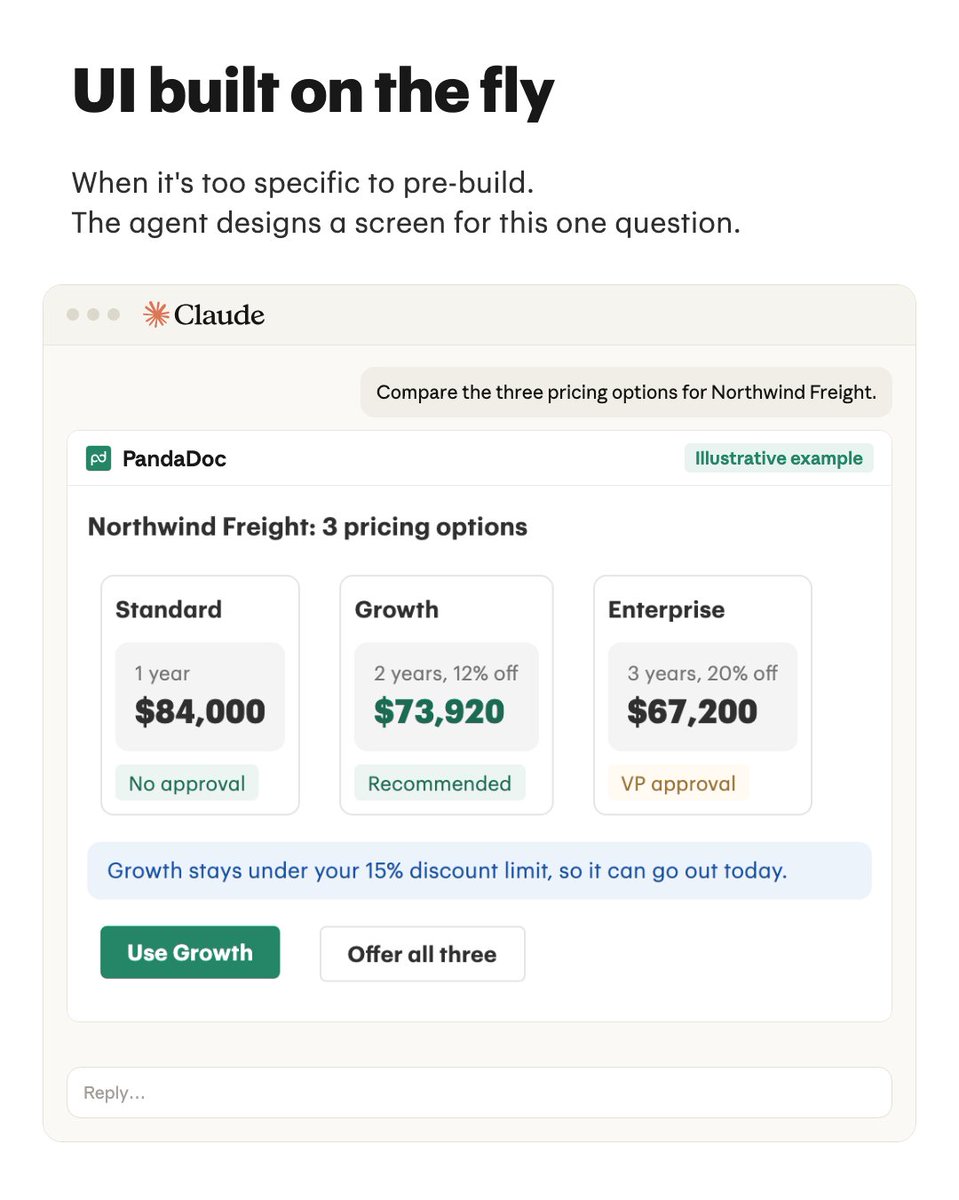
2) Widgets in the chat, when it's faster to do than to describe
3) Generative UI, when it's too specific to pre-build
4) Actionable dashboards, running on top of MCP, which you check every week
L4 is my favorite, and you can try it today. I wrote a step-by-step guide in PandaDoc community on building actionable dashboards in Claude with Artifacts on top of the our MCP:
https://t.co/KRFqVCWLqR
How is this playing out in your product? Do agents feel like they're taking your UI away, or making it better?
@noahfleming@ryan_doser13 Totally! It almost feels like Claude is the new frontend (for a lot of our users), and agents/MCP is the new backend. We’re living in exciting times!
@noahfleming@ryan_doser13 Thanks so much for sharing!
Are you using it alone, or with the team? What are your thoughts on the legally binding aspect of e-sign? I would assume your solution is, kind of, mimicking the real e-sign?
@noahfleming@ryan_doser13 Do you mind aharing more? Have you also built e-sign? How does it work for you? Do you have tempaltes, or just create one off docs? Do you upload into your tool?
Here's one of Claude's best-kept secrets: you can build your own custom interface for the apps you use every day. Seriously, if you're on Claude Desktop and you haven't pinned a few artifacts hooked up over MCP to your favorite tools (PandaDoc, obviously 😉), you're leaving a lot on the table.
Lately I've been digging through our feature requests, and it turns out a ton of them can be solved with artifacts. Users get a level of customization no portal could ever give them, with AI handling their exact problem the way that makes sense to them.
Earlier this week I dropped a quick guide in our community on how to do it, plus a recipe for building an artifact like the one in the video. If you want a head start and some inspiration, grab them. They're totally free :)
https://t.co/KRFqVCWLqR
Create documents in @pandadoc, without opening PandaDoc 😉
PandaDoc is now live in the Notion Marketplace as an MCP connection. That means you can start designing your documents right where you already think and write: in Notion.
Draft your document in a Notion page, ask Notion AI to "create it in PandaDoc" — and get a ready-to-send document with fields, variables and signature blocks already in place.
Write in @NotionHQ. Close the deal in PandaDoc.
A year ago a lot of us were ready to bury templates. Agents would just write every document from scratch.
Turns out that's expensive in every way. You pay tokens to regenerate text you never wanted changed. You wait minutes for a one-line edit. And you can't fully trust what comes back, because the agent can quietly add terms your legal team or stakeholders never approved.
I've been trying to figure out what could replace a template in an agent system, and I've built a few prototypes along the way. We already have rules (CLAUDE.md, AGENTS.md), skills, tools, MCP and memory.
But none of them is a template. Nothing holds the document itself: the language you trust, the parts nobody may touch, the gaps meant to be filled.
Yes, you can build it yourself. Schemas, renderers, DOCX scripts, validation. It quickly becomes its own little ecosystem, just to send a proposal. And I doubt general agent stacks will ever build it for us. Documents are too specific.
So for now the best answer I've found is one we've been building at PandaDoc for years: really good templates. Variables the agent fills, sections it can't rewrite, approved content to pick from, and a person's yes before anything goes out. That's exactly the part agents are missing.
Has anyone solved this better? How do you handle templates in your agent setup?
@gambrill@ChatGPT Absolutely love this, and across our customer base, I noticed that those who treat agents like that are actually more successful at moving their business to new rails than those who have been using Zapier or Make in the past
Absolutely love it!
What I've noticed across our customers is that those who are applying this mindset are actually much faster at adopting agentic AI than those who built a lot of automation in the past with Zapier, Make, or n8n. They still think in terms of rigid, deterministic workflows and tasks.
@LeeLinAI123 I couldn't agree more, and I see a lot of this in the interviews I have with Padnadoc's clients. Most are still using agents for read-only operations. At the same time, those who understand how to use agents literally move their entire business to Grok, Claude, etc
@RoryCrave Totally! Context, rules, and audit are the 3 key elements that stay in the platform, even if the entire workflow is managed by the agent. This record also helps avoid a loop of re-approvals if the context hasn't changed for one approver but other approvers have rejected
I keep coming back to the same question in conversations with SaaS product teams: if customers can use Claude, ChatGPT or Grok to do the work, what should we still build inside the product?
That includes both the interface and our own AI agents.
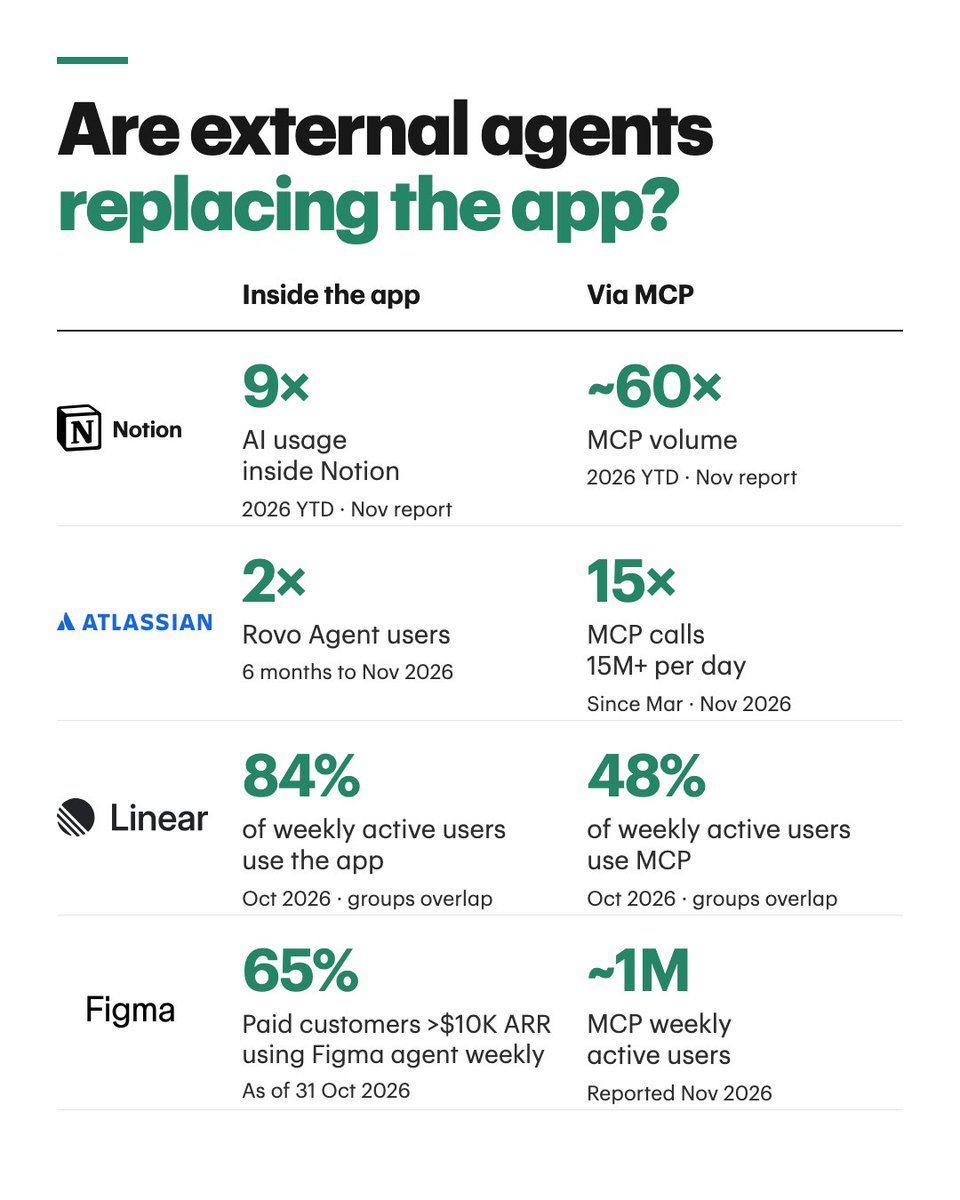
The public numbers make the question more interesting. Notion reports roughly 60× growth in MCP volume alongside 9× growth in AI usage inside Notion. At Atlassian, 98% of MCP users were also active on the platform that month. Linear reports growing app usage alongside MCP adoption.
Here are the mental models I'm using:
1. Be the context system, not the chat layer. Don't try to out-build the frontier labs on the assistant. Be the structured, permissioned place every agent reads from and writes to. Your own agents still matter, as the thing that keeps that context current.
2. Bring your own agent first, in-app AI second. Build the foundation: AI-friendly docs, an MCP server, curated prompts. Let users prove workflows with the agent they already trust, then turn the winners into in-app features on the same tools. An in-app copilot still has a job, but it isn't your distribution strategy.
3. Hybrid, not headless. Opening MCP doesn't empty the app; the best 2026 data shows both surfaces growing. The UI's job shifts to review, approval, a shared view, undo, and a clear record of who, or what, did the work.
4. Own the control plane, or become a pipe. Losing the screen doesn't mean losing the value. Companies pay for permissions, a clear line between suggest and execute, a shared data model and an audit trail. If that layer moves to a third-party "agent firewall", you really do become a database.
5. In-product agents matter. Chatbot wrappers don't. A helper chat bolted onto old screens is the old workflow in a new skin. What lasts is agents that move work forward on their own, with clear levels of autonomy, AI actions that are labeled and reversible, and a human at the checkpoint.
At PandaDoc, documents, approvals and signatures make this very concrete. An agent can prepare the work, but someone still needs to decide when it’s ready to become official.
Curious how you’re making this tradeoff: what are you still investing in inside the product, and what are you leaving to the customer’s agent?
Here's what people usually hand their bot, roughly in this order:
1. "Every Monday, tell me which documents are still waiting for a signature, who hasn't signed, and for how long"
2. "Every morning, tell me which sent documents were opened but still aren't signed"
3. "For anything unsigned after 7 days, draft a short nudge I can review. Don't send it"
4. "Every Monday, give me a short status report: draft, sent, viewed, completed, declined, and average time to sign"
5. "Create a document from our standard template for [name], fill what you can, and show it to me before sending"
6. "Draft renewals from our template for agreements expiring in the next 30 days and leave them for my review"
One pattern we’re seeing when talking to less tech-savvy customers: people who have never built workflows in Zapier, Make, or n8n find it surprisingly easy to set up routines with agents. They don’t think about triggers, steps, or integrations. They see their Grok Bot agents as teammates and simply give them responsibilities.
For example, instead of building a workflow to check proposals, they can ask their Sales Assistant bot: “Check my unsigned PandaDoc proposals every Monday”. The update comes back in the same conversation.
The most interesting part isn’t that AI can automate the work. It’s that more people can now automate it without ever thinking of it as automation.
***
If you're using Grok Bot with PandaDoc, we’d love to hear what you’re building! https://t.co/X4V8wVG6j9