Claude Code feels completely different once you install this.
Anthropic quietly released an official plugin called claude-code-setup and it basically turns Claude Code from “pretty good” into an actual AI dev environment.
It scans your project and recommends:
→ hooks
→ skills
→ MCP servers
→ subagents
→ automations
Then sets everything up step-by-step for you.
Most people are using Claude Code completely vanilla…
which is why their experience feels messy.
The real power comes from the ecosystem around it.
Install:
/plugin install claude-code-setup@claude-plugins-official
Bookmark this before you forget it.
SOMEONE JUST VIBE CODED A FULL 3D FLIGHT SIMULATOR IN A SINGLE WEEKEND USING CLAUDE CODE.
One weekend.
One person.
One AI coding tool.
Built entirely in the browser.
Real-world terrain.
Real locations.
Full 3D flight physics.
You can literally fly anywhere on Earth.
No studio.
No giant dev team.
No multi-year production cycle.
Just speed, leverage, and execution.
This is what software creation looks like now.
Small teams—and even solo builders—can ship what used to require companies.
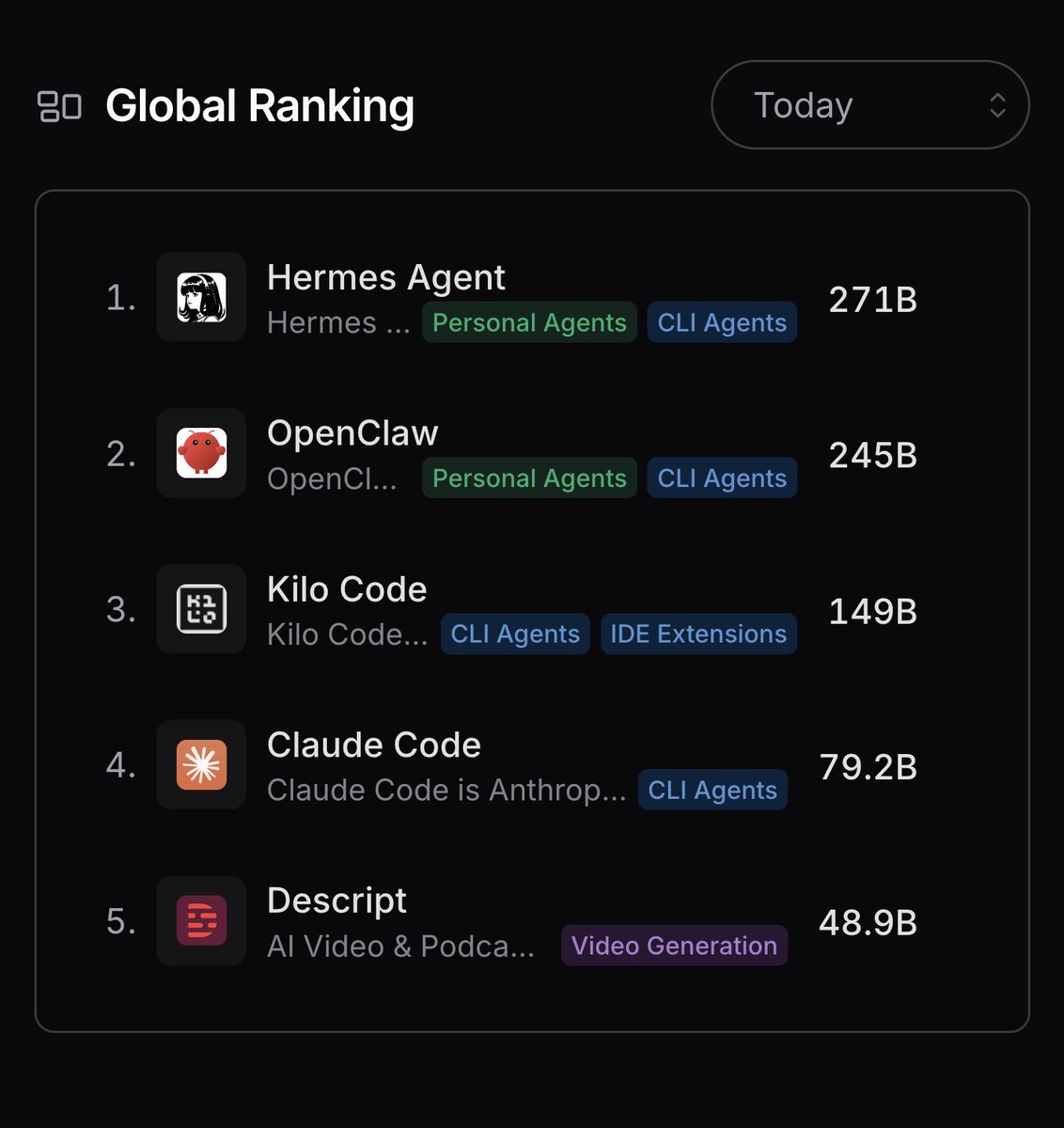
Hermes Agent is now #1 on the Global @OpenRouter token rankings.
While our journey together has just begun, we'd like to take this opportunity to thank our contributors, supporters, and users for all they have done to get us this far.
SOOO many less bugs building stuff with this...
- Claude Opus 4.7 makes the feature plan
- GPT-5.5 reviews the plan (always finds issues)
- Opus updates the plan, GPT approves
- Opus builds, uses Playwright to test UX/UI
- GPT reviews feature code (always finds issues)
- Opus fixes issues, GPT signs off ✅
- Then I test fully myself, usually very minor issues
- Merge and deploy! 🚀
I'm using @conductor_build to easily bounce back and forth between the two and VERY happy with this workflow 👏👏.
Kind of crazy to pay ~$400/month for what feels like a full dev team that never pushes back on all my stupid UI requests and small changes 😂.
Introducing web-agent, an open framework for building web agents 🔥
Build AI agents that search, scrape, and interact with the web - powered by the same architecture behind our /agent endpoint.
100% open source. Bring any model. Anthropic, OpenAI, or your own.
This is huge : @X released an MCP server today..
How to Connect X to your 🦞 :
**Step 1: Run the XMCP Server**
git clone https://t.co/28snn6oaEa
cd xmcp
cp env.example .env
Edit the .env file with your X OAuth consumer key and secret. Set the callback URL to http://127.0.0.1:8976/oauth/callback in your X Developer app.
For safety, add an allowlist such as:
X_API_TOOL_ALLOWLIST=searchPostsRecent,createPosts,getUsersMe,getPostsById,likePost,repostPost
Then run:
python -m venv .venv && source .venv/bin/activate
pip install -r requirements.txt
python https://t.co/yO2ogIBpks
The server will be available at http://127.0.0.1:8000/mcp. Complete the OAuth flow on first run and keep this process active.
**Step 2: Add XMCP in @OpenClaw**
Use the following command:
openclaw mcp set x '{
"url": "http://127.0.0.1:8000/mcp"
}'
Verify with:
openclaw mcp list
openclaw mcp show x
**Step 3: Test the Integration**
Restart the OpenClaw agent or reload MCP configuration if required.
Test by sending these prompts to OpenClaw in your chat app:
- Search recent posts about MCP on X and summarize the top trends
- Draft and post this thread on X
- Get my X profile information
- Like the latest post from @xdevplatform
OpenClaw will use the XMCP tools automatically when relevant.
**Key Benefits**
- OpenClaw provides persistent memory and works across multiple messaging platforms.
- XMCP delivers standardized access to X API functionality.
- Combined, they enable an agent that can research trends, post content, engage with posts, and report results within your existing chat workflows.
**Safety and Configuration Notes**
Start with a minimal tool allowlist in the XMCP .env file. Expand gradually after testing.
The allowlist can be updated and requires restarting the XMCP server.
Monitor logs in both the XMCP server and OpenClaw for troubleshooting.
X actions performed by the agent are public.
XMCP repository: https://t.co/fIxYHLI33T
OpenClaw MCP documentation: https://t.co/15Rod9Q4QG
🚨BREAKING: Someone just open-sourced a tool that converts PDFs to markdown at 100 pages per second. 100% FREE.
Runs entirely on CPU. No expensive GPUs needed.
No cloud.
It's called OpenDataLoader PDF.
Give it any PDF - scanned documents, scientific papers, multi-column reports, complex tables - and it converts everything into clean Markdown, JSON with bounding boxes, or HTML. Ready to feed straight into any AI pipeline.
Not a wrapper around someone else's OCR. Not a basic text extractor. A full document intelligence engine that understands layout, reading order, headings, tables, and formulas.
Here's what this thing can do:
→ Extracts text in the correct reading order across multi-column layouts
→ Pulls complex borderless tables with 0.93 accuracy — highest of any open-source parser
→ Detects heading hierarchy, nested lists, and document structure automatically
→ Runs OCR on scanned PDFs in 80+ languages including Chinese, Arabic, Korean, and Japanese
→ Extracts math formulas as LaTeX from scientific papers
→ Gives you bounding boxes for every single element on the page
→ Describes charts and images using a built-in vision model
→ Filters prompt injections and hidden text - built-in AI safety that no other parser has
Here's why every existing tool loses:
They benchmarked it against 200 real-world PDFs including scientific papers and multi-column documents. OpenDataLoader scored 0.90 overall. Docling scored 0.86. Marker scored 0.83 but takes 54 seconds per page. MinerU scored 0.82 at 6 seconds per page.
OpenDataLoader local mode? 0.05 seconds per page. That is over 1,000x faster than Marker at nearly the same accuracy.
Here's the wildest part:
It has two modes. Local mode runs pure Java — 20 pages per second on a basic CPU. Hybrid mode adds an AI backend for complex pages and scores #1 in every category. Run it on an 8-core machine with batch processing and you hit 100+ pages per second.
Your documents never leave your machine. Zero API calls. Zero data transmission. 100% local.
It even has a built-in AI safety layer that catches hidden text, transparent fonts, and off-page content that other parsers silently pass through to your LLM.
One command to install:
pip install -U opendataloader-pdf
Works with Python, Node.js, and Java. Official LangChain integration included.
3.3K GitHub stars. 478 commits. 51 releases. 13 contributors. Actively maintained.
100% Open Source. Apache 2.0 License.
# Workflow Orchestration
## 1. Plan Node Default
- Enter plan mode for ANY non-trivial task (3+ steps or architectural decisions)
- If something goes sideways, STOP and re-plan immediately — don't keep pushing
- Use plan mode for verification steps, not just building
- Write detailed specs upfront to reduce ambiguity
## 2. Subagent Strategy
- Use subagents liberally to keep main context window clean
- Offload research, exploration, and parallel analysis to subagents
- For complex problems, throw more compute at it via subagents
- One task per subagent for focused execution
## 3. Self-Improvement Loop
- After ANY correction from the user: update `tasks/lessons.md` with the pattern
- Write rules for yourself that prevent the same mistake
- Ruthlessly iterate on these lessons until mistake rate drops
- Review lessons at session start for relevant project
## 4. Verification Before Done
- Never mark a task complete without proving it works
- Diff behavior between main and your changes when relevant
- Ask yourself: "Would a staff engineer approve this?"
- Run tests, check logs, demonstrate correctness
## 5. Demand Elegance (Balanced)
- For non-trivial changes: pause and ask "is there a more elegant way?"
- If a fix feels hacky: know everything you know, implement the elegant solution
- Skip this for simple, obvious fixes — don't over-engineer
- Challenge your own work before presenting it
## 6. Autonomous Bug Fixing
- When given a bug report: just fix it. Don't ask for hand-holding
- Point at logs, errors, failing tests — then resolve them
- Zero context switching required from the user
- Go fix failing CI tests without being told how
---
# Task Management
1. **Plan First**: Write plan to `tasks/todo.md` with checkable items
2. **Verify Plans**: Check in before starting implementation
3. **Track Progress**: Mark items complete as you go
4. **Explain Changes**: High-level summary at each step
5. **Document Results**: Add review section to `tasks/todo.md`
6. **Capture Lessons**: Update `tasks/lessons.md` after corrections
---
# Core Principles
- **Simplicity First**: Make every change as simple as possible. Impact minimal code
- **No Laziness**: Find root causes. No temporary fixes. Senior developer standards
- **Minimal Impact**: Changes should only touch what's necessary. Avoid introducing bugs
We just released Claude Code channels, which allows you to control your Claude Code session through select MCPs, starting with Telegram and Discord.
Use this to message Claude Code directly from your phone.
🚨 This is how engineers at Amazon, Google, and Shopify actually use Claude Code.
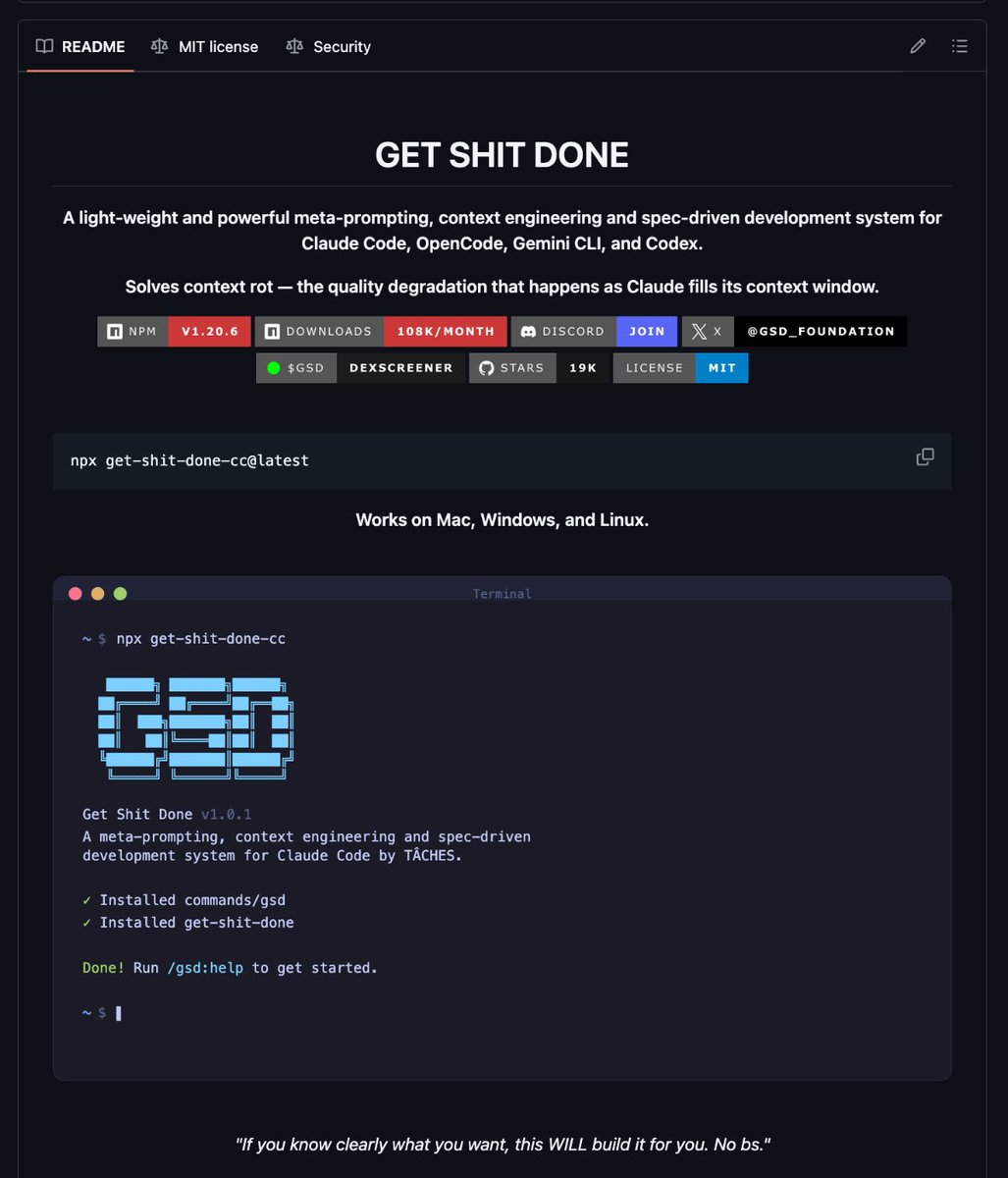
It's called GSD (Get Shit Done) and it solves context rot the quality degradation that destroys your Claude Code sessions as the context window fills up.
No BMAD. No enterprise sprint theater. No Jira nonsense.
Here's how it works:
You run one command
→ /gsd:new-project
→ It interviews you until it fully understands your idea
→ Spawns parallel research agents to investigate your stack
→ Creates atomic task plans with XML structure Claude actually understands
→ Executes in fresh 200k context windows per task
→ Commits every single task to git automatically
Here's the wildest part:
Your main context window stays at 30-40% the entire time.
All the heavy lifting happens in subagent contexts. No degradation. No "I'll be more concise now." Just clean, consistent execution.
Engineers at Amazon, Google, Shopify, and Webflow trust this thing.
MIT license. One command to install:
npx get-shit-done-cc@latest
Link in the first comment 👇
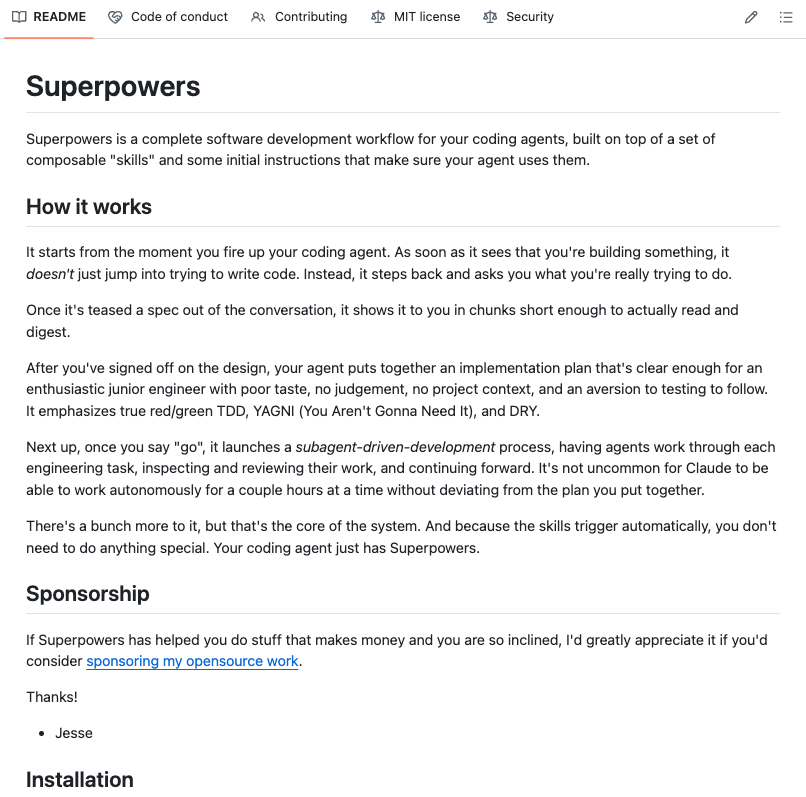
🚨 Holy shit...A developer on GitHub just built a full development methodology for AI coding agents and it has 40.9K stars on GitHub.
It's called Superpowers, and it completely changes how your AI agent writes code.
Right now, most people fire up Claude Code or Codex and just… let it go. The agent guesses what you want, writes code before understanding the problem, skips tests, and produces spaghetti you have to babysit.
Superpowers fixes all of that.
Here's what happens when you install it:
→ Before writing a single line, the agent stops and brainstorms with you. It asks what you're actually trying to build, refines the spec through questions, and shows it to you in chunks short enough to read.
→ Once you approve the design, it creates an implementation plan so detailed that "an enthusiastic junior engineer with poor taste and no judgement" could follow it.
→ Then it launches subagent-driven development. Fresh subagents per task. Two-stage code review after each one (spec compliance, then code quality). The agent can run autonomously for hours without deviating from your plan.
→ It enforces true test-driven development. Write failing test → watch it fail → write minimal code → watch it pass → commit. It literally deletes code written before tests.
→ When tasks are done, it verifies everything, presents options (merge, PR, keep, discard), and cleans up.
The philosophy is brutal: systematic over ad-hoc. Evidence over claims. Complexity reduction. Verify before declaring success.
Works with Claude Code (plugin install), Codex, and OpenCode.
This isn't a prompt template. It's an entire operating system for how AI agents should build software.
100% Opensource. MIT License.
Claude Code power users, you'll want to see this.
There's a public repo that's basically a complete AI agency for Claude Code: 61 specialized agents across engineering, design, marketing, product, testing, and more, each with a unique personality, workflows, and real deliverables.
Instead of prompting a generic assistant, you activate the exact specialist you need. Security engineer, growth hacker, reality checker, whimsy injector. Drop them into ~/.claude/agents/ and they're ready to go.
Also works with Cursor, Windsurf, Aider, and Gemini CLI.
Repo:
https://t.co/AigPxno7tv
🚨 I just found a 100% open-source Python web scraping library that makes you basically invisible to bot detection.
It's called Crawlee.
Build reliable crawlers that fly under the radar of every modern anti-bot system.
What it does:
→ Scrapes any website with BeautifulSoup, Playwright, or raw HTTP your choice
→ Auto-rotates proxies and manages sessions so you never get blocked
→ Handles JS-heavy sites with full headless browser support
→ Parallel crawling that scales automatically with your system resources
→ Saves data to persistent storage no lost progress if something crashes
→ Retries failed requests automatically without you touching anything
One pip install.
Works on any site. Any format. HTML, PDF, JPG, PNG all of it.
8.1K stars. 100% Opensource. Apache 2.0 License.
(Link in the comments)
nobody talks about this but openclaw has a hidden setting that changes everything.
in your config, add cache-ttl: 15m
this means your agent session resets after 15 minutes of inactivity instead of building up until it breaks.
most agents go stupid after 2-3 hours because the context window fills up. agent starts forgetting rules, hallucinating, ignoring instructions.
with a 15 min cache-ttl, every time you step away and come back, your agent reboots fresh - but reads its memory files on the way back in. clean slate, full memory, every time.
combine this with a 2 hour idle reset and your agent literally never degrades.
the people running agents for weeks straight without issues? this is their secret.
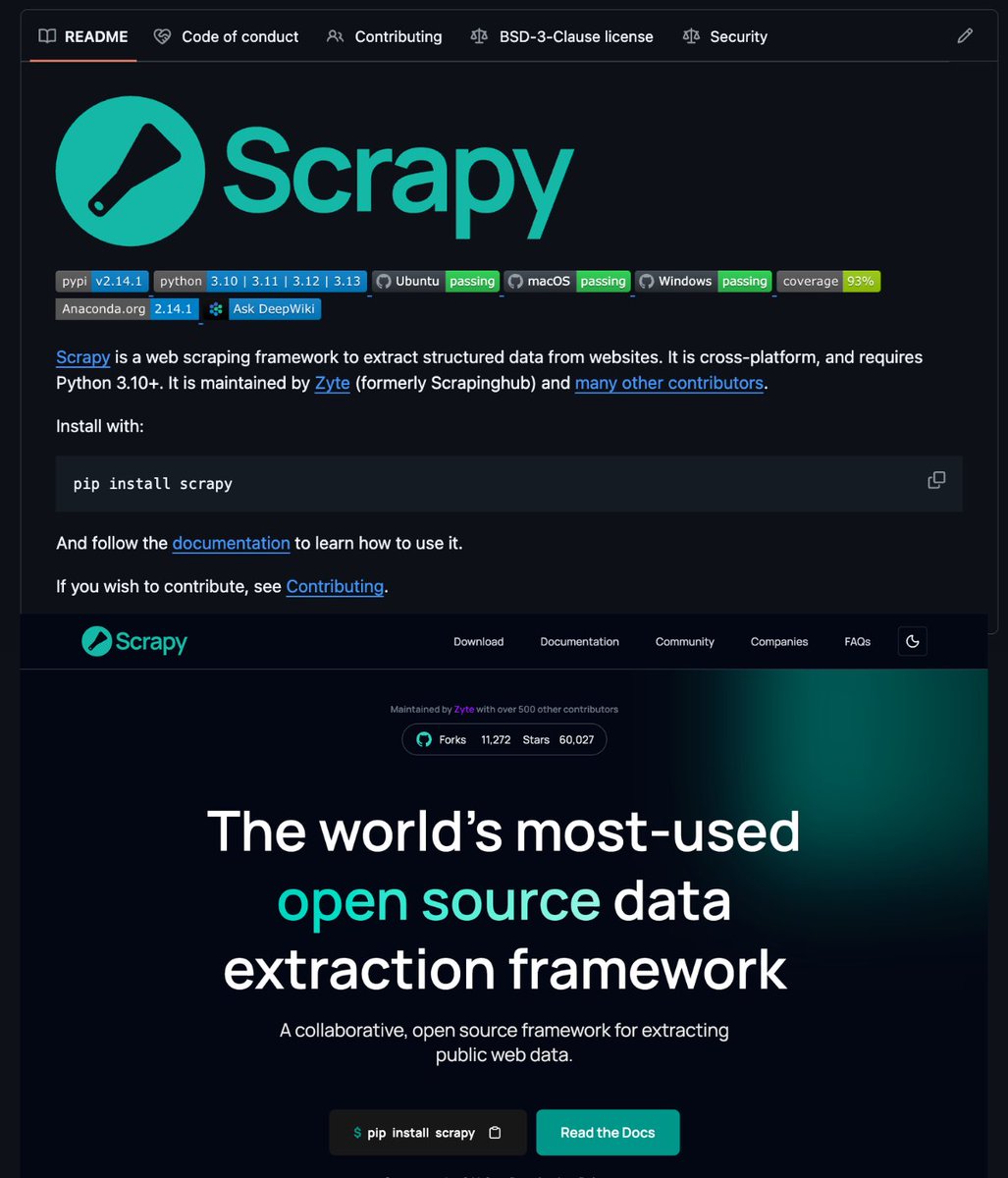
🚨This Python framework scrapes ANY website and extracts structured data in minutes.
It's called Scrapy and it crawls and extracts structured data from any website entirely from your own machine.
No SaaS scraping bills. No cloud API limits. No data leaving your infrastructure.
It's powered by Python's most battle-tested crawling engine with 59K stars and 15+ years of production use.
→ Define your spider once
→ Get clean structured data
→ Scale to millions of pages
→ Export to JSON, CSV, XML instantly
All running locally. Zero cloud dependency.
But it's not just a scraping script.
It's a full data extraction framework:
→ Async architecture for parallel crawling at scale
→ Built-in middleware for proxies, retries, and rate limiting
→ CSS and XPath selectors with zero boilerplate
→ Pluggable pipelines for cleaning, deduplication, and storage
→ 54,800+ production projects already depend on it
100% Opensource. BSD-3 License.
Works on macOS, Windows, and Linux right now.
This is the moment web scraping stops being a SaaS subscription and starts running on your own terms.
Link in the first comment 👇
Here's how to use your ChatGPT account with @openclaw!
openclaw onboard --auth-choice openai-codex
openclaw models set openai-codex/gpt-5.3-codex
openclaw models status --plain
h/t @AndrewWarner@calebhodges
ralph-tui v0.8.0 is live 🤘
bun install -g ralph-tui
Feat: GitHub Copilot CLI agent plugin (thanks cachemoney)
Feat: Image paste support for creat-prd mode (thanks jesse-merhi)
Fix: Memory exhaustion on very large runs (thanks dyxushuai)
Fix: Filter tombstoned issues from beads-rust tracker (thanks thunter009)
Fix: Beads-rust epic filtering (thanks dvic)
Fix: Claude Code path detection issue on Windows
Fix: Parallel execution fails on macOS/APFS
Fix: Custom agents don't show up in TUI settings
https://t.co/KF3a5xaHmH
Introducing Claude Opus 4.6. Our smartest model got an upgrade.
Opus 4.6 plans more carefully, sustains agentic tasks for longer, operates reliably in massive codebases, and catches its own mistakes.
It’s also our first Opus-class model with 1M token context in beta.
Tomorrow is an extremely important day
A massive, landscape shifting technology will drop
Anthropic will release Sonnet 5. It will be smarter than the already smartest model out there, Opus 4.5
It will be half the price, double the speed, and be able to spin up swarms of agents
It will be able to make your ClawdBot faster smarter better for a fraction of the price
If you are not actively canceling everything on your calendar tomorrow in order to use this technology and see what it's capable of, you will be relegated to the permanent underclass when the singularity hits
A few times a year everything changes. ClawdBot was one of them. Sonnet 5 is another. During these events you MUST take action. You MUST see what's possible.
First things I'd do if I were you:
1. Have it code an app for you
2. Give it your entire todo list, see what it can knock off
3. Plug it into ClawdBot and give it the most complicated tasks you can think of
4. Give it a list of your goals and ambitions. Ask how it can help you achieve them
See you on the other side.