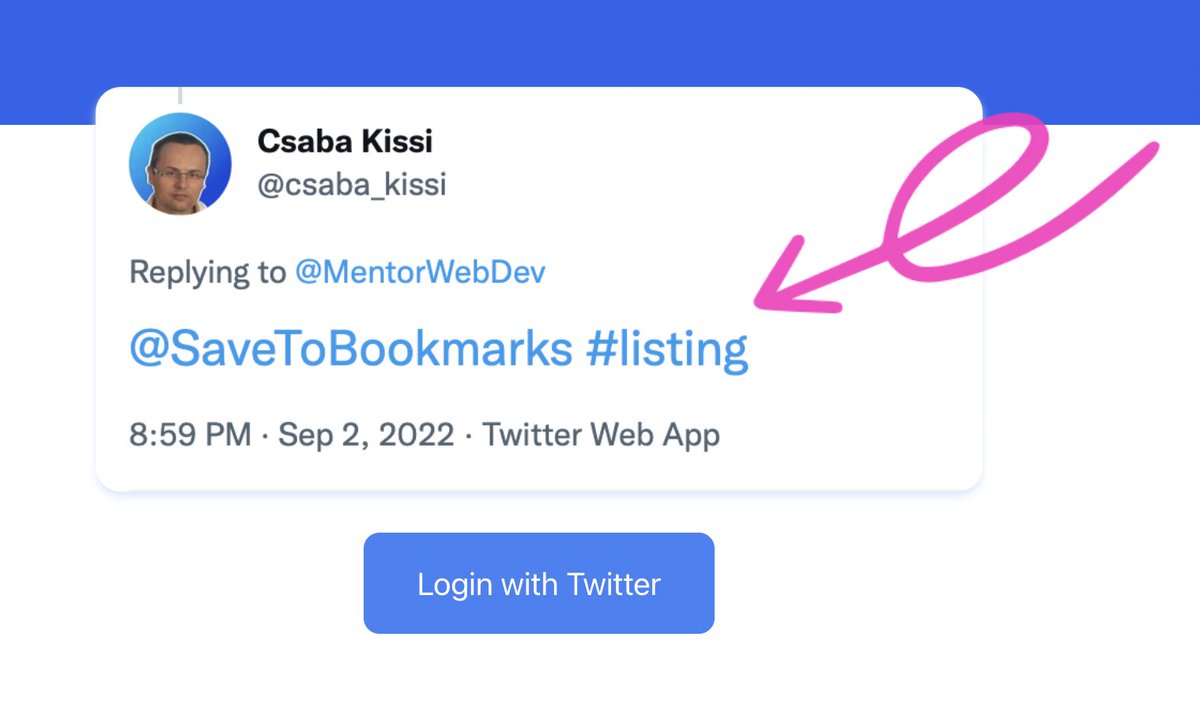
If you don't know how to use the SaveToBookmarks bot please take a look at the picture below.
Just reply with @SaveToBookmarks.
You can even use tags.👇👇
Open-source and free tools for coders.
https://t.co/cws4Kn6mNf - Open-source workspace for AI agents
https://t.co/QfIg7QXA2P - Deploy apps without managing infrastructure
https://t.co/1nDJI25QKl - Directory of directories
https://t.co/Zx7Sp2SQn3 - Open-source, self-hosted application deployment platform.
https://t.co/9227Gzk4BL - Open-source React components for web and mobile
⚛️ Most React developers know the Virtual DOM exists.
Far fewer understand why it makes React feel so fast.
Here's the simplified flow behind every UI update: 🧵
1️⃣ Real DOM
Every change directly modifies the browser's DOM tree.
That means:
• Direct element updates
• More layout recalculations
• More repaint/reflow work
• Performance drops as updates become more frequent
Small apps? Fine.
Large interactive apps? It becomes expensive.
2️⃣ Virtual DOM
React creates a lightweight in-memory copy of the UI.
Instead of immediately touching the browser DOM, it:
✅ Builds a new virtual tree
✅ Compares it with the previous one
✅ Detects exactly what changed
✅ Updates only those specific DOM nodes
This dramatically reduces unnecessary work.
3️⃣ The update process looks like this:
👆 User interaction
⬇️
⚛️ React creates a new Virtual DOM
⬇️
🔍 React compares it with the previous version (Diffing)
⬇️
🎯 Only changed elements are identified
⬇️
🌐 Minimal updates are applied to the Real DOM
Instead of rebuilding everything, React performs surgical updates.
4️⃣ Real DOM workflow
👤 User action
➡️ Browser updates the DOM
➡️ Layout recalculation (Reflow)
➡️ Repaint
➡️ Screen updates
Each modification can trigger expensive browser operations.
5️⃣ Virtual DOM workflow
👤 User action
➡️ Virtual DOM updates
➡️ Diff algorithm runs
➡️ Only affected nodes are patched
➡️ Browser performs minimal rendering work
The browser does much less overall work.
6️⃣ Quick comparison
🔴 Real DOM
• Updates the full DOM tree
• More repaint & reflow
• Slower under frequent changes
• Browser handles every update
🟢 Virtual DOM
• Updates only changed nodes
• Efficient diffing
• Less rendering work
• Better performance in dynamic UIs
• React coordinates the updates
7️⃣ One important clarification:
The Virtual DOM isn't "faster than the DOM."
React still updates the real browser DOM.
The speed comes from reducing the number of expensive DOM operations, not eliminating them.
That's the key idea many tutorials skip.
Understanding this makes React's rendering model much easier to reason about. 🚀
@csaba_kissi The number will probably increase even more.
The barrier almost doesn't exists.
Even the deployment is becoming super easy.
Even for complex apps.
I built a directory of directories: https://t.co/t9ODLOeYsY
It shows you where to submit your startup for backlinks, and for each one:
- Domain Rating, verified by Ahrefs
- dofollow or nofollow links
- free or paid, with actual prices
- approval time + a direct link to the submission page
filterable by niche. free, no signup
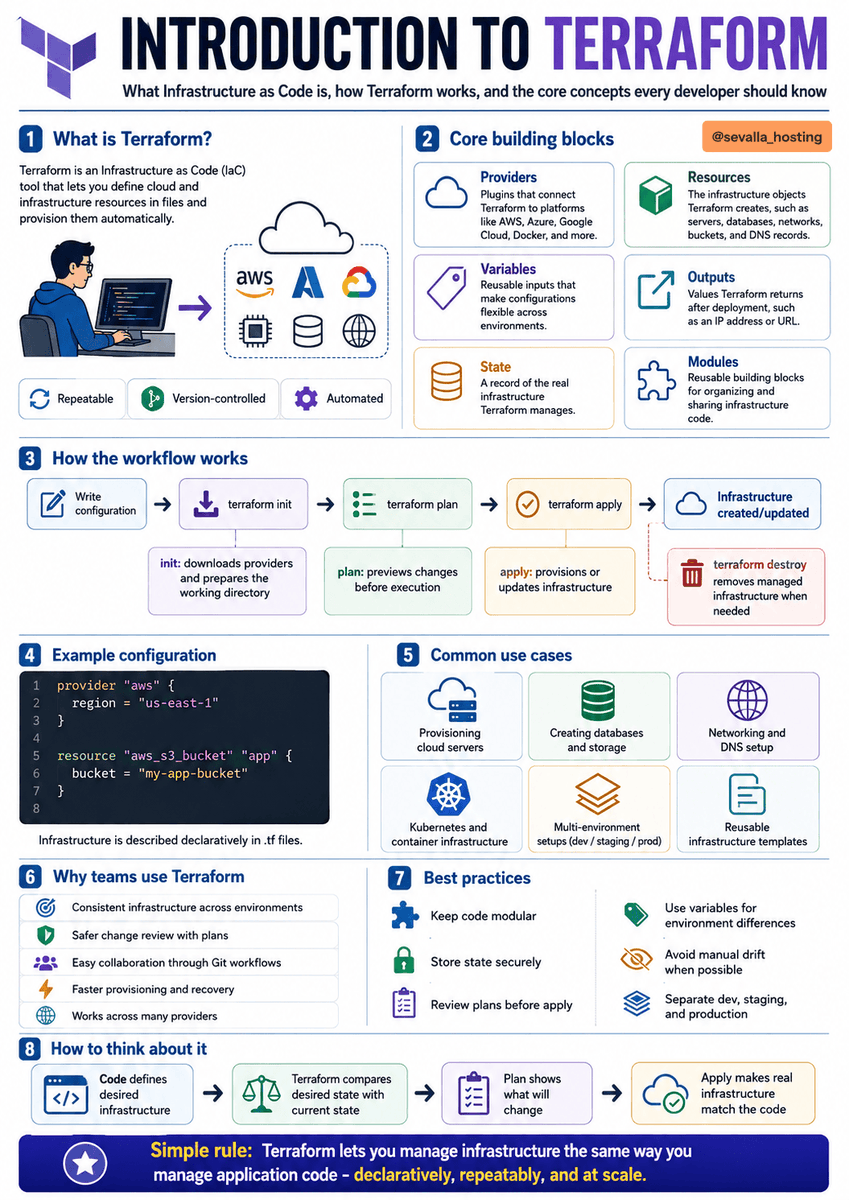
Terraform lets you manage infrastructure the same way you manage application code. 🏗️
Instead of manually creating servers, databases, networks, and storage, you describe the desired infrastructure in .tf files.
Terraform then compares your configuration with the current state and applies the required changes.
Core concepts:
☁️ Providers - connect Terraform to platforms like AWS, Azure, Google Cloud, Docker, or Kubernetes
📦 Resources - infrastructure objects Terraform creates, such as servers, databases, buckets, and DNS records
🏷️ Variables - reusable inputs for different environments
📤 Outputs - useful values returned after deployment, such as an IP address or URL
🗄️ State - Terraform’s record of the infrastructure it manages
🧩 Modules - reusable infrastructure building blocks
The basic workflow:
1️⃣ Write the configuration
2️⃣ Run terraform init
3️⃣ Run terraform plan
4️⃣ Review the proposed changes
5️⃣ Run terraform apply
6️⃣ Terraform creates or updates the infrastructure
To remove managed resources:
terraform destroy
Terraform is commonly used for:
☁️ Provisioning cloud servers
🗄️ Creating databases and storage
🌐 Configuring networks and DNS
☸️ Managing Kubernetes infrastructure
🏢 Creating dev, staging, and production environments
♻️ Reusing standardized infrastructure templates
Why teams use it:
✅ Repeatable infrastructure
✅ Version-controlled configuration
✅ Safer change reviews
✅ Faster provisioning and recovery
✅ Consistent environments
✅ Support for multiple cloud providers
Important best practices:
🔐 Store state securely
👀 Review every plan before applying
🧩 Keep configurations modular
🏷️ Use variables for environment differences
🚫 Avoid manual infrastructure changes
📁 Separate development, staging, and production
REST API vs GraphQL
REST uses a resource-based approach, where each resource has its own endpoint, such as /users, /posts, or /products. It is simple, predictable, easy to cache, and supported by a massive ecosystem of tools.
GraphQL uses a query-based approach with a single /graphql endpoint. The client can request exactly the fields it needs, which helps reduce over-fetching, under-fetching, and unnecessary network requests. 🚀
REST is usually the better fit for:
✅ Simple CRUD applications
✅ Public APIs
✅ Microservices
✅ Projects that rely heavily on HTTP caching
✅ Teams that want a smaller learning curve
GraphQL is often better for:
✅ Complex or deeply nested data
✅ Web and mobile apps with different data needs
✅ Real-time features through subscriptions
✅ Products that evolve quickly
✅ Reducing multiple API round trips
REST is mature, straightforward, and proven.
GraphQL is flexible, efficient, and powerful for complex data requirements.
The best choice is not based on trends. It depends on your application architecture, team experience, caching needs, and the type of data your frontend needs to retrieve. 💡
Open-source and free apps for coders
https://t.co/mUYgjhZFdB - Open-source motion effects with AI prompts
https://t.co/IQNseVG0ks - Collect feature requests for your projects for free
https://t.co/ID8DnKtYM8 - Visually rich web experiments, UI effects, animation demos.
https://t.co/KZooo5Yc45 - Open-source image compression and conversion in the browser.
https://t.co/RQW0LFmYbE - Open-source email testing tool for local development.
Open-source and free apps for coders
https://t.co/BPMf1DPYnD - 7000+ free SVG icons
https://t.co/pb09YwWSDH - Open-source collection of CSS cursors
https://t.co/rfmsSMD1eK - Turns your Chrome into stable commands for the AI agents
https://t.co/5VJKnlSeKj - Free design inspiration from top sites
https://t.co/RwBUs0PG8V - Open-source animated UI Components for React