🚀 Ready to take your job search to the next level? Meet Quester! 🎉
Master your job hunt with Quester:
✅ Track Applications
✅ Organize Interviews
✅ Stay Updated with Widgets
Simplify your job search! Download now: https://t.co/LuRroSG6st
#jobs#jobsearch#career#tech#app
🚀 Ready to take your job search to the next level? Meet Quester! 🎉
Master your job hunt with Quester:
✅ Track Applications
✅ Organize Interviews
✅ Stay Updated with Widgets
Simplify your job search! Download now: https://t.co/LuRroSG6st
#jobs#jobsearch#career#tech#app
iOS tips ✨ 4 excellent tools I use often to improve iOS codebase #iosdev
🚀 periphery: identity unused parameters, variables, and code
https://t.co/Z7crqFfQCQ
🚀 SwiftLint: ensure your code adheres to the best coding convention
https://t.co/9ZAJfb06Jf
🚀 SwiftFormat: auto format Swift code with extensible rules
https://t.co/oruou64oEz
🚀 typos: spell check your source code and find typos
https://t.co/UMTEArP0bG
@Dimillian It's a personal preference, I would create two @ViewBuilder functions. One for Text and the other for the switch case and group them into VStack or HStack(whatever in the design) in the body instead of depending on the parent view for the grouping.
I recently finished updating all `ObservableObject` classes to @Observable. Here's a couple of noteworthy points I discovered along the way that might be useful.
1. Lazy properties
You'll get the error: 'lazy' cannot be used on a computed property.
The solution, if appropriate, is to mark each lazy property with @ObservationIgnored.
I say if appropriate because you might need those properties to have observation functionality, so be careful here. In my case I used lazy on properties that don’t change after initialization so no issues.
2. @Published properties
Since the @Published property wrapper is not required in @Observable classes, you might have to update code that accessed Combine pipelines. In my case I was only using .sink() blocks to run closures when values changed, so the solution was pretty simple, i.e., use didSet on the properties instead.
3. @AppStorage properties
You’ll get the error: Property wrapper cannot be applied to a computed property.
The solution is to declare the value as a computed property instead.
So, instead of something like this in your model:
@AppStorage(wrappedValue: defaultValue, "key")
var someValue: Bool
Use an explicit computed property instead:
var someValue: Bool {
get {
access(keyPath: \.someValue)
return UserDefaults.someValue
}
set {
withMutation(keyPath: \.someValue) {
UserDefaults.someValue = newValue
}
}
4. @Bindable property wrapper
If you pass your @Observable class to the environment, i.e., View().environment(viewModel), then you’ll encounter errors like Cannot find '$viewModel' in scope.
Here, you need to use the @Bindable property wrapper. You can either make a local bindable property inside the view body like this:
var body: some View {
@Bindable var viewModel = viewModel
…
}
Alternatively you can pass your view model to Bindable.init() like this, for example:
.alert(“alert_title”, isPresented: Bindable(viewModel).isAlertPresented) {
…
}
@azamsharp Probably you have this package opened somewhere in another project.
If you close that project and reopen this project it should work. Best idea would be quite Xcode and reopen this project 😄
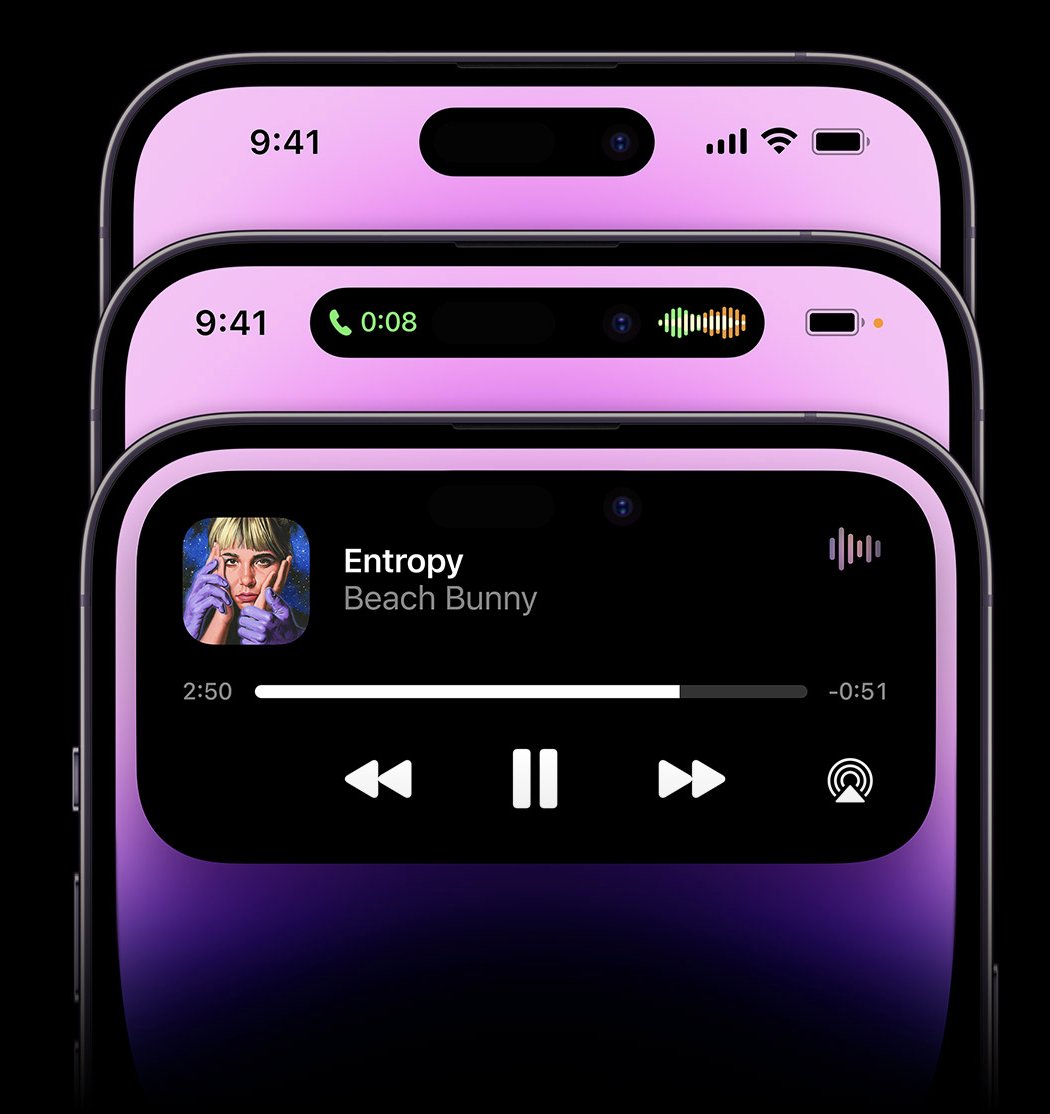
The Dynamic Island has to be one my favorite software-related surprises in a while.
In hindsight, it explains so much of Apple's recent design decisions on iOS: pill-shaped alerts, Live Activities, compact UI. They've been playing the long game. I love this. #AppleEvent