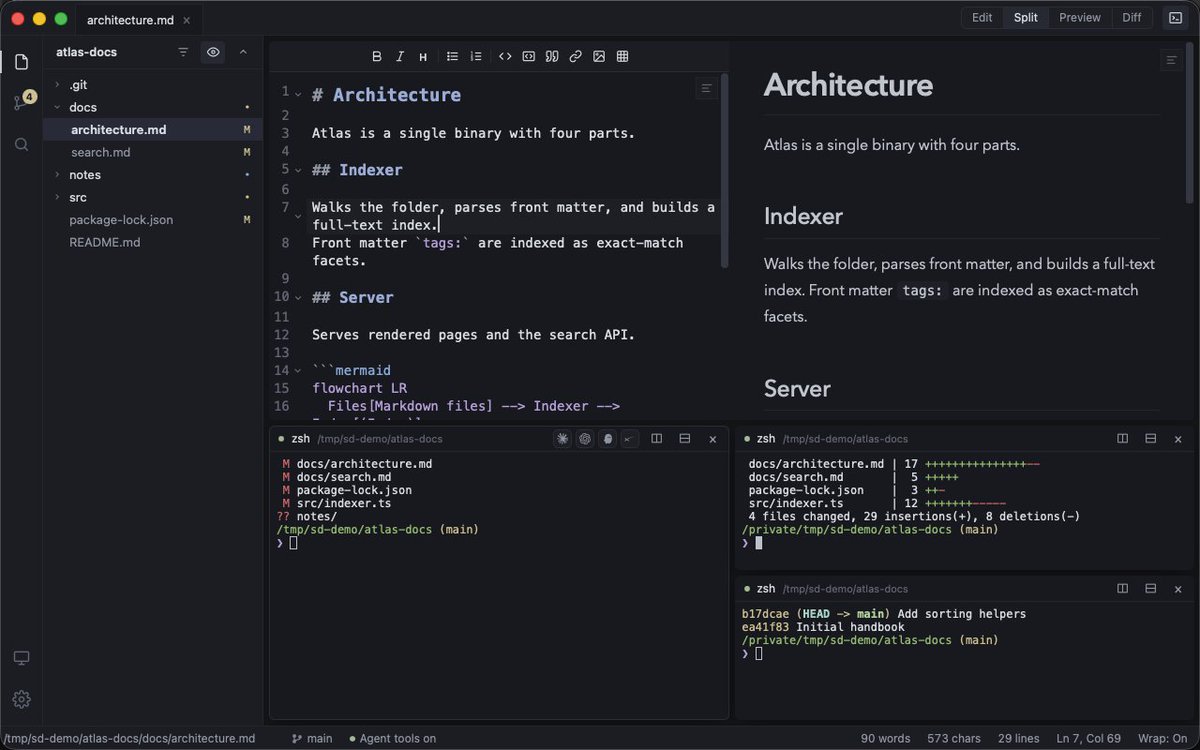
A small, local markdown editor for the files your agents write. Split terminals, one review queue for the relevant changes. macOS, Windows, Linux. Open source.
Meet SparkDown: a small, local markdown editor for the files your AI agents write.
Run agents in split terminals, then review every change they made in one queue, file by file.
macOS, Windows, Linux. Free and open source. 3.9 MB on Mac.
https://t.co/tZNSiooSc0
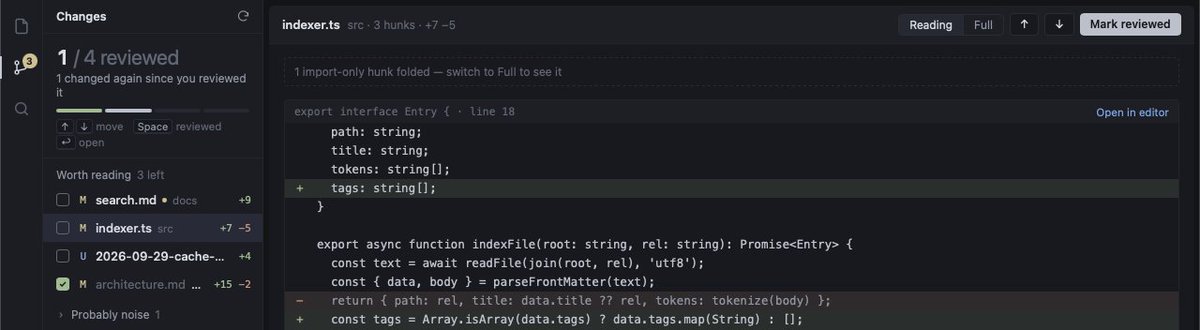
@toankhontech Good habit. The other half for us is after the run: list every changed file, read the real code first, and keep lockfiles and generated files in their own group so a stray bump stands out without burying the diff. That's the Changes view in SparkDown, if it's useful.
@anokarun03 Agreed. What helped us was less visualizing and more cutting what you have to read: fold import-only and whitespace-only hunks, put lockfiles and generated files in their own group, then go file by file. We built that into SparkDown, a small open-source markdown editor.
@ManicNovaSoft Same here. Tests and specs shrink what needs eyes, but something still has to read the rest. What helped us was tracking it per file: mark each one reviewed, and if the agent edits it again it goes back to pending. That's how the Changes view in SparkDown works (free, MIT).
@MichalekJan93 Agreed, they deserve their own look, not a skim between button changes. In SparkDown's review list, lockfiles sit in a separate collapsed group so they don't get interleaved with the code. We label it "Probably noise", which is fair to push back on for dependency bumps.
SparkDown 0.4.3 is out.
Find in the terminal, Discard changes in the Changes view, a sparkdown command on your PATH, and a round of reliability fixes for saving, search and the terminal.
Update in the app, via Homebrew, or grab it here:
https://t.co/T1DpYjjrpf
@SrinivasValekar Fair point. Not every line deserves the same attention. Our take in SparkDown: Worth-reading files come first, lockfiles and generated files fold into a collapsed "Probably noise" group, and import- and whitespace-only hunks hide by default.
@gsemetfr@neethanwu Same reason we made SparkDown: a small markdown editor with a live preview and built-in terminals for Claude Code or Codex, so you can read what the agent writes right next to it. Open source, if it's useful to you: https://t.co/tZNSiooSc0
@bravish_ Interesting result. Churn is easy to miss when you only see the final diff. We track it per file in SparkDown: a file you already reviewed goes back to pending when the agent edits it again, so needless edits are visible.
@lodeliscom@theo Agreed. That's why we built SparkDown's Changes view as a queue: a checkbox per file, lockfiles and generated files folded away, and a file goes back to pending if the agent edits it again. (We're the SparkDown team, it's free and open source.)
@Magnosud The "solid way to check" is the hard part. What helps us: see every changed file, fold away import- and whitespace-only hunks, mark each file reviewed. That's the flow we built into SparkDown, open source if you want to look: https://t.co/ARHDhAlBJZ
@themayukhbasu Markdown in git is a solid choice. The part we found tedious was reading each handoff, so SparkDown (that's us) watches the folder live and lists every changed file in a review queue. Free, open source: https://t.co/tZNSiooSc0
Local-first: no account, no telemetry, and it never calls a vendor API. Works with Claude Code, Codex, Gemini CLI, Cursor CLI, opencode or any agent CLI. Remote folders over SSH. MIT. macOS and Linux, Windows in preview. https://t.co/ARHDhAl3Ur
Meet SparkDown: a small, local markdown editor for the files your AI agents write.
Run agents in split terminals, then review every change they made in one queue, file by file.
macOS, Windows, Linux. Free and open source. 3.9 MB on Mac.
https://t.co/tZNSiooSc0
Agents run in built-in split terminals, up to 4 panes. Files update live as they write. Agents in those terminals can read what you're viewing over a local MCP server, with no port and no token.