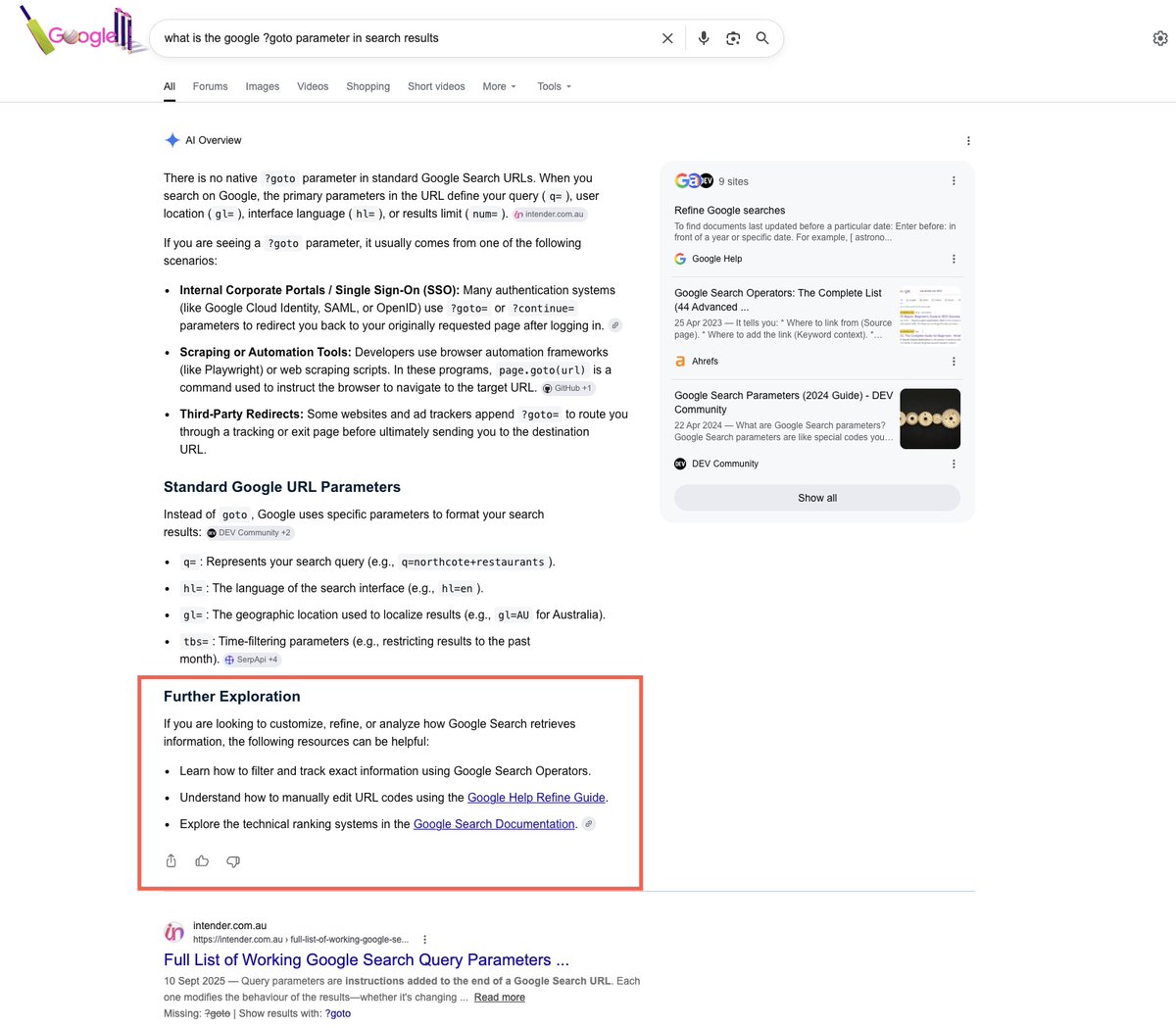
Recently, Google announced an update for AI features that would include an extension to "explore new angles".
I'm now seeing an early iteration of this within AI overviews, which features a 'further exploration' section at the end of the answer.
The new extension is primarily there to feature links to related resources.
📖 More details and examples on this test: https://t.co/iIfqdi3UNv
📧 To keep updated on SERP changes, subscribe to my monthly newsletter: https://t.co/CyLde59l8t
🔎If you're a macOS user (sign up to the waitlist for Windows/Linux), you can also use @serplens for your SEO: https://t.co/QmDSUvDoPR
SEO used to be about pages, rankings, and backlinks. That foundation still matters, but it’s no longer the whole truth 🤓
Now it’s:
• UGC
• Communities
• LinkedIn
• Reddit
• AI search modes
• Autonomous agents
Here's how it's moved from website to a full-on ecosystem👇
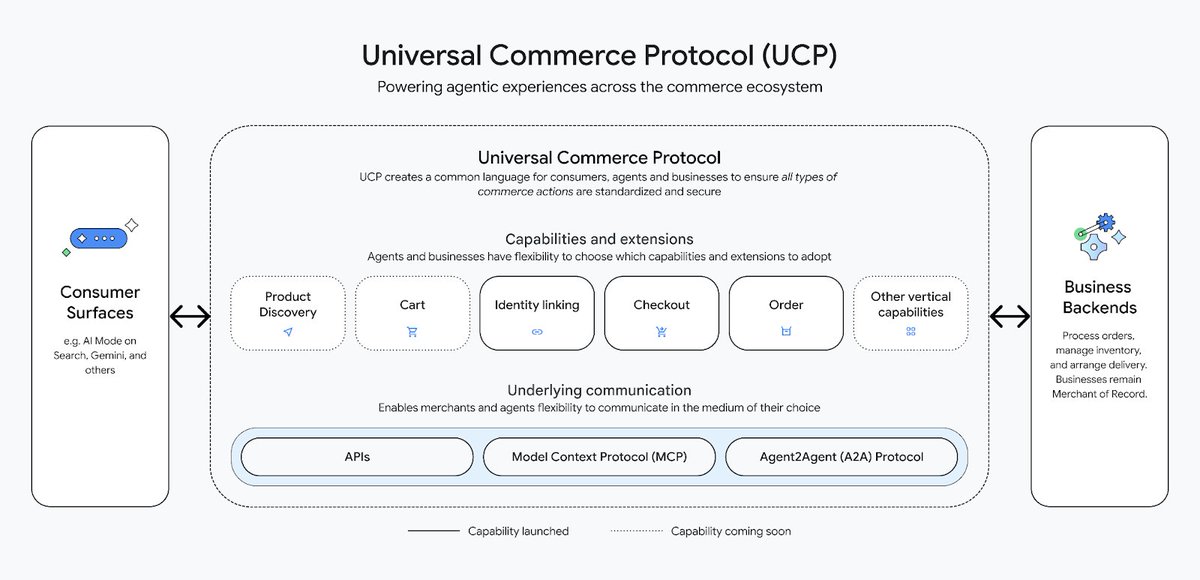
Google released a major update to the Universal Commerce Protocol (UCP) in March 2026.
UCP is an open standard that enables AI agents to communicate with ecommerce platforms and complete purchases on behalf of users.
For example, when a user asks Gemini, “Find the best running shoes under $100,” the AI agent can run a search, browse products across retailers, and present relevant options. With user approval, it can then complete the purchase – all enabled by UCP.
The March 2026 update introduces new capabilities, including cart support and access to product catalogs. Google has also simplified onboarding through Merchant Center to attract more retailers. UCP-powered checkout is currently available to eligible U.S.-based merchants, with global expansion planned throughout 2026.
Here's how to prepare your business now: https://t.co/RgqPgxUrqn.
The work you put into social media SEO can now shape your brand's visibility across multiple search experiences beyond social platforms, including AI Overviews, AI Mode, ChatGPT, and more.
For years, "social media SEO" meant winning in-platform search and appearing in the feed. Brands optimized captions, hashtags, and bios to climb TikTok's For You page or surface in Instagram's Explore.
That still matters. But using social media to influence external search visibility and shape how LLMs talk about your brand is now just as important.
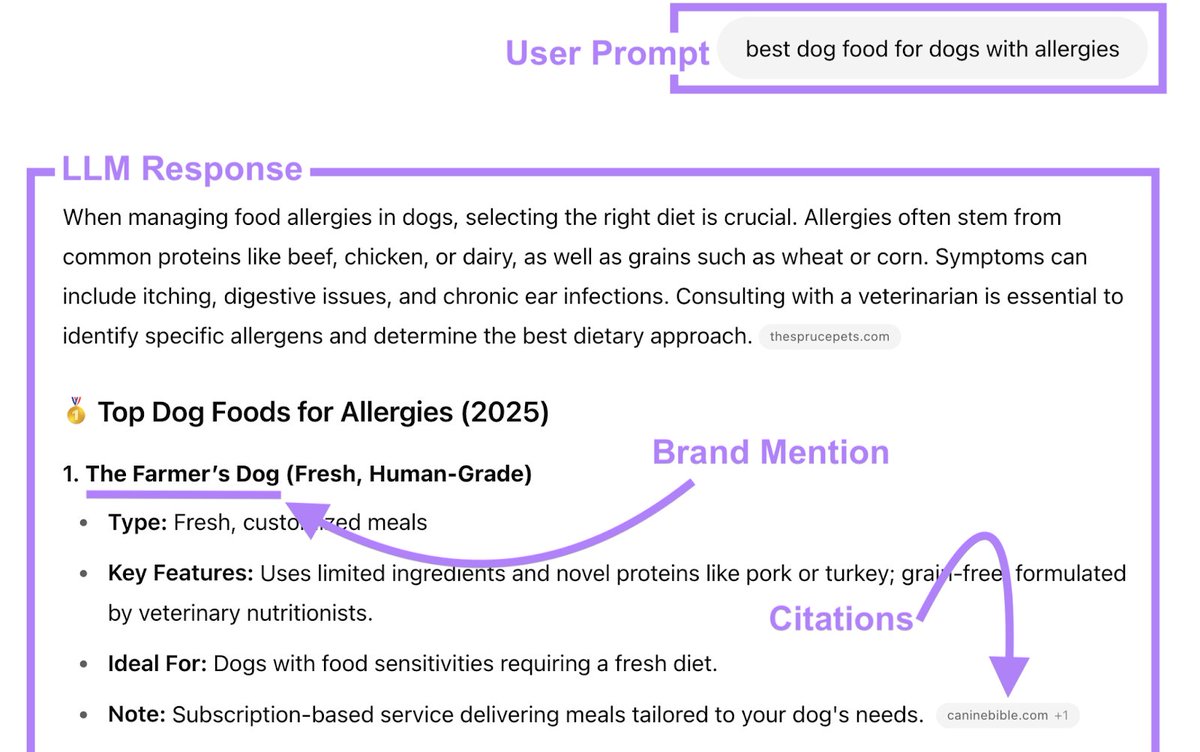
Our AI visibility study found that Reddit, LinkedIn, YouTube, Facebook, and Instagram are among the top domains LLMs cite. When a buyer asks ChatGPT "which managed WordPress host should I pick," answers are often pulled from Reddit threads, YouTube tutorials, and LinkedIn posts
https://t.co/mI3b6Yg5V8.
Most SEO teams start the same way.
They lock in SEO basics and manage to show up in Google. They test AI search. And then… they get stuck 🙃
Here's your path to actually be found in search. On what level is your team right now?
Semrush One and Semrush Enterprise help you make that jump ↓
https://t.co/OUMWwtbNnU.
Google released a major update to the Universal Commerce Protocol (UCP) in March 2026.
UCP is an open standard that enables AI agents to communicate with ecommerce platforms and complete purchases on behalf of users.
For example, when a user asks Gemini, “Find the best running shoes under $100,” the AI agent can run a search, browse products across retailers, and present relevant options. With user approval, it can then complete the purchase – all enabled by UCP.
The March 2026 update introduces new capabilities, including cart support and access to product catalogs. Google has also simplified onboarding through Merchant Center to attract more retailers. UCP-powered checkout is currently available to eligible U.S.-based merchants, with global expansion planned throughout 2026.
Here's how to prepare your business now: https://t.co/NI1rDr06I6.
AI search platforms like ChatGPT, Google AI Mode, and Perplexity are changing how content gets discovered. But what makes one piece of content get cited while another gets ignored?
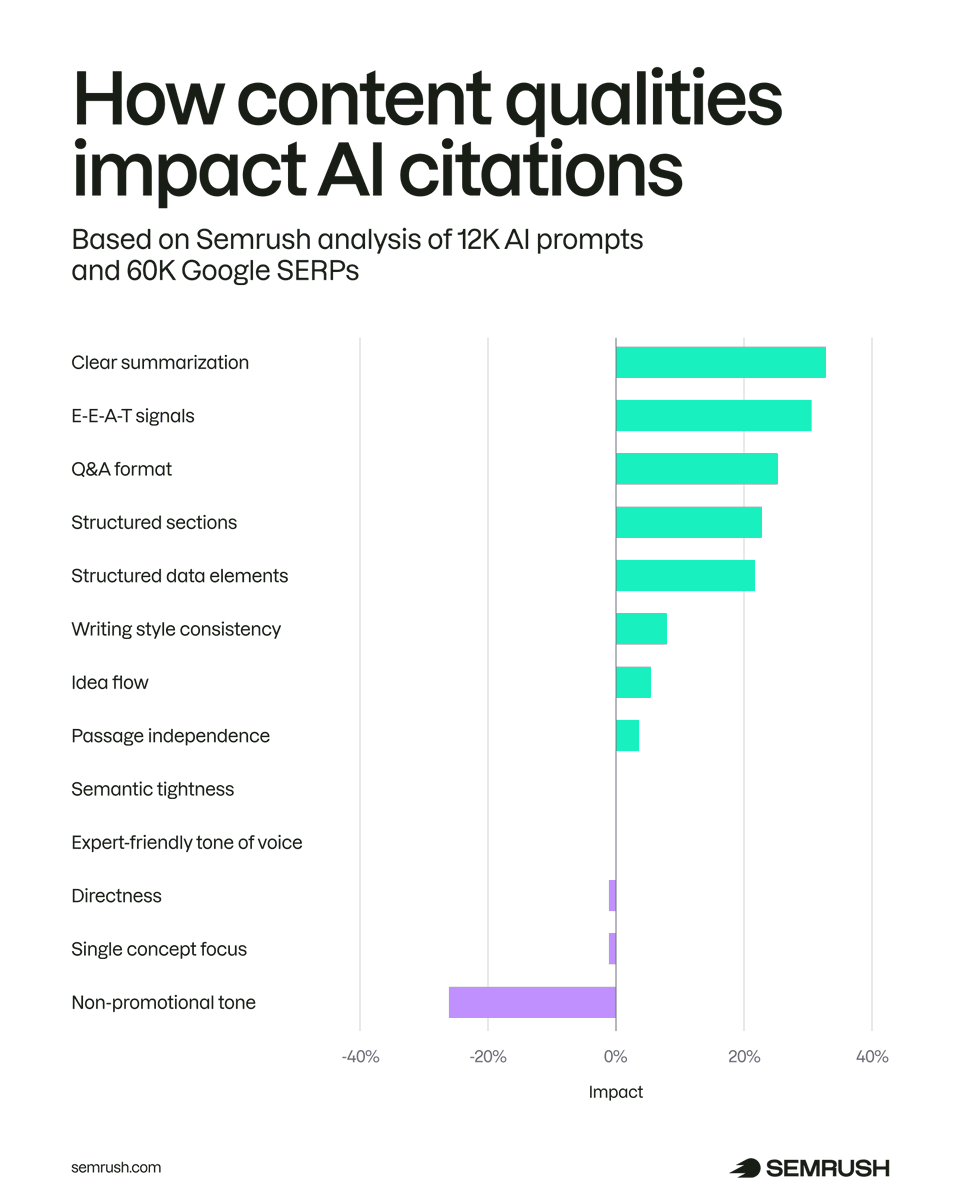
To answer this, we analyzed thousands of citations and compared them to similar pages ranking in Google. Our goal was to identify which text-only qualities most strongly correlate with AI citation behavior, and whether these patterns differ from traditional SEO signals.
Based on our research, we found five content qualities that showed a strong positive correlation with AI citations, plus one that showed a negative correlation:
• Clarity and summarization: +32.83%
• EEAT signals: +30.64%
• Q&A format: +25.45%
• Section structure: +22.91%
• Structured data elements: +21.60%
• Non-promotional tone: -26.19%
In short: content that delivers clear answers, demonstrates expertise, and uses structured formatting is more likely to be cited.
Full breakdown: https://t.co/sqTUqijf1Y.
🚨 New @bing Webmaster Tools AI Performance Dashboard Insights: We can now see which pages are being cited for a specific grounding query, and which grounding queries are driving citations to a specific pages 👌 Thanks so much for hearing the community feedback @kmadhavan77 , @facan and team 🙌 See the announcement here: https://t.co/BBLlDMy5UG
Google is testing out the new bubble link approach with embedded links in AI Mode.
Instead of clicking through directly to the website when a brand is mentioned, the bubble link treatment now means the user has to click again if they want to visit the website.
Details: https://t.co/AdmNwsi4vO
📧 Stay on top of changes to Google's SERPs by subscribing to the SERP Alert Newsletter. Join 3,200+ subs for monthly updates: https://t.co/CyLde58NiV
The llms.txt file is a proposed standard meant to help large language models (LLMs) better understand and use content from websites.
The idea is pretty straightforward: Instead of letting AI crawlers wander around your site, you give them a curated list of your most important content. To tell AI what content on your site it should actually pay attention to.
We already have standards like robots.txt and sitemaps to help search engines navigate websites more efficiently. What’s different about llms.txt is that it’s specifically designed for AI models that might use your content to answer questions or generate responses for users.
Learn more in our blog post: https://t.co/K6rsrdBBVF.
Nano Banana Pro. Create an infographic for major Google algorithm updates over the past two years. Not bad, not bad at all... :) I like how it color-coded them and added icons for core, reviews, and spam.
The 'loyalty benefits' extension on merchant knowledge panels looks to have rolled out now. Great opportunity if stores have a compelling loyalty program.
LLM optimization helps your brand show up in AI tools (like ChatGPT) by getting good mentions online and creating content AI can easily use in answers ⬇️ https://t.co/ONq34bWsSh.
Today we released the August 2025 spam update.
It may take a few weeks to complete, and we'll post on the Google Search Status Dashboard when the rollout is done:
https://t.co/VyY24LVujq
Book your stall now! Scan the QR code or visit our Website:
https://t.co/26FYZACee3 to know more.
Explore Layout, Stall Options & Pricing:
Click here to view details - https://t.co/5IYbwGQ4Xa.
The time has come. Google's AI Mode is now showing outside of labs for the first time.
This means that not only is it showing more broadly for users, the data will now start to appear in Google Search Console (in the performance report).
Click this link: https://t.co/0muiRb1r1x to take part in an experiment to see if the data is showing in GSC like Google has said it will.
h/t @SachuPatel53124 for being the first one to spot AI Mode showing outside of labs for the first time since the Google I/O announcement last month.
Note: it seems like AI Mode is only showing for some regions currently (I can see it in the US), so let me know in the comments if its appearing for you or not after clicking the link above.
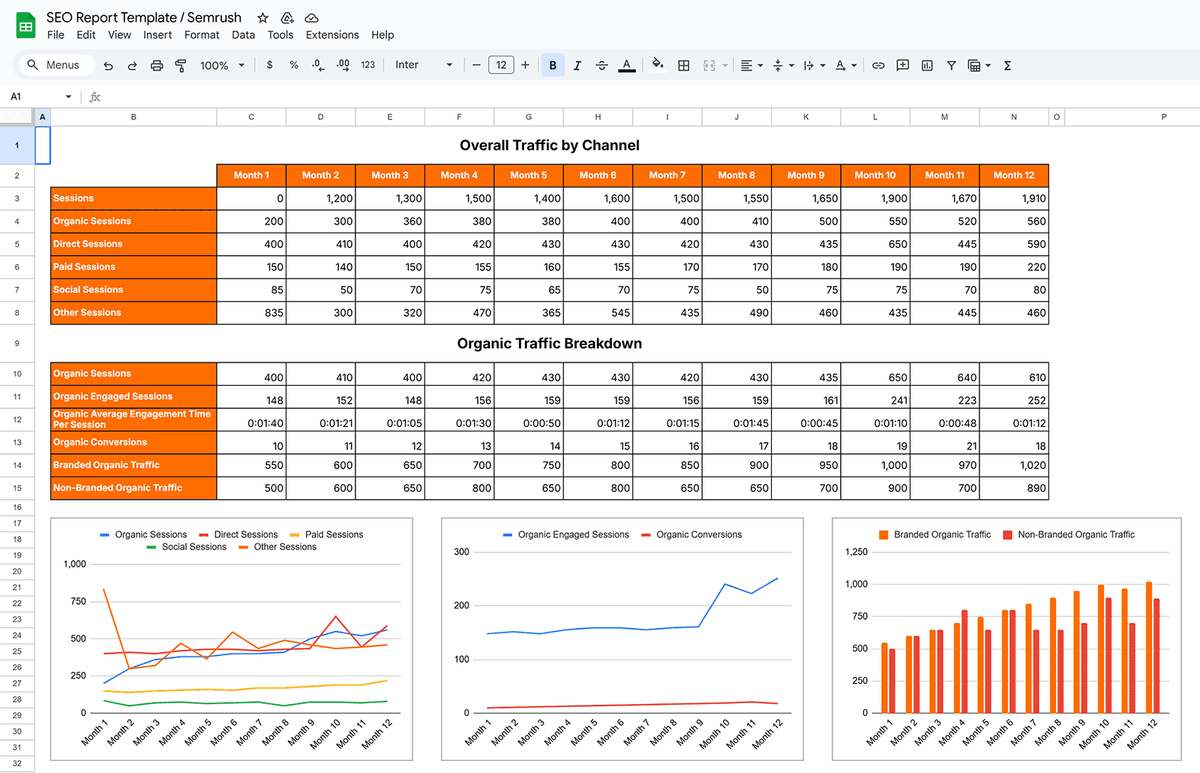
Our SEO report template helps you understand and communicate your website’s organic performance related to traffic, keywords, and backlinks.
Get it for free here! https://t.co/r6DP5CMAVg.
📢 Google is rolling out a new feature for changing the Reports snapshot template in GA4. 👇
Navigate to Reports > Reports Snapshot in your GA4 property. You should see the top screenshot if this feature is available in your property.
If you don't see the top screenshot, follow the steps below:
Step-1: Navigate to Reports > Reports Snapshot in your GA4 property.
Step-2: Click on the 'Customize Report' button (pencil icon). A 'Customize report' overlap would appear on the right hand side of your screen.
Step-3: Scroll to the bottom of the overlay, until you see the 'Change Report Snapshot' button under 'TEMPLATE'. You won't see this button, if this feature is not yet available to you.
Step-4: Select a template that shows the performance metric you want to see from the 'Preview a template' overlay. Currently, the following three templates are available: 'User behavior', 'Sales and revenue' and 'Marketing performance'.
Step-5: Click on the 'Choose this template' button if you want to use the template. Going forward, when you open the 'Reports snaphot' report, you will see the new templated you installed.