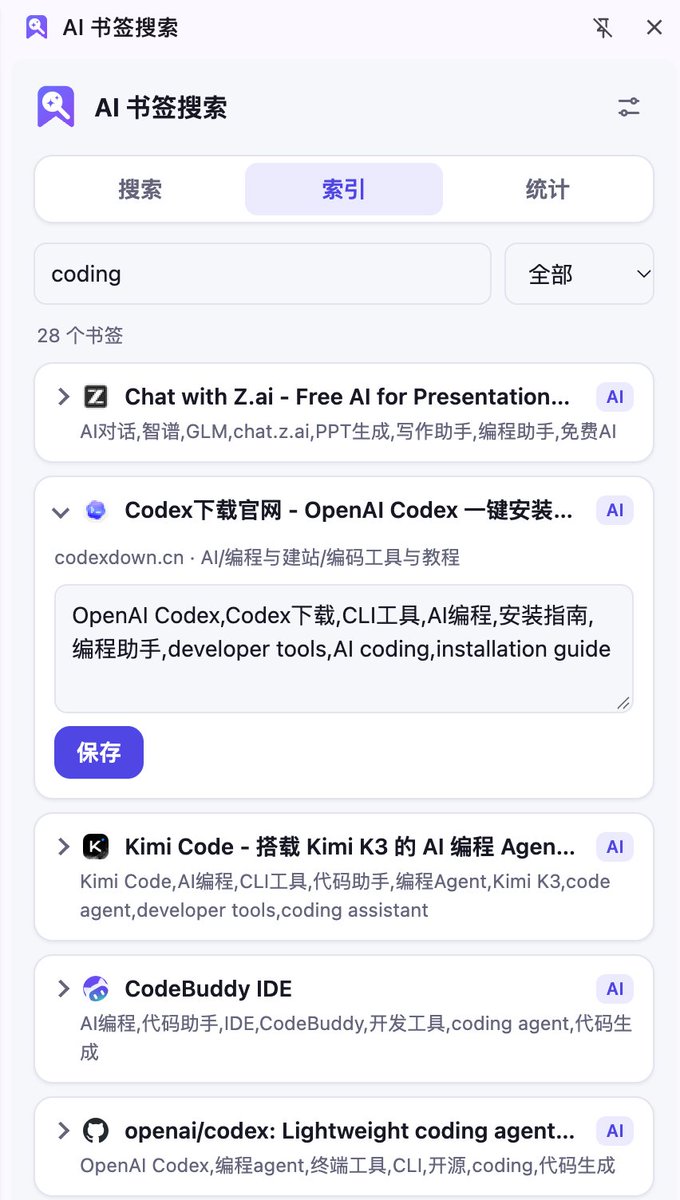
A decade-plus of Chrome bookmarks. 1000+ of them. And the sites I saved? Still unfindable.
Bookmarks don't scale — past a certain point they become a pool of dead water. Everything's "in there," but if you can't dig it out, it's the same as nothing.
So I built myself a Chrome extension with Claude Opus 5.5. Core features:
1. Auto-indexes all bookmarks (existing + new — you can also add tags manually), with natural-language search. "Which image-compression sites did I bookmark?" → straight to the answer, no digging through three layers of folders.
2. Suggests deletions based on open frequency: bookmarks untouched for ages get listed for one-click cleanup.
3. BYO API key for both indexing and AI search. I plugged in the Mimo V2.6 Flash model — less than $0.01 per search.
If you've ever drowned in bookmarks, like or leave a comment — I'll open-source the project soon.
We'll be spending a lot more time trying to understand the outputs of language models. A few thoughts, tips & tricks:
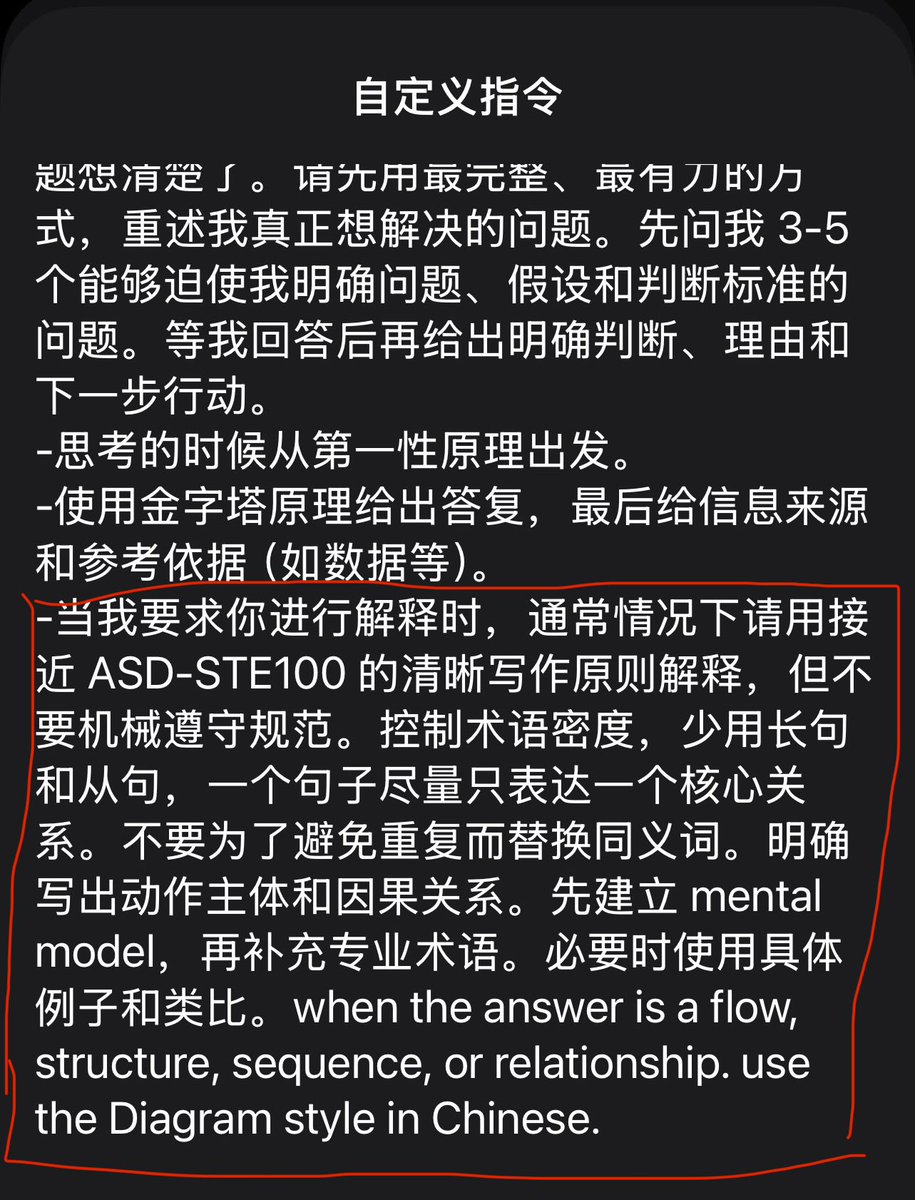
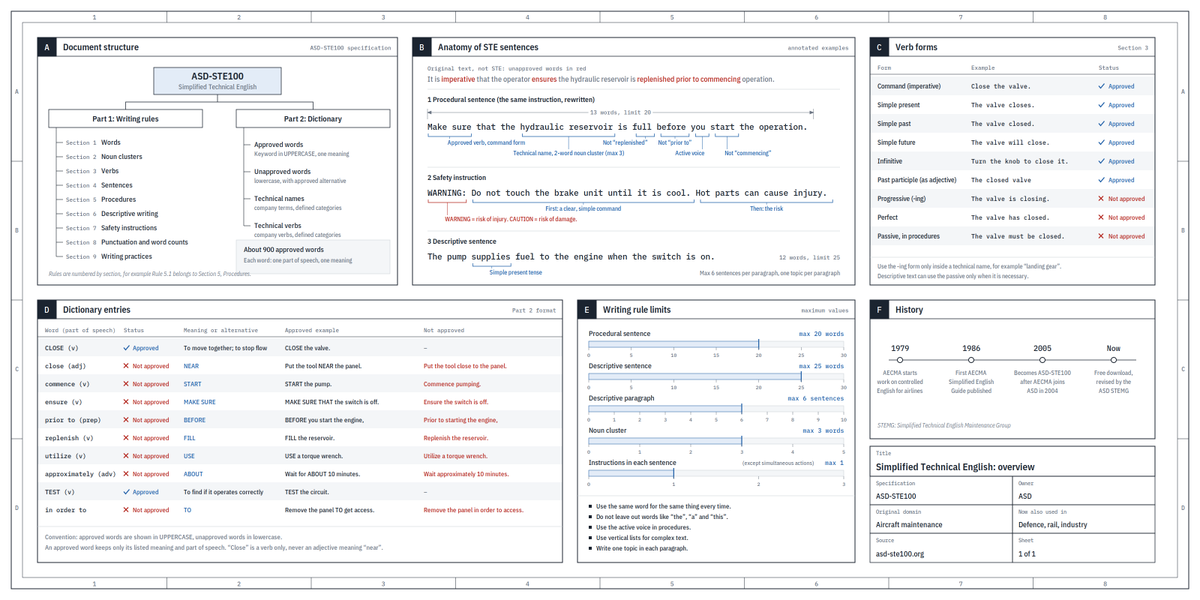
Writing. Something I've had success with: Ask your LLM to explain something in ASD-STE100, it's a controlled language specification originally developed for aerospace maintenance documentation. LLMs well-versed in this language and it comes with heavy constraints on clean writing style that I often find a lot more readable. Sometimes I've tried to soften it a bit e.g. ask for "80% of the way to ASD-STE100" because the spec is quite stringent. But even better:
Diagrams / images. Instead of writing, ask your LLM to create a diagram. These can be a lot easier to process, parse, and understand. But even better:
Web pages. Ask for output "in HTML" to get a beautiful, interactive webpage. LLMs are getting really good at frontend and can create beautiful experiences, animations, etc. But even better:
Explainer videos. The output format I am most bullish on is fully custom / bespoke explainer videos generated on any arbitrary topic. Experiment with things like "Create a 3b1b style video explainer on X. Use my ElevenLabs API key for audio narration". (you'd need an API key for the latter or you can ask your LLM to find you decent free alternatives that use your local compute). This is actually starting to work!
In summary:
- As LLMs get better, they will do more and more of the legwork autonomously, and a lot more of our work will rise up the abstractions into oversight and understanding.
- Luckily, LLMs can help here too because as intelligence and code are increasingly abundant, you can ask for large, custom, discardable software artifacts (e.g. web apps, video explainers) that would have never made sense to create before. Push the boundaries here and you'll be surprised.
If your CEO hired someone to "own" org development, your org development is already dead.
OD without power is theater: surveys, workshops, culture decks. The real levers — headcount, incentives, reporting lines — only the CEO can pull.
A CEO can delegate the craft. They cannot delegate the accountability.
The AI assistant I've been using — Meta's Muse (I call it Milo) — is honestly one of the best I've tried. It handles my inbox, manages my calendar, and gets things done for me like a real personal assistant.
Join me 👇
🔗 https://t.co/ZfWVxDuMW9
🔑 Invite code: [45VO58]
We each get 1 billion tokens when you join. Win-win!
Most bad AI work isn't a model problem. It's a delivery-standard problem. You know what "good" looks like. The AI doesn't. Here's the three-step fix that actually works.
1. Sharpen before you assign.
Don't drop the full task on day one. Talk it through first. Ask for rough samples, a simple cover, a rough page, anything cheap. Round by round, pull the unspoken standards out of your head and into the chat.
2. Write it down, then run it clean.
Once you agree, turn that chat into one clear brief. Open a fresh window. Hand the whole document over once. Don't keep patching mid-run and waiting through another long loop.
3. Keep the brief. Reuse it.
That document isn't just for this job. It's team knowledge. Next similar task, start from the brief, not from zero. Quality goes up. Cycle time goes down.
Collaboration engineering beats better prompts.
Codex hit me with "Selected model is at capacity." All my models went dark. My projects, sessions, and harness configs all live there, so leaving Codex wasn't an option.
I stayed. I just made Codex talk to third-party models too, with Open Codex:
https://t.co/Lb7XI874Y4
How: I didn't install it by hand. I gave Claude Code this prompt and let it do the work:
"Help me install this plugin: https://t.co/Lb7XI874Y4. It lets Codex use third-party models while still using OpenAI's own models. First check whether installing it would wipe my Codex sessions. If it would, warn me before installing. Back up my Codex config before install so I can restore it if something breaks."
That one prompt got me out of capacity hell without abandoning the harness I already built.
#codex #ClaudeCode
How I pick GPT-6 Astra reasoning levels, without lighting my quota on fire.
Skip Ultra. It costs a lot and the extra juice is tiny.
Non-coding and simple coding: low or medium.
Hard coding: high or xhigh is enough.
A real bone to chew: leave Codex. Use ChatGPT 6 Pro, plug in the official GitHub plugin, let it open the PR. The $200/mo ChatGPT Pro 20x plan gives you 200 of those a week.
The combo that actually works:
Easy job: gpt-6 low or medium.
Harder job: start on high, with plan mode. Let it audit, research, and write the plan.
Then drop to low or medium and execute.
Planning is where you want it to think. Once the plan is on the table, the rest is just doing the work. Lower effort is fine there.
#gpt6
3. Session-to-session, I write five lines and stop. What is in flight. Why it matters this week. What the next session is for, in one sentence. Where the spec, plan, and diff already live. What I believe but have not verified. A guess written as a fact becomes the next agent's floor.
I run multiple agents every day. The hard part isn't the model.
It's the handoff.
Agent A finishes.
Agent B starts from a worse brief than a junior hire would get.
Context dies in the gap.
That's collaboration engineering. Prompting is just the surface.
2. A new chat that starts with "continue" is not a handoff. It's a memory leak. The last session already paid for the context. The next one should inherit the live thread, the reason it exists, and pointers to what is already written down. Not a vibe. Not the whole transcript.
In the AI era, prompt engineering may only be a surface-level skill. The deeper skill is collaboration engineering.
How we think about AI shapes how we use it.
If we treat AI as a traditional tool, we naturally expect a simple transaction: I give an instruction; it delivers a result. If the result isn’t good enough, we conclude that the tool isn’t good enough.
But if we treat AI as a cognitive collaborator, the way we work with it changes.
We start asking ourselves:
Did I make the goal clear?
Can I give useful feedback?
Am I willing to let it challenge my assumptions and point out where I might be wrong?
Perhaps the key to using AI well isn’t learning more prompts. It’s learning how to become a better collaborator.
A good collaborator can define goals, give feedback, and be challenged.
And great human–AI collaboration isn’t just about humans constantly correcting AI.
It works both ways:
We help AI understand the problem better.
AI helps us understand the problem differently.
That’s when AI stops being a tool that simply follows instructions and becomes a cognitive partner—one that can think with us, iterate with us, challenge us, and help us move toward better answers.
The idea is cool, but could you please write a more understandable tutorial? I downloaded this desktop app, but haven't figure it out how to use it. The 'Memories' listed my recent sessions from other local agents, but all are labeled 'Processing Failed', so not sure if it actually works.