Solution Architect IT infrastructure; Windows; Virtualisation; VMware; VDI; Citrix; Xen - Health check; Build; Migrate; Consolidate; Secure - father of two boys
❌ Admins, please block Device Code Flows (DCF) in your tenant today!!
In the post below I share how device code phishing works, the CA policy to create and finally show how it get's blocked with the policy.
🧵👇
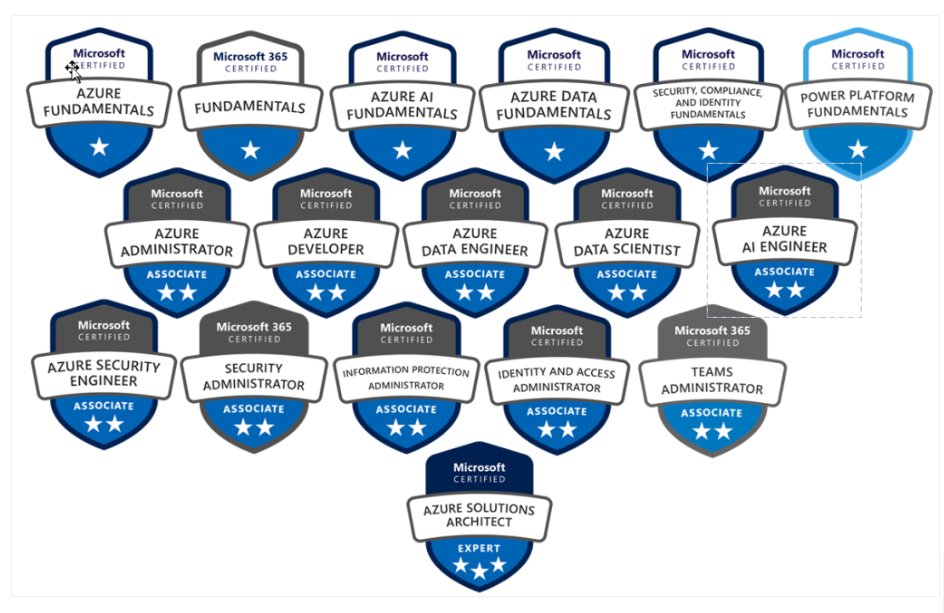
Microsoft is Offering FREE Azure 2025 Certification Courses!
No Fee, Completely Free
These 20 Courses Includes Video Tutorials, Hand's on Labs and Notes.
Don't miss these courses if you want to make your career in 2025:
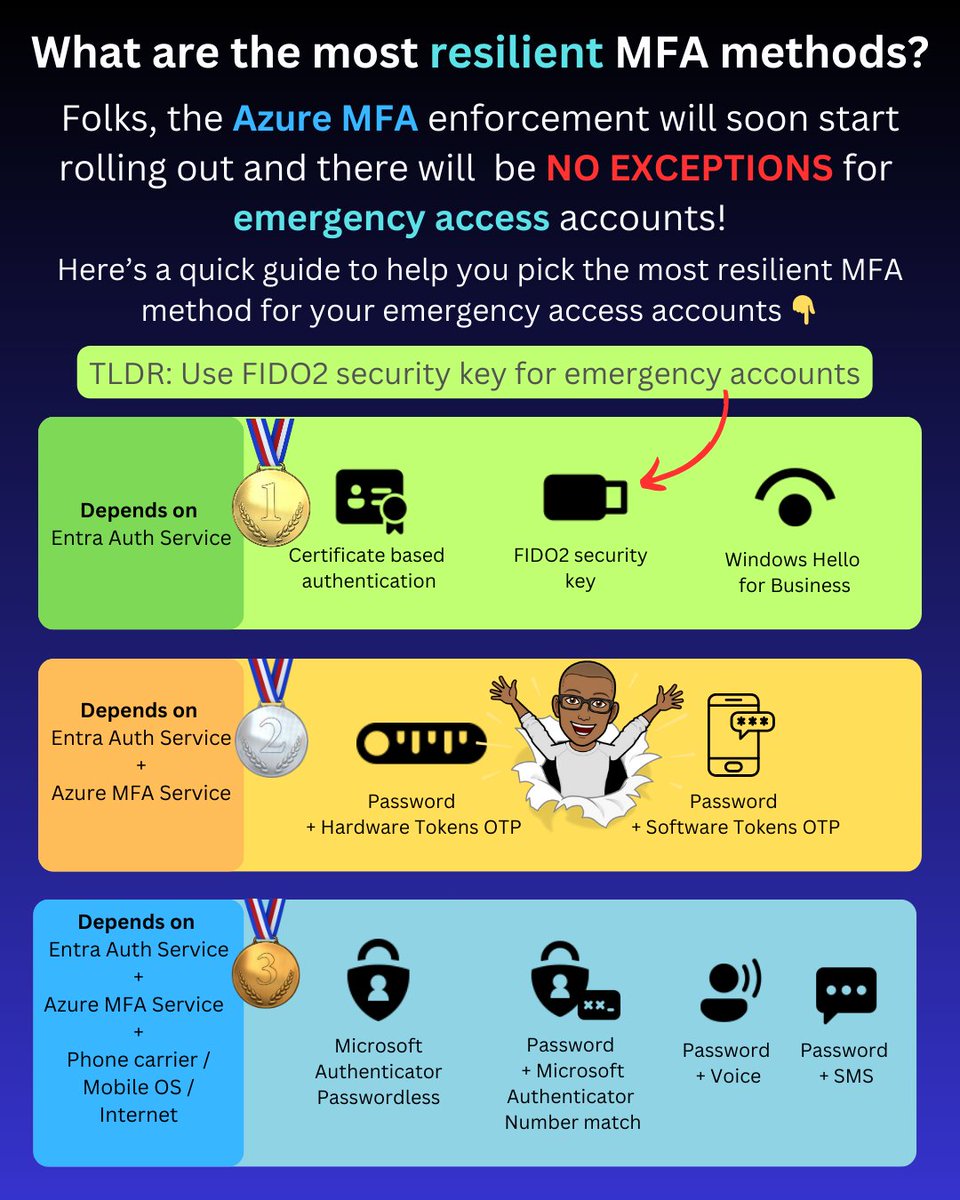
As part of the Azure MFA enforcement rollout, emergency accounts will now need to be registered for MFA.
You should typically avoid using MFA methods that have dependencies on other services, such as the Azure MFA service or your mobile carrier.
This leaves the following as the three most resilient MFA options:
✅ Certificate-based authentication
✅ Windows Hello for Business
✅ FIDO2 security keys
These three methods' only dependency is the core Entra authentication service, which is the same as password authentication that relies on the Entra auth service.
Now, when it comes to your emergency access account, the most likely option is to use FIDO2 security keys.
Here's why.
Windows Hello for Business (WHfB) for emergency access
Windows Hello for Business is not a viable option for emergency access accounts. It requires a device that must be frequently updated, constantly connected to the internet for the PRT to be renewed, and there are also the costs and operational overhead associated with the device.
Certificate-based authentication for emergency access
If you haven't deployed certificate-based authentication, you'll need to set it up and ensure that you use self-signed keys to avoid dependencies on external PKI/CRL infrastructure. Not to mention a smart card and card reader or some other hardware for storing the certificates.
FIDO2 security keys for emergency access
This essentially leaves FIDO2 security keys, which are simple to enable in Entra ID, require very low or no maintenance, take up little space, can be stored securely, and can be purchased for $25 retail.
PS: I've intentionally not included device-bound passkeys in Authenticator as they are currently in public preview, and you most likely don’t want to use them for your emergency access account yet.
-------------
Liked this post? Bookmark this and feel free to follow me for more tips on Microsoft Security and Microsoft Entra.
Remember to click the bell icon on my Twitter profile. This way Twitter will show you all my posts in your feed so you don't miss anything.
Please like, repost to share with others. Thanks!
I've been waiting a long time to start sharing this with everyone.
Finally, the Intune Device Migration tool version 7 is coming out, and will include scenarios to migrate a PC between Intune tenants in addition to migrating the device state from domain or hybrid join to pure cloud native.
Want to fully migrate from SCCM or comanaged? We can do that too.
And forget about 4 reboots... we're taking it down to 1.
Over the next two weeks there will be a ton of content around this, both written and video, but I wanted to start off with an overview detailing where we left the current solution and what the biggest changes are.
https://t.co/fYsLIEDFz6
#intune #autopilot #microsoftgraph #windows11 #azure #entraid #surfaceforbusiness #migration #microsoft365 #msftadvocate #windows365 #mdm
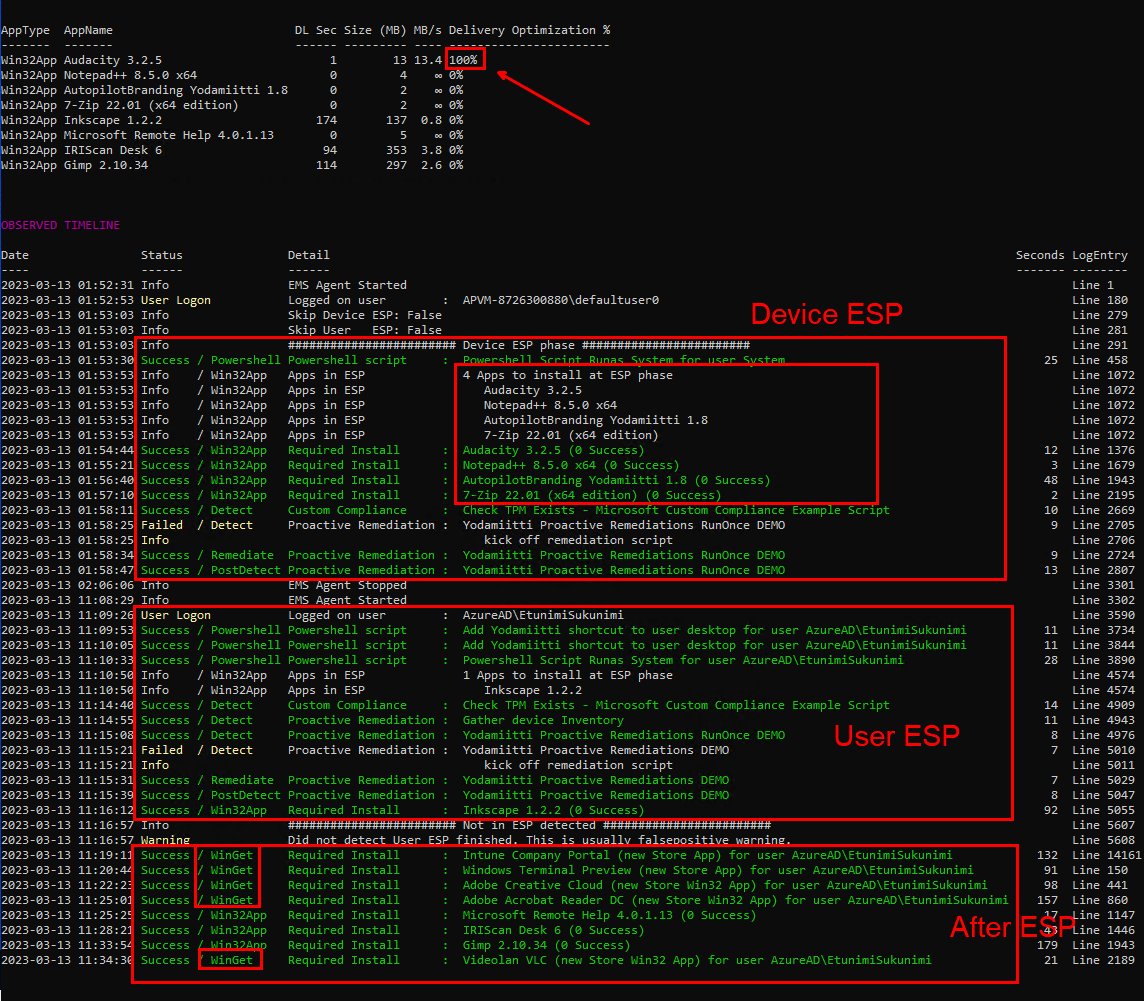
Huge announcement! I just released new Intune log events analyzer and LogViewerUI tool Get-IntuneManagementExtensionDiagnostics.ps1. It shows Intune events in Timeline. This helps understanding Windows Autopilot and Intune deployments. #MSIntune https://t.co/UQu2RFr9SX
Simplify Windows Hello for Business SSO with Cloud Kerberos Trust – Part 1 of 3 Mega “Mini Series” #MSIntune#WHfB@michael_mardahl
https://t.co/TFN7KsXseW
Question: What's better than peanut butter and jelly for an Azure AD admin?
Answer: Our newly launched feature that adds conditional access policy support to Azure AD PIM.
Folks, this is a marriage made in heaven. Read on for a quick walkthrough. 🧵👇🏾
Are you tired of clicking around in Microsoft portals to get to a blade?
Introducing https://t.co/jZV3o3tYP1 your Microsoft cloud command line for the browser!
Use the power of your keyboard and your memory to get to your favourite Microsoft portal or blade in seconds.
Inventor Takashi Kaburagi succeeded in automating a Rubik's Cube to solve itself. This 3D printed cube leverages intelligent servo motors located at its center that are programmed to solve the cube.
Source @pascal_bornet
Deploy Teams media optimization with Intune Proactive Remediation to Windows 365: The Microsoft Windows 365 provides all the benefits of Windows, without any of the traditional hardware limitations. It is the most optimized Microsoft… https://t.co/NI8qP9SN3u #SCCM#MSIntune#MEM