Which steps in your SKILL.md actually help?
I want to use a Devin Bot to build a tool that runs the same task across models, removes one skill step at a time, and shows what changes in the output.
Would you try it? What skill would you test first?
A new update has been released for the Complete Godot VFX Handbook! It now includes 128/250 pages covering VFX, shaders and UI✨ https://t.co/ffEKie1Sx3
Claude Drawing
Claude paints in 83 styles with code, no image model and no GPU
Ink wash, impasto oil, clay, cyanotype, stained glass, a Roman mosaic, pixel art, a VHS frame. Claude plans the composition and writes a short scene script with the library. Then it renders, checks the result against a per style list of real failure modes and fixes it over 2 to 4 rounds.
Because it is code, placement is exact and the same seed gives the same picture. Snapshots can animate the painting being made.
It runs offline on a CPU, with no API key or quota. A Claude Code skill.
https://t.co/WKAPrbxW8r
OpenCode isn’t free anymore if you want serious usage
so if you’re looking for the cheapest ways to run strong coding models, these are the options i’d check first:
1. DeepRelay, $4.99/month
2.5B input + 250M output tokens/month for DeepSeek V4.1 Flash off-peak. there’s also a $0.99 plan with 500M input + 50M output if your usage is tiny.
2. Mistral student, €6/month
the Vibe API key can also give you access to DeepSeek V4.1, GLM 5.3 and GLM 5.3 Flash, not only to Mistral models.
3. CommandCode, $1/month
probably the cheapest subscription here, but the catch is that it only works with their own harness.
4. Alibaba Cloud, $3-$6/month
cheap access to models like Qwen 3.8 Max and GLM if DeepSeek isn’t a requirement.
5. Muse / MiMo, $5-$6/month
both are worth checking if you mainly want cheap coding inference without jumping to a $10 to $20 subscription.
if your usage is really light, i’d still skip subscriptions and just use direct API credits.
that can easily be cheaper than paying monthly for capacity you never use.
Xcode 27 includes agent skills for modern best practices and new APIs.
You can export these skills and use them outside Xcode with a single command:
xcrun agent skills export --output-dir ~/Downloads/xcode-skills
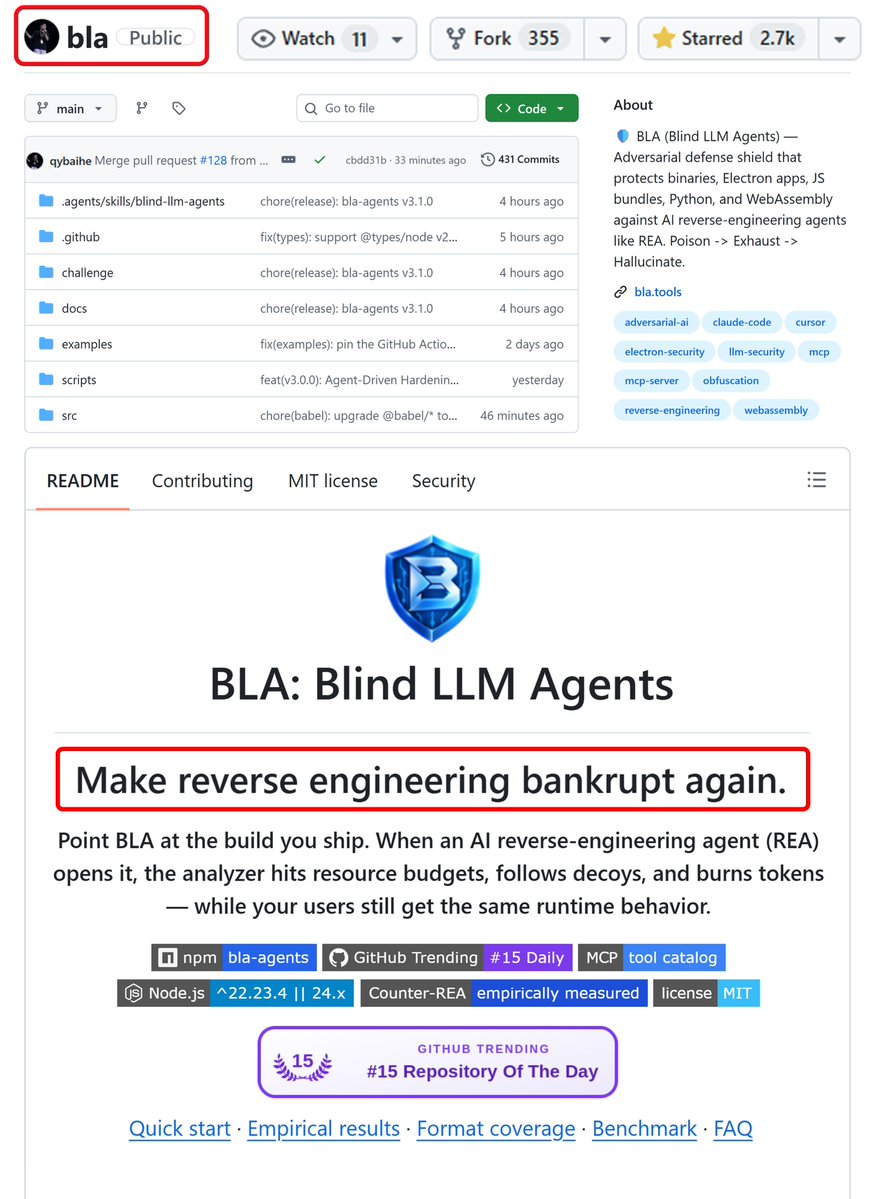
REA (reverse engineer anything) - F*CKED by chinese student...
solo dev just dropped protection for your app & site & game from reverse-engineering and AI hackers, for free
REA not dangerous anymore.
here's how to use and setup BLA (Blind LLM Agents):
first understand how it works:
• REA opens your app in 1 command, BLA hides traps inside it before you ship
• fake keys and decoy code for AI to chase, plus files built to blow past REA's own limits
• AI burns tokens on dead ends, your users get the exact same app
here's how to set it up for FREE:
1 → open Claude Code in the folder of your app, site or game
2 → say: " install Node.js 24 if I don't have it, build my project, then run npx bla-agents setup and npx bla-agents harden"
3 → it finds your build itself: dist, build, Electron .asar, .wasm, Python, native binaries
4 → it plants fake keys and decoy code, then checks every protected file still runs the same
5 → the step everyone skips: ship the files from the new .bla-hardened folder, not your old build
6 → for sites it protects the JS your site sends to browsers, your server code never leaves your server anyway
7 → want proof? run: npx bla-agents benchmark - before vs after on 14 test apps
paste link on repo below as soon as possible:
62 reasons to use MonoCode 👀
Core idea:
- One GUI for 11 coding agents: Claude Code, Codex, Cursor, Grok Build, OpenCode, Antigravity, Pi, omp, fx, Hermes Agent and Devin.
- Uses your existing subscriptions. It runs the CLIs you've already installed and logged into.
Reference to Game
References are the cheat code for AI media generation.Most people prompt and pray. Start with curated references and your output quality jumps.
@OdinLovis proved it with video-to-game : one video reference and the LLM knows where to start and how it should look.
https://t.co/Eug3Xz06PS
But one video only gets you so far. What if you could define everything?
→ Art direction
→ Game mechanics
→ HUD & UI
→ Levels
→ Objects & assets
That’s why I built Reference to Game.Create any reference you want first, then generate a game that matches your vision instead of the model’s guess.
New skill: /gestures
Helps you build beautiful, intuitive gestures for your app.
Adds rubber banding, velocity support for dragging, drags that carry momentum, everything I learned from building Sonner and Vaul, and more.
I’ve been using it a lot recently, you’ll love it.
Si siempre quisiste entender cómo funciona un motor eléctrico, ve esto
Alguien le pidió a una IA que le explicara un motor real y creo una página interactiva con estilo de dibujo a mano.
Cómo funciona la demo:
→ Ves el motor en 3D: la bobina girando entre dos imanes, uno rojo y uno azul
→ Mueves el voltaje de la batería, la fuerza del imán y las vueltas de la bobina, y el giro cambia en vivo
→ Volteas los imanes o la batería y el motor gira al revés
→ Las gráficas de abajo te dibujan la corriente y el empuje en cada ángulo
→ Puedes detener la bobina con la mano y ver dónde pierde fuerza
Para qué sirve:
→ Entender por qué la electricidad y el imán hacen girar algo
→ Ver qué cambia si le das más voltaje o más vueltas al cable
→ La base de los motores que mueven cualquier robot
Según su creador (@thebuggeddev), lo armó preguntándole a una IA cómo funciona un motor de verdad.