It is a well-known fact that marketing and sales teams often exaggerate when trying to make a software look better than competitors or when making claims that are not entirely accurate to drive sales.
In the past, it was easier to get away with such claims. Today, CIOs and CTOs have AI by their side to validate such claims and compare the real capabilities of competing software before going ahead with the purchase.
These situations create discomfort for technical teams on both sides. Customer technical teams arrive with high expectations based on promised features, while vendor delivery teams know many of those features do not exist and cannot realistically be delivered.
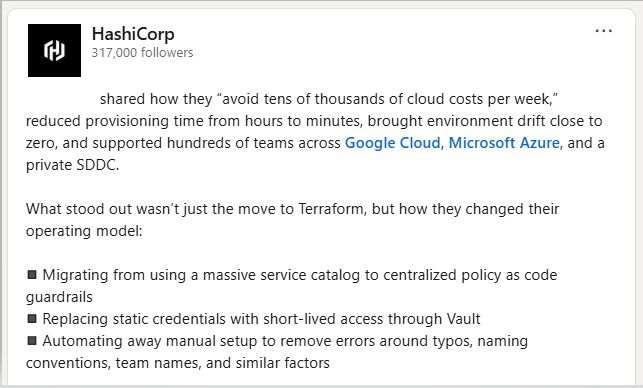
I recently came across some marketing material online where the creator of Terraform made similar claims for a telecom giant that also happens to be my former employer. When I was there more than 10 years ago, the vendor team typically took around one hour to deploy the software. I am not sure how that timeline changed to hours and how Terraform supposedly reduced it from hours to minutes.
Infrastructure provisioning speed is ultimately controlled by the cloud provider. No IaC tool can fundamentally change that beyond minor external optimizations, and certainly not from hours to minutes in such scenarios. This is the reason we don't make such claims in our marketing materials.
I had provisioned bare metal servers on SoftLayer (now called IBM Cloud Classic Infrastructure) in the past, and I know it takes hours. I am yet to see a demo where Terraform reduces that to minutes. That would be the ideal way to validate such claims.
Stop paying for tool sprawl. Consolidate your cloud strategy. 📉
As a technology leader, you are constantly battling fragmentation. You have one vendor for Infrastructure as Code, another subscription for FinOps and a third platform attempting to solve the Internal Developer Portal puzzle.
That’s three contracts, three integration points and three silos of data.
MechCloud eliminates this fragmentation. We replace the need for disparate platforms by converging the three critical pillars of cloud engineering into one stateless solution:
1️⃣ Stateless IaC Engine (Provision securely without the headaches of state files or locking)
2️⃣ FinOps (Real-time cost visibility integrated directly into the plan)
3️⃣ Developer Portal (Self-service access with built-in governance)
Reduce your Total Cost of Ownership (TCO) and simplify your vendor management. Move from a fragmented, state-heavy stack to a unified stateless solution.
Hey DevOps Engineers and Cloud Architects,
Did you know you can see exactly which Amazon Web Services (AWS) resource and which dimension of that resource such as storage, IOPS, throughput or hours contributed to your Jan 2026 bill?
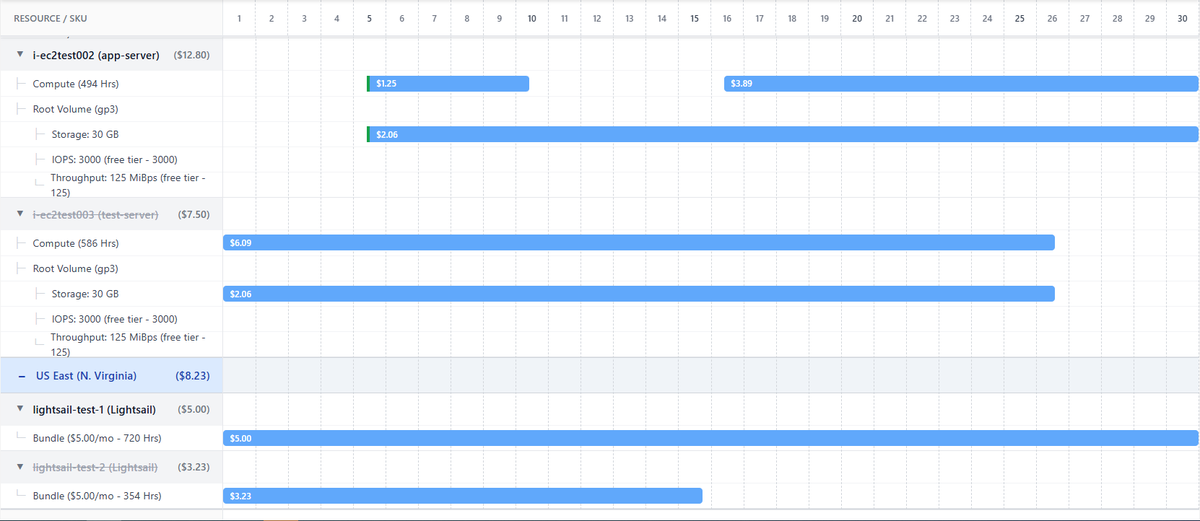
With MechCloud Cost Explorer, cloud cost is not an aggregated number or a finance-only summary. It becomes a resource-level and time-based breakdown visualized on a Gantt chart.
What this gives you:
👉 Identify which specific resources drove your Jan 2026 spend
👉 See which dimensions of each resource contributed to cost
👉 Visualize when each cost component was active during the month
👉 Validate the bill by tracing every dollar back to infrastructure
Traditional cost tools show totals.
FinOps tools group categories.
Terraform shows resources.
MechCloud connects resources, dimensions, time and cost in one view.
If you want cloud cost that is explainable, auditable and engineer-readable, this changes the conversation.
Watch the video and rethink how you analyze cloud cost.
Start here - https://t.co/w6bEHIMAig
#DevOps #CloudArchitecture #AWSCost #FinOps #InfrastructurePlanning #MechCloud
CLIs are giving tough competition to MCP servers when it comes to managing platforms with a large number of REST APIs. At the moment, there is no clear evidence that LLMs work more efficiently or faster with an API simply because it has MCP servers in addition to a CLI.
There are several problems we are seeing with MCP servers today.
- You are responsible for discovering and configuring the right MCP server or servers which is not easy for people who are new to a platform.
- On platforms with a large number of REST APIs, finding the correct MCP server becomes difficult because there are often many MCP servers to choose from.
- You can't configure an MCP server once and use it across all MCP clients such as VS Code, Windsurf etc.
- Most MCP servers expose only a small subset of the underlying REST API endpoints.
- MCP servers need to be updated regularly, similar to CLIs and Terraform providers, to take advantage of new features in the underlying REST APIs.
- Many MCP servers provide read-only access to the APIs they wrap.
- Many support only local mode and work with a single set of user credentials.
- Token usage is inefficient because MCP clients send the prompt along with all configured tool specifications to the LLM even when most tools are never used.
CLIs, on the other hand, have several advantages.
- You can configure a CLI once on your machine and use it with any vibe coding tool whether it is a CLI or IDE.
- You only need to install one thing, the CLI, which usually provides full coverage of a large set of REST APIs, for example one AWS CLI instead of many AWS MCP servers.
- There is no ongoing complexity around authentication and authorization, local versus remote setup or multiple transport protocols.
- Upgrading a single CLI is much simpler than upgrading multiple MCP servers.
- You avoid situations where you are forced to fall back to a CLI or UI because an MCP server does not support certain APIs or only offers read-only access.
If an agentic tool has access to a CLI, using it instead of one or more MCP servers leads to faster execution and significantly lower maintenance overhead.
You can now test a REST API running anywhere (your workstation, a private network or the public internet) directly from the browser using @mech_cloud REST Agent, without downloading or installing Postman or any other desktop application.
The demo shows a real API running on a local machine being invoked securely through MechCloud REST Agent with zero local setup and no special agents or extensions.
MechCloud REST Agent can invoke any REST API endpoint, public or private, right from the browser. In addition to generic REST APIs, MechCloud also supports @Docker, @kubernetesio, @Cloudflare and @MongoDB REST APIs out of the box.
For secured APIs you can optionally configure https://t.co/Oheoxsuuvb so that credentials are never stored inside MechCloud.
Upcoming releases will add the ability to save request payloads and collections to give a Postman like experience, but with no software installation and no secrets stored in a third-party cloud.
https://t.co/cU6gl0o4SB
Lately I’ve been seeing a lot of LinkedIn posts that portray @kubernetesio in a very negative way.
The common claim is that Kubernetes is too complex for (early stage) startups and that startups are wasting time and money by adopting k8s.
I don’t agree with this at all.
I’ve been using Kubernetes since 2018. From day one, I chose to go with self-managed Kubernetes using kubeadm instead of managed services. The main reason was portability. I wanted the freedom to run my clusters anywhere using the same knowledge without having to learn cloud provider specific implementations that come with managed Kubernetes.
Another important reason was @mech_cloud. A lot of MechCloud concepts and features are inspired by Kubernetes. Running self-managed clusters helped us understand Kubernetes internals deeply, how components talk to each other, how upgrades work and what really happens under the hood. That knowledge has been invaluable in building our own platform.
For non-production environments, including local development setups, we use MicroK8s to keep things lightweight, simple and cost-effective.
Whenever something goes wrong, most of the time one command is enough:
kubectl get events -A
This single command has helped us diagnose the majority of issues in our clusters.
Setting up Kubernetes is also far simpler than people make it sound. You can create a two-node cluster with one control plane and one worker with just five commands. After that, it is a one-time step to install an ingress controller or Gateway API implementation. Want to add more worker nodes? Provision a node and run two commands. That is all you need.
Coming to the managed vs self-managed Kubernetes debate, it really depends on your priorities.
Do you want to hire DevOps engineers to install, upgrade, patch and operate Kubernetes clusters yourself or do you want them focused purely on deploying and running applications while paying a cloud provider to manage the cluster for you?
Managed Kubernetes services are operated by cloud providers who have some of the best Kubernetes engineers in the world. These teams manage clusters for thousands of customers at massive scale. They handle upgrades, security patches, reliability and complex operational challenges that most companies would rather avoid.
So yes, managed Kubernetes costs more but you are also paying for world-class expertise and peace of mind.
As a small startup, you may not need Netflix level complexity but avoiding Kubernetes is not the solution. Kubernetes is flexible by design. It works equally well for simple setups as well as highly complex ones. You decide how much complexity you want to take on.
So the next time someone says startups with a few microservices are wasting time and money by using (managed) Kubernetes, just show them these five commands.
Not everyone at a tech giant gets to work on cutting-edge, innovative projects. A lot of people end up building side projects because their day job simply isn’t challenging enough.
If you’re exploring startup credits for a side project, here are some thoughts from my personal experience. I originally shared this as a response to a Reddit thread where someone asked for guidance on Cloudflare credits.
We applied to the Cloudflare startup program back when there was no formal “credits” concept. They simply upgraded one of our domains to an enterprise plan, which was incredibly helpful.
But here’s the most important message I have for you: don’t quit your job.
There are plenty of startups with deep pockets that are still struggling to get paying customers. I follow a few competitors who have raised 10M+ USD, and their founders are still extremely active on LinkedIn trying hard to generate traction.
Getting real customers is the hardest part. It can take years to build a profitable business.
Recently I read about a founder of a vibe-coding startup with 20M+ ARR who was personally messaging developers, asking them to try his product and share feedback. That says a lot.
If influencer hype were true – the idea that you can just be super active on social media and paying customers will magically appear – I would simply hire a few influencers to do that job for me.
But the reality is different.
Unless you already have a strong personal brand and built-in distribution, direct outreach and persistent hard work are still the only reliable ways to get paying customers.
Here are a couple of videos we created to appreciate the Cloudflare team. Last year they were supposed to downgrade our enterprise plan, but they extended it for one more year after I explained that gaining traction as a bootstrapped startup takes time:
https://t.co/xAlsxgeCjW
https://t.co/94aqMeYv3X
We also received credits from AWS, GCP, and Azure. Azure even extended ours by 6 months on special request.
Interestingly, most of the Azure and GCP credits expired unused. That brings me to another lesson: don’t apply for credits from all hyperscalers at the same time. You probably won’t be able to utilize them properly.
Cloudflare has a very generous free tier, so most months our bill was almost zero. The only thing I paid for was domain renewal, which isn’t covered under the enterprise plan.
Hope this helps someone out there.
Wishing every solopreneur a happy and peaceful new year 2026!
💡 How about looking at your @awscloud bill on a Gantt chart where cost is mapped directly on time?
Not by service.
Not by region.
But by actual resources.
AWS Billing and Cost Management shows line items grouped by service, then region, and then priced usage dimensions such as instance type, operating system, capacity type, and location.
This works very well for financial reporting and compliance use cases.
Engineers often need visibility at a different abstraction level which is the actual resources they manage every day.
Teams usually want to know:
👉 How much did this specific resource cost?
👉 For how long did it actually run?
👉 Which priced usage dimensions were applied to it?
👉 During which part of the month was it active?
This Gantt view answers all of that in one screen.
Each row represents a real resource.
Each bar represents real time.
Each bar carries the exact dollar value for that time slice.
You can clearly see:
👉 When compute was running and when it was not
👉 That storage continues charging even when compute stops
👉 Root volume cost separated from compute
👉 Storage, IOPS and throughput shown as independent cost drivers
👉 Exact hourly footprints such as 494 hours and 586 hours
👉 Partial month resources compared to full month resources
👉 Lightsail flat bundles compared to EC2 usage based billing
👉 Region level totals and resource level totals in the same view
👉 Free tier boundaries reflected inside the timeline
This is not just a cost report.
This is a financial timeline of your infrastructure.
No spreadsheets.
No CSV files.
Just clarity.
Resource by resource.
Hour by hour.
Dollar by dollar.
This Gantt-based cost timeline will be available as part of MechCloud Stateless IaC in the coming days.
. @Google has announced MCP servers for some GCP (e.g. GKE) and Google services (e.g. Maps).
These MCP servers are different because these are hosted/managed by Google and support user identity. This means these are multi-tenant unlike many other MCP servers which are single tenant and require end users to run these locally.
MCP servers are just another way for LLMs to communciate with a platform but there is no reason why these should be hosted and managed by anyone other than the party which owns the REST APIs for that platform. Single tenancy has a limitation where different users will see exactly same data because a MCP client will be interacting with MCP server with its own identity using an api key or service account and not with the identity of the user. MCP servers being single tenant but REST APIs being multi tenant will cause integration nightmare and complexies which many teams would not like to deal with.
With this Google has set an example where MCP servers have become another control plane in addition to REST APIs offering same experience to both MCP and REST API clients. Hopefully this will become a norm for infrastructure platforms.
However, keeping an IaC provider in sync with REST APIs is a big challenge and it seems this problem will now extend to MCP servers too.