@AnythingLFC_@gbsans One has to admit, if such were to happen, and Iraola were somehow to be the one to get Nunez to perform consistently (at least there’d be no language barrier this time), that would make for one hell of a story…
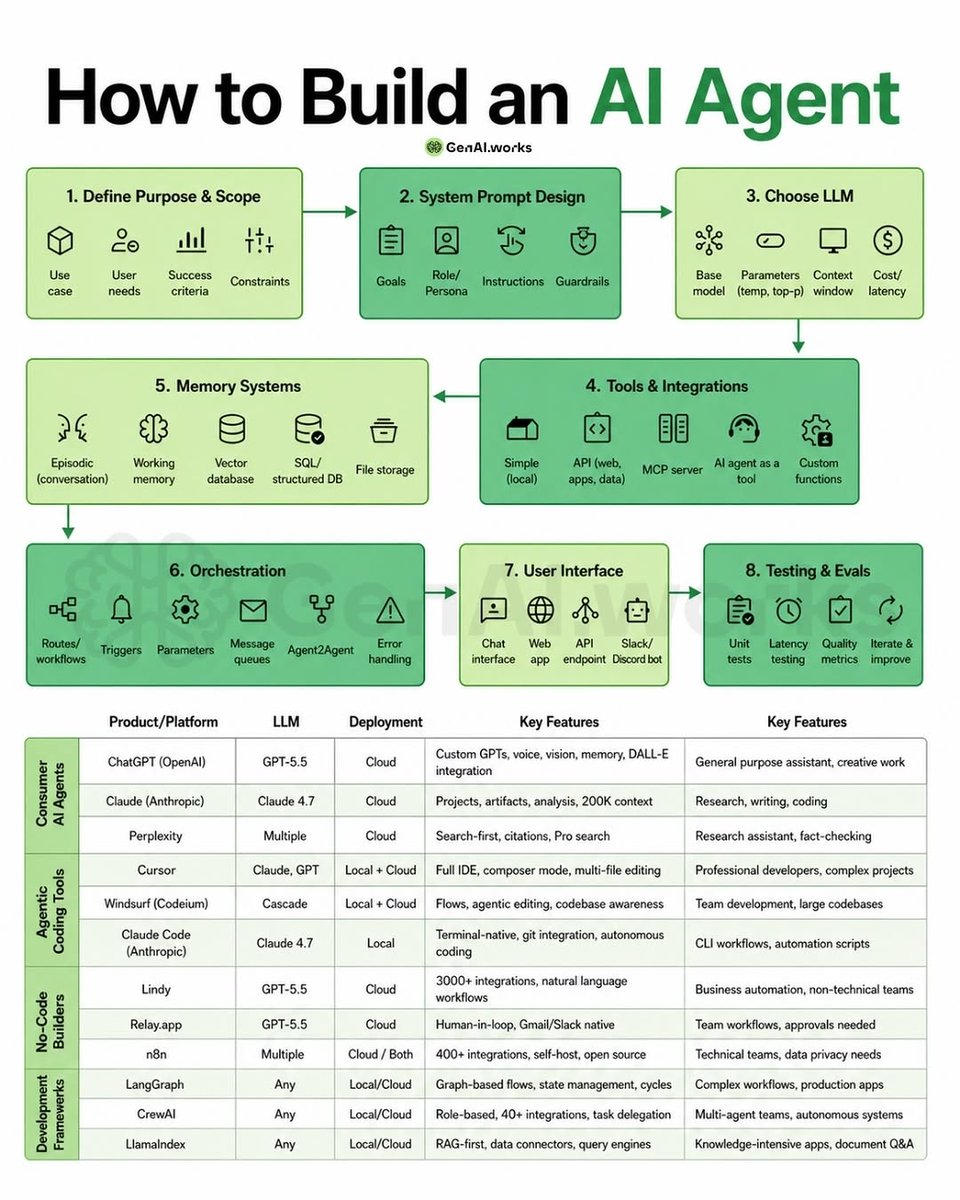
Building an AI Agent in 2026 is no longer just about picking an LLM.
The real magic happens in the system around the model. 🤖
This roadmap perfectly breaks down how modern AI agents are actually built from scratch. 👇
A production-ready AI agent needs 8 core layers:
1️⃣ Define the Purpose
Before writing prompts, define:
• use case
• user needs
• constraints
• success metrics
Most AI projects fail because this step is skipped.
2️⃣ System Prompt Design
Prompts are becoming operating systems for agents.
A strong system prompt defines:
• role/persona
• goals
• instructions
• safety guardrails
3️⃣ Choose the Right LLM
Different models = different strengths.
• GPT-5.5 → versatility & tool usage
• Claude → reasoning & long context
• Perplexity → research & citations
There’s no “best model.”
Only the best model for the task.
4️⃣ Tools & Integrations
This is where AI becomes actionable.
Agents connected to:
• APIs
• MCP servers
• databases
• custom tools
• external apps
Can actually execute workflows instead of just generating text.
5️⃣ Memory Systems
Memory is the difference between:
“a chatbot”
and
“an intelligent assistant.”
Modern agents use:
• working memory
• vector databases
• structured storage
• episodic memory
6️⃣ Orchestration
This is the hidden layer most people ignore.
Workflows, triggers, queues, retries, routing, multi-agent coordination…
This is what turns prompts into systems.
7️⃣ User Interface
The best AI products win on UX, not just intelligence.
Chat apps, APIs, Slack bots, dashboards - interface matters.
8️⃣ Testing & Evaluations
If you don’t measure quality, latency, reliability & hallucinations…
your AI product will eventually break at scale.
The biggest takeaway?
AI Engineering is rapidly becoming a combination of:
Software Engineering + Prompting + Systems Design + Automation.
The engineers who understand orchestration, memory, tools & workflows will dominate the next decade of AI products.
Save this roadmap.
This is basically the blueprint for building AI agents in 2026. 🚀
Follow @elora_khatun for more AI engineering breakdowns, prompts, workflows & agent architectures.
30 Must Know Terms in Claude
__________
Claude is moving faster than most people can learn it.
So I made a simple 30-term map to catch up in 5 minutes:
1. Models
Opus = deep thinking, strategy, writing
Sonnet = daily work, editing, workflows
Haiku = quick, cheap, lightweight tasks
2. Core Apps
Chat = basic Claude interface
Projects = your workspace for repeat work
Claude Code = for developers and builders
3. Newer Surfaces
Claude Design = build visuals and websites
Claude in Excel = work inside spreadsheets
Claude in Chrome = browse and take action
4. Context & Memory
Projects = task-specific context
Custom Instructions = project-level rules
Memory = remembers useful details across chats
5. Outputs
Artifacts = docs, code, apps, previews
Markdown = Claude's clean output format
CLAUDE.md = instruction file for Claude Code
6. Skills System
Skills = reusable workflows
SKILL.md = instructions behind a skill
Plugins = skills + connectors bundled together
7. Connections
Connectors = Claude linked to your apps
Computer Use = Claude clicks and types
Dispatch = run tasks from mobile to desktop
8. Power Modes
Extended Thinking = better reasoning
Research = deep reports
Web Search = live internet results
9. Smart Helpers
Scheduled Tasks = recurring Claude actions
Global Instructions = default working style
AskUserQuestion = structured input from you
10. Foundations
Prompt = what you ask
Style = how Claude responds
Vibecoding = building by prompting
Most people don't need to learn everything.
But if you understand this map, Claude stops feeling like "just another chatbot" and starts becoming a real work system.
I'm building a full Claude learning library for non-technical professionals.
1. Follow @coder_surya
2. Save the post.
3. Repost to your network.
4. Join AI Community: https://t.co/ioQEJKhR1q
____________________________
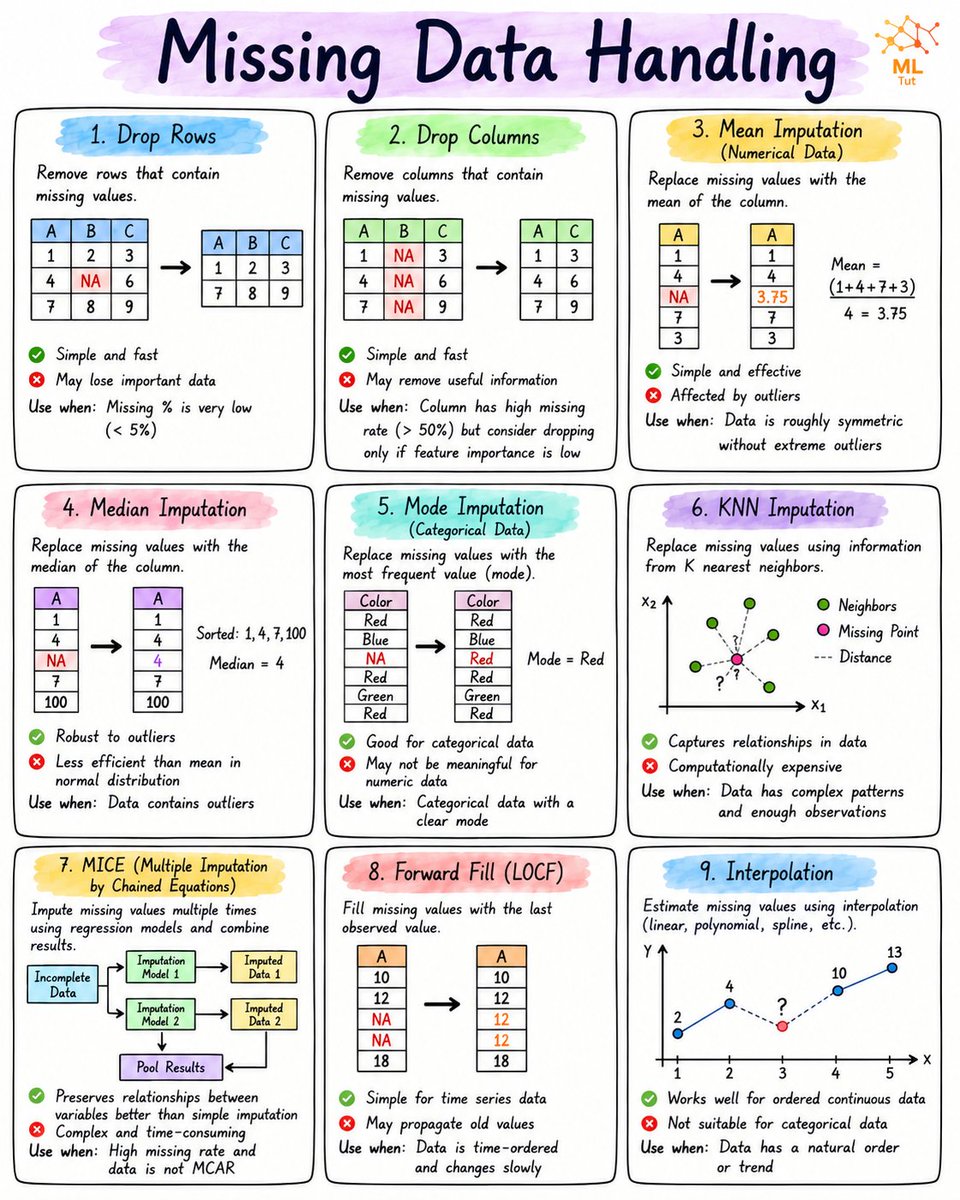
Missing data can quietly ruin your machine learning model. 📉
Before training any model, learn when to use Mean, Median, Mode, KNN, MICE, and other imputation techniques. The right choice can significantly improve accuracy and reliability. 🚀
Save this cheat sheet for your next Data Science or ML project. 📌
500 HOURS OF AI INFRASTRUCTURE KNOWLEDGE. FREE.
Most people learn prompts.
This teaches what actually powers AI in production:
→ Kubernetes
→ MLOps
→ Distributed Systems
→ Cloud Infrastructure
→ Model Serving & Monitoring
The stuff behind real AI products. Not tutorials. Not hype. Just engineering.
https://t.co/G1RYGehU8X
Anthropic just dropped a 31-page prompting guide.
Here's everything you actually need (in 10 rules):
1. You write "review this contract" and pray.
Fix: Name every output. "Review this contract. Flag risks per clause. Rate severity 1-5. Return as a table."
2: You say "summarize this" on a 40-page report.
Fix: 4.8 sizes the answer to the input. Cap it: "5 bullets. Each under 15 words. Start each with an action verb."
3: You write "don't use jargon. don't be salesy."
Fix: Negative instructions don't stick.
Flip them: "Write in plain English a 16-year-old could read aloud."
4: You type "can you help me with the email?"
Fix: Each verb ships something. For example: "Go to Gmail. Find [contact]. Write the send-ready reply. Under 90 words. Tone: confident, casual."
5: You wait for Claude to web search on its own.
Fix: Claude opus 4.8 calls fewer tools than 4.6.
Force it: "Use web search aggressively. Verify every claim with at least 2 sources."
6: You miss the warm tone from old Claude.
Fix: Claude opus 4.8 is direct. Almost zero emojis. Paste 2-3 sentences in the voice you want.
Tell Claude to match the rhythm.
7: You ask for "a landing page" & get bare minimum.
Fix: Drop this one line on every creative task
→ "Go beyond the basics."
It's from Anthropic's own doc.
8: You forget Claude 4.8 doesn't reason by default.
Fix: They call it "Thinking." Effort: High
Add this at the end: "Think before answering (maximum reasoning)." Free upgrade. Every time.
9: You rewrite the same prompt 14 times a week.
Fix: A skill is a command with instructions pre-built.
Write the same prompt twice? Make it a skill.
10: You assume Claude knows what you meant.
Fix: Old Claude 4.6 guessed.
New Claude 4.8 does exactly what you typed.
Spell it out. Output. Order. Length. Tone. Format.
If you don't say it, you don't get it.
To go even further & download my .md files directly:
Step 1. Go to https://t.co/psB7XxAv8w.
Step 2. Subscribe for free. Don't pay anything.
Step 3. Open my welcome email (most skip this).
Step 4. Hit the automatic reply button inside.
Step 5. Download my .md files from my Notion.
Bonus. Enjoy my best copy-paste prompts, too.
🤖 Best YouTube Channels to Learn AI in 2026
AI is evolving faster than ever. If you want to stay ahead, these YouTube channels are packed with valuable insights, tutorials, and real-world AI applications:
🎯 AI Explained
🎯 Andrej Karpathy
🎯 Cole Medin
🎯 DeepLearningAI
🎯 Futurepedia
🎯 Matthew Berman
🎯 Skill Leap AI
🎯 Tech With Tim
🎯 Tina Huang
🎯 Two Minute Papers
Why follow these channels?
✅ Learn AI from industry experts
✅ Stay updated with the latest AI breakthroughs
✅ Master LLMs, AI Agents, and Generative AI
✅ Build practical AI projects
✅ Understand cutting-edge research in simple terms
Whether you're a beginner or an experienced developer, these channels can significantly accelerate your AI learning journey.
💡 Which AI channel is your favorite? Share it in the comments!
📌 Save this list for later. ♻️ Repost to help others learn AI. 🚀 Follow @Tech_Rose1 for more AI resources, tools, and ideas.
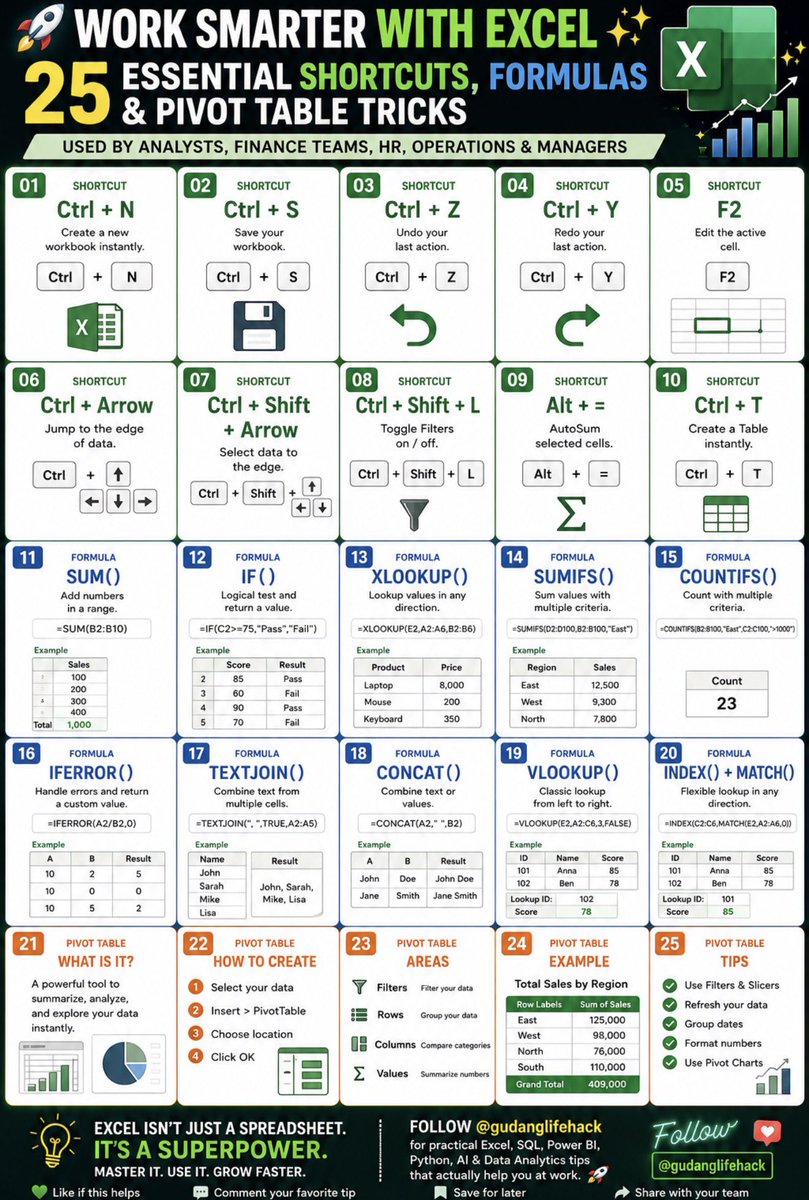
⚡ Work Smarter With Excel
Most people use only 10% of Excel’s capabilities.
The other 90% is where productivity, automation, and career growth happen.
Here are 25 Excel shortcuts, formulas, and Pivot Table tricks every professional should know. 🧵
(Save this thank me later).







![rubenhassid's tweet photo. Anthropic just dropped a 31-page prompting guide.
Here's everything you actually need (in 10 rules):
1. You write "review this contract" and pray.
Fix: Name every output. "Review this contract. Flag risks per clause. Rate severity 1-5. Return as a table."
2: You say "summarize this" on a 40-page report.
Fix: 4.8 sizes the answer to the input. Cap it: "5 bullets. Each under 15 words. Start each with an action verb."
3: You write "don't use jargon. don't be salesy."
Fix: Negative instructions don't stick.
Flip them: "Write in plain English a 16-year-old could read aloud."
4: You type "can you help me with the email?"
Fix: Each verb ships something. For example: "Go to Gmail. Find [contact]. Write the send-ready reply. Under 90 words. Tone: confident, casual."
5: You wait for Claude to web search on its own.
Fix: Claude opus 4.8 calls fewer tools than 4.6.
Force it: "Use web search aggressively. Verify every claim with at least 2 sources."
6: You miss the warm tone from old Claude.
Fix: Claude opus 4.8 is direct. Almost zero emojis. Paste 2-3 sentences in the voice you want.
Tell Claude to match the rhythm.
7: You ask for "a landing page" & get bare minimum.
Fix: Drop this one line on every creative task
→ "Go beyond the basics."
It's from Anthropic's own doc.
8: You forget Claude 4.8 doesn't reason by default.
Fix: They call it "Thinking." Effort: High
Add this at the end: "Think before answering (maximum reasoning)." Free upgrade. Every time.
9: You rewrite the same prompt 14 times a week.
Fix: A skill is a command with instructions pre-built.
Write the same prompt twice? Make it a skill.
10: You assume Claude knows what you meant.
Fix: Old Claude 4.6 guessed.
New Claude 4.8 does exactly what you typed.
Spell it out. Output. Order. Length. Tone. Format.
If you don't say it, you don't get it.
To go even further & download my .md files directly:
Step 1. Go to https://t.co/psB7XxAv8w.
Step 2. Subscribe for free. Don't pay anything.
Step 3. Open my welcome email (most skip this).
Step 4. Hit the automatic reply button inside.
Step 5. Download my .md files from my Notion.
Bonus. Enjoy my best copy-paste prompts, too.](https://pbs.twimg.com/media/HJoSjWJa0AA7KX8.jpg)