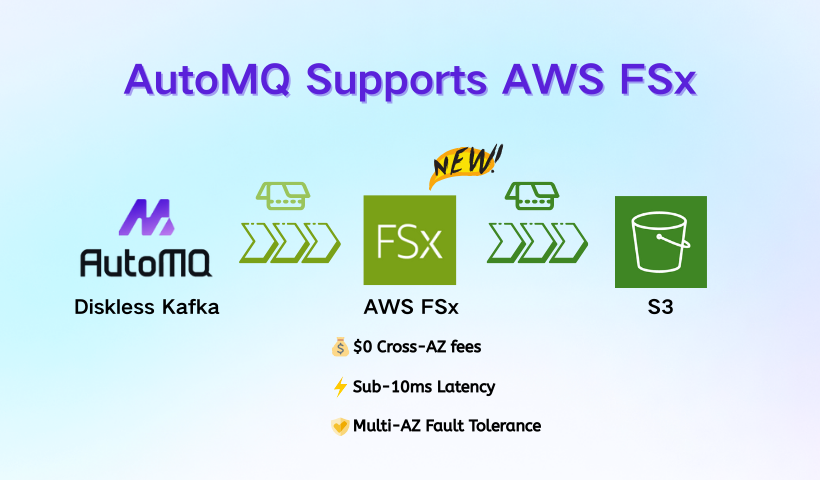
🚀 Breaking: AutoMQ now supports AWS FSx WAL!
This architecture resolves the dilemma of running Kafka on AWS:
❌ EBS: Low latency, but high Cross-AZ costs.
❌ S3-only: Cost-efficient, but high write latency.
The AutoMQ x FSx Way:
📉 Latency: Sub-10ms writes via multi-AZ shared storage.
💸 Costs: Zero cross-AZ data transfer fees.
☁️ Storage: Fully backed by S3 for infinite elasticity.
It's truly Cloud-Native: Performance + Low Cost.
👉Read the deep dive: https://t.co/yEna8LKc6Z
#Kafka #CloudNative #DataStreaming #AWS #FSx #AutoMQ
🚀 What if "waiting" actually makes your Kafka producer faster?
🔎For years, the “best practice” for low-latency Kafka was simple: send immediately (https://t.co/5pggZA5v5F=0).
But Apache Kafka 4.0 redefines low-latency best practices—changing the default to https://t.co/5pggZA5v5F=5.
🧐Why?
Because true low latency isn’t about sending faster—it’s about batching smarter.
In our latest deep dive, we break down:
🔹Why 5ms of “artificial delay” often reduces end-to-end latency?
🔹How https://t.co/5pggZA5v5F and batch.size truly interact with Kafka’s serial request model?
🔹A scenario deduction: 27.5ms → 7.5ms avg latency — just by tweaking one config.
⚙️How AutoMQ’s pipeline architecture eliminates this trade-off entirely —Low latency without waiting. High throughput without tuning.
💡Want to uncover the real best practice for low-latency Kafka? — This is for you.
🔗Read the full in-depth analysis and scenario deductions here: https://t.co/Aly0hXkanL
#ApacheKafka #Kafka #AutoMQ #PerformanceTuning #DataStreaming #SystemDesign #BestPractice #CloudNative #OpenSource
This is how 𝗔𝗜 𝗔𝗴𝗲𝗻𝘁 𝗠𝗲𝗺𝗼𝗿𝘆 works.
In general, the memory for an agent is something that we provide via context in the prompt passed to LLM that helps the agent to better plan and react given past interactions or data not immediately available.
It is useful to group the memory into four types:
𝟭. Episodic - This type of memory contains past interactions and actions performed by the agent. After an action is taken, the application controlling the agent would store the action in some kind of persistent storage so that it can be retrieved later if needed. A good example would be using a vector Database to store semantic meaning of the interactions.
𝟮. Semantic - Any external information that is available to the agent and any knowledge the agent should have about itself. You can think of this as a context similar to one used in RAG applications. It can be internal knowledge only available to the agent or a grounding context to isolate part of the internet scale data for more accurate answers.
𝟯. Procedural - This is systemic information like the structure of the System Prompt, available tools, guardrails etc. It will usually be stored in Git, Prompt and Tool Registries.
𝟰. Occasionally, the agent application would pull information from long-term memory and store it locally if it is needed for the task at hand.
𝟱. All of the information pulled together from the long-term or stored in local memory is called short-term or working memory. Compiling all of it into a prompt will produce the prompt to be passed to the LLM and it will provide further actions to be taken by the system.
We usually label 1. - 3. as Long-Term memory and 5. as Short-Term memory.
A visual explanation of potential implementation details 👇
And that is it! The rest is all about how you architect the topology of your Agentic Systems.
What do you think about memory in AI Agents?
#GenAI #AI #MachineLearning
Inspired by @kozlovski 's posts for #Confluent. We have also summarized 14 innovations that #AutoMQ has made over Kafka. We hope this helps you quickly understand AutoMQ's innovations to #Kafka.
Which of these innovations do you like the most? 🤔🤔
One of the cool things about being in Hangzhou is running into some of the interesting streaming devs out here.
I spent the afternoon with the AutoMQ team 😁
I didn't know they powered rednote!
🎙️ We are excited to partner with @AutoMQ_Lab for their 1st #AWS#meetup in 2025, in-person (Singapore) & online (YouTube Live). Hear about enhancing data streaming efficiency from engineers from @InsideGrab & @awscloud, & @xinyubest from AutoMQ.
https://t.co/Ou6pQLFpx1
We have released a specific video tutorial here. In just 5 minutes, you can see how AutoMQ completely unifies stream and analysis. 🎉 #apachekafka#automq#s3table
🎉 Exciting news! AutoMQ has launched its table topic on AWS! The Kafka Topic's stream data can now be effortlessly stored on S3 in iceberg table format, seamlessly integrating with S3 Table, Athena, Data Lake formation, and other services. Users can enjoy a unified experience without the hassle of managing additional metadata or data processing, making streamlining stream and analysis processes easier than ever!
Learn how to utilize the table topic feature in AutoMQ with this tutorial: https://t.co/uo1eqy5m7F
#ApacheKafka #DataLake #Iceberg #Athena #S3 #AutoMQ #AWS #DataEngineer #BigData #s3table
#AutoMQ is on the right path. It's truly amazing 🎉 , #AutoMQ has already supported hashtag #AWS S3 table on the first day of its new feature release. In December, AutoMQ's Table Topic capability is about to be launched, which can support storing Kafka's topic directly in the Iceberg table format on S3. The introduction of AWS S3 table has further enhanced the capability of AutoMQ Table Topic. If you are interested in trying out this capability, feel free to contact us. #kafka #s3table #streaming #aws #s3
👍👍Thanks to @gurubaseio for providing AI Q&A capabilities to the AutoMQ community. Now you can learn and understand AutoMQ more conveniently by asking AI. #apachekafka#streaming#automq
Meet AutoMQ 🚀
"AutoMQ is a cloud-first alternative to Kafka by decoupling durability to S3 and EBS. 10x Cost-Effective. No Cross-AZ Traffic Cost. Autoscale in seconds. Single-digit ms latency. " @AutoMQ_Lab
https://t.co/yXQ501jYf3
#cloud#kafka#opensource
The Evolution of Kafka Storage Architecture
When implementing Kafka at scale, choosing the right storage strategy is critical. Let's examine four key approaches that have emerged:
1. Traditional Local Storage
The classic Kafka setup uses local disks exclusively, offering:
- Fast, low-latency performance
- Simple architecture
However, it faces significant challenges:
- Limited by local disk capacity
- Complex management as you scale
- High costs for enterprise-grade storage
2. Tiered Storage Architecture
This hybrid approach combines local disks with cloud storage (S3):
- Unlimited scalability through cloud storage
- Cost optimization for cold data
- Implemented by Confluent and Redpanda
Limitations remain:
- Still depends on local storage
- Core scalability challenges persist
3. Direct S3 Storage (WarpStream)
This approach eliminates local storage entirely:
- Built in Go, using S3 as primary storage
- Complete cloud-native architecture
- Excellent for logging/observability workloads
- Higher latency (P99: 620+ ms)
- Significant cost savings
- Maintains Kafka protocol compatibility
4. WAL with S3 Storage (AutoMQ)
The latest evolution combines Write-Ahead Logging (WAL) with S3 storage:
Key Features:
- Stateless brokers enabling rapid partition migration
- Full Kafka protocol compatibility
- Low latency through EBS-backed WAL
- Flexible architecture supporting both S3 and EBS as WAL
- Cost-effective S3-based storage
- Fast elasticity with seconds-level scaling
AutoMQ's approach represents a significant advancement, offering an optimal balance of performance, cost-efficiency, and scalability while maintaining complete compatibility with existing Kafka deployments.
This architecture particularly shines in cloud environments where rapid scaling and cost optimization are crucial, while still delivering the performance characteristics expected from a modern messaging system.
Scaling Kafka clusters has always been a challenging task. Kafka uses the ISR multi-replica mechanism to ensure data persistence. However, in 2024, when cloud computing is very mature, this design seems a bit outdated.#apachekafka#streaming#cruisecontrol
AutoMQ offloads persistence to cloud storage, creating a new generation of Kafka based on cloud storage. This makes manual partition reassignment a thing of the past. Forget about cruise control and partition reassignment, you don't need to worry about these in AutoMQ. #apachekafka #automq #streaming #cruisecontrol #partition #kafka
https://t.co/sPfpPkiVVO
The expensive cross-AZ traffic fees on AWS are essentially a flexible tool prepared for its sales. It can gain competitiveness by adjusting its discounts when competing with third-party vendors. Now, AutoMQ has helped Kafka break this shackle. #kafka#streaming#automq
What to do when Kafka generates a lot of cross-AZ traffic fees when deployed on AWS with multiple AZs? You will have the answer after reading this blog post. #apachekafka#streaming#aws#s3
https://t.co/3XR0E8Qkj8
@ocadaruma However, AutoMQ is, after all, designed based on the cloud. If you deploy AutoMQ in a private environment, this often requires some official commercial support.
@ocadaruma If you are using AutoMQ on-premise. Then you can consider using the `S3 WAL` mode. It only need a s3 API compatible object storage like minio.
State of the art, is to move the “state” to the object storage.
Yes there are challenges, but also amazing benefits.
- stateless nodes which leads to ease of operations
- cost efficiency
- high durability
- bottomless storage
Here is how AutoMQ does it:
https://t.co/jz2miRmcQv
Please also consider joining the channel as a member to get additional benefits:
https://t.co/xX6HEDfNRn