502, 503, and 504 look almost identical in production.
But each one tells you to investigate a different layer.
Here’s the difference:
- 502 Bad Gateway :
The gateway/proxy reached the upstream server, but received an invalid response.
“I reached you, but your response was bad.”
- 503 Service Unavailable :
The service is currently unable to handle the request.
“I’m here, but I can’t serve you right now.”
- 504 Gateway Timeout
The gateway/proxy reached the upstream server, but it didn't receive a response within the expected time.
“I asked you, but you took too long.”
OAuth 2.0 & OIDC Clearly Explained !!
You've clicked "Login with Google" thousands of times.
You've probably implemented it at least once copied a tutorial, got it working, moved on.
But here's what most engineers can't answer:
what actually happened?
Which requests went where?
What do the tokens mean?
Why are there four different flows?
OAuth 2.0 is the most widely implemented and most widely misunderstood protocol on the web.
TIL: Get a single HTTP header value with curl 🔥
For someone who's been using `curl | grep | awk` for a decade, it's quite a revelation. Funnily enough, Claude Code defaults to grep-ing and awk-ing, too.
The -o /dev/null part is important to suppress the rest of the output.
Folks, iximiuz Labs needs your help. I heard it - no one likes subscriptions. So the lifetime option is back. And the cheaper playground-only and content-only plans are also available. But the only way for me to continue working on the platform is the ongoing community support.
Speak 5 lines to yourself every morning:
1. I am the BEST.
2. I CAN do it.
3. GOD is ALWAYS with me.
4. I am a WINNER.
5. Today is MY DAY.
Do this for 30 days straight. You will win so bad.
Warren Buffett: "I have mainly learned by reading. I don't think I have any original ideas."
"If you learn reasonably well from other people, you don't have to get any new ideas or do much on your own. You can just apply the best of what you see."
quick k8s note:
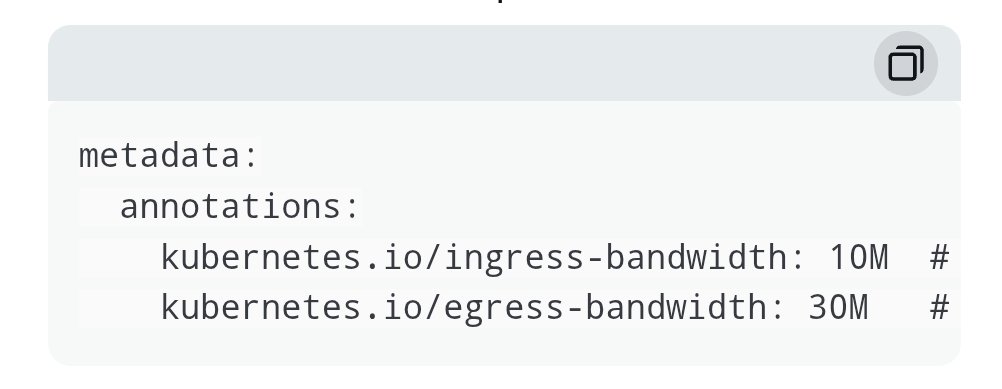
just found out thats its possible to configure bandwidth limits for a pod or deployments. by default the bandwidth limit feature is not enabled. but you can control the inbound and outbound bandwidth of a pod by using Kubernetes pod annotations, like below 😃
Btw, M for Mbps, G for Gbps