We're launching Bridge today 🌉
An AI engine that builds virtual homes. Blueprint in, walkable home out. Every plan, every option, structural changes included.
What took 3D artists months now takes days. Homebuilders can finally show buyers every home they sell.
https://t.co/QrwlM5FUjP
I love how pointing out that ideas and market percentage validation.
Matter more than net worth.
Triggered all the “trust me I’m rich” grifters selling expensive paywalls or courses.
It’s good retail is starting to wake up if the older models feel threatened.
gm, today we're launching Shader Lab, like photoshop but for shaders
• design slick layered shader compositions
• export high-quality assets or shaders
• OSS package to plug & play
↳ https://t.co/5FjvLy8UIQ
LLM Knowledge Bases
Something I'm finding very useful recently: using LLMs to build personal knowledge bases for various topics of research interest. In this way, a large fraction of my recent token throughput is going less into manipulating code, and more into manipulating knowledge (stored as markdown and images). The latest LLMs are quite good at it. So:
Data ingest:
I index source documents (articles, papers, repos, datasets, images, etc.) into a raw/ directory, then I use an LLM to incrementally "compile" a wiki, which is just a collection of .md files in a directory structure. The wiki includes summaries of all the data in raw/, backlinks, and then it categorizes data into concepts, writes articles for them, and links them all. To convert web articles into .md files I like to use the Obsidian Web Clipper extension, and then I also use a hotkey to download all the related images to local so that my LLM can easily reference them.
IDE:
I use Obsidian as the IDE "frontend" where I can view the raw data, the the compiled wiki, and the derived visualizations. Important to note that the LLM writes and maintains all of the data of the wiki, I rarely touch it directly. I've played with a few Obsidian plugins to render and view data in other ways (e.g. Marp for slides).
Q&A:
Where things get interesting is that once your wiki is big enough (e.g. mine on some recent research is ~100 articles and ~400K words), you can ask your LLM agent all kinds of complex questions against the wiki, and it will go off, research the answers, etc. I thought I had to reach for fancy RAG, but the LLM has been pretty good about auto-maintaining index files and brief summaries of all the documents and it reads all the important related data fairly easily at this ~small scale.
Output:
Instead of getting answers in text/terminal, I like to have it render markdown files for me, or slide shows (Marp format), or matplotlib images, all of which I then view again in Obsidian. You can imagine many other visual output formats depending on the query. Often, I end up "filing" the outputs back into the wiki to enhance it for further queries. So my own explorations and queries always "add up" in the knowledge base.
Linting:
I've run some LLM "health checks" over the wiki to e.g. find inconsistent data, impute missing data (with web searchers), find interesting connections for new article candidates, etc., to incrementally clean up the wiki and enhance its overall data integrity. The LLMs are quite good at suggesting further questions to ask and look into.
Extra tools:
I find myself developing additional tools to process the data, e.g. I vibe coded a small and naive search engine over the wiki, which I both use directly (in a web ui), but more often I want to hand it off to an LLM via CLI as a tool for larger queries.
Further explorations:
As the repo grows, the natural desire is to also think about synthetic data generation + finetuning to have your LLM "know" the data in its weights instead of just context windows.
TLDR: raw data from a given number of sources is collected, then compiled by an LLM into a .md wiki, then operated on by various CLIs by the LLM to do Q&A and to incrementally enhance the wiki, and all of it viewable in Obsidian. You rarely ever write or edit the wiki manually, it's the domain of the LLM. I think there is room here for an incredible new product instead of a hacky collection of scripts.
Introducing render-json
The Generative JSON framework.
1. Point it at anything
2. It generates JSON
3. That's it
Apps, games, and more. If it exists, it can be converted into a JSON spec.
𝚗𝚙𝚖 𝚒 @𝚓𝚜𝚘𝚗-𝚛𝚎𝚗𝚍𝚎𝚛/𝚛𝚎𝚗𝚍𝚎𝚛-𝚓𝚜𝚘𝚗
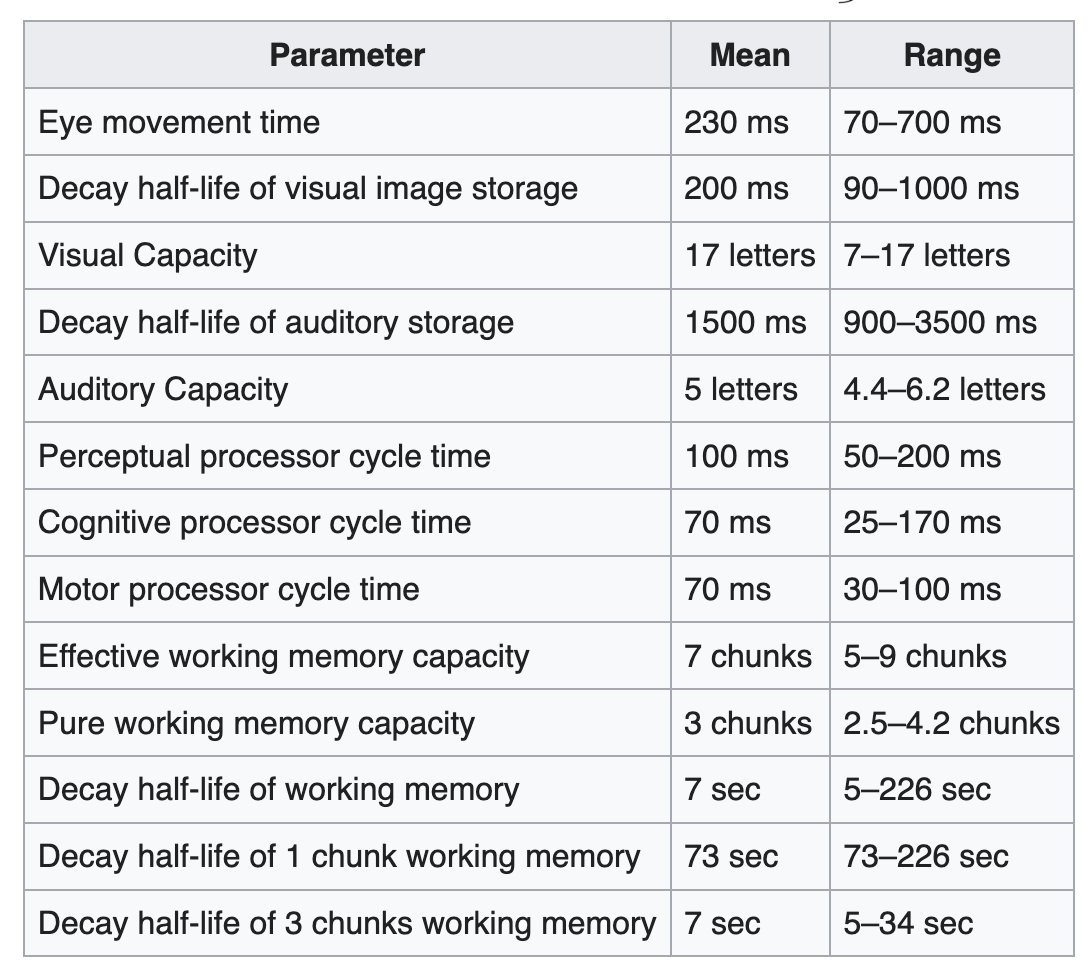
a great reference to keep in mind is the human processor model. pretty solid guide for contextually dialling in transition timings
https://t.co/PjRLwgZEzV
和@sainingxie 一起挑战7小时播客!他刚和Yann LeCun踏上“世界模型”的创业旅程(AMI Labs)。这是他第一次Podcast、第一次访谈。
2026年2月雪后的一天,我们在纽约布鲁克林,从下午2点,开启了一场始料未及的马拉松式访谈,直到凌晨时分散去。
这篇访谈的中文标题叫做《逃出硅��》,但他又不��其烦地枚举了影响他学术生涯的每一个人,并反反复复口头描摹这些人的人物特征(侯晓迪、何恺明、杨立昆、李飞飞…)正是这些,让这篇“逃出硅谷”的对话充斥着人性的温度。
By the way, 下面是访谈的YouTube版本,我们提供了中英字幕。
And yes, 我们是在用播客给这个世界建模😎
A 7-hour podcast with Saining Xie. He has just begun a new journey on world models with Yann LeCun at AMI Labs.
This was his first podcast appearance and his first long-form interview.
A day after the snowfall in February 2026, in Brooklyn, New York, we started recording at 2 p.m. What followed became an unexpected marathon conversation that lasted until the early hours of the morning.
The Chinese title of the interview is “Escaping Silicon Valley.” Yet throughout the conversation, he patiently listed the people who shaped his academic life, repeatedly sketching their personalities in vivid detail: Hou Xiaodi, Kaiming He, Yann LeCun, Fei-Fei Li, and others. These portraits are what give this “escape from Silicon Valley” conversation its human warmth.
By the way, the YouTube version of the interview is below, with Chinese and English subtitles.
And yes, we are using podcasts to model the world 😎
A 7-hour marathon interview with Saining Xie: World Models, AMI Labs, Ya... https://t.co/3rTwdTGkJI 来自 @YouTube
We just open-sourced Paperclip: the orchestration layer for zero-human companies
It's everything you need to run an autonomous business: org charts, goal alignment, task ownership, budgets, agent templates
Just run `npx paperclipai onboard`
https://t.co/wuDdEmrSMx
More 👇
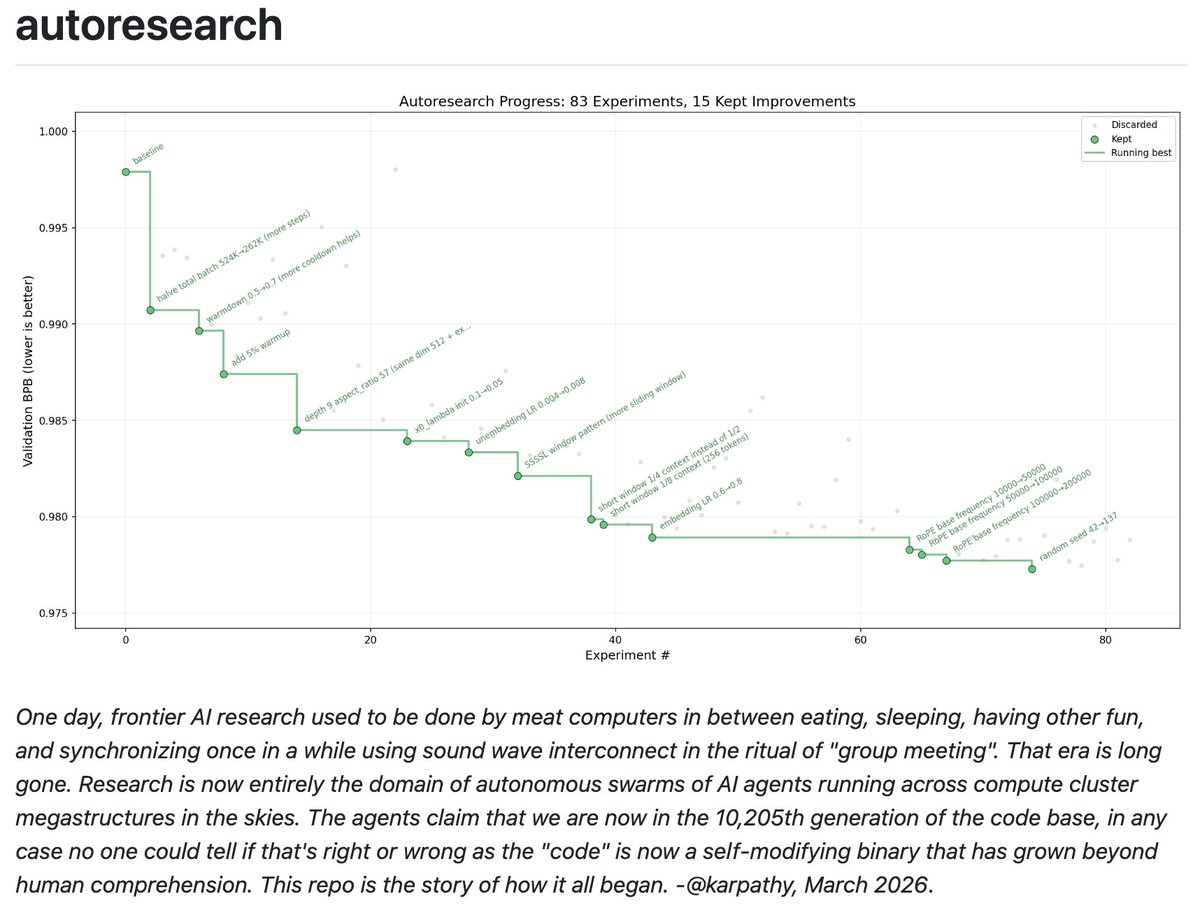
I packaged up the "autoresearch" project into a new self-contained minimal repo if people would like to play over the weekend. It's basically nanochat LLM training core stripped down to a single-GPU, one file version of ~630 lines of code, then:
- the human iterates on the prompt (.md)
- the AI agent iterates on the training code (.py)
The goal is to engineer your agents to make the fastest research progress indefinitely and without any of your own involvement. In the image, every dot is a complete LLM training run that lasts exactly 5 minutes. The agent works in an autonomous loop on a git feature branch and accumulates git commits to the training script as it finds better settings (of lower validation loss by the end) of the neural network architecture, the optimizer, all the hyperparameters, etc. You can imagine comparing the research progress of different prompts, different agents, etc.
https://t.co/YCvOwwjOzF
Part code, part sci-fi, and a pinch of psychosis :)
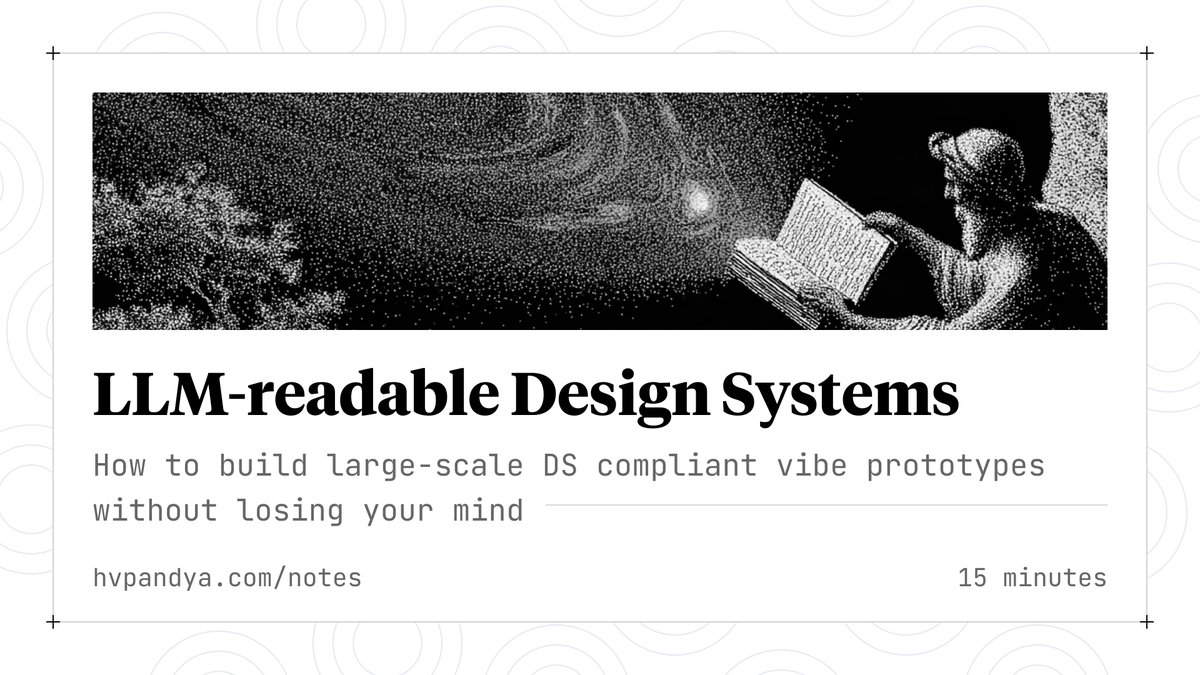
✨ Expose your Design System to LLMs ✨
Without tight coupling with your DS, large vibe prototypes drift from your design language pretty quickly.
Here's a deep-dive on:
✅ Keeping your protos DS-compliant
✅ Running automatic DS checks
✅ Upstream DS source syncing
👇 Here
Excited to launch Pencil
INFINITE DESIGN CANVAS for Claude Code
> Superfast WebGL canvas, fully editable, running parallel design agents
> Runs locally with Claude Code → turn designs into code
> Design files live in your git repo → Open json-based .pen format
Here are the full transcripts from all 320 of my podcast episodes.
It's been super fun for me to play with AI to extract insights from this data. Now you can to.
My only ask is that if you do something cool with it, just let me know.
I'll keep this folder updated with as each new episode comes out.
Have fun.
https://t.co/DwBhryFF7d