My first academic paper just got published. And considering I'm not in academia, it might possibly also be my last. https://t.co/lGEXHF38ap. Thank you @dzerbino @BenedictPaten @amnovak!
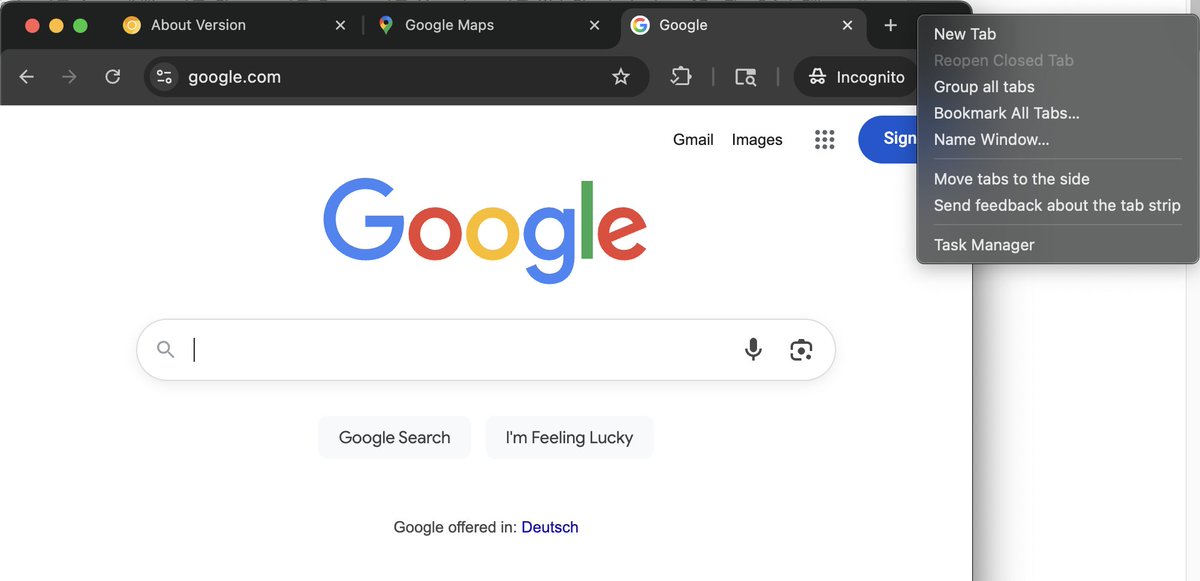
@Stammy Vertical tabs can be set up even without touching flags: simply right-click on the tab strip in Chrome Canary and select "Move tabs to the side".
@pchr_@jecfish There should be a tooltip with an explainer text when hovering over the disabled toggle. This is easy to miss, so we're adding a warning box
@simevidas@ChromeDevTools It actually is a setting behind the scenes. Our goal was to not bother most DevTools users at all and have this only ever show up for new users. That's why pasting is allowed automatically as long as you've used the console before to some amount.
⚔️ How is Chrome DevTools fighting against self-XSS attacks?
In this post, @woolfib walks us through the recent updates in #ChromeDevTools to better protect innocent users.
👉 https://t.co/XpgEfS2k6z
@a_sator ca. 4,3 Mio Frauen zwischen 15 und 19 geben müsste?
Für mich wirkt es so, als würde Dein Chart folgendes enthalten: "Von 100.000 Frauen (jeden Alters), wie viele sind zwischen 15 und 19 und haben Suizid begangen?"
@FrontMuc@bmeurer@PhilippSpo@celebrate_com If anyone is interested in the links I shared in my talk, here are the slides https://t.co/IlsMBntAnN. Not much to see there otherwise, since I mostly did a live demo.
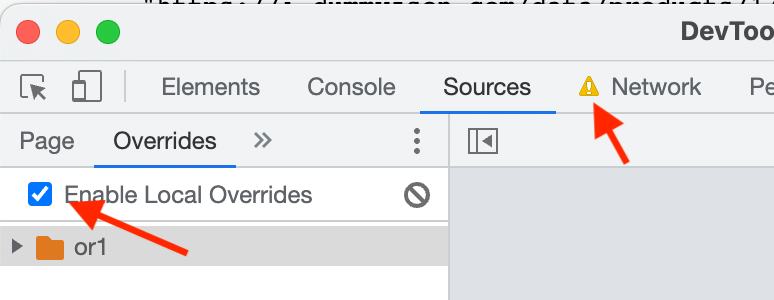
@v2heart@ChromeDevTools Do you mean the yellow exclamation mark? This warns not only of header overrides, but of local overrides being turned on in general. You can turn them off in Sources->Overrides
@kongmoumou666@ChromeDevTools Right-click on the request and now there should be an option "Save for overrides". This will create an overrides and let you edit its content. Does this work for you?
@kongmoumou666@ChromeDevTools I don't know your exact use case, but this might already be possible: in the network panel, right-click on the request in question, and if there is no "Save for overrides" option, click "Open in new tab". Open DevTools for the new tab, go to network panel.