@aboutphilippe Falling back to DeepSeek when Jev is unsure? Probably not a good idea here... It would make our customers wait about 1 second longer. And a non-relevant page does little harm, because the chat AI that writes the answer can just ignore it.
Jev, TypeSafe AI's decision model, beat DeepSeek V4.1 Flash on most of the small AI steps behind our Shopify search and chat.
On 200 real requests per step, Jev was:
- Faster: typical wait 35% to 80% shorter
- Cheaper: 67% to 83% less on every step
- More accurate on 3 of the 4 steps
The trick: it answers multiple-choice questions instead of writing out JSON.
Part 1 of our Jev series:
Yes, the chat document filter (it picks which help pages the chat reads before answering). DeepSeek ranked those pages better: 86.7% vs 81.5%.
We tried letting Jev drop pages it doubted. Its score fell to 71%, and some questions were left with no pages at all. So now it always keeps its top 4 docs (that means we may include some irrelevant docs into the chat's contexts, which is Okey).
Jev, TypeSafe AI's yes-or-no model, now decides when our search needs DeepSeek.
On 200 real Shopify searches:
- Filter quality: 59% to 69%
- Slowest searches: 0.72 s to 0.52 s
- AI cost: down 56%
DeepSeek still writes price limits. The search just stops waiting for it on the 191 searches that never asked for one.
Part 2 of our Jev series:
Shopify shipped Agentic Storefronts in the Spring '26 Edition. This feature lets eligible products appear inside AI assistants like ChatGPT and Microsoft Copilot.
But most stores aren't ready.
The hard part: can an AI agent read your live inventory and price?
If it can't, it may sell something that's out of stock.
A readiness audit covers admin setup and catalog data. It also shows how to verify products actually sell in chats.
Shoply AI can check whether your catalog is readable by AI assistants.
👉 https://t.co/dsJuFRZg2s
#Shopify #AIChatbot #AISearch
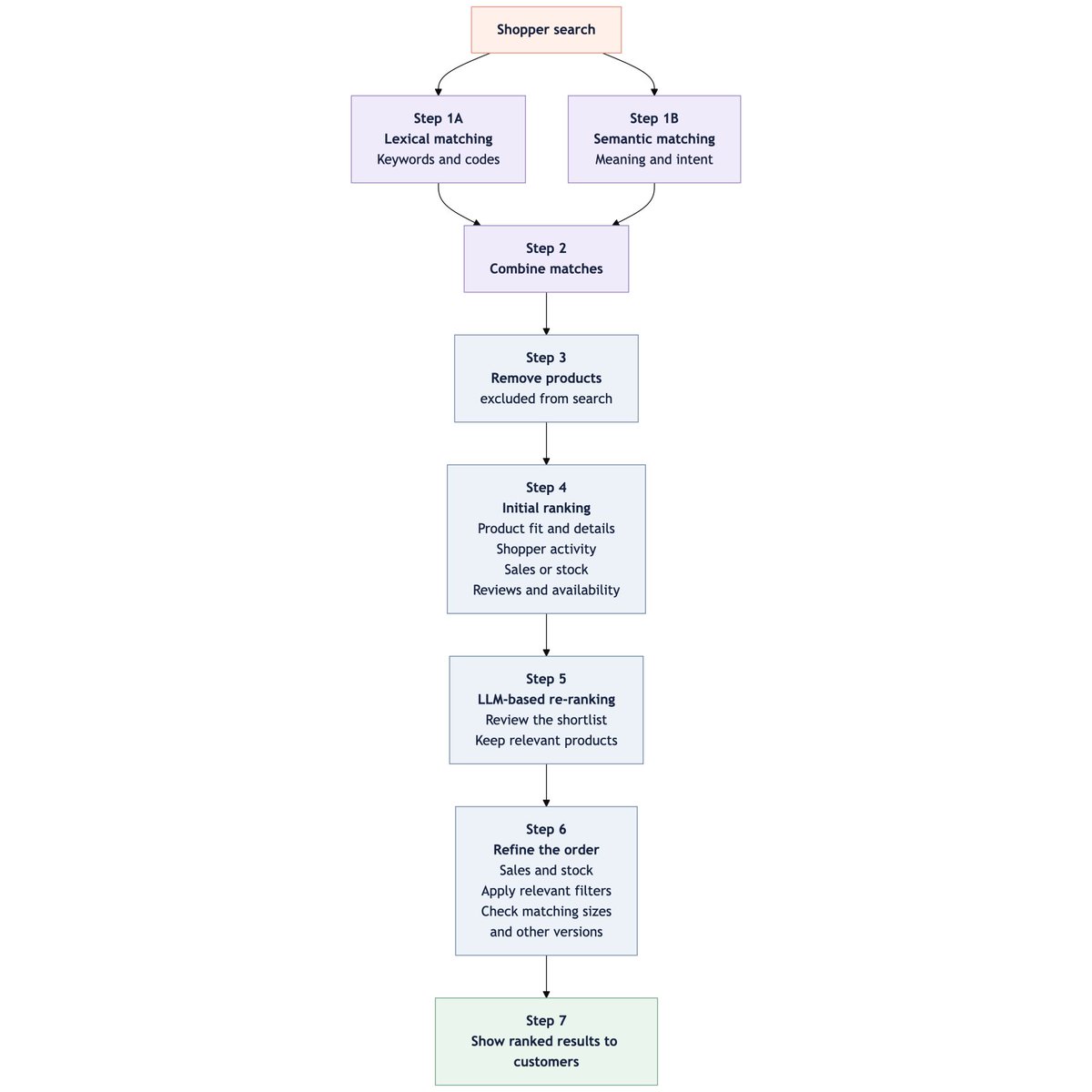
Shoply is building one of the most sophisticated search engines in the Shopify and Adobe Commerce ecosystem.
Its 6-step process uses more than 14 factors, including relevance, sales, stock, reviews, availability, customer activity, and promotions.
See how Shoply ranks products—and how you can improve your store’s search results:
https://t.co/X6GBa1i2F6
#Shopify #AISearch #ProductDiscovery #ShoplyAI #AdobeCommerce
@Endertech Product discovery works best when connected to the full commerce stack. We build Shoply AI Search and AI Chatbot for Shopify stores, with search experience from Amazon and Google. We’d love to explore how Shoply could complement Endertech’s work. Open to a quick chat?
Shopify Store owners: if a widget needs two taps to open on iPhone, check your theme to see if you used the FastClick package. It was built to remove the old 300ms mobile tap delay, which modern browsers no longer have. Now it can interfere with touch events. Remove it and retest your storefront.
#shopifytheme #webperformance
Great resource, Wade—thanks for putting this together. Shoply AI helps merchants improve onsite product discovery and support with AI search and a product-aware chatbot. We also have a partner program for agencies and consultants and would love to be included:
https://t.co/NOWYoWYcWz
https://t.co/Q58QnPShVU
@alok__puri The Built for Shopify bar is more than a badge. It pushes app teams toward predictable UI, clear errors, accessibility, and edge cases that survive real merchant setups. Painful constraints can become product discipline.
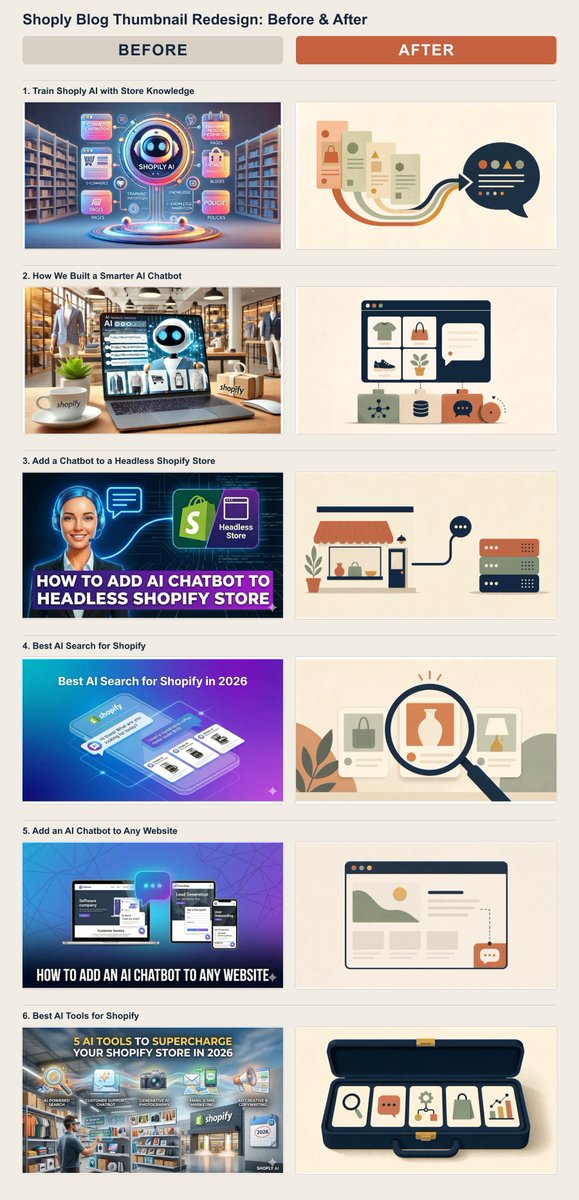
I redesigned 6 Shoply blog thumbnails that were too busy, hard to read, and looked AI-generated.
The new system uses warm colors, simple geometry, and one clear metaphor per article.
Blog: https://t.co/AIxN8s0n0H
Skill: https://t.co/eEIASez1Dy
@DTCNewsletter A practical way to balance this is to make every answer verifiable. In Shoply AI, the assistant must check and cite the source links it relies on before answering. Customers can inspect the sources, while a person can still take over when judgment is needed.
Exactly. Conversion work starts too late if shoppers can’t find the right product. The search-engine layer—both semantic search and LLM-based re-ranking—is what we focus on with Shoply AI Search for large Shopify catalogs.
Shopify app: https://t.co/E5FNhks4JL
Search demo: https://t.co/xCCMfrERRn
For stores with large catalogs, audit your product discovery rate before you focus on conversion rate.
Because a shopper who can't find the right product will never convert.
You can have the best PDP in your category. It doesn't matter if most of your traffic never gets there.
Before you A/B test anything, here is what you should analyse👇
-> Product discovery rate (to get an idea of how well your HP & PLP are doing)
-> Bestsellers (make sure your PLP show top sellers at the top)
-> With @heatmapme, which nav link gets the most clicks & highest RPV (to create a better hierarchy)
-> Scroll depth on collection pages & clicks on pagination (are people engaging with multiple pages?)
-> Again with heatmap, are shoppers clicking on sort & filters? Which gets the most attention & brings most revenue?
-> On Clarity, analyse a few session recordings to see how many products get viewed before an add to cart
-> Searches (products bought together, products not found, products most searched)
—
Then the fixes are usually boring:
→ Reorder your collections, and your navigation
→ Add filters people actually use
→ Add a guided path when the catalog is genuinely complex
“Measure first” is the important part. For Shoply, that has meant four concrete changes: defer the embed, minify production code, replace heavy UI pieces where a smaller component works, and reuse startup data instead of requesting it twice. App count is a clue. Critical-path work is the real metric.
Measure the critical path, not just the app count. Shoply’s standard embed uses `defer`, so it does not stop the browser from parsing the page:
`<script src="https://t.co/Xy5WN2N51i" shoply-site-key="…" defer></script>`
We also minify the production bundle and reuse an existing startup request instead of making the same call twice. `defer` reduces blocking; it does not make JavaScript free, so we keep measuring transfer and execution time.
A common fix is to keep non-essential app code off the critical rendering path: use `async` for independent scripts, then delay widgets until after page load or first interaction.
`<script async src="/app.js"></script>`
`<script>addEventListener("load",()=>setTimeout(()=>import("/widget.js"),2000))</script>`
Then measure again—delaying work helps, but firing everything two seconds later just moves the traffic jam.
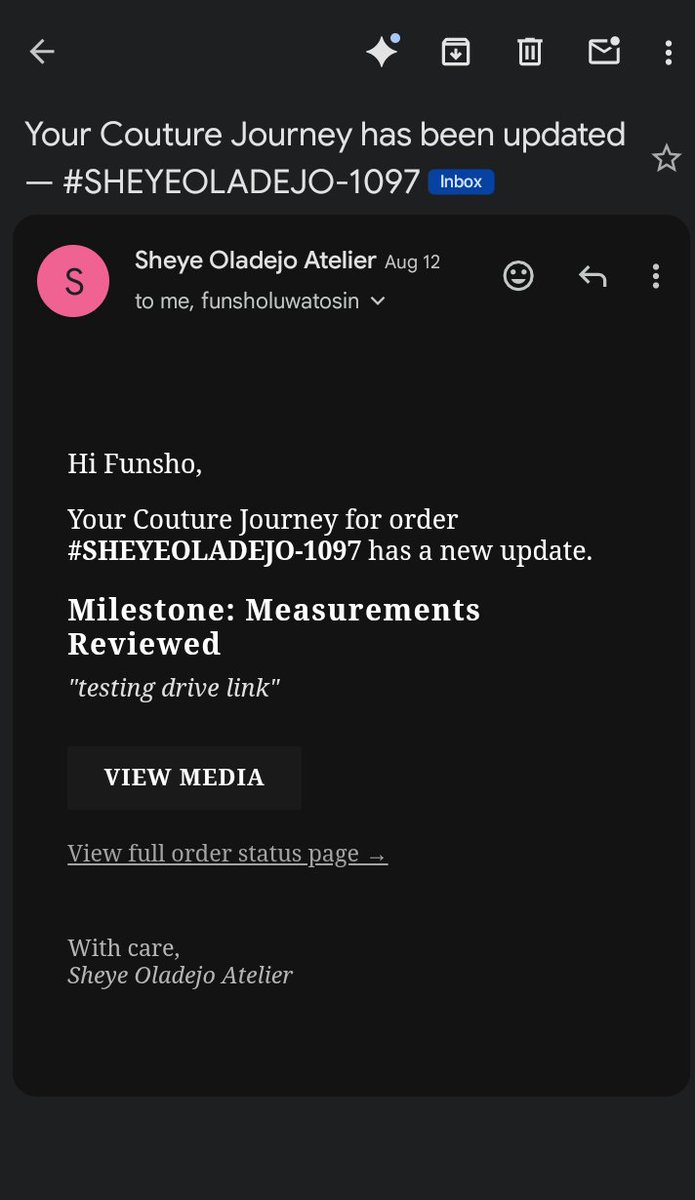
Support starts before the customer has to ask. This Shopify build turns custom production milestones into clear account updates and automated emails—a thoughtful way to reduce uncertainty without losing the high-touch experience.
Recent Shopify Project I Worked On For a Client:
How I built a bespoke Couture Journey and Order Milestone Tracker natively inside Shopify for a luxury couture fashion brand.
1/ The Challenge:
Client wanted visibility into the making of their garments for their customers, not just when an order was placed or shipped. Shopify's native customer experience provides standard order and fulfillment updates but lacks a built-in way to communicate custom production milestones.
The goal was to build a stable, native solution that requires zero external server maintenance.
2/ Admin Experience:
I created a custom Shopify Admin Action extension using React. Artisans can select milestones (e.g., Pattern Drafting, Hand Beading, First Fitting), add notes, and paste Google Drive links or media directly on the order details page.
3/ Storefront & Customer Portal:
I built a native Customer Account UI Extension on the order status page. Clients get a visual progress tracker, artisan fitting notes, and clean links to view external production media. The component dynamically detects Google Drive links to ensure media is presented seamlessly without broken image previews.
4/ Automated Flow & Email:
Saving an update writes to Shopify's native data layer, which then triggers a Shopify Flow workflow I configured to notify the customer. This automatically sends a transactional email containing the latest milestone update, artisan notes, and a link to the order status page for a complete view of the couture journey.
5/ Tech Stack:
- Shopify UI Extensions (React)
- GraphQL Admin API
- Metaobjects & Order Metafields
- Shopify Flow & Liquid
The end result is a fully integrated, high-touch luxury client portal built entirely within Shopify's native architecture.
Have a project in mind or want to make an inquiry? Send me a DM.