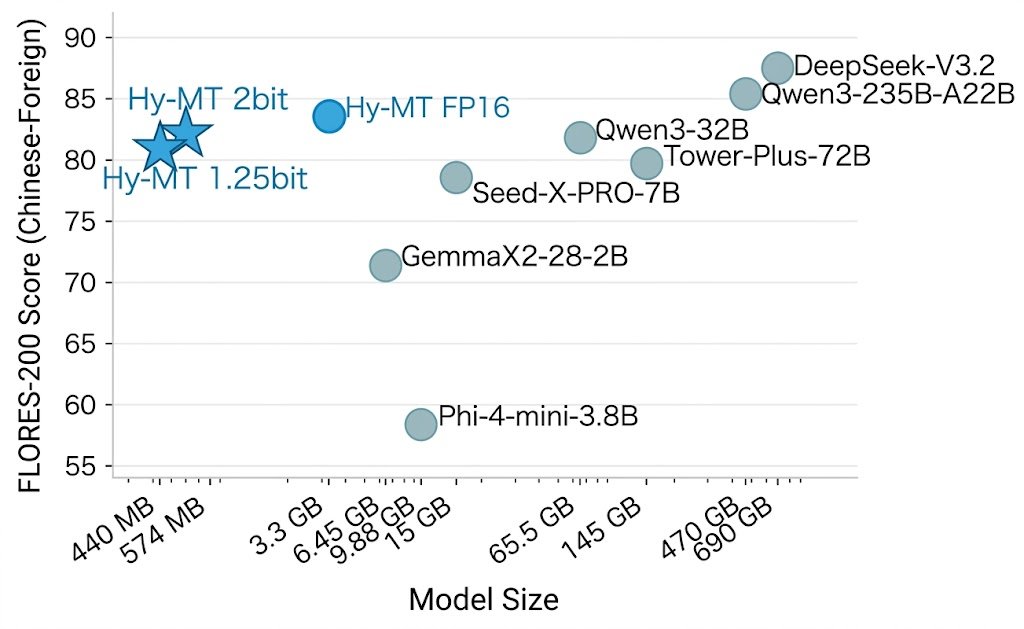
We're open-sourcing Hy-MT1.5-1.8B-1.25bit — a 440MB translation model that runs fully offline on your phone, supports 33 languages, and outperforms Google Translate.
At 1.8B parameters, it matches commercial translation APIs and 235B-scale models on standard benchmarks. By quantizing to 1.25-bit, memory drops from 3.3GB (FP16) to 440MB — 25% smaller and ~10% faster than prior 1.67-bit approaches, with no accuracy loss.
Covers 33 languages, 5 dialects, and 1,056 translation directions including minority languages like Tibetan and Mongolian.
Our translation model has won 30 first-place rankings in international MT competitions and is already deployed across multiple Tencent products.🏆
📲Demo APK (Android): https://t.co/DbcwLBe6vw
🤗Hugging Face:: https://t.co/NgXKeNZz4L
🔗GitHub: https://t.co/b6DqGKDelf
📄Paper: https://t.co/1a6repNrnt
Our official Agent Skills repository on @github is here!
Skills are a simple, open format for giving agents new capabilities and expertise. Think of a skill as compact, agent-first documentation for a specific tech or task.
Learn more → https://t.co/7w887vz3lE #GoogleCloudNext
LLM Knowledge Bases
Something I'm finding very useful recently: using LLMs to build personal knowledge bases for various topics of research interest. In this way, a large fraction of my recent token throughput is going less into manipulating code, and more into manipulating knowledge (stored as markdown and images). The latest LLMs are quite good at it. So:
Data ingest:
I index source documents (articles, papers, repos, datasets, images, etc.) into a raw/ directory, then I use an LLM to incrementally "compile" a wiki, which is just a collection of .md files in a directory structure. The wiki includes summaries of all the data in raw/, backlinks, and then it categorizes data into concepts, writes articles for them, and links them all. To convert web articles into .md files I like to use the Obsidian Web Clipper extension, and then I also use a hotkey to download all the related images to local so that my LLM can easily reference them.
IDE:
I use Obsidian as the IDE "frontend" where I can view the raw data, the the compiled wiki, and the derived visualizations. Important to note that the LLM writes and maintains all of the data of the wiki, I rarely touch it directly. I've played with a few Obsidian plugins to render and view data in other ways (e.g. Marp for slides).
Q&A:
Where things get interesting is that once your wiki is big enough (e.g. mine on some recent research is ~100 articles and ~400K words), you can ask your LLM agent all kinds of complex questions against the wiki, and it will go off, research the answers, etc. I thought I had to reach for fancy RAG, but the LLM has been pretty good about auto-maintaining index files and brief summaries of all the documents and it reads all the important related data fairly easily at this ~small scale.
Output:
Instead of getting answers in text/terminal, I like to have it render markdown files for me, or slide shows (Marp format), or matplotlib images, all of which I then view again in Obsidian. You can imagine many other visual output formats depending on the query. Often, I end up "filing" the outputs back into the wiki to enhance it for further queries. So my own explorations and queries always "add up" in the knowledge base.
Linting:
I've run some LLM "health checks" over the wiki to e.g. find inconsistent data, impute missing data (with web searchers), find interesting connections for new article candidates, etc., to incrementally clean up the wiki and enhance its overall data integrity. The LLMs are quite good at suggesting further questions to ask and look into.
Extra tools:
I find myself developing additional tools to process the data, e.g. I vibe coded a small and naive search engine over the wiki, which I both use directly (in a web ui), but more often I want to hand it off to an LLM via CLI as a tool for larger queries.
Further explorations:
As the repo grows, the natural desire is to also think about synthetic data generation + finetuning to have your LLM "know" the data in its weights instead of just context windows.
TLDR: raw data from a given number of sources is collected, then compiled by an LLM into a .md wiki, then operated on by various CLIs by the LLM to do Q&A and to incrementally enhance the wiki, and all of it viewable in Obsidian. You rarely ever write or edit the wiki manually, it's the domain of the LLM. I think there is room here for an incredible new product instead of a hacky collection of scripts.
Build an incident response agent with read-write MCP tools for autonomous diagnosis, remediation, and post-mortem documentation - https://t.co/3MKe6Ivvwz
It's 3 AM, your pager goes off, and the API is throwing 500s. You're half-awake, staring at dashboards, correlating metrics and logs across a dozen services while customer impact grows by the minute. This notebook builds an SRE incident response agent that handles that workflow autonomously: investigating incidents, identifying root causes, applying remediations, and documenting the results.
In Notebook 02, we built an observability agent that could read from external systems. This notebook goes further. The agent can also take action, editing configuration files and restarting services to fix the problems it finds. It uses the Claude Agent SDK with MCP tools scoped for safe infrastructure access.
To all men over 30,
• Zinc
• Vitamin D3 + K2
• Magnesium
• Creatine
• Omega-3
Muscle is earned.
Hormones are built.
If energy is slipping, do these things
Numbers every engineer should know:
- p50: Median request latency
- p99: 1% of requests are slower / 99% are faster
- p99.9: One in a thousand requests are slower
- MAX: Slowest requests
p50 is useful for assessing median, across-the-board performance. p99(.9) for studying long-tail issues. MAX for investigating the longest running / analytics requests.
This goes for every component of a distributed system, not just databases.