Math you need to be a great data engineer:
- Basic Statistics
•Mean, median, mode
•Variance and standard deviation
•Probability distributions
•Hypothesis testing
•Confidence intervals
•Correlation vs causation
•Sampling techniques
- Linear Algebra
•Vectors and matrices
•Matrix multiplication
•Eigenvalues and eigenvectors
•Singular Value Decomposition (SVD)
•Dot product and cross product
•Linear transformations
•Applications in dimensionality reduction (e.g. PCA)
- Basic Calculus
•Limits and continuity
•Derivatives and gradients
•Integrals (basic understanding)
•Partial derivatives
•Chain rule
•Optimization (min/max problems)
•Gradient descent (applied optimization in ML)
- Regular Algebra
•Solving equations and inequalities
•Polynomials and factoring
•Exponents and logarithms
•Systems of equations
•Functions and their properties
•Order of operations
•Ratios, proportions, and percentages
- Discrete Math
•Sets and set operations
•Logic and Boolean algebra
•Functions and relations
•Combinatorics (permutations & combinations)
•Graph theory (nodes, edges, paths)
•Trees and traversals
•Big-O notation (complexity analysis)
Would you add anything?
Data engineering in 2025 looks nothing like it did 5 years ago. The shift from imperative to declarative is reshaping everything. From how we build, deploy, and think about data platforms.
Below are 9 concepts driving this transformation.
FREE APIs for Your Projects🔥
🌦️OpenWeatherMap API
📰News API
🌍REST Countries API
😂Chuck Norris Jokes
🍔Open food facts
🐙GitHub API
🤖Reddit API
📂OneDrive API
🐶Dogs API
🎉GIPHY API
🍿Movie(omdbapi) API
🦠VirusTotal API
🎮Pokemon (pokeapi) API
🔭NASA API
Building Data Pipelines has levels to it:
- level 0
Understand the basic flow: Extract → Transform → Load (ETL) or ELT
This is the foundation.
- Extract: Pull data from sources (APIs, DBs, files)
- Transform: Clean, filter, join, or enrich the data
- Load: Store into a warehouse or lake for analysis
You’re not a data engineer until you’ve scheduled a job to pull CSVs off an SFTP server at 3AM!
level 1
Master the tools:
- Airflow for orchestration
- dbt for transformations
- Spark or PySpark for big data
- Snowflake, BigQuery, Redshift for warehouses
- Kafka or Kinesis for streaming
Understand when to batch vs stream. Most companies think they need real-time data. They usually don’t.
level 2
Handle complexity with modular design:
- DAGs should be atomic, idempotent, and parameterized
- Use task dependencies and sensors wisely
- Break transformations into layers (staging → clean → marts)
- Design for failure recovery. If a step fails, how do you re-run it? From scratch or just that part?
Learn how to backfill without breaking the world.
level 3
Data quality and observability:
- Add tests for nulls, duplicates, and business logic
- Use tools like Great Expectations, Monte Carlo, or built-in dbt tests
- Track lineage so you know what downstream will break if upstream changes
Know the difference between:
- a late-arriving dimension
- a broken SCD2
- and a pipeline silently dropping rows
At this level, you understand that reliability > cleverness.
level 4
Build for scale and maintainability:
- Version control your pipeline configs
- Use feature flags to toggle behavior in prod
- Push vs pull architecture
- Decouple compute and storage (e.g. Iceberg and Delta Lake)
- Data mesh, data contracts, streaming joins, and CDC are words you throw around because you know how and when to use them.
What else belongs in the journey to mastering data pipelines?
today we are introducing codex.
it is a software engineering agent that runs in the cloud and does tasks for you, like writing a new feature of fixing a bug.
you can run many tasks in parallel.
This is the largest number of aircrafts lost by India in a single duel in history. Even during the epic "speed shooting classic over Sangla Hill" M M Alam brought down three aircrafts. This time the tally is 5. Complete decimation!
Stop manually debugging your DAGs and queries! It’s a waste of time!
Use tools like Windsurf or Cursor to:
1.Generate DAGs from plain English
Describe your pipeline in natural language (“Run daily, extract from S3, load to Snowflake”), and let Cursor scaffold the Airflow DAG for you.
2.Refactor messy SQL into CTEs
Drop in a giant SQL query—Cursor will convert it into clean, readable Common Table Expressions with aliases and comments.
3.Optimize slow queries
Paste a SQL query and ask Cursor: “Where are the bottlenecks?” It’ll suggest better indexes, JOIN orders, and aggregation strategies.
4.Auto-document DAGs
Paste your DAG file and ask for a docstring or markdown summary. Great for onboarding or PRs where reviewers need fast context.
AI will relieve us from so much suffering! How else do you use AI in your data engineering job?
Docker Free Learning Resources
Want to learn Docker? Here are some free resources to help you get started:
1) Docker’s Official Docs - The best place to learn the fundamentals. (https://t.co/EoBkLjstoT)
2) Play with Docker - An interactive online playground to practice Docker commands. (https://t.co/hL11oXiC3P)
3) Docker Curriculum - A hands-on tutorial covering Docker basics to advanced concepts. (https://t.co/QyHFPE89FQ)
4) YouTube: TechWorld with Nana (https://t.co/hsGyep5zI5)
5) YouTube: DevOps Directive (https://t.co/IaVQGn0XaL)
6) Katacoda Docker Scenarios - Interactive learning platform for hands-on Docker exercises. (https://t.co/Q22kyAV5Uw)
7) Awesome Docker GitHub Repo – A curated list of Docker resources, guides, and tools. (https://t.co/1IlUYUUJg6)
8) Practical Docker with Node.js - Free eBook on using Docker with Node.js. (freeCodeCamp)
9) Docker Cheat Sheet - Quick reference guide for common Docker commands. (https://t.co/ZVvE9dmwo0)
These resources will help you build a strong foundation in Docker, from understanding the basics to deploying real-world applications.
Docker: Core Concepts & Fundamentals
Docker is an open-source platform that automates the deployment, scaling, and management of applications using containerization.
Core Components:
Docker Engine: The core of Docker, comprising the Docker daemon (dockerd), which manages containers, and the Docker CLI (docker), a command-line interface for user interactions.
Docker Images: Read-only templates that define the contents of a container, including the application code, runtime, libraries, and configurations.
Docker Containers: Executable instances of Docker images that run applications in isolated environments.
Dockerfile: A script containing a series of instructions on how to build a Docker image.
Docker Compose: A tool for defining and running multi-container Docker applications using YAML files.
Must-Knows:
Portability: Docker containers can run consistently across different environments, from a developer’s local machine to production servers.
Efficiency: Containers share the host system’s kernel, making them more lightweight and faster to start than traditional virtual machines.
Isolation: Each container operates in its isolated environment, ensuring that applications do not interfere with one another.
Version Control: Docker images can be versioned, facilitating rollbacks and consistent deployments.
Community and Ecosystem: Docker boasts a vast ecosystem, including Docker Hub, a repository hosting thousands of pre-built images.
Understanding these fundamentals is crucial for leveraging Docker to streamline application development, deployment, and scaling processes.
• 3 AM page 🚨
• Kafka broker is running out of disk (11.8TB out of 12TB used) 🚨
• You check everything: throughput, connections network. Nothing seems out of the ordinary 😥
• Retention settings are set to 1 day. It's one topic that hasn't been cleaned in weeks 🤷♂️
• You frantically Google, page, and ping team-mates 🙏
... until you figure out ...
the `log_message_timestamp_type` setting
This setting defines what the timestamp on a Kafka record is for storage purposes on the broker.
The storage timestamp is used, among other things, in computing log retention.
That is, when you have `log_retention_hours=24`, Kafka will delete a log file only when the LARGEST (latest) timestamp of any record in that log file is older than 24 hours. 💡
i.e, after the youngest record is more than 24 hours old.
Back to the `log_message_timestamp_type` config. There are two supported values:
• LogAppendTime - the time at which the record was appended to the disk on the broker.
• CreateTime - the time that was provided by the Producer client when constructing its message.
The default is CreateTime.
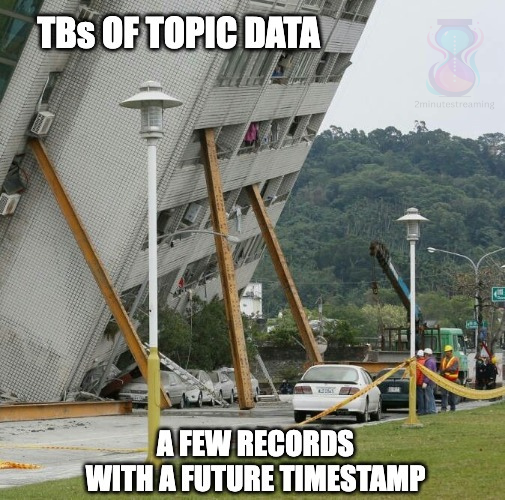
This means that if you have just one Producer client send a message with a timestamp in the future -- e.g "01-01-2120" - your log file will never get deleted!
It's easier to make this mistake than you think.
A common gotcha for improperly-set timestamps is an imperfection in the way the protocol and APIs handle them: the Java producer client accepts timestamps in a Long format, assuming they’re expressed in milliseconds.
I’ve been told stories where users pass microseconds, because that's the format their consumers expected.
The current time in microseconds is 1741954109098000, which if improperly converted to milliseconds (as the Kafka broker would do), would result in a timestamp of the year 57,170 - 'Thu Apr 30 57170'.
Guess when Kafka would expire that record 🗿
This gotcha is surprisingly common and can cost your Kafka admin a night (or a few) worth of sleep.
Ways to circumvent this:
💡 - change `log_message_timestamp_type` to AppendTime
💡 - set the size-based retention limits too - `log_retention_bytes`
💡 - NEW (since 3.6): set `message_timestamp_after_max_ms` to block records with timestamps further ahead than the configured interval. This can help prevent improper format conversion like the microsecond example
💡 - (best one) follow me here for more such tips ✅ @kozlovski
This will ensure you have a maximum upper bound per topic that you'll never breach 👌
When you're writing code, you need to think about designing systems that are scalable and maintainable.
And inefficient software design can lead to issues like scope creep, miscommunication, delays, and so on.
In this guide, Soham teaches you Software Design basics along with some helpful best practices to follow.
https://t.co/X4xpKkQvO5
Python has levels to it:
- Level 1: Fundamentals
Master the basics before diving into algorithms:
•Variables, data types (lists, tuples, dictionaries, sets)
•Control structures (if-else, loops)
•Functions and recursion
•List comprehensions
•String manipulation
If you don’t have these down, tackling algorithms will be much harder.
- Level 2: Mastering Data Structures
Understand how these work under the hood:
•Arrays & Lists – Fast lookups, slow inserts/deletes (unless at the end). Python lists are dynamic arrays.
•Hash Tables (Dictionaries/Sets) – O(1) lookups, great for solving problems with fast key-value retrieval.
•Stacks & Queues – LIFO (stack) vs FIFO (queue), useful for recursion, backtracking, and BFS/DFS.
•Graphs – Adjacency list vs matrix, BFS vs DFS, shortest path (Dijkstra’s, A*).
Know when to use each one—data structures make or break algorithm performance.
- Level 3: Mastering Algorithms
You don’t need to memorize every algorithm, but you must understand:
•Sorting – QuickSort, MergeSort, HeapSort (know their time complexities).
•Searching – Binary search (huge time-saver over brute force).
•Recursion & Backtracking – Solving problems by breaking them into smaller ones. Think DFS, permutations, N-Queens
•Greedy Algorithms – Interval scheduling, Huffman encoding, activity selection.
The more problems you solve, the better you’ll get at recognizing which approach to use.
⸻
- Level 4: Performance Optimization & Low-Level Understanding
•Time & Space Complexity Analysis (Big O Notation) – Know how to optimize solutions.
•Profiling & Debugging – Use timeit, cProfile, and memory profiling to analyze code efficiency.
•Python-Specific Optimizations – Use collections (defaultdict, Counter), itertools, and NumPy for faster operations.
•Parallelism & Concurrency – Multi-threading vs multi-processing, async programming.
•Memory Management – Python’s garbage collector, reference counting, __slots__ for reducing memory overhead
If you reach this level, coding interviews and system design become much easier!
⸻
What else would you add for mastering Python?
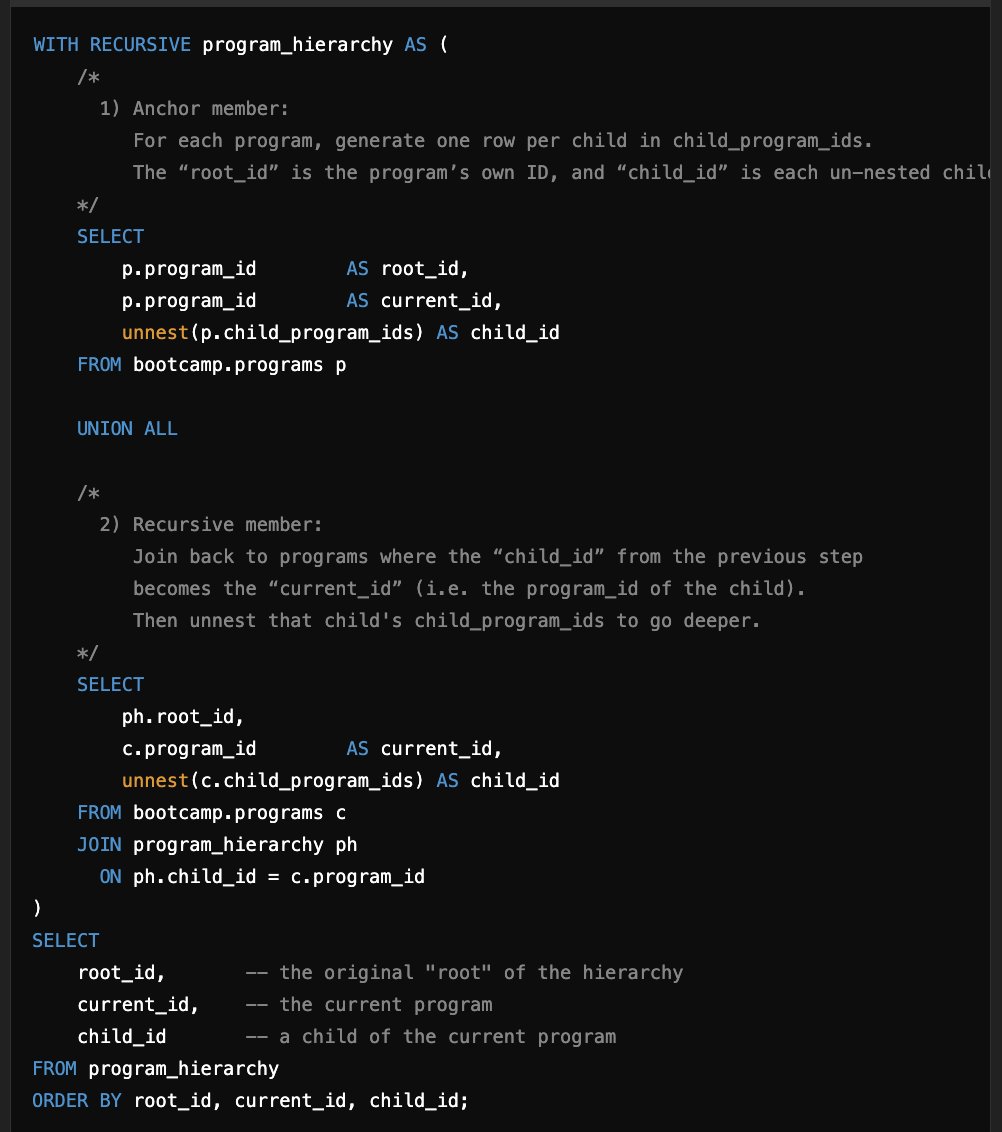
I wrote a recursive common table expression for the second time in my career today!
My content has complex parent/child relationships.
For example:
The All-Access Subscription is parent to the January 6th boot camp which is parent to the Infrastructure and Analytics Tracks.
I needed to figure out a way to pull all the "child" programs up to the parent at an arbitrary layer of nesting. This code will go as deep as your data structure is nested!
Last time I needed to do this was when I was working at Netflix and needed to do the same with modeling all the Manager -> Employee relationships.
This is my student, Taylor's capstone project architecture.
https://t.co/CWvLDHU2Lx students aren't just building data pipelines. They're building entire data warehouses and systems.
If you want to build something amazing like this, you should join the next cohort!
Subscribe to https://t.co/6f8dBaoZd0 for more updates!