(Finally) wrote up "Understanding Positional Embeddings in Modern LLMs."
A RoPE from-scratch tutorial missing from my LLM building blocks collection + what recent architectures do (NoPE, partial RoPE, hybrids).
Prob not the flashiest topic, but essential for understanding LLMs
LLM engineer's handbook
(30 minutes a day, 10 weeks, 50 lessons)
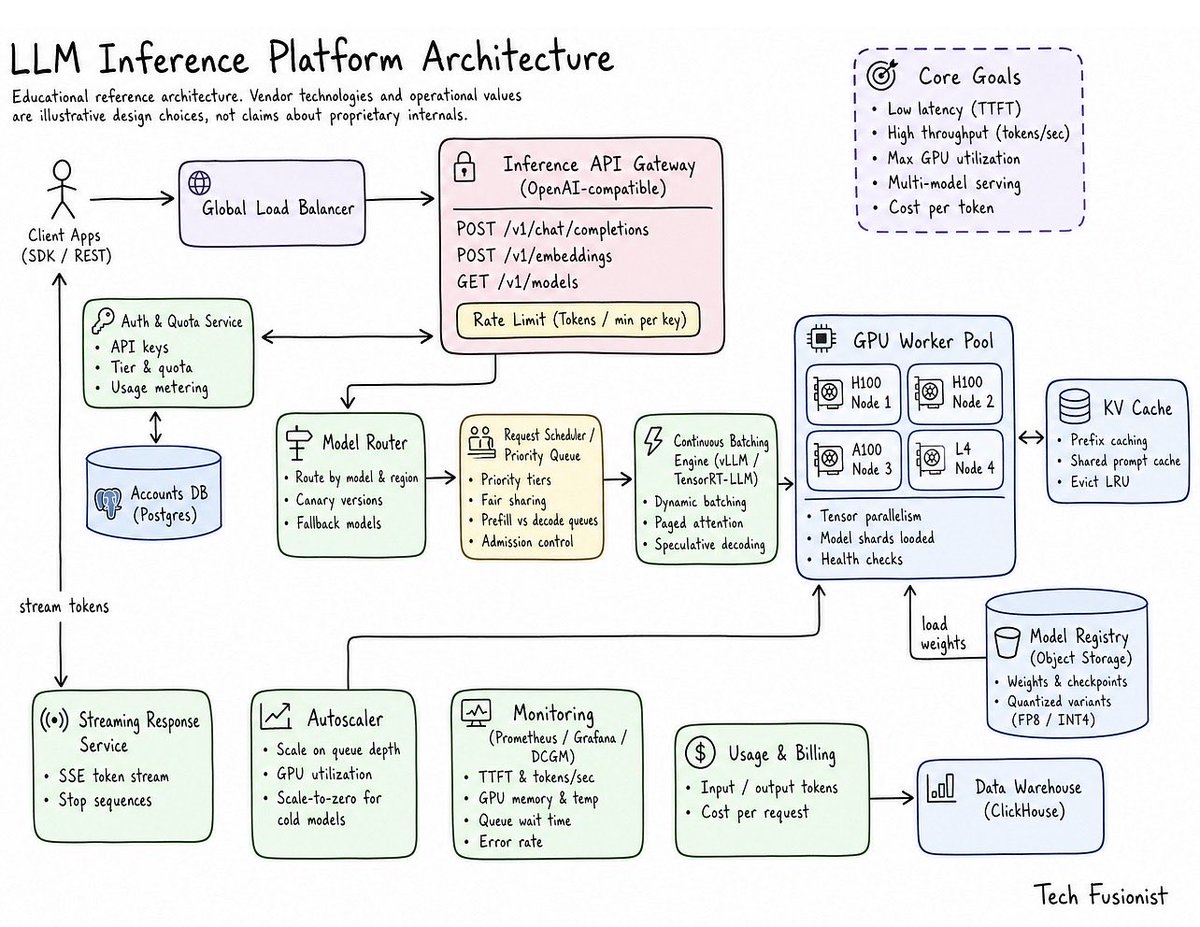
a roadmap for llm inference serving where everything points at one service instead of scattering across demos. you get the mental model first, then serve a model, instrument it, load test it past 1000 concurrent requests, and tune it. you finish with a stack you configured yourself and a benchmark worth publishing.
here is what it covers:
→ the roofline model, and why decode waits on memory while prefill waits on compute
→ vLLM internals, PagedAttention and the scheduler, read from the code
→ Prometheus and Grafana for TTFT, inter-token latency, and queue depth
→ SGLang and RadixAttention prefix reuse, benchmarked against vLLM
→ load testing past 1000 concurrent requests
→ quantization across FP16, FP8, and INT4, on quality as well as speed
→ speculative decoding and KV eviction, including where the gains disappear
→ disaggregated prefill and decode, deployed on Kubernetes
→ a cost, latency, and quality router with per-request token budgeting
→ publishing a reproducible benchmark
the roadmap on GitHub: https://t.co/pOqkWvDJ2d
(don't forget to star 🌟)
i am also writing an article for each major topic. the first one is out, on how a GPU actually works.
the article is quoted below.
𝗫𝗚𝗕𝗼𝗼𝘀𝘁 𝘃𝘀 𝗟𝗶𝗴𝗵𝘁𝗚𝗕𝗠 𝗰𝘀 𝗖𝗮𝘁𝗕𝗼𝗼𝘀𝘁
What I have learned from using all three in real projects:
XGBoost is the safe default. Great docs, huge community, and every knob you could want.
LightGBM is what I reach for when the data is big and time is short. Just keep an eye on num_leaves, because it can overfit fast.
CatBoost is the one to try first when your data is full of IDs, cities, product codes and other categories. It needs very little tuning to do well.
One more thing. Don't trust a benchmark you didn't run yourself, including this one. Tune each model properly and test on your own data before you decide.
We built InferenceForge 🔥, an agentic system that profiles, benchmarks, and optimizes LLM inference for agent workloads.
43% higher throughput than the best published baseline under the same latency SLA on the SemiAnalysis AgentX benchmark.
We built an inference engine for DeepSeek V4.1-Flash from scratch in Rust and CUDA.
4xB300: ~1,740 TPS decode
8xB300: ~2,060 TPS decode
1M-token prefill in ~12s
It's open-source.
Anthropic just published an engineering guide on how to build always-on agents.
The biggest misconception: an always-on agent does NOT run 24/7. It sleeps almost all day, wakes up for short runs, saves state, and goes back to sleep.
The 5 core pieces I distilled:
1. Event Inbox
Put a database table between webhooks and your agent. Acknowledge webhooks fast, run only one active worker per user so runs never collide, and batch rapid messages together.
2. Timers
Keep timers in a separate table from the inbox. Split them into one-off follow-ups and recurring schedules. A background poller drops due timers into the inbox.
3. Lean Memory + Dreaming
Only store what cannot be looked up again: user instructions, user notes, past messages, and task progress. Load a small index at wakeup, not every file. Run periodic dreaming passes to clean out stale facts.
4. Unattended Permissions
Never put raw API keys inside the agent sandbox — inject them through an outside proxy. Use Deferred Tool Calls to pause risky actions for approval without blocking the worker.
5. Outbox
Queue outgoing replies so your agent paces notifications instead of spamming users at 3 AM.
https://t.co/1zew6WaRbE
Medusa: why make one guess when you can make several? 🐍
In speculative decoding, you can guess the next tokens all at once, or one after the other. All at once is faster, but each guess is blind to the ones before it, so it's less accurate.
Medusa (https://t.co/2pqN6eVsK5) keeps the speed and simply... makes more guesses.
The authors added few small heads sit on top of the model's last hidden state, one per future token. Instead of trusting a single guess, each head keeps its top few. Put together, they form a tree of possible continuations 🌳
The tree has more tokens than a single sequence, but one forward pass still checks all of it, thanks to a custom attention mask where each token only sees its own branch. The longest valid branch is kept.
Speculation stays almost free, and only one branch has to be right: over 2.2x faster with the base model frozen, up to 3.6x if you fine-tune it too.
To them, the answer to the flaws of parallelism was more parallelism. But some disagreed... 🦅
Big reasoning speedups are here. 1,000× faster training and 280× less compute than any looped model. All done using a fully trainable energy from the 80s
Keep reading to hear how energy is the right paradigm for reasoning
With @HughBlayney@jcrwhittington@prefrontal_ai
🧵/10
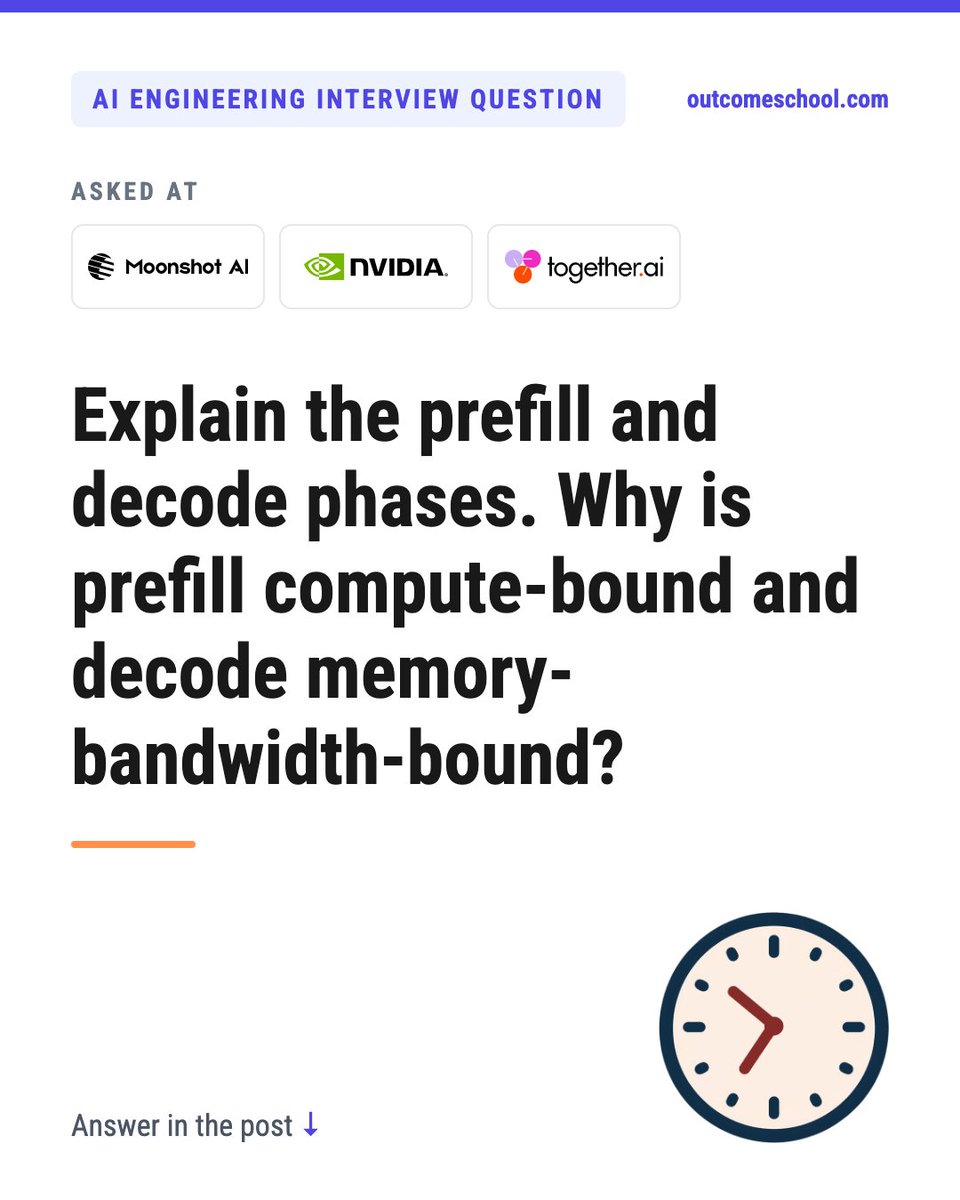
This question was asked in AI Engineering interviews at Moonshot AI, NVIDIA, and Together AI.
Question: Explain the prefill and decode phases. Why is prefill compute-bound and decode memory-bandwidth-bound?
Let's answer it step by step.
Prefill is the phase where the LLM reads the whole prompt in one go and builds the KV Cache. Decode is the phase where it generates the answer one token at a time. Prefill does a lot of math for every weight it reads from memory, so it is limited by compute. Decode does very little math for every weight it reads, so it is limited by memory bandwidth.
The key idea is arithmetic intensity: the number of FLOPs we do per byte we read from GPU memory.
For a weight matrix in FP16, every weight is 2 bytes. Each token that uses it does 2 FLOPs (one multiply, one add).
Prefill: a prompt of T tokens is processed in parallel. We read each weight once and use it for all T tokens. So, about 2T FLOPs per 2 bytes, which is about T FLOPs per byte. For a prompt of 2,000 tokens, that is about 2,000 FLOPs per byte.
Decode: only 1 new token per step. We read every weight to do just 2 FLOPs with it. That is about 1 FLOP per byte. On top of that, we also read the full KV Cache of that request.
Now, the GPU side. An A100 does about 312 TFLOPS in FP16 and reads about 2 TB per second from memory. So, it needs about 156 FLOPs per byte to keep the compute units busy.
- Prefill: about 2,000 FLOPs per byte is far above 156. The compute units are the bottleneck. Compute-bound.
- Decode: about 1 FLOP per byte is far below 156. The compute units wait for memory. Memory-bandwidth-bound.
Let's take a 7B model in FP16. The weights are 14 GB.
- Decode, one user: reading 14 GB at 2 TB per second takes about 7 ms per token. The math is about 14 billion FLOPs, which needs only about 0.05 ms. The GPU is idle most of the time.
- Prefill, 2,000 tokens: about 28 trillion FLOPs, close to 90 ms at peak, while reading the weights still takes only 7 ms.
This is why the two phases map to two different latency numbers:
- Time to first token (TTFT) is mostly prefill.
- Time per output token (TPOT) is mostly decode.
And this is how we optimize each one:
- Decode: batch many requests, so each weight read serves many tokens. Quantized weights and GQA mean fewer bytes to read. Speculative decoding verifies several tokens per weight read.
- Prefill: use fast attention kernels like FlashAttention, and reuse a shared prefix with prompt caching.
- Mixing them: chunked prefill splits a long prompt, so it does not stall the decode steps of other users.
In the interview, the most important line is: it comes down to arithmetic intensity. Prefill reuses each weight across all prompt tokens, so it is compute-bound. Decode reads every weight for a single token, so it is memory-bandwidth-bound, and batching is the main fix.
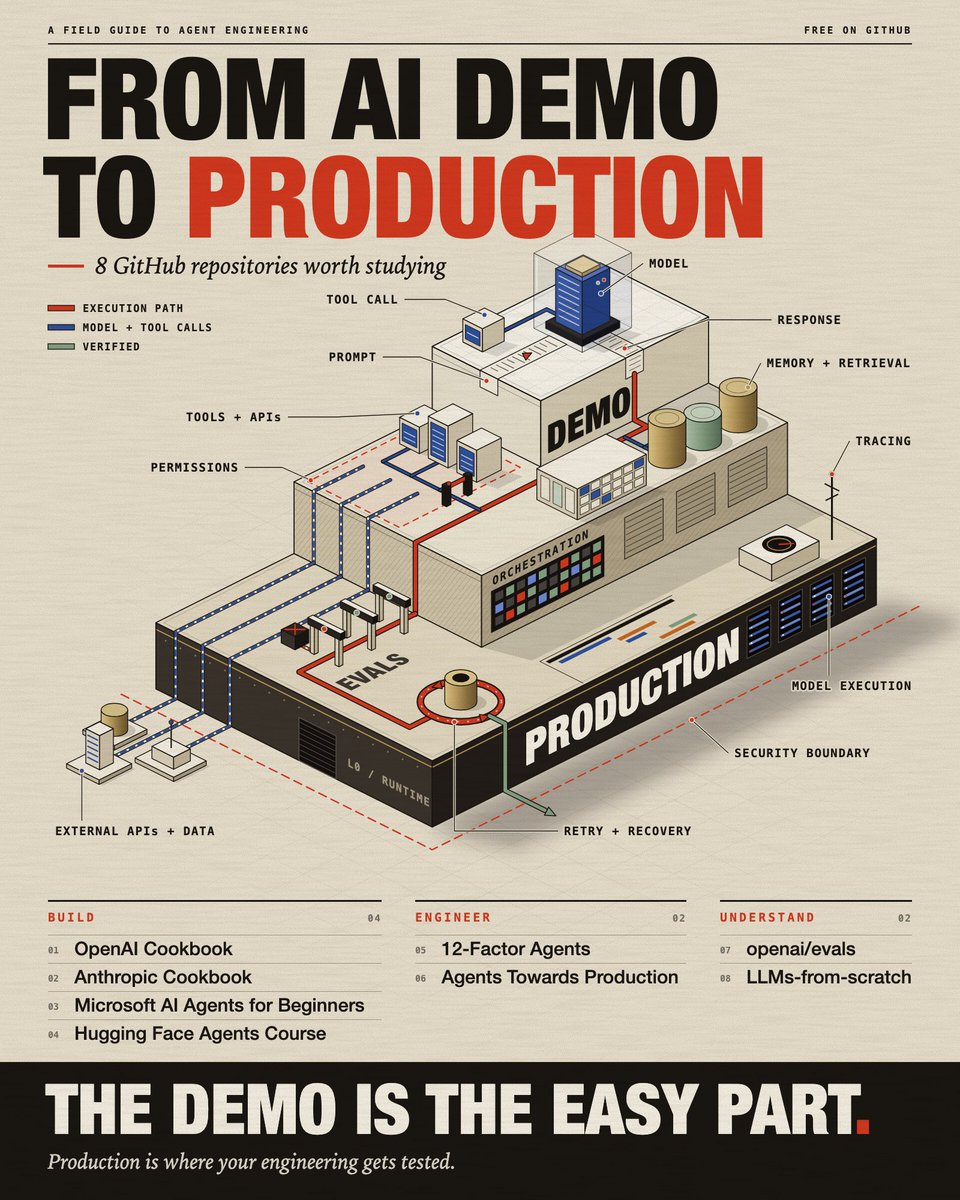
Most people learning AI agents are learning how to build demos. Very few are learning how to stop those agents from making expensive mistakes in production.
These 8 GitHub repos cover the engineering behind that gap.
1. OpenAI Cookbook
Working examples for structured outputs, function calling, embeddings, RAG and evaluation. The nearest thing to an official answer for how a feature is meant to be built.
https://t.co/2tlT98oKCT
2. Anthropic Cookbook
Notebooks for tool use, retrieval, evaluation and agent patterns on Claude. Read the evaluation notebooks even if you never touch Claude. They show what testing a prompt actually looks like.
https://t.co/PsntMdJ3FC
3. 12-Factor Agents
Principles for agents that hold up in production, written by people who got tired of rebuilding the same orchestration layer. Read this before you decide whether you need a framework or just a loop and a few functions.
https://t.co/Ew59vSZFyq
4. Agents Towards Production
Code-first tutorials on memory, MCP, security, tracing and deployment. This covers the stretch between a demo agent and one that survives a real user.
https://t.co/R6OLg9Tg1L
5. Microsoft AI Agents for Beginners
Lessons with code on tools, RAG, multi-agent, memory and security. Good if your mental model of an agent is still fuzzy. Weak if you already ship them.
https://t.co/wAi4fn6slw
6. Hugging Face Agents Course
A structured path from your first agent to a final project. Pick this if you want a sequence to follow, not a pile of notebooks.
https://t.co/heNY5lzaRm
7. openai/evals
The evaluation harness plus a registry of benchmarks. Read it to see evals written as code instead of someone eyeballing outputs.
https://t.co/jJP9xO4qhQ
8. LLMs-from-scratch
Builds a GPT-like model in PyTorch, from tokenizer to finetuning. Not agent work at all. It's on the list because it's the only way to stop treating the model as magic.
https://t.co/9KgYqxCmeE
Reading all eight still won't make you good at shipping agents. Agents rarely fail because of a missing library. They pass the demo, then give a plausible wrong answer the next morning. The only thing that catches that is an eval suite built from your own failures, and no repo will write that one for you.
Where to start depends on what you already do:
If you've never built an agent, start with Microsoft's, then Hugging Face's.
If you already build them, 12-Factor Agents, then Agents Towards Production.
If your agent works but you don't trust it, openai/evals, then Anthropic's evaluation notebooks.
If you want to stop guessing how the model works, LLMs-from-scratch.
Inkling 2 Small brings stronger agentic coding, vision, and knowledge work on the same efficient backbone.
On Day 0, we made Inkling 2 Small fast to serve and practical to fine-tune:
· 576 tok/s per user at batch 1 on NVIDIA Vera Rubin
· 123 tok/s per user at batch 192
· Text and vision RL with Miles on just 8 Blackwell GPUs
· NVIDIA Vera Rubin, Blackwell, Hopper, AMD MI350X / MI355X and Google TPU v7x
i found "executive mindset" to be the biggest differentiator from people who can use agents super effectively
it comes natural for people who had been an executive of a large org before, but it's counter-intuitive for people who haven't done so
a few examples
1. after you send a prompt, do you stare at the chat to see what the agent is doing?
most agent UX today leads people to do that, but a good executive never watches over an employee's shoulder after they've sent an ask - they are immediately on to the next problem
2. do you rely on chat for important decision making?
"just chat" sounds elegant, but there's a reason company executives rarely rely on plain talking for high stake decisions
instead, they ask the team for documents or presentations. it puts a bit more prep work on the team, but the discussions end up being a lot more efficient
3. when your agent did something wrong, do you curse at it and twist its arms to do it right?
some successful executives actually do that as well, but they also do something else afterwards - figure out what allowed the mistake to happen in the first place, and stop it at its root
4. do you spend all your time carefully examining everything to make sure the code is bug free?
now this is getting spicy, but you can pick any popular product on earth and you won't find a single one that's bug free
good executives accept the calculated risk and invest time in the right workflows to catch bugs early before shipping, get alerts if they happen, and making sure fixes can go out quickly - never make themselves the bottleneck by being the tester
our tools, skills, workflows etc change all the time, but building the right mindset is durable and can help you for a long time
if you aren't clear how to acquire the mindset yet, i recommend starting with asking yourself this when you try to decide to do something or not -
"if i have 100x more agents doing 100x more work for me every day, how would i do this?"
do this enough times, and you'll find yourself actually able to control 100x more agents effectively
I've been working on something around OMP that I think is missing from how we use coding agents today: handing off active sessions between machines.
Right now, most tools solve this through session persistence. You start an agent on a machine, keep the process alive with something like tmux, and reconnect to it later. Rex has a similar approach.
But that's not quite what I want.
For example, I'm working on my laptop and need to close it. I want to hand the entire session over to my VPS or Mac Mini through Tailscale and have the agent continue working there.
Not reconnect to the laptop. Not keep the laptop awake. Actually move the session and continue execution on another machine.
There are some interesting problems here. The conversation history is only one part of the session. There's also the working directory, uncommitted changes, running processes, tool state, and the execution environment. Moving all of that reliably is a different problem from simply restoring a conversation.
I'm experimenting with this using OMP and Ghostty.
The goal is pretty simple: I should be able to start working on any machine, hand the session off to another, and pick up exactly where I left off without thinking about which machine is doing the work.
I think we're going to see more of this as coding agents become long-running processes rather than something we start and stop inside a terminal.
The machine should be an execution resource, not something the session is permanently attached to.
Your codebase, mapped 🗺️
Folders, languages, hotspots - your whole repo in one interactive map, built 100% locally. Nothing ever leaves your machine.
badger map - free & open source. If it's useful, star the repo.
Try the live demo: https://t.co/hdNNR9hyPU