These are the best visual AI resources for learning Transformers, LLMs, embeddings, diffusion, inference and model internals ↓
1/ Transformer Explainer - Watch GPT process text through embeddings, attention, MLPs and next-token prediction.
https://t.co/vkyxOqDVll
2/ Brendan Bycroft’s LLM Visualization - Explore an LLM from architecture down to tensors and operations.
https://t.co/ZFGH0pRtP3
3/ 3Blue1Brown - Visual intuition for linear algebra, neural networks, backprop, attention and Transformers.
https://t.co/plaENBG6aQ
4/ The Illustrated Transformer - One of the clearest visual explanations of embeddings, Q/K/V and attention.
https://t.co/tYrJCm17L6
5/ TensorFlow Playground - Watch neural networks learn as you change layers, activations, features and learning rate.
https://t.co/vva9dm1Gnv
6/ Google PAIR AI Explorables - Interactive explainers on LLMs, generalization, interpretability and model behavior.
https://t.co/vva9dm1Gnv
7/ Distill - Exceptional visual essays on t-SNE, feature visualization, GNNs and interpretability.
https://t.co/FuqpUdDwZD
8/ Abhik Sarkar’s Transformer Visualizations - RoPE, KV cache, FlashAttention, MQA, GQA and more.
https://t.co/vva9dm1Gnv
9/ Visual Guide to Attention Variants - MHA, MQA, GQA and MLA visually compared.
https://t.co/nbpKMa0cpT
10/ Visual Guide to Mixture of Experts - Routing, experts, sparse activation and load balancing.
https://t.co/3gu7xq5e3i
11/ Modular LLM Inference Handbook - Prefill, decode, KV cache, batching, quantization and speculative decoding.
https://t.co/itMIfZnPP5
12/ Apple Embedding Atlas - Explore clusters, neighborhoods and outliers in large embedding spaces.
https://t.co/hxKdXSp5I2
13/ Diffusion Explainer - Follow Stable Diffusion step by step.
https://t.co/YVHEG1zslC
14/ Neuronpedia - Explore features, activations, SAE latents and attribution graphs inside real models.
https://t.co/F8P8eNDH3W
15/ Seeing Theory - Probability, Bayes, distributions, regression and inference made interactive.
https://t.co/KeEhGNSMIQ
16/ CNN Explainer - Visualize convolutions, feature maps, activations and pooling.
https://t.co/sCwv59d2S6
17/ GAN Lab - Train a GAN in your browser and watch its generated distribution evolve.
https://t.co/G94RDWMNak
Save this. There’s a serious AI curriculum hiding inside these links.
Sending lots of love to the Apple community on my last day as CEO. My title changes tomorrow, but the love I have for the Apple community never will. Thank you for being a constant source of inspiration. My gratitude is endless, and I’m excited for the next chapter!
Prompt, context, harness & loop engineering, clearly explained!
An agent is a while loop with four layers of engineering wrapped around it:
- Prompt engineering
- Context engineering
- Harness engineering
- Loop engineering
Each one wraps the last, and the model sits in the middle, so none of them compete with the others. Instead, they just zoom one level further out.
> Prompt engineering:
This defines the input the model sees on one call, often composed of a role, instructions, examples, and an output format.
The techniques here alter the internal computation and reasoning the model goes through due to the wording it sees:
- Chain-of-thought makes it work in steps before answering
- Few-shot examples define the format and the edge cases
- A JSON schema or XML tags make the output parseable by code
- Self-consistency samples a few chains and takes the majority
> Context engineering:
It's everything the model sees on a turn, not just the prompt. That includes the query, retrieved docs, memory, prior turns, and tool outputs from earlier steps.
The window is finite and fills up fast, so the engineering work is to rank inputs and cut everything that isn't pulling weight.
You do this by:
- Retrieving only the chunks relevant to the query, then reranking them
- Keeping key facts out of the middle, where accuracy drops
- Summarizing old turns, evict stale outputs, push big blobs to files
> Harness engineering:
It's the code around the model that defines the tools, parses the calls, retries on failure, and can route work to sub-agents so one handles retrieval and another handles code.
A verifier then grades the result by running tests, validating a schema, etc.
Prompt and context involve getting one call right. The harness involves everything that has to happen around that call for it to run in a real system.
> Loop engineering:
In the usual setup, you manage the outer loop, i.e, you write a prompt, read the turns the agent runs, write the next prompt, and repeat, while catching failures.
This layer hands that job to the agent itself. It kicks off on a schedule or an event, and runs many turns with no prompt in between.
A loop inherently doesn't know when it's finished. An agent can report that it's done and halt while the tests still fail. So the stop can't be the agent's word, but rather it has to be a real signal, like:
- A turn and token cap to stop stuck runs
- A no-progress detector to catch repeated calls
- A completion check to verify the goal with a separate model or a deterministic test
By this layer, you're operating on the whole run, so the engineering moves from writing each prompt to setting the goal and the stop conditions up front and letting it run.
If you want to dive deeper into loop engineering, my co-founder wrote a full breakdown of that outer loop.
It goes from the basic while loop to a run that finishes on its own, with the code behind each part, and the parts that are hard to get right, like knowing when to stop, context rot over a long run, and keeping the checker separate from the maker.
Read it below.
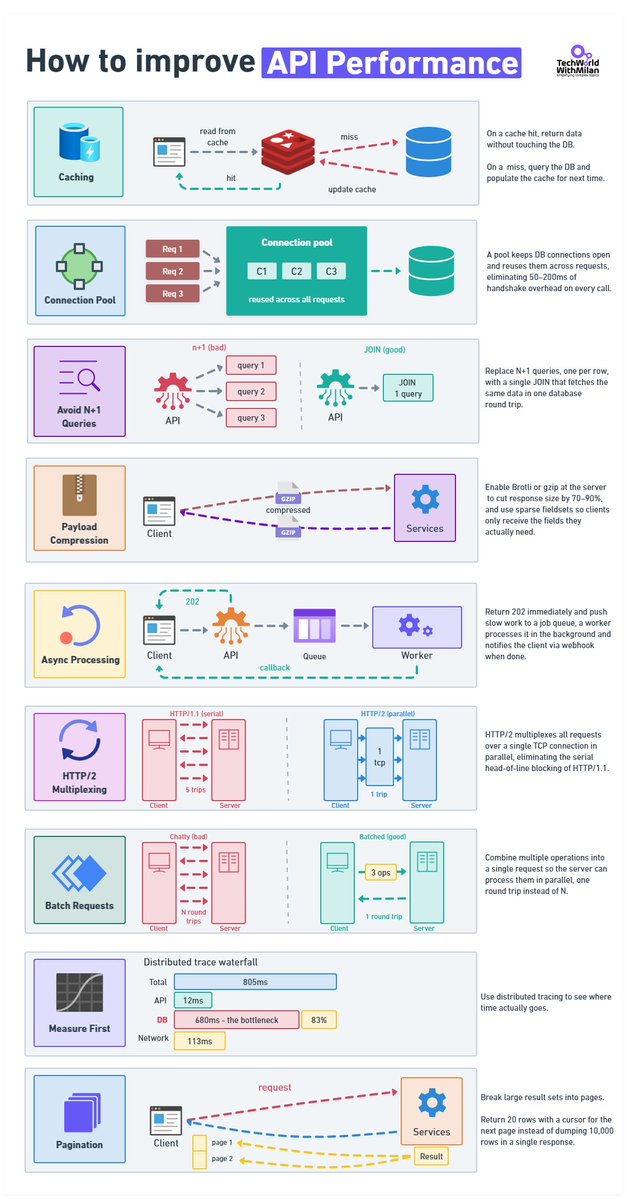
𝗧𝗼𝗽 𝗦𝘁𝗿𝗮𝘁𝗲𝗴𝗶𝗲𝘀 𝘁𝗼 𝗜𝗺𝗽𝗿𝗼𝘃𝗲 𝗔𝗣𝗜 𝗣𝗲𝗿𝗳𝗼𝗿𝗺𝗮𝗻𝗰𝗲
𝟭. 𝗖𝗮𝗰𝗵𝗶𝗻𝗴
A cache hit never touches the database. On a miss, you query the DB and write to cache so the next caller doesn't pay the same cost.
The part that engineers usually get wrong is invalidation. TTL is easy to implement and will absolutely serve stale data at the worst moment. Event-driven invalidation is accurate, but now you have a new thing that can break.
𝟮. 𝗖𝗼𝗻𝗻𝗲𝗰𝘁𝗶𝗼𝗻 𝗣𝗼𝗼𝗹𝗶𝗻𝗴
When you open a new connection, for each request, a few things happen: TCP handshake, TLS, Auth, etc. This takes 50–200ms, or even more. Pool your connections.
𝟯. 𝗔𝘃𝗼𝗶𝗱 𝗡+𝟭 𝗤𝘂𝗲𝗿𝗶𝗲𝘀
Every slow codebase I've worked in had this problem. You fetch a list of records, then loop through them and query related data for each. And it works fine locally with 10 rows, but in production with 2,000, it's 2,001 database round-trips per request.
We can fix this with one JOIN. Also, we need to index the columns in your WHERE clause.
Before you change anything, run a profiler and verify this is actually the problem. I've assumed N+1 before and been wrong.
𝟰. 𝗣𝗮𝘆𝗹𝗼𝗮𝗱 𝗖𝗼𝗺𝗽𝗿𝗲𝘀𝘀𝗶𝗼𝗻
This is something usually forgotten. A 120 KB JSON response becomes roughly 18 KB. If you're not doing this, you're sending the client unnecessary work.
You can choose Brotli or gzip.
𝟱. 𝗔𝘀𝘆𝗻𝗰 𝗣𝗿𝗼𝗰𝗲𝘀𝘀𝗶𝗻𝗴
Operations that take seconds don't belong inside an HTTP response. Return 202, put the job on a queue, process it in the background, fire a webhook when it's done. Your p99 will thank you.
𝟲. 𝗛𝗧𝗧𝗣/𝟮
HTTP/1.1 runs one request at a time per connection. That made sense in 1997. HTTP/2 multiplexes everything over a single TCP connection, allowing all requests to be in flight at once, with header compression on top. If your infrastructure supports it and you haven't switched, worth looking at why not.
𝟳. 𝗕𝗮𝘁𝗰𝗵𝗶𝗻𝗴
Ten API calls are 10 round-trips, but also 10 times the latency cost. Let clients bundle operations into one request and process them in parallel on the server.
In REST: POST /batch or GET /users?ids=1,2,3.
GraphQL handles this without you having to think about it.
𝟴. 𝗠𝗲𝗮𝘀𝘂𝗿𝗲 𝗙𝗶𝗿𝘀𝘁
Set up OpenTelemetry and look at actual traces before touching anything. I've watched teams spend weeks optimizing the wrong layer.
Here is a real example: API handler: 12ms, network: 113ms, DB query: 680ms. Everyone was looking at the API layer, but the problem was that it was sitting in the database the whole time.
An afternoon of instrumentation would have shown them that almost immediately.
𝟵. 𝗣𝗮𝗴𝗶𝗻𝗮𝘁𝗶𝗼𝗻
Never return 10,000 rows. Return 20 with a cursor for the next page.
Offset pagination scans and discards rows on every call, at page 500 you're scanning 10,000 rows to show 20. Cursor-based picks up exactly where it left off.
SonarQube is an open source tool that helps you analyze your code to find any bugs and vulnerabilities.
And in this article, Divya explains how you can use it.
She walks you through what SonarQube does, helps you get it installed and set up, and runs through a quick code analysis.
https://t.co/2Xhrost9m3
3.1 Pro can generate website-ready, animated SVGs from a simple text prompt. Since these are built in pure code and not pixels, they stay crisp at any scale with incredibly small file sizes. Check out the difference:
a bunch of you said this would be huge for real estate 🏡
so i pushed it further: virtual staging just went 3d 👀
the flow:
1. capture 16 ultra-wide photos
2. stitch into a 360° equirectangular panorama
3. feed that into @NanoBanana with a staging prompt → generate a newly staged 360° image
4. reconstruct that into a fully navigable 3d world using @theworldlabs
you’re not just staging photos anymore -
you’re staging space
i’m starting to think 360° panoramas might just be the bridge between 2d and 3d worlds
edit the pano. edit the world.
I still can’t believe this is free.
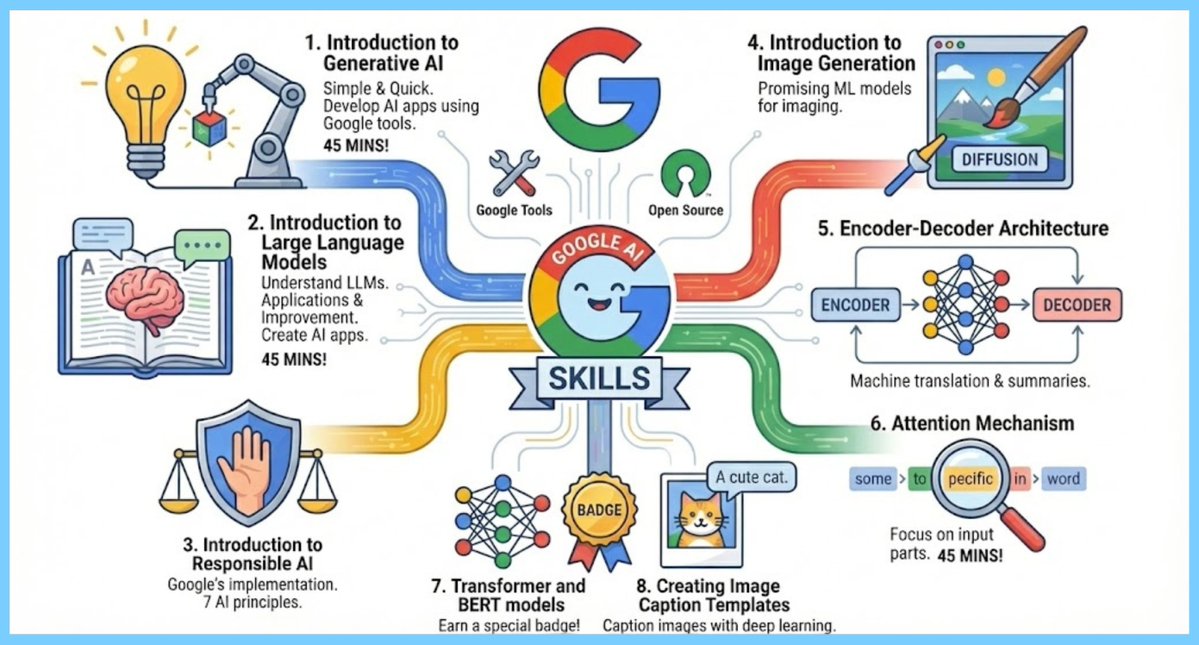
Most universities are charging tuition to teach theoretical AI.
Meanwhile, Google is giving away practical, state-of-the-art training for $0.
Some courses take just 45 minutes. ⏱️
• Generative AI & LLMs? ✅ • Diffusion & Image Generation? ✅ • Transformers & BERT? ✅ • Earn a Badge? ✅
Here are 8 free courses you can start today (plus many more available on the platform):