𝗥𝗘𝗦𝗧 𝘃𝘀 𝗚𝗿𝗮𝗽𝗵𝗤𝗟 𝘃𝘀 𝗴𝗥𝗣𝗖 𝘃𝘀 𝗪𝗲𝗯𝗦𝗼𝗰𝗸𝗲𝘁𝘀.
𝗥𝗘𝗦𝗧 exposes resources through HTTP endpoints, making it practical for public APIs and standard CRUD operations.
With 𝗚𝗿𝗮𝗽𝗵𝗤𝗟, clients can request specific fields and related data, making it useful when different clients need different data shapes.
𝗴𝗥𝗣𝗖 uses strongly typed contracts and efficient serialization, making it well suited for backend service communication.
For real-time communication, 𝗪𝗲𝗯𝗦𝗼𝗰𝗸𝗲𝘁𝘀 enable persistent, two-way connections, allowing applications to exchange data as events happen.
But exchanging data in real time doesn't necessarily mean an application can respond naturally.
Take AI voice agents used in customer support. They need to do more than stream audio. They also need to handle interruptions, understand conversational context, and adapt how they respond, while meeting enterprise security and deployment requirements.
Deepgram Flux TTS addresses the speech generation side of this by using conversational context to adjust tone, pacing, and emotion in real time.
For example, a support agent can respond empathetically to a frustrated customer, then switch to clearly reading out a tracking number.
Combined with streaming and interruption handling, this helps developers build more natural voice experiences without scripting every interaction.
𝗛𝗲𝗮𝗿 𝗙𝗹𝘂𝘅 𝗧𝗧𝗦 𝗶𝗻 𝗮𝗰𝘁𝗶𝗼𝗻 → https://t.co/7sODRhCiUX
What else would you add?
——
♻️ Repost to help others learn and grow.
🙏 Thanks to @DeepgramAI for sponsoring this post.
➕ Follow me ( Nikki Siapno ) to improve at system design and AI.
REST vs GraphQL vs gRPC vs WebSockets.
𝗥𝗘𝗦𝗧 exposes resources through HTTP endpoints, making it practical for public APIs and standard CRUD operations.
With 𝗚𝗿𝗮𝗽𝗵𝗤𝗟, clients can request specific fields and related data, making it useful when different clients need different data shapes.
𝗴𝗥𝗣𝗖 uses strongly typed contracts and efficient serialization, making it well suited for backend service communication.
For real-time communication, 𝗪𝗲𝗯𝗦𝗼𝗰𝗸𝗲𝘁𝘀 enable persistent, two-way connections, allowing applications to exchange data as events happen.
But exchanging data in real time doesn't necessarily mean an application can respond naturally.
Take AI voice agents used in customer support. They need to do more than stream audio. They also need to handle interruptions, understand conversational context, and adapt how they respond, while meeting enterprise security and deployment requirements.
Deepgram Flux TTS addresses the speech generation side of this by using conversational context to adjust tone, pacing, and emotion in real time.
For example, a support agent can respond empathetically to a frustrated customer, then switch to clearly reading out a tracking number.
Combined with streaming and interruption handling, this helps developers build more natural voice experiences without scripting every interaction.
𝗛𝗲𝗮𝗿 𝗙𝗹𝘂𝘅 𝗧𝗧𝗦 𝗶𝗻 𝗮𝗰𝘁𝗶𝗼𝗻 → https://t.co/7sODRhCiUX
What else would you add?
——
♻️ Repost to help others learn and grow.
🙏 Thanks to @DeepgramAI for sponsoring this post.
➕ Follow me ( Nikki Siapno ) to improve at system design and AI.
Workflow vs AI Agent.
A 𝘄𝗼𝗿𝗸𝗳𝗹𝗼𝘄 follows a path you define in advance.
Step A → Step B → Step C.
That works well when the process is predictable and the next step is already known.
But an 𝗔𝗜 𝗮𝗴𝗲𝗻𝘁 works differently.
You give it a goal, and it can decide which steps, tools, or actions to use based on the context it encounters.
That makes agents useful when the path cannot be fully scripted upfront.
But an agent is only as powerful as its execution layer.
In enterprise environments, that means connecting it to the applications, data, and business processes where the work actually happens.
Workday is starting to open up more of that layer to developers.
𝗙𝗼𝗿 𝘁𝗵𝗲 𝗳𝗶𝗿𝘀𝘁 𝘁𝗶𝗺𝗲, 𝗪𝗼𝗿𝗸𝗱𝗮𝘆 𝗵𝗮𝘀 𝗼𝗽𝗲𝗻𝗲𝗱 𝗶𝘁𝘀 𝗗𝗲𝘃𝗲𝗹𝗼𝗽𝗲𝗿 𝗣𝗹𝗮𝘁𝗳𝗼𝗿𝗺 𝘁𝗼 𝗶𝗻𝗱𝗲𝗽𝗲𝗻𝗱𝗲𝗻𝘁 𝗱𝗲𝘃𝗲𝗹𝗼𝗽𝗲𝗿𝘀. That means builders can now deploy AI-powered solutions around Workday applications, data, and business processes, with access to an ecosystem powering 75 million+ active users.
For developers building skills around enterprise AI, this opens up an ecosystem that was previously out of reach.
𝗝𝗼𝗶𝗻 𝘁𝗵𝗲 𝗪𝗼𝗿𝗸𝗱𝗮𝘆 𝗗𝗲𝘃𝗲𝗹𝗼𝗽𝗲𝗿 𝗣𝗹𝗮𝘁𝗳𝗼𝗿𝗺 → https://t.co/QC1uHwkf5o
What else would you add?
——
♻️ Repost to help others learn AI agents.
🙏 Thanks to @Workday for sponsoring this post.
➕ Follow me ( Nikki Siapno ) to improve at AI and system design.
Postgres vs MySQL.
𝗣𝗼𝘀𝘁𝗴𝗿𝗲𝘀 is built as a single, integrated system, and that design choice shapes how everything else works.
Data is stored in heap tables, where multiple row versions coexist. Updates create new versions, while old ones remain until cleaned up (VACUUM). MVCC is built into the data model, enabling advanced indexing and extensibility.
𝗠𝘆𝗦𝗤𝗟 is built around a pluggable storage engine architecture.
The SQL layer sits on top, while InnoDB handles storage. Old row versions are kept in undo logs and reconstructed when needed. Data is organised as a clustered index, with the primary key defining physical layout.
Which database do you prefer?
——
Thanks to our partner Kickresume who keeps our content free.
𝗔𝗿𝗲 𝘆𝗼𝘂 𝘀𝘂𝗿𝗲 𝘆𝗼𝘂'𝗿𝗲 𝗳𝗼𝗹𝗹𝗼𝘄𝗶𝗻𝗴 𝘂𝗽 𝗼𝗻 𝗲𝘃𝗲𝗿𝘆 𝗷𝗼𝗯 𝘆𝗼𝘂 𝗮𝗽𝗽𝗹𝘆 𝘁𝗼? Keep track of every application with Kickresume's free Job Application Tracker.
Track your applications here → https://t.co/TZsm6HU2nX
——
♻️ Repost to help others learn databases.
Git branching strategies: Do you know the differences?
𝗙𝗲𝗮𝘁𝘂𝗿𝗲 𝗯𝗿𝗮𝗻𝗰𝗵𝗶𝗻𝗴 keeps each feature in its own branch, isolated from the main branch, making pull requests easier to review. Once complete, the feature is merged back into main.
𝗚𝗶𝘁𝗳𝗹𝗼𝘄 uses two long-lived branches: dev for development and main for production. Features are built in separate branches, then merged into dev. Releases are prepared in dedicated branches before merging into production.
𝗚𝗶𝘁𝗟𝗮𝗯 𝗳𝗹𝗼𝘄 combines feature branching with environment-based deployment workflows. Changes move through environments like staging before reaching production, making it well-suited for CI/CD and staged releases.
𝗚𝗶𝘁𝗛𝘂𝗯 𝗳𝗹𝗼𝘄 simplifies things. The main branch is always deployable. Developers create short-lived branches, open pull requests, and merge once approved, often triggering deployment.
𝗧𝗿𝘂𝗻𝗸-𝗯𝗮𝘀𝗲𝗱 𝗱𝗲𝘃𝗲𝗹𝗼𝗽𝗺𝗲𝗻𝘁 minimizes branching. Changes are merged into main frequently, supported by strong automated testing, CI pipelines, and feature flags to maintain stability.
There's no one-size-fits-all branching strategy. The right approach depends on your team's size, release process, and how frequently you deploy.
What else would you add?
——
Thanks to our partner Kickresume who keeps our content free.
𝗔𝗿𝗲 𝘆𝗼𝘂 𝘀𝘂𝗿𝗲 𝘆𝗼𝘂'𝗿𝗲 𝗳𝗼𝗹𝗹𝗼𝘄𝗶𝗻𝗴 𝘂𝗽 𝗼𝗻 𝗲𝘃𝗲𝗿𝘆 𝗷𝗼𝗯 𝘆𝗼𝘂 𝗮𝗽𝗽𝗹𝘆 𝘁𝗼? Keep track of every application with Kickresume's free Job Application Tracker.
Track your applications here → https://t.co/TZsm6HU2nX
——
♻️ Repost to help others Git.
➕ Follow me ( @NikkiSiapno ) to improve at system design.
𝗔𝗴𝗲𝗻𝘁𝗶𝗰 𝗦𝗗𝗟𝗖 𝘃𝘀 𝗠𝗼𝗱𝗲𝗿𝗻 𝗦𝗗𝗟𝗖 𝘃𝘀 𝗧𝗿𝗮𝗱𝗶𝘁𝗶𝗼𝗻𝗮𝗹 𝗦𝗗𝗟𝗖.
With 𝘁𝗿𝗮𝗱𝗶𝘁𝗶𝗼𝗻𝗮𝗹 𝗦𝗗𝗟𝗖 (𝗪𝗮𝘁𝗲𝗿𝗳𝗮𝗹𝗹), work moves through sequential phases, with planning done upfront and testing before release. This provides structure, but makes adapting to changing requirements difficult.
Whereas with 𝗺𝗼𝗱𝗲𝗿𝗻 𝗦𝗗𝗟𝗖 (𝗔𝗴𝗶𝗹𝗲 + 𝗗𝗲𝘃𝗢𝗽𝘀), teams work in shorter iterations, continuously deliver updates, and respond to feedback faster. It's more flexible, but humans still handle most of the execution.
Now, with 𝗮𝗴𝗲𝗻𝘁𝗶𝗰 𝗦𝗗𝗟𝗖 (𝗔𝗜 𝗔𝗴𝗲𝗻𝘁𝘀), agents can take on planning, coding, testing, and debugging, while humans shift toward setting goals, providing context, and reviewing outcomes.
The key difference is how work gets done, and how much of it can be automated.
But faster execution doesn't automatically mean faster delivery.
According to Atlassian's 2026 State of DevEx report, 𝟴𝟳% of developers say AI helps them ship faster, yet 𝗼𝗻𝗹𝘆 𝟮𝟴% report less organizational friction.
Developers still spend time finding information, context switching, and reviewing AI-generated work.
This is why an AI-native SDLC requires more than AI coding tools. Teams need to rethink how requirements, context, collaboration, and validation work together.
Atlassian's research explores this gap between individual productivity and team-wide efficiency, and what it takes to make AI useful across the entire development lifecycle.
𝗥𝗲𝗮𝗱 𝘁𝗵𝗲 𝗳𝘂𝗹𝗹 𝗿𝗲𝗽𝗼𝗿𝘁 → https://t.co/7BO87QacFS
What else would you add?
——
♻️ Repost to help others learn SDLC.
🙏 Thanks to @Atlassian for sponsoring this post.
➕ Follow me ( Nikki Siapno ) to improve at AI and system design.
𝗠𝗖𝗣 𝘃𝘀 𝗦𝗸𝗶𝗹𝗹𝘀.
𝗠𝗖𝗣 𝗶𝘀 𝘁𝗵𝗲 𝗰𝗼𝗻𝗻𝗲𝗰𝘁𝗶𝗼𝗻 𝗹𝗮𝘆𝗲𝗿. It gives AI systems a standard way to connect to external systems and capabilities. MCP servers expose tools that the model can discover and invoke, whether that’s querying a database, calling an API, or taking action in another system. Instead of building one-off integrations, MCP gives agents a consistent interface for accessing those capabilities.
𝗦𝗸𝗶𝗹𝗹𝘀 𝗮𝗿𝗲 𝗿𝗲𝘂𝘀𝗮𝗯𝗹𝗲 𝗽𝗹𝗮𝘆𝗯𝗼𝗼𝗸𝘀 for how an agent should perform a task. A Skill packages instructions in a SKILL. md file, alongside optional scripts, references, and other resources. Rather than adding another service or integration, Skills run within the agent’s existing environment and give it task-specific procedures, conventions, and know-how it can load when needed.
MCP gives agents reach. Skills give them know-how. Together, they’re part of a broader shift toward AI taking a more active role in engineering work.
But building capable AI systems involves more than connecting tools and defining instructions.
Developers also need to understand how to work with data, implement retrieval, give AI models the right context, and more.
MongoDB's AI Learning Hub helps you build these skills through free, self-paced learning tracks, hands-on tutorials, and practical resources
𝗦𝘁𝗮𝗿𝘁 𝗹𝗲𝗮𝗿𝗻𝗶𝗻𝗴 𝗳𝗼𝗿 𝗳𝗿𝗲𝗲 → https://t.co/kByOI91D6X
Start building AI apps with MongoDB Atlas → https://t.co/WZYLuP8CBg
What else would you add?
——
♻️ Repost to help others learn AI.
🙏 Thanks to @MongoDB for sponsoring this post.
➕ Follow me ( Nikki Siapno ) to improve at AI and system design.
5 things slowing developers down in 2026
(and why faster coding doesn't solve them):
Atlassian's latest State of DevEx report reveals the biggest sources of developer friction.
𝟱. 𝗨𝗻𝗰𝗹𝗲𝗮𝗿 𝗿𝗲𝗾𝘂𝗶𝗿𝗲𝗺𝗲𝗻𝘁𝘀 (𝟰𝟬%)
↳ Clarifying what actually needs to be built.
𝟰. 𝗧𝗲𝗰𝗵𝗻𝗶𝗰𝗮𝗹 𝗱𝗲𝗯𝘁 (𝟰𝟰%)
↳ Working around existing code and architectural limitations.
𝟯. 𝗖𝗼𝗻𝘁𝗲𝘅𝘁 𝘀𝘄𝗶𝘁𝗰𝗵𝗶𝗻𝗴 (𝟰𝟱%)
↳ Moving between tasks, tools, and priorities.
𝟮. 𝗠𝗲𝗲𝘁𝗶𝗻𝗴𝘀 (𝟱𝟬%)
↳ Time spent coordinating instead of executing.
𝟭. 𝗙𝗶𝗻𝗱𝗶𝗻𝗴 𝗶𝗻𝗳𝗼𝗿𝗺𝗮𝘁𝗶𝗼𝗻 (𝟱𝟭%)
↳ Searching across fragmented documentation and tools.
But why do these bottlenecks persist even as AI makes coding faster?
The video explains what's happening across the SDLC.
For a deeper look at what engineering teams can do about it, join Atlassian's expert panel discussing the findings.
𝗥𝗲𝗮𝗱 𝘁𝗵𝗲 𝗳𝘂𝗹𝗹 𝗿𝗲𝗽𝗼𝗿𝘁 → https://t.co/iRXZuyHlTO
𝗪𝗮𝘁𝗰𝗵 𝘁𝗵𝗲 𝘄𝗲𝗯𝗶𝗻𝗮𝗿 → https://t.co/18dQwxUZP7
What else would you add?
Thanks to @Atlassian for sponsoring this post.
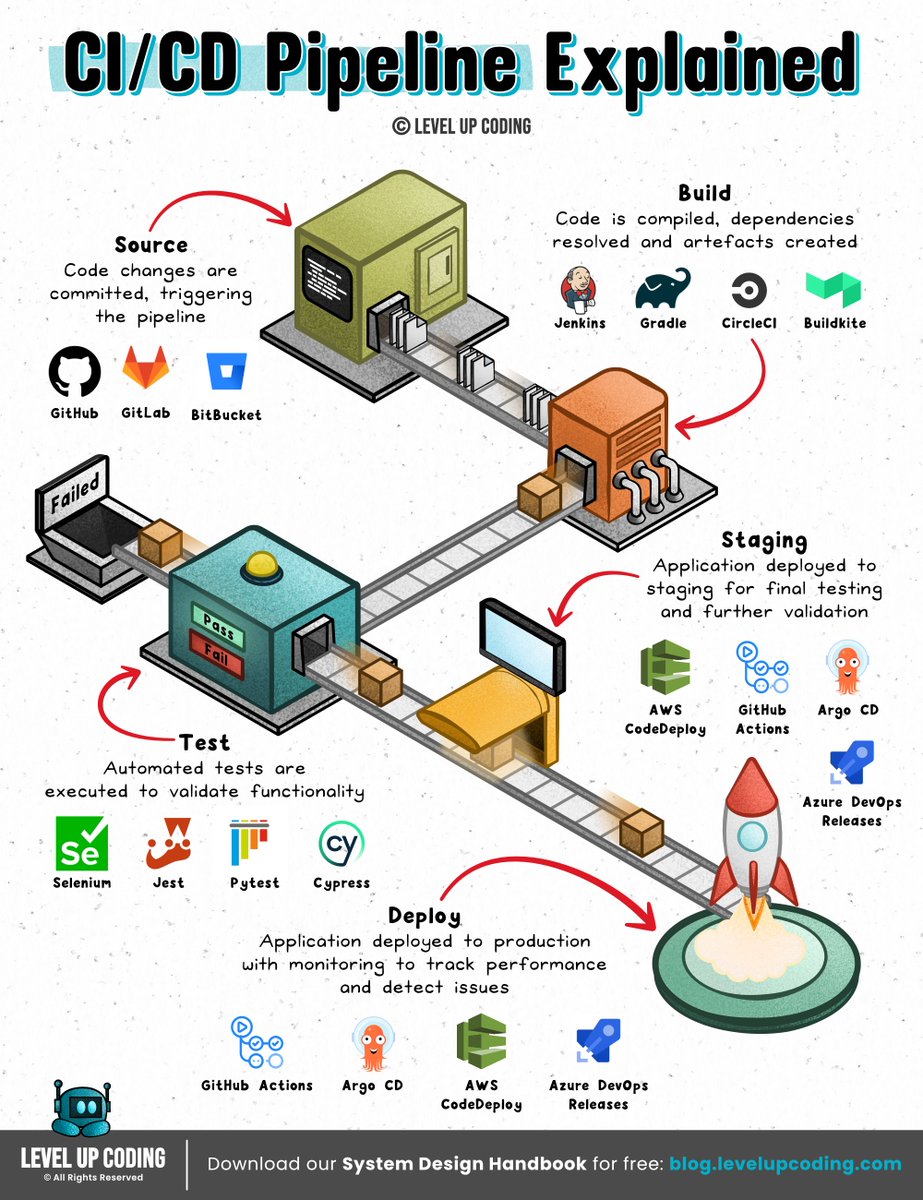
𝗖𝗜/𝗖𝗗 𝗣𝗶𝗽𝗲𝗹𝗶𝗻𝗲𝘀 𝗖𝗹𝗲𝗮𝗿𝗹𝘆 𝗘𝘅𝗽𝗹𝗮𝗶𝗻𝗲𝗱.
CI/CD pipelines automate the path from code change to production.
A typical pipeline connects:
→ Source control
→ Automated testing
→ Artifact creation
→ Security scanning
→ Deployment
The goal is simple: catch problems earlier and make releases repeatable.
But automating deployment creates another problem: the pipeline still needs permission to access your infrastructure.
It may need to push a container image, deploy to Kubernetes, access a database, or modify cloud resources.
One option is to give the pipeline a long-lived credential.
But that means another secret to store, rotate, and protect.
Workload identity takes a different approach.
Instead of storing a permanent secret, the workload proves its identity and receives short-lived access when it needs it.
Teleport’s Machine & Workload Identity applies this model to CI/CD jobs, AI agents, and other automated workloads accessing infrastructure.
CI/CD controls how code moves through the deployment process.
Workload identity controls what that automation is allowed to access.
𝗟𝗲𝗮𝗿𝗻 𝗺𝗼𝗿𝗲 𝗵𝗲𝗿𝗲 → https://t.co/Qfv6hSa4Kp
What else would you add?
——
♻️ Repost to help others learn system design.
🙏 Thanks to @goteleport for sponsoring this post.
➕ Follow me ( Nikki Siapno ) to improve at system design.
𝗠𝗖𝗣 𝘃𝘀 𝗔𝗣𝗜 𝘃𝘀 𝗦𝗸𝗶𝗹𝗹𝘀.
An 𝗔𝗣𝗜 defines how software systems communicate through specific endpoints, requests, and responses. It gives applications a structured way to access data or trigger functionality in another system.
𝗠𝗖𝗣 (Model Context Protocol) standardizes how AI applications discover and interact with external tools, data, and resources. Instead of building custom integrations for every AI client, MCP servers expose capabilities through a common protocol that agents can use.
𝗦𝗸𝗶𝗹𝗹𝘀 package reusable instructions, workflows, and resources that guide agents through specific tasks. Rather than providing new connections to external systems, they give agents task-specific procedures and know-how they can load when needed.
Together, they help agents connect to systems and use those capabilities to complete tasks.
But building all these integrations and workflows from scratch takes time.
Precisely AI Studio helps builders build faster with 𝗿𝗲𝗮𝗱𝘆-𝗺𝗮𝗱𝗲 𝗔𝗜 𝗮𝗴𝗲𝗻𝘁𝘀, 𝗮𝗽𝗽𝘀, 𝗮𝗻𝗱 𝘀𝗸𝗶𝗹𝗹𝘀 𝗰𝗼𝗻𝗻𝗲𝗰𝘁𝗲𝗱 𝘁𝗵𝗿𝗼𝘂𝗴𝗵 𝗠𝗖𝗣. Builders can explore and test them using sample data, then bring agents and skills into their existing AI stack.
Explore Precisely AI Studio → https://t.co/Foa98LDoxs
What else would you add?
——
♻️ Repost to help other learn AI.
🙏 Thanks to @PreciselyData for sponsoring this post.
➕ Follow me ( Nikki Siapno ) to improve at AI and system design.
Things Every Developer Should Know: CI/CD Pipelines.
CI/CD pipelines automate the path from code change to production.
A typical pipeline connects:
→ Source control
→ Automated testing
→ Artifact creation
→ Security scanning
→ Deployment
The goal is simple: catch problems earlier and make releases repeatable.
But automating deployment creates another problem: the pipeline still needs permission to access your infrastructure.
It may need to push a container image, deploy to Kubernetes, access a database, or modify cloud resources.
One option is to give the pipeline a long-lived credential.
But that means another secret to store, rotate, and protect.
Workload identity takes a different approach.
Instead of storing a permanent secret, the workload proves its identity and receives short-lived access when it needs it.
Teleport’s Machine & Workload Identity applies this model to CI/CD jobs, AI agents, and other automated workloads accessing infrastructure.
CI/CD controls how code moves through the deployment process.
Workload identity controls what that automation is allowed to access.
𝗟𝗲𝗮𝗿𝗻 𝗺𝗼𝗿𝗲 𝗵𝗲𝗿𝗲 → https://t.co/Qfv6hSa4Kp
What else would you add?
——
♻️ Repost to help others learn system design.
🙏 Thanks to @goteleport for sponsoring this post.
➕ Follow me ( Nikki Siapno ) to improve at system design.
Top 12 API Security Best Practices:
• Add rate limiting and throttling
• Monitor and log activity
• Use an API gateway
• Encrypt data at rest
• Validate all inputs
• Version your APIs
• Whitelist allowed clients
• Use HTTPS
• Enforce authentication
• Enforce authorization
• Manage dependencies proactively
• Run regular security audits
This list is not exhaustive, there are plenty more: API key/token lifecycle management, secret rotation, principle of least privilege, etc.
If you want to dive deeper, I'm releasing some deep dive articles on API design in my newsletter over the next two months.
What else would you add?
——
📌 PS: One of the most important skills for an engineer is system design. Download my 𝟮𝟭𝟴 𝗽𝗮𝗴𝗲 𝗦𝘆𝘀𝘁𝗲𝗺 𝗗𝗲𝘀𝗶𝗴𝗻 𝗛𝗮𝗻𝗱𝗯𝗼𝗼𝗸 for free and join 35,000+ engineers who get my free weekly newsletter → https://t.co/LybPLdor9s
——
♻️ Repost to help others learn API security.
➕ Follow me ( @NikkiSiapno ) to improve at system design.
𝗛𝗧𝗧𝗣, 𝗛𝗧𝗧𝗣 𝟮, 𝗛𝗧𝗧𝗣 𝟯: 𝗗𝗼 𝘆𝗼𝘂 𝗸𝗻𝗼𝘄 𝘁𝗵𝗲 𝗱𝗶𝗳𝗳𝗲𝗿𝗲𝗻𝗰𝗲𝘀?
HTTP now powers complex modern applications, but it started as a simple protocol for retrieving documents.
𝗛𝗧𝗧𝗣/𝟬.𝟵 only supported a single GET request with no headers or status codes; just raw HTML from the server. It was simple and fast, but lacked structure and scalability.
𝗛𝗧𝗧𝗣/𝟭.𝟬 introduced headers, status codes, and content types, making the web more structured and extensible, but required a new TCP connection for every request, which didn’t scale well.
𝗛𝗧𝗧𝗣/𝟭.𝟭 added persistent connections, caching, and chunked transfer, making web interactions more efficient, but still suffered from head-of-line blocking and connection overhead at scale.
𝗛𝗧𝗧𝗣𝗦 is HTTP layered over TLS, providing encryption, integrity, and authentication, securing communication over the internet, but adds handshake overhead and operational complexity.
𝗛𝗧𝗧𝗣/𝟮 introduced multiplexing, binary framing, and header compression, allowing multiple requests over a single connection, improving performance, but still relies on TCP and suffers from transport-level blocking.
𝗛𝗧𝗧𝗣/𝟯 runs over QUIC (UDP) with built-in TLS 1.3, enabling independent streams, faster handshakes, and reduced latency, but introduces more complexity in infrastructure and network handling.
From per-request connections → to multiplexing over TCP → to QUIC and independent streams. That’s the evolution of HTTP.
📌 If you want to learn more, dive deeper here: https://t.co/HsKI9atEuR
What else would you add?
𝗝𝗲𝘃 𝗖𝗹𝗲𝗮𝗿𝗹𝘆 𝗘𝘅𝗽𝗹𝗮𝗶𝗻𝗲𝗱.
What is it?
How does it work?
Why is everyone talking about it?
Jev is designed to evaluate inputs and return structured decisions without generating long-form responses.
Here's the basic flow:
1) Provide an input
↳ Send the text or data you want evaluated.
2) Define your questions
↳ Specify the decisions or classifications you need.
3) Get structured predictions
↳ Jev returns answers with confidence scores.
This makes it useful for classification, relevance scoring, and routing.
The advantage? Faster, cheaper decisions without the overhead of generating long-form responses.
The 𝗼𝘂𝘁𝗽𝘂𝘁 𝗶𝘀 𝗮 𝗱𝗲𝗰𝗶𝘀𝗶𝗼𝗻 your application can act on, 𝗿𝗮𝘁𝗵𝗲𝗿 𝘁𝗵𝗮𝗻 𝗮 𝗴𝗲𝗻𝗲𝗿𝗮𝘁𝗲𝗱 𝗲𝘅𝗽𝗹𝗮𝗻𝗮𝘁𝗶𝗼𝗻.
One use case for these structured decisions is managing AI agent memory.
Instead of storing every interaction, an agent needs to evaluate which information is relevant, trustworthy, and worth remembering.
Jev can help make those decisions, while a database stores the memories and their supporting evidence.
Oracle's technical guide walks through exactly that.
𝗥𝗲𝗮𝗱 𝘁𝗵𝗲 𝗳𝘂𝗹𝗹 𝗴𝘂𝗶𝗱𝗲 →https://t.co/mrApUusWzn
What else would you add?
——
♻️ Repost to help others learn Jev.
🙏 Thanks to @Oracle Developers for sponsoring this post.
➕ Follow me ( Nikki Siapno ) to improve at AI and system design.
𝗗𝗼𝗰𝗸𝗲𝗿 𝘃𝘀 𝗞𝘂𝗯𝗲𝗿𝗻𝗲𝘁𝗲𝘀.
Docker is a containerization platform that solves the “𝗶𝘁 𝘄𝗼𝗿𝗸𝘀 𝗼𝗻 𝗺𝘆 𝗺𝗮𝗰𝗵𝗶𝗻𝗲” problem.
It builds images, runs containers, and primarily runs them on a single host. Applications are packaged with everything they need and run as lightweight, isolated containers. The focus is on running software consistently with simple primitives like images and containers.
𝗞𝘂𝗯𝗲𝗿𝗻𝗲𝘁𝗲𝘀 is a cluster orchestration system.
It manages containers across multiple machines using a control plane that schedules and maintains containerized workloads. It works with Pods and reconciles actual state to desired state. The focus is on operating software at scale with capabilities like self-healing, autoscaling, and rolling updates.
Kubernetes doesn’t create containers. It orchestrates them. Docker runs containers. Kubernetes keeps them running.
What else would you add?
♻️ Repost to help other learn and grow.
💾 Save for later.