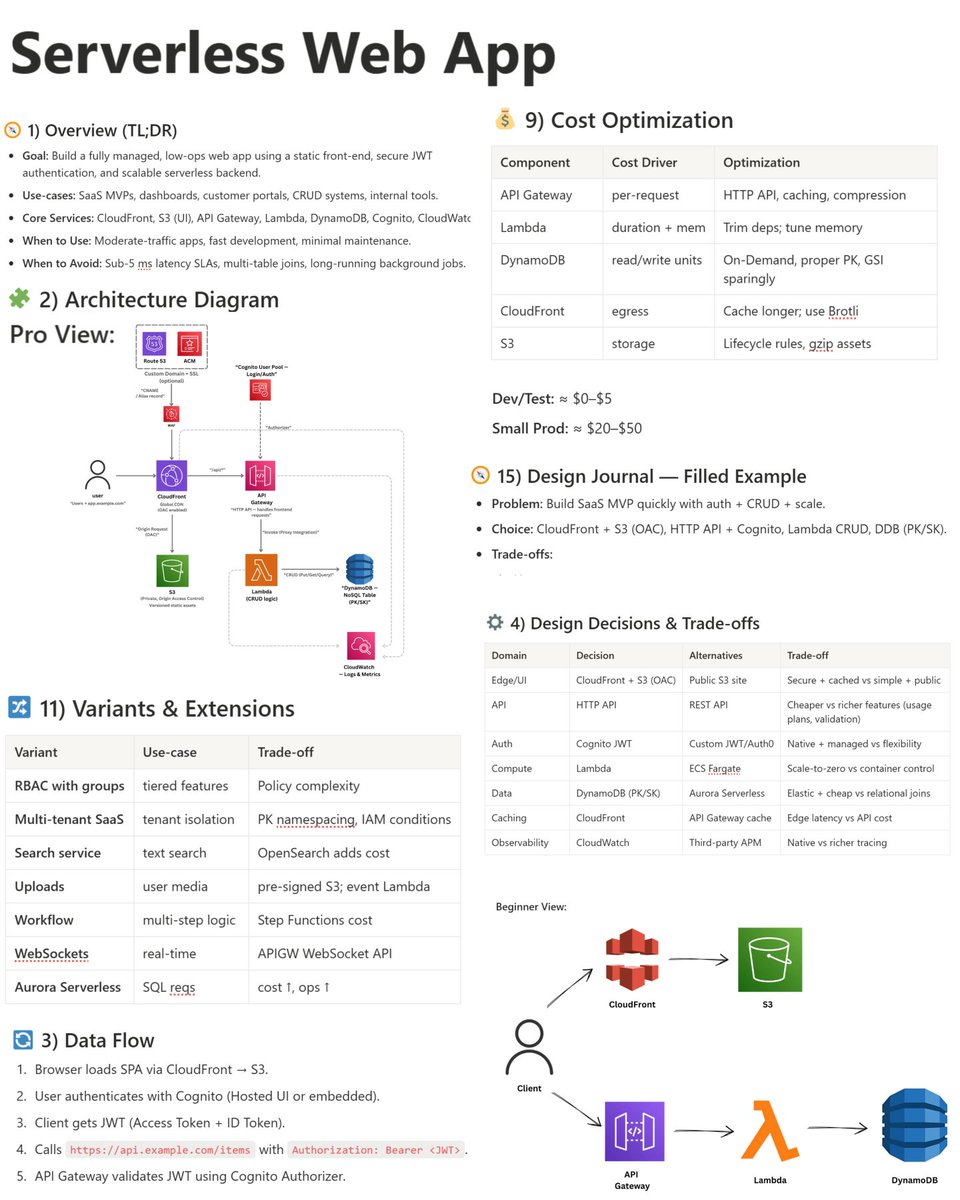
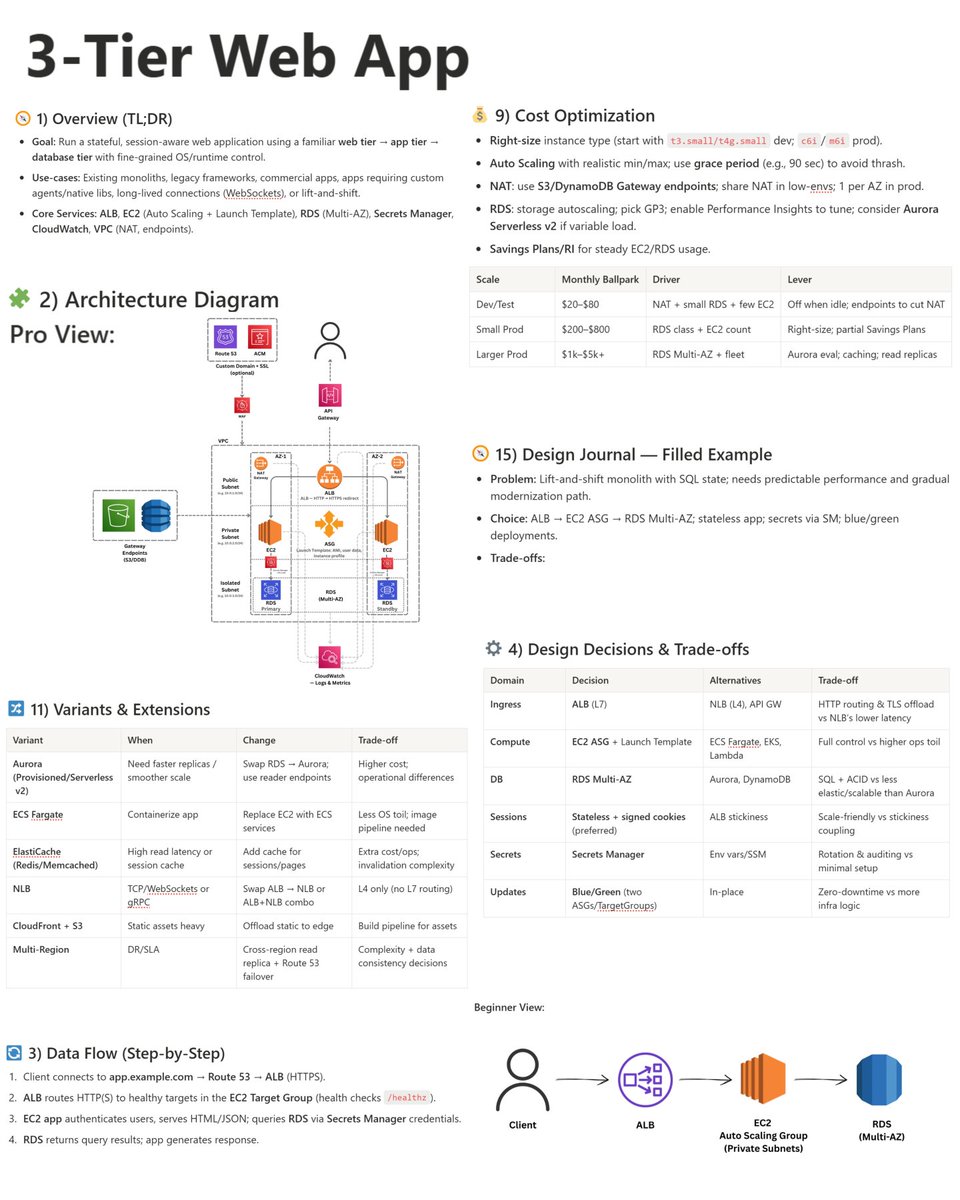
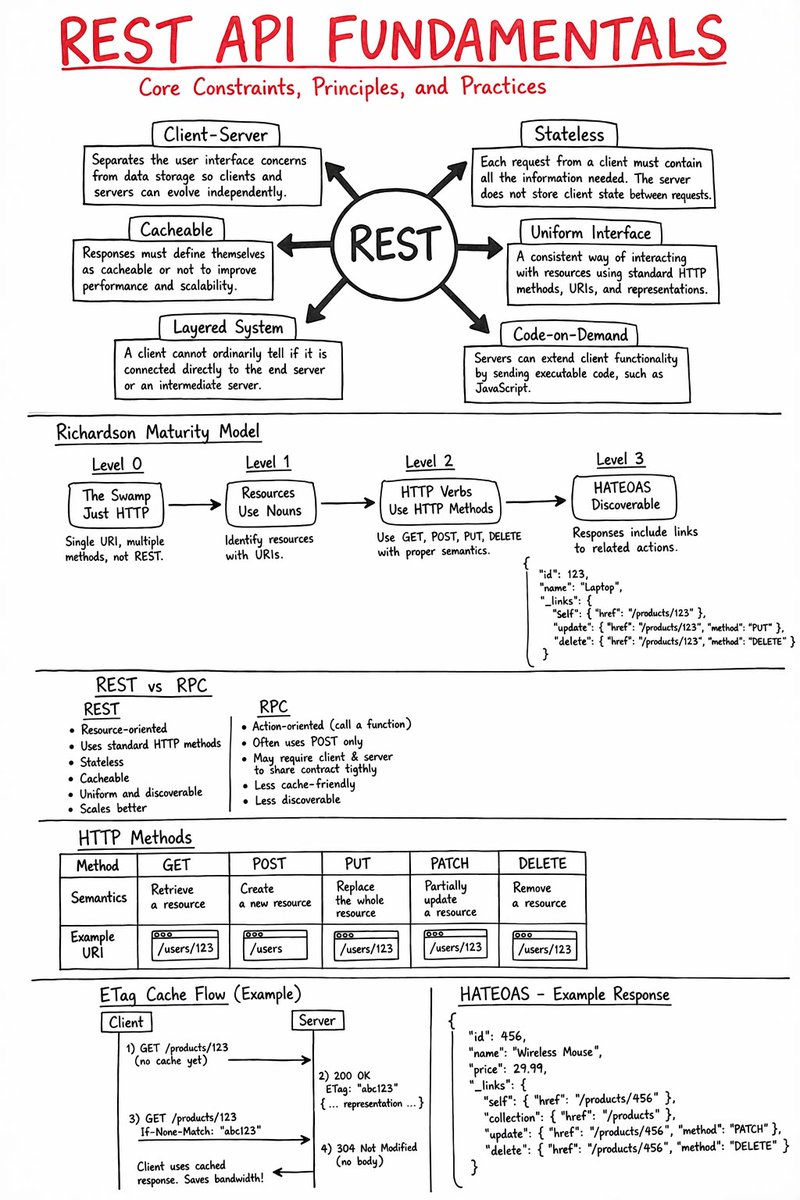
System Design Series - Day 8/30
API Gateway Patterns – The Front Door of Your Microservices
API Gateway is the single entry point for all your clients.
Without it:
- Mobile/web clients call 10+ different services directly
- Authentication is duplicated everywhere
- Rate limiting, CORS, logging → repeated in every service
- Services are fully exposed to the internet
With it:
- One clean URL for clients
- Centralized auth, rate limiting, routing, aggregation
- Backend services stay hidden and secure
Here’s everything you need to know about API Gateway patterns.
What is an API Gateway?
Think of it as the hotel front desk
Without a front desk:
- Guests wander around looking for rooms
- No security check
- Housekeeping and room service have no coordination
With a front desk:
- Single check-in point
- Routes guests to correct room
- Handles security, coordination, and requests
API Gateway does exactly that for your microservices.
The Problem It Solves
Before API Gateway:
Mobile app needs user profile + orders:
→ Calls User Service directly
→ Calls Order Service directly
→ Calls Payment Service directly
Problems:
- Client knows internal service URLs
- Multiple network calls (slow on mobile)
- Auth tokens sent to every service
- No centralized rate limiting or logging
- Services exposed to the internet
After API Gateway:
Mobile app calls one URL:
https://api.example. com/profile
Gateway handles everything internally:
- Authenticates once
- Routes and aggregates calls
- Returns combined response
Benefits:
- 1 network call from client
- Services completely hidden (security win)
- Centralized cross-cutting concerns
- Much better client experience
Core Responsibilities:
1. Routing
Maps external URLs to internal services
GET /api/users → User Service
GET /api/orders → Order Service
2. Authentication & Authorization
Validates JWT/OAuth once at the gateway.
Services trust the gateway.
3. Rate Limiting
Prevents abuse (e.g., 100 requests/min per user).
4. Request Aggregation
Combines multiple backend calls into one response for the client.
5. Protocol Translation
Client uses REST → Service uses gRPC (handled at gateway).
Advanced Patterns
- Circuit Breaker → Prevents cascading failures when a service is down
- Request/Response Transformation → Convert old → new API formats
- Caching → Cache frequent responses at the gateway level
- Logging & Monitoring → Centralized observability
When to Use API Gateway
Use it when:
- You have multiple microservices
- External clients (mobile, web, third-party)
- You need centralized auth, rate limiting, or aggregation
Don’t use it when:
- Simple monolith (overkill)
- Only internal service-to-service communication
- Ultra-low latency is critical (extra hop)
Popular Solutions
- Kong (open-source, powerful plugins)
- AWS API Gateway (managed, serverless)
- NGINX + Lua (DIY, lightweight)
- Traefik, Envoy, KrakenD
Summary
API Gateway is not just a proxy.
It is the security layer, traffic manager, and aggregator for your entire backend.
It simplifies client code, hides internal complexity, and centralizes cross-cutting concerns.
Trade-offs:
- Extra network hop (adds latency)
- Becomes a critical component (make it highly available)
Used correctly, it’s one of the most valuable pieces in any microservices architecture.
Tomorrow (Day 9): Inter-Service Communication Patterns
Questions about API Gateway?
Drop them below 👇
#SystemDesign #APIGateway #Microservices #Backend
JAVA PROJECTS TO BUILD IN THIS MODERN ERA
FOUNDATIONS: CORE JAVA DEVELOPMENT
→ Build a CLI-based task manager using core Java
→ Create a file-based note-taking application
→ Develop a custom logging framework
→ Build a multithreaded file downloader
→ Create a basic HTTP server from scratch
→ Implement a custom JSON parser
→ Build a terminal-based chat application (Sockets)
→ Create a Java-based password manager (encrypted storage)
→ Develop a mini JVM-like interpreter (advanced)
→ Build a plugin-based application system
BACKEND & API DEVELOPMENT
→ Build a RESTful API using Spring Boot
→ Create a JWT authentication system
→ Develop a full user management system (RBAC)
→ Build a URL shortener service
→ Create a scalable API gateway (Spring Cloud)
→ Develop a microservices architecture (Spring Boot + Eureka)
→ Build a GraphQL API with Spring Boot
→ Create a real-time notification system (WebSockets)
→ Develop a rate limiting system
→ Build a backend for a SaaS product
DATABASE & DATA SYSTEMS
→ Build a custom ORM (like Hibernate basics)
→ Create a database migration tool
→ Develop a caching layer (Redis integration)
→ Build a distributed ID generator (Snowflake-like)
→ Create a search engine with indexing (Lucene)
→ Develop a data pipeline (Kafka + Java consumers)
→ Build a time-series data storage system
→ Create a database connection pool
→ Develop a multi-tenant database system
→ Build a data synchronization service
CLOUD, DEVOPS & DISTRIBUTED SYSTEMS
→ Build a distributed logging system (ELK integration)
→ Create a CI/CD pipeline automation tool
→ Develop a containerized Java app (Docker + Kubernetes)
→ Build a service discovery system
→ Create a configuration management server
→ Develop a fault-tolerant system with circuit breakers
→ Build a job scheduler (like cron service)
→ Create a distributed cache system
→ Develop a monitoring system (metrics + alerts)
→ Build a resilient messaging system (Kafka/RabbitMQ)
AI, MODERN APPS & INTEGRATIONS
→ Build an AI chatbot using Java + OpenAI API
→ Create a document summarization tool
→ Develop a recommendation engine
→ Build a voice assistant (speech-to-text integration)
→ Create a fraud detection system (ML integration)
→ Develop a code analysis tool
→ Build an AI-powered email responder
→ Create a semantic search system
→ Develop a RAG-based knowledge assistant
→ Build an AI-powered resume screening system
FULL-STACK & PRODUCT-LEVEL PROJECTS
→ Build a full-stack e-commerce system (Spring Boot + React)
→ Create a social media platform backend
→ Develop a real-time collaboration tool (like Google Docs)
→ Build a project management tool (like Jira)
→ Create a SaaS billing and subscription system
→ Develop a blogging platform (CMS)
→ Build a learning management system (LMS)
→ Create a fintech transaction processing system
→ Develop a ride-sharing backend system
→ Build a scalable video streaming backend
To master Java by building real-world, production-grade systems, get the complete handbook here:
https://t.co/kHTjfoHnfH
If you're looking for a good portfolio project, or just a fun way to practice your skills, this one's for you.
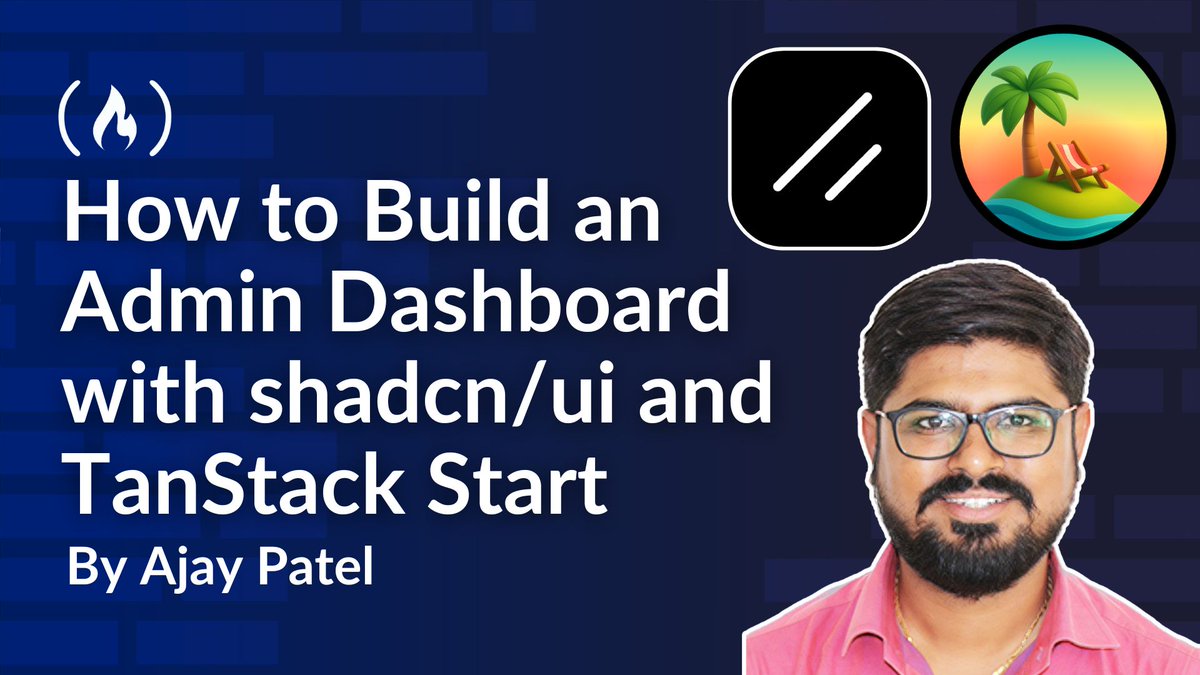
@ajaypatel_aj walks you through building an admin dashboard using shadcn/ui and TanStack Start.
The dashboard will have charts and widgets, a product page, a settings and profile page, and more.
https://t.co/yI6XsD8OID
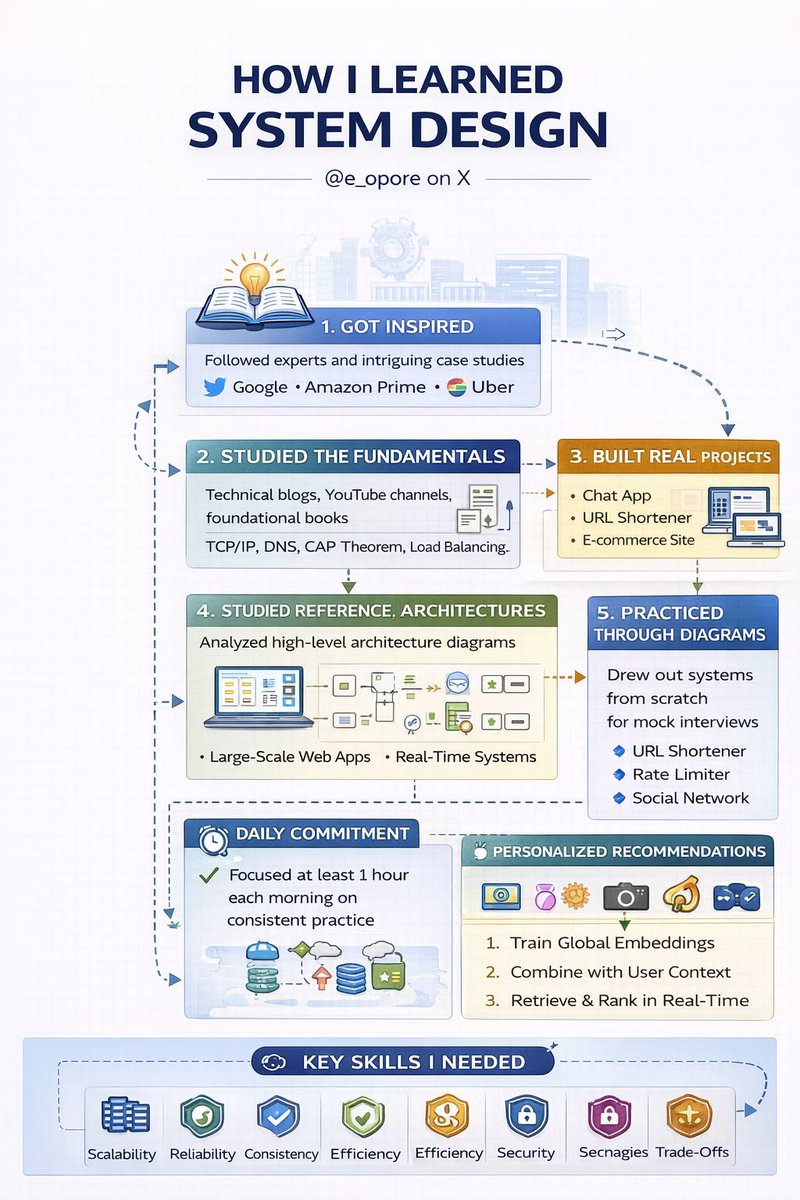
HOW I LEARNED SYSTEM DESIGN
THE HONEST JOURNEY FROM INTERVIEW FAILURE TO ARCHITECTING PRODUCTION SYSTEMS THAT ACTUALLY SCALE
I did not start with system design because I loved it.
I started because I failed it.
The first time I faced a system design interview, I froze. Not because I didn’t understand coding, but because I had never been taught how to think in systems. I knew how to build features. I didn’t know how to build systems that survive real users, real traffic, and real failures.
That failure changed everything.
THE WAKE-UP CALL
I walked into that interview confident. I walked out confused.
I was asked to design a scalable system.
I started writing code in my head. That was my first mistake.
System design is not about syntax.
It is about thinking.
What I lacked:
→ Understanding scale
→ Knowing trade-offs
→ Communicating architecture clearly
→ Breaking down vague problems
That moment forced me to rethink how I approached engineering.
STEP 1: I STOPPED THINKING LIKE A CODER
I had to unlearn something important.
Coding solves problems at a micro level.
System design solves problems at a macro level.
So I shifted my mindset:
→ From “How do I implement this?”
→ To “How does this system behave at scale?”
Instead of focusing on functions, I started focusing on:
→ Users
→ Traffic
→ Data flow
→ Bottlenecks
→ Failure points
That shift alone made a huge difference.
STEP 2: I LEARNED THE FUNDAMENTALS FIRST
Before jumping into complex architectures, I went back to basics.
I studied:
→ Load balancing
→ Caching strategies
→ Database design (SQL vs NoSQL)
→ Horizontal vs vertical scaling
→ CAP theorem
→ Consistency vs availability trade-offs
At first, it felt overwhelming.
But over time, patterns started repeating.
System design is not about memorizing solutions.
It is about recognizing patterns.
STEP 3: I STARTED BREAKING SYSTEMS DOWN
Instead of trying to design everything at once, I learned to decompose problems.
Every system I designed followed this structure:
→ Requirements (functional + non-functional)
→ High-level architecture
→ Core components
→ Data flow
→ Bottlenecks
→ Scaling strategy
→ Trade-offs
This gave me clarity.
And more importantly, it gave me confidence.
STEP 4: I STUDIED REAL SYSTEMS
This is where things started to click.
I stopped learning in isolation and started studying real-world systems:
→ How messaging systems handle millions of users
→ How streaming platforms deliver content globally
→ How marketplaces handle transactions and inventory
→ How social platforms manage feeds and notifications
I realized something powerful:
Every large system is just a combination of smaller, well-understood components.
STEP 5: I PRACTICED OUT LOUD
System design is not just about knowing.
It is about explaining.
So I practiced:
→ Speaking while designing
→ Justifying every decision
→ Explaining trade-offs clearly
→ Thinking under pressure
At first, it felt awkward.
But this is what transformed my interview performance.
Because in real interviews, clarity beats complexity.
STEP 6: I FAILED AGAIN (BUT BETTER)
I didn’t magically become perfect.
I failed again.
But this time, I understood why.
→ I missed edge cases
→ I didn’t estimate scale properly
→ I overcomplicated parts of the system
Each failure became feedback.
And slowly, I improved.
STEP 7: I STARTED THINKING LIKE AN ARCHITECT
This was the turning point.
I stopped trying to impress.
I started trying to design systems that actually work.
My approach became:
→ Start simple
→ Scale gradually
→ Optimize only when necessary
→ Always consider trade-offs
Because real systems are not perfect.
They are practical.
WHAT I LEARNED THE HARD WAY
If you are learning system design right now, understand this:
→ You don’t need to know everything
→ You need to think clearly
→ You need to communicate well
→ You need to understand trade-offs
And most importantly:
→ You need to practice consistently
System design is a skill.
And like any skill, it improves with time.
FINAL THOUGHT
Looking back, that failure was necessary.
It forced me to grow beyond writing code.
It pushed me to understand systems at scale.
It turned me from a developer into someone who can design real-world architectures.
If you are struggling with system design, you are not behind.
You are just in the process.
Keep going.
WANT TO MASTER SYSTEM DESIGN FASTER?
If you want a structured path that takes you from beginner concepts to real-world system architecture, I’ve put together a complete guide:
→ https://t.co/2LauJpfbk4
It covers fundamentals, patterns, real-world systems, and practical breakdowns to help you design with confidence.
Build systems that scale.
Not just code that works.
Don’t overcomplicate it.
• Build a Password Manager to learn file handling, hashing (not full crypto)
• Build a URL Shortener to understand routing, IDs, and persistence
• Build a Todo App with deadlines to practice CRUD and basic state
• Build a Web Scraper to learn requests, parsing, and rate limits
• Build a CLI Expense Tracker to master logic, files, and edge cases
• Build a Log Analyzer to work with files, timestamps, and patterns
• Build a Simple Recommender using similarity rules (not ML magic)
• Build an Email Automation Script using SMTP and scheduling
Projects. Not tutorials.
As a backend engineer.
Please learn:
- System Design (scalability, microservices)
-APIs (REST, GraphQL, gRPC)
-Database Systems (SQL, NoSQL)
-Distributed Systems (consistency, replication)
-Caching (Redis, Memcached)
-Security (OAuth2, JWT, encryption)
-DevOps (CI/CD, Docker, Kubernetes)
-Performance Optimization (profiling, load balancing)
-Cloud Services (AWS, GCP, Azure)
-Monitoring (Prometheus, Grafana)
Pick up a language..
Stop jumping from one language to the other