Where creatives get their news 📰
- 5 free tools, resources, and tutorials every single week.
- The latest updates and news on creative tools.
- 100% free, unsubscribe anytime.
Subscribe here 👇
https://t.co/mHXjeKWVMl
REPLIT JUST LAUNCHED AI SLIDES THAT DON'T LOOK LIKE AI MADE THEM
every other AI slide generator spits out decks that scream "made by AI."
replit slides is going hard on the angle that yours will actually look presentable.
how it works:
> describe what you want and it builds a full deck
> start from scratch or use a built-in template
> import an existing pptx and let AI restyle the whole thing
> export to pptx, pdf, or google slides
the actually interesting part:
> slides are generated as code under the hood
> same project can also spin up apps, mobile UIs, dashboards, and animations
> everything shares the same design tokens (fonts, colors, spacing)
> so your launch deck and the live dashboard it links to look like one product
this isn't really replit competing with gamma or tome. its replit betting that slides, dashboards, animations, and apps are all just code (and once you have an agent that writes code well, every knowledge artifact comes from the same prompt).
link in replies 👇
Hot take.
AI is genuinely good now, and pretending otherwise is starting to look silly.
It has your context, your voice, your past work, your weird little phrasings.
It can draft faster than you can think of a coherent sentence.
Not better than you. Just faster.
And here's the part people keep conveniently missing.
You can edit it. You can rewrite it. You can throw 90% of the output straight in the trash.
The blank page was always the real enemy, not the quality of the first draft.
AI kills the blank page in about four seconds.
Just generate ten variations, pick the one with a pulse, and make it yours.
That's not "AI slop."That's called having a starting point.
Refusing to use AI to ideate in 2026 is a bad idea.
Have fun with that. The rest of us are shipping.
A NEW AI VIDEO EDITING TOOL JUST DROPPED THAT WORKS LIKE A REAL VIDEO EDITING TEAM INSTEAD OF A CLIP GENERATOR
it's called agent opus and it's not one model doing everything. it's a team of specialized agents handing work to each other like an actual production studio.
you type a prompt, attach references (links, PDFs, images), pick a format, and they take it from there:
> @ researcher pulls facts from your URLs and docs
> @ scriptwriter drafts the transcript
> @ storyboardartist breaks it into scenes
> @ hookdesigner generates 3 viral hooks for you to pick from
> @ assetmanager collects the visuals
> @ motiondesigner builds the animations
> @ voiceactor handles narration
> @ videoeditor cuts the footage and polishes timings
you stay in the loop the whole way. it shows you the plan, waits for your sign-off, lets you pick the hook, then assembles the final scenes.
prompt box options: vertical format, voice, AI twin, and style match (so it can copy an existing video's look).
the bigger picture: the multi-agent pattern that took over coding tools (claude code, codex) just landed in video production. each agent owns one role and only its role.
the real read: the bottleneck for AI video was never the clip generation. it was the research, scripting, hooks, and editing decisions. agent opus is the first tool that breaks those into named specialists instead of stuffing them all into one bloated model.
link in replies 👇
Unity launched "Unity Studio," a no-code 3D editor.
This is a browser-based no-code editor for building and sharing interactive 3D experiences (no game development skills required).
Canva released "Magic Layers.”
This is a new feature that converts any flat image (including AI-generated ones) into a fully editable, multi-layered design inside the @Canva editor.
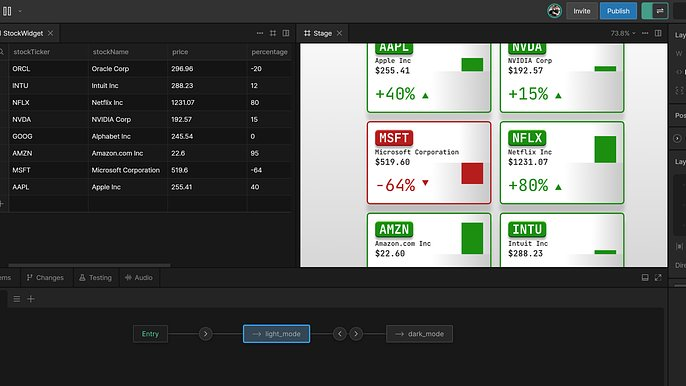
Rive shipped “Editor 0.8.4450."
This update includes:
- A new View Model data table
- More real estate in the State Machine UI
- Tags for Timelines and Listeners
- Multi-event support on individual Listeners
Pomelli from @GoogleLabs now supports:
- Photoshoot: Turn any product photo into on-brand studio imagery.
- Animate: Bring those visuals to life as a video.
Both are free in beta.
Notion AI Meeting Notes now run in the background, allowing you to switch apps or lock your screen, and your notes keep going.
Available on iOS and Android.
Recraft added video generation to Recraft Studio.
This allows you to edit on canvas and animate with Kling, Grok, Veo, Sora, and other top models, all in one place.
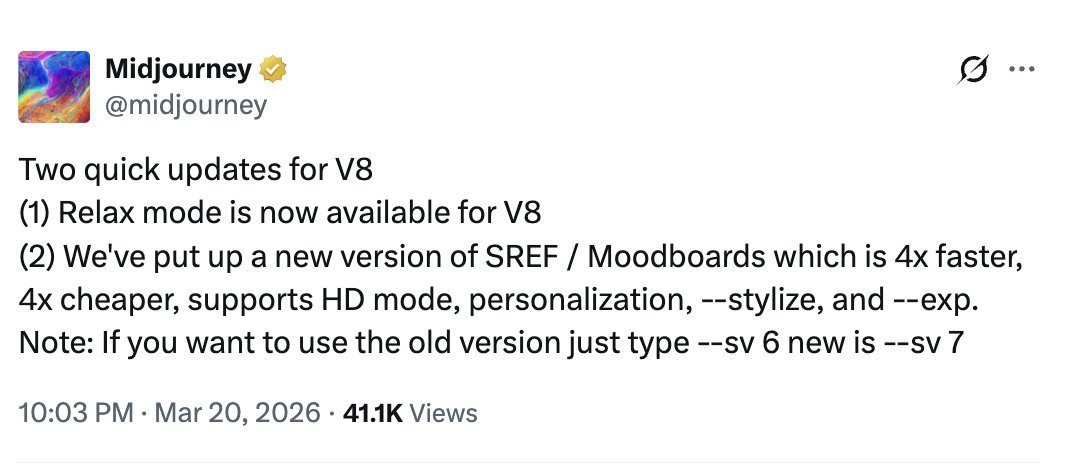
Midjourney added Relax mode for V8 and shipped a new SREF/Moodboards version that's 4x faster, 4x cheaper, supports HD mode, personalization, and --stylize.
Replit now integrates with @MeetGranola.
This allows you to use your meeting notes as context to build anything, like a journal powered by your recent calls.