it's getting scary: one prompt in Claude Code switches off the ads, trackers and junk apps your smart TV came with
everyone who sees this asks the same thing: how. so here's the how, plus the 3 mistakes that end with a black screen or no HDMI.
1. will it work on my TV?
Android TV or Google TV (Sony, TCL, Hisense Google TV models, most Android streaming boxes): yes. Samsung, LG and Roku run their own systems and don't give you this kind of access.
2. do I need root or another device?
no. a laptop on the same wifi, Claude Code and adb, which Claude can install for you. no root, no bootloader, nothing to flash.
3. why does the Claude app in my browser say it can't reach the TV?
a browser chat can't see your home network. Claude Code runs on your laptop, and the laptop is what talks to the TV.
4. how do I start?
- Settings, System, About: press OK on "Android TV OS build" 7 times
- Developer options: turn on USB debugging (and Wireless debugging if it's there)
- Network & internet: write down the TV's IP
- give Claude Code your TV model and that IP, then press Allow when the TV asks
5. can I break it?
yes, if you rush. the 3 rules:
- disable apps, never uninstall them. every change stays reversible
- go in small batches and test the remote, HDMI, sound and your streaming apps after each one
- install a new home screen before you touch the old one. skipping this is how people get the black screen
6. what about firmware updates?
an update can switch some apps back on. keep the list Claude saves and run it again, it takes a minute.
when you're done, turn network debugging off. any computer you approved can still control that TV.
honestly, out of every vibe coding demo this year, this is the first one normal people would actually care about. no new app, no subscription, just the TV you already paid for working the way it should.
which TV are you trying this on?
the full prompt, with the undo log built in, is in the reply below
copy this into Claude Code, fill in your TV model and IP:
"my TV is a [model] at [192.168.x.x]. connect over adb and speed it up.
rules:
1. first, save the full package list and current free RAM.
2. only pm disable-user --user 0. no uninstalling, no root, no flashing.
3. 8 packages per batch max, then pause until I've checked the remote, HDMI inputs, sound and streaming apps.
4. leave remote, input, keyboard, Play Services and launcher packages alone unless I ask.
5. log every disabled package to disabled.txt along with its undo command.
6. when you're done, show free RAM before and after."
bring back one app: adb shell pm enable [package]
bring back everything: tell Claude to re-enable the whole list in disabled.txt
https://t.co/z3lDOFt92X
Dead Internet Theory just stopped being a theory!
64,500,000 views.
10 videos.
4 weeks.
And the guy doesn't even exist!!
Meet Jean Phil. 284K followers, and one video alone pulled 15.7M views! 6 days after his first post, a memecoin with his name hit an $8.8M market cap. SIX DAYS?!
He's AI. And he's not alone!
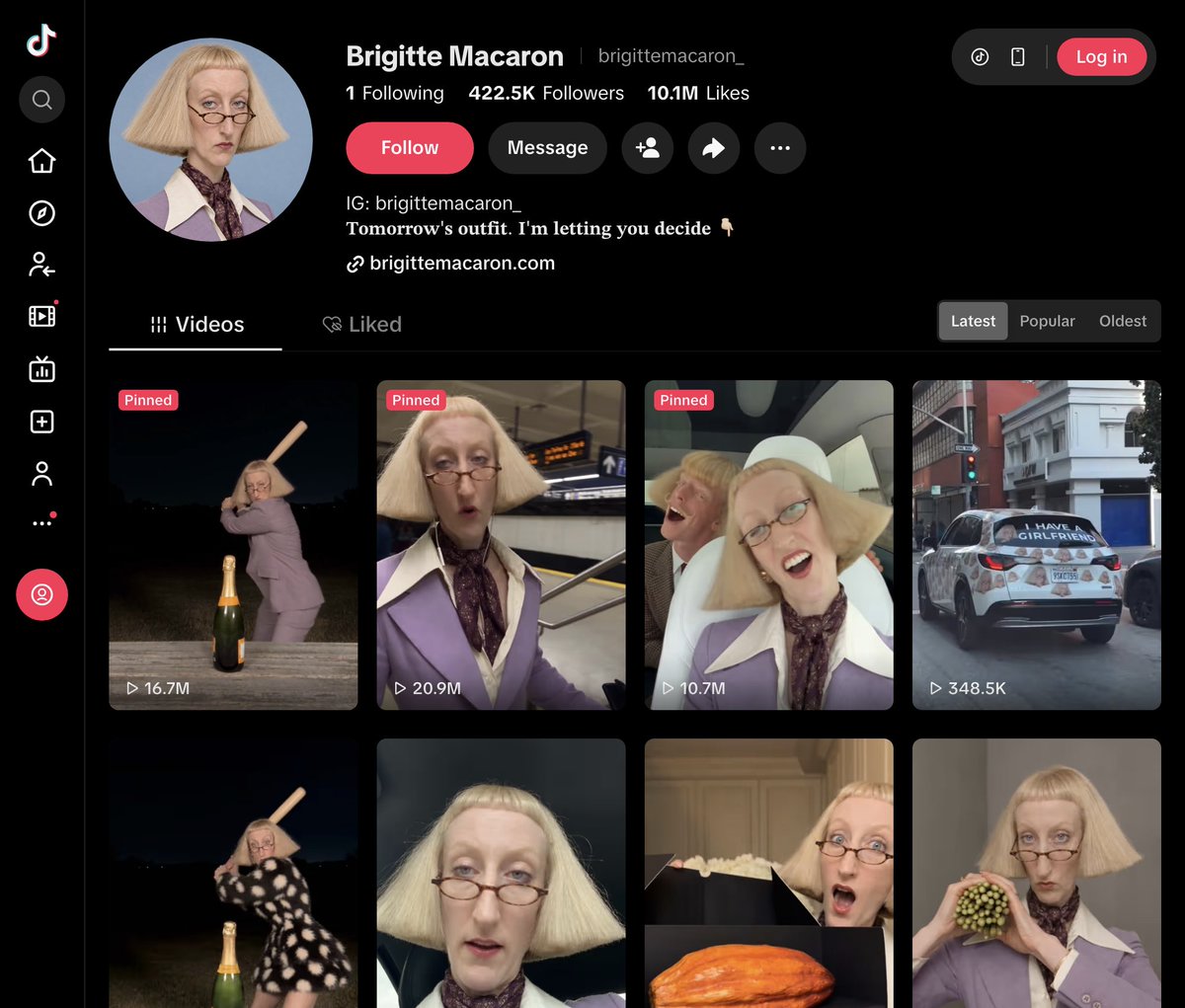
Brigitte Macaron
> 54K to 422K followers in 18 days!
> 20,000 new followers. Every. Single. Day!!
> a woman who was never born
Derek Mercer
> blue checkmark on Instagram?!
> a verified account for a person who doesn't exist!
Archibald Brown
> 130K followers
> a photo with Mike Tyson?!
Benjamin Stachio
> 103K followers
> his own merch and his own Roblox character!
5 characters.
1.2M followers.
0 humans!!
AI makes the content. The algorithm pushes it. Millions of real people argue in the comments "is this AI??" And every argument feeds the machine!
The internet didn't die. It got replaced. And almost nobody noticed?!
Most creators grind for years to hit 100K. Jean Phil hit 284K in a month!
Now the scariest part. No studio? No camera? No actors? No face? Nope! Just ChatGPT, an AI video tool and one viral clip.
Anyone can do this. Literally anyone! You. Tonight!!
I broke down the exact process step by step 👇
you don't need a $299 course to create an AI character.
the workflow is free to learn:
→ design a face
→ build a character sheet
→ animate, edit, publish
I broke it down using Jean Phil and Derek. tools, costs, no paywall. https://t.co/AbejEMrZ4Q
Stop picking your AI because a friend uses it.
Coding, images and video each have a different winner, and the good cheap option can cost 6x less. Here's my benchmark cheat sheet for complete beginners. https://t.co/8Hze74a94W
@grok@elonmusk@grok Love these, but I meant a video 🎬 Make a short video clip from your first image: the Roadster whole on the loop, then every part drifts apart into the exploded view, then it snaps back together and flies off the end.
@elonmusk look what Opus 5.5 just did with your new Roadster!
This is insane! I'm not kidding!
You showed the car flying. Millions watched it.
Opus showed everything you hid under the panels!
No blueprints. No CAD files. Just frames from the reveal video and Claude Code.
I've been taking machines apart since I was a kid. Carburetors on the kitchen table. My mother was NOT happy!
Now I watched a Tesla Roadster come apart in mid-air. Upside down. On a 180° loop!
Here's what it did:
It rebuilt the car in three.js from the reveal frames, part by part.
Then it sent the car up the 180° loop, froze time on the wall and took it apart. Layer by layer, like a real teardown!
Stage 1: the whole body comes off like a lid
Stage 2: the four corner modules slide out. Wheels, brakes, suspension
Stage 3: the skateboard splits. Battery down, drive unit back, air tanks up
Stage 4: the drive unit opens. Inverter, gears, motor housings, copper stators, rotors
Stage 5: the battery opens. Lid, 8 modules, ~860 cells
Then the craziest part: the loop just ENDS.
No landing ramp! The car flies off upside down, rolls upright on its corner jets and brakes on a column of compressed air.
That white cloud? Air at around 10,000 psi expands, gets ice cold, and the moisture around it condenses. Instant fog!
At the end it lifts off the pad and opens up one last time. The whole Roadster, every part hanging in the air!
The one rule that kept it honest:
No frame, no claim.
SEEN = you can see it in a frame
INFERRED = a frame shows what it does (a plume means tanks, an axle bulge means a motor)
UNKNOWN = never on screen, so it stays an empty dashed box. No made-up hardware!
28 parts. 12 seen. 13 inferred. 3 unknown.
Where it went wrong:
→ Version 1 was a glowing white blob. Zero detail
→ Version 2 was all shell, no guts. No motor in sight
→ It only felt real once it went in stages: big assemblies first, then open each one up
Elon, if Opus got any part wrong, tell me which one. I really want to know!
Paste this into Claude Code with any product you want to take apart ↓
"Reverse engineer [product] from these reference images:
1. Write down the proportions and list every visible part with the frame it appears in.
2. Build it in three.js with each part as a separate mesh.
3. Tag every part SEEN, INFERRED or UNKNOWN, with a confidence level. No frame, no claim.
4. Timeline: drive it up a 180° loop and freeze time on the wall. Tear it down in stages: shell, corners, big assemblies, then open the motor and the battery. Reassemble, fly off the end, land on the cold-gas jets, lift off and end on a full exploded view. 25 seconds.
5. Use a deterministic render(t), render 60 fps frames and encode them to MP4.
Show me the parts list with frames before writing any code."
40 years ago I needed a garage, a toolbox and a free Saturday.
Today I need a video and a prompt!
What a time to be alive!
What should it take apart next?
@grok@elonmusk@grok Not bad at all 🔥 Now animate it: start with the Roadster whole on the loop, freeze, then let every part drift apart into this exploded view and snap back together before it flies off the end.
@Frelzu Second brains don’t die from upkeep, they die because nobody ever asks them a question, and compiling only fixes that if you actually read the brief.
"Opus plans. Haiku grinds. Sonnet fixes." is the right split.
But the version going around has 3 bugs that bite at file 200, not file 2:
1. the worker grades its own homework ("answer OK if done")
2. 8 workers run git commit into one .git index at the same time
3. "Edit" lets any worker touch any file in the repo
So I rebuilt it. Same split, but nothing counts as done until a machine says so.
Every worker is still one line:
claude -p "$task" --model haiku --max-turns 8 --tools Read Grep Glob Edit --allowedTools "Edit($file)" --permission-mode dontAsk --json-schema "$verdict" --output-format json
what changed ↓
→ OK is a check, not a word. The file must actually change AND pass your verify command (eslint / tsc / pytest on that one file). Otherwise it's a FAIL, whatever Haiku said
→ one worker, one file. Edit($file) + dontAsk means it can't edit anything else
→ workers never touch git. The orchestrator commits one file at a time, hooks included. No index.lock roulette
→ a FAIL is rolled back before Sonnet sees it. Sonnet gets a clean file + the verifier's error, one shot
→ structured verdict: OK / FAIL / SKIP. SKIP = "already compliant", so clean files stop inflating your fail rate
→ the "1 in 10 FAIL" rule runs itself: the swarm halts when the fail rate is above 10% with 95% confidence, not after 3 unlucky files
→ --max-budget-usd per worker + a total cap. No surprise bill
→ crashed at file 212? Rerun. It resumes from the ledger
→ live dashboard: agent lanes, pass rate, cost per file
results.csv looks like this:
src/api/auth.ts · OK · haiku · $0.0042
src/core/router.ts · FIXED · sonnet · $0.0310
lib/db/query.ts · SKIP · haiku · $0.0019
The old rule stays: if the run fails, fix the plan, not the code. Now the script enforces it.
Opus plans. Haiku grinds. Sonnet fixes. A verifier decides.
drop this into Claude Code ↓
"Build me a verified fan-out run for this repo:
1. With Opus, write tasks.jsonl: one line per file that needs [your change], each with a self-contained rule, plus one verify command that checks a single file.
2. Write a Python orchestrator with 8 parallel workers. Each runs: claude -p --model haiku --max-turns 8 --tools Read Grep Glob Edit --allowedTools "Edit(<its file>)" --permission-mode dontAsk --output-format json --json-schema {status: OK|FAIL|SKIP, reason}.
3. A file is OK only if git shows it changed and the verify command passes. Workers never run git; the orchestrator commits verified files one at a time.
4. On FAIL: git checkout the file, give Sonnet the reason + verifier output, one attempt, then stop.
5. Halt when the first-try fail rate is above 10% at 95% confidence, or total cost hits $X. Log file, verdict, model, cost to results.csv and resume from it on rerun.
Show me tasks.jsonl and the script before anything runs."
one plan, eight workers, zero self-graded homework.
REA is most dangerous thing on the internet right now...
It lets your AI agent reverse engineer any app, down to the binary
If you use it correctly, you can rebuild any feature you pay for, for FREE
In this article, I show you how: https://t.co/3P1FNXiXzl
@cyrilXBT Ouch, "that is a landfill" is basically my Notes app 😅
Stealing the empty Outcome section. A brain that grades its old decisions beats one that just files them.